
Woodpeckers ASMS-L
Woodpeckers AutoScale Miter Sled Instruction Manual
Brand: Woodpeckers | Model: ASMS-L
Introduction
This manual provides detailed instructions for the safe and effective use of your Woodpeckers AutoScale Miter Sled, Left Model (ASMS-L). The AutoScale Miter Sled is designed to enhance precision and efficiency for table saw crosscuts and miter cuts, featuring an auto-adjusting fence for accurate measurements across various angles.
Key Features
- ASMS-L Model: Includes (1) Left Side Sled, (1) Hold Down Clamp, and (1) Flip Stop.
- Auto-Adjusting Fence Pivot: Automatically adjusts the length scale to remain perfectly calibrated at any angle from 0° to 60°, unlike traditional miter sleds.
- Phenolic Table: The main frame is machined from durable phenolic, a material resistant to temperature and humidity changes, ensuring consistent accuracy. The main table measures 23-½ inches long x 18-½ inches wide.
- Leaf-Spring Miter Bar: Ensures a perfect fit even in worn miter slots.
- Laser-Engraved Protractor: Features positive stops and is graduated in half-degree increments for precise angle setting.
- Extendable Fence: Reaches out to 50 inches for longer workpieces.
- Optional Drop Zone: The optional Drop Zone Table (sold separately) catches offcuts and supports long boards throughout the cut. It measures 23-1/2" long and 13" wide and includes a stealth stop adjustable from 3/4" to 7-1/2".
Setup
Before initial use, ensure all components are present and free from damage. Familiarize yourself with the sled's parts and their functions.

Overview of the Woodpeckers AutoScale Miter Sled, Left Model.
The miter bar is designed with leaf springs to ensure a snug fit in your table saw's miter slot, compensating for variations or wear.

Close-up of the miter bar with nylon leaf springs for consistent fit.
The cam micro-adjuster allows for precise initial adjustment of the fence. Use an appropriate hex key to fine-tune its position.

Adjusting the cam micro-adjuster for initial setup.
Operating Instructions
Auto-Adjusting Fence Operation
The core innovation of the AutoScale Miter Sled is its fence pivot mechanism. Unlike traditional sleds, the AutoScale's fence automatically adjusts its position relative to the blade as the angle changes, ensuring the measurement scale remains accurate.
Demonstration of the AutoScale's unique auto-adjusting fence pivot, maintaining scale calibration at various angles.

The sliding pivot point ensures the scale remains calibrated to the blade across the entire angle range.

The scale and stop maintain the same distance from the blade from 0° to 60°.
Using the Flip Stop
The included flip stop allows for repeatable cuts. Its unique design prevents sharp mitered ends from lifting the stop out of position, ensuring consistent accuracy.
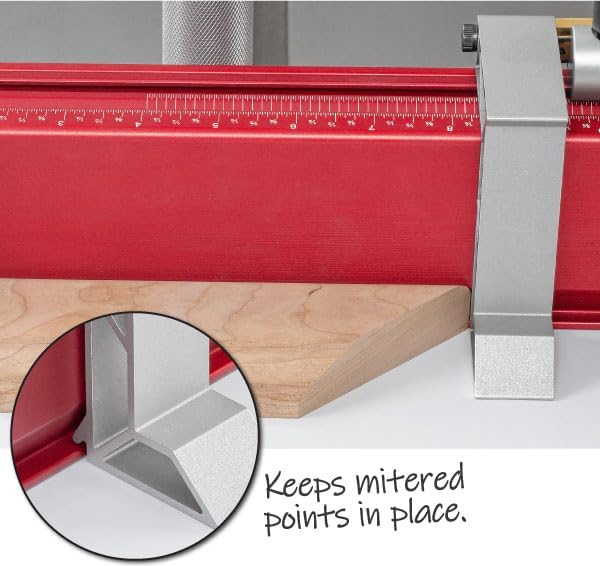
The design of the stop helps keep mitered points securely in place during cuts.
The fence can be extended to accommodate longer workpieces, with a built-in shelf providing additional support.

A shelf at the end of the fence provides additional support for longer workpieces.
Crosscut Capacity
The AutoScale Miter Sled offers significant crosscut capacity, allowing for wide cuts on most table saws. Its robust construction ensures stability and precision during operation.

A user demonstrating a crosscut with the AutoScale Miter Sled, highlighting its safe, accurate, convenient, and repeatable operation.
Optional Drop Zone Table
For enhanced functionality, the optional Drop Zone Table integrates seamlessly with the AutoScale Miter Sled. It is designed to catch offcuts, keeping your workspace cleaner, and provides continuous support for long boards throughout the cutting process. The Drop Zone features a milled slot to fit Woodpeckers Stealth Stops, allowing for precise setting of cut lengths for multiple short workpieces.
Maintenance
To ensure the longevity and continued accuracy of your Woodpeckers AutoScale Miter Sled, follow these maintenance guidelines:
- Cleaning: Regularly wipe down the phenolic table and aluminum fence with a clean, dry cloth to remove sawdust and debris. Avoid abrasive cleaners that could damage the surfaces or laser engravings.
- Lubrication: Periodically apply a dry lubricant (e.g., PTFE spray) to the miter bar and any sliding components to ensure smooth operation. Do not use wet lubricants that can attract sawdust.
- Inspection: Before each use, inspect all fasteners to ensure they are tight. Check the miter bar for any signs of wear or damage.
- Storage: Store the miter sled in a dry environment, away from extreme temperature fluctuations, to prevent any potential material distortion, although the phenolic material is highly stable.
Troubleshooting
If you encounter issues with your AutoScale Miter Sled, consider the following common problems and solutions:
- Inaccurate Cuts:
- Ensure the miter bar is properly seated in the table saw slot and the leaf springs are providing consistent pressure.
- Verify that the fence is securely locked at the desired angle.
- Check the micro-adjuster for any unintended movement.
- Fence Sticking/Rough Movement:
- Clean any accumulated sawdust or debris from the fence's sliding mechanism and the protractor track.
- Apply a dry lubricant to the sliding surfaces.
- Stop Lifting During Cut:
- Ensure the workpiece is firmly against the fence and the stop.
- Utilize the hold-down clamp to secure the workpiece, especially for smaller pieces or those prone to lifting.
Specifications
| Manufacturer | Woodpeckers |
| Part Number | ASMS-L |
| Style | Left Only |
| Usage | Wood Cutting |
| Main Table Dimensions | 23-½ inches long x 18-½ inches wide |
| Fence Extension Length | Up to 50 inches |
| Protractor Graduation | Half-degree increments |
| Fence Material | Extruded Aluminum |
| Table Material | Phenolic |
Warranty and Support
Woodpeckers products are known for their quality and precision. For specific warranty information and customer support, please refer to the documentation included with your product or visit the official Woodpeckers website. You can also visit the Woodpeckers Store on Amazon for additional resources and product information.
Ask a question about this manual
Ask about setup, troubleshooting, compatibility, parts, safety, or missing instructions. Manuals+ will review the question and use this page’s manual context to help answer it.