
1. Product Overview
Enhance your electric scooter experience with this versatile footrest. Crafted using durable and UV-resistant PETG material through 3D printing, it offers a sturdy platform for added comfort during rides. Its sleek design seamlessly integrates with your scooter, providing reliable support and convenience. Upgrade your ride with this practical and well-constructed footrest.
2. Features
- Versatile Compatibility: This 3D printed footrest fits multiple electric scooter models including Laotie es 18 lite, Ti 30, es 18, T 30, es 19, L8S Pro, Yume Y11, and Teewing X3, X4, X5.
- Durable Construction: Made from strong, reliable, and UV-resistant PETG material for long-lasting use.
- Convenient Design: The footrest attaches securely to your scooter, providing a comfortable platform to rest your feet.
- Easy Installation: Simple to install and compatible with the specified scooter models.
3. Compatibility
This footrest is designed for broad compatibility with various electric scooter models. Confirmed compatible models include:
- Laotie es 18 lite
- Laotie Ti 30
- Laotie es 18
- Laotie T 30
- Laotie es 19
- Laotie L8S Pro
- Yume Y11
- Teewing X3
- Teewing X4
- Teewing X5
Please ensure your scooter model is listed above or consult the manufacturer for specific fitment details if your model is not explicitly mentioned.
4. What's in the Box
Upon opening the package, you should find the following item:
- 1 x Universal Electric Scooter Footrest
If any items are missing or damaged, please contact customer support immediately.
5. Setup and Installation
Follow these steps to properly install your new footrest:
- Inspect the Footrest: Before installation, carefully inspect the footrest for any signs of damage from shipping.
- Identify Mounting Points: Locate the designated mounting points on your electric scooter's frame, typically near the rear wheel or deck. These points may vary by scooter model.
- Align the Footrest: Position the footrest against the scooter's frame, aligning its mounting holes with the scooter's mounting points.
- Secure with Hardware: Use appropriate screws, bolts, or other fasteners (not included, as they are specific to your scooter model) to securely attach the footrest. Ensure all fasteners are tightened firmly to prevent wobbling during use. Do not overtighten, as this may damage the footrest or scooter frame.
- Test Stability: After installation, gently apply pressure to the footrest to ensure it is stable and does not move or flex excessively.

Figure 1: Footrest installed on an electric scooter, providing a stable platform.

Figure 2: Top view of the footrest, highlighting the textured grip surface and integrated logo.

Figure 3: Underside of the footrest, illustrating the design of the mounting points.

Figure 4: Side view of the footrest, emphasizing its ergonomic shape and textured grip.

Figure 5: Alternative side view of the footrest, showcasing its robust construction.
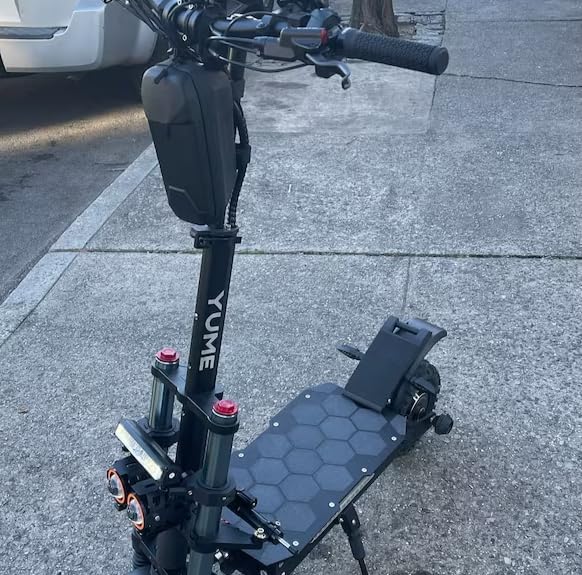
Figure 6: Full view of an electric scooter with the footrest attached, demonstrating its integrated appearance.
6. Operating Instructions
Once installed, the footrest is ready for use. It provides an additional point of contact for riders, enhancing comfort and control, especially during longer rides or when navigating uneven terrain.
- Foot Placement: Position your feet comfortably on the footrest to relieve pressure from standing on the main deck.
- Enhanced Stability: Use the footrest to brace yourself, particularly when accelerating, braking, or turning, to improve overall stability.
- Riding Posture: Experiment with different foot positions to find the most comfortable and stable riding posture for your individual needs.
7. Maintenance
To ensure the longevity and optimal performance of your footrest, follow these simple maintenance guidelines:
- Regular Cleaning: Wipe the footrest with a damp cloth to remove dirt, dust, and debris. For stubborn grime, a mild soap solution can be used. Avoid harsh chemicals or abrasive cleaners, as they may damage the PETG material.
- Check Fasteners: Periodically inspect the mounting screws or bolts to ensure they remain tight. Vibrations from riding can sometimes loosen fasteners over time. Retighten as necessary.
- Inspect for Damage: Regularly check the footrest for any cracks, chips, or signs of wear. While PETG is durable, extreme impacts can cause damage. Replace the footrest if significant damage is observed to ensure safety.
- UV Exposure: Although the material is UV-resistant, prolonged exposure to direct sunlight can still cause some degradation over many years. Store your scooter in a shaded area when not in use to maximize the footrest's lifespan.
8. Troubleshooting
If you encounter any issues with your footrest, refer to the following common problems and solutions:
- Footrest Feels Loose/Wobbly:
Solution: This is typically due to loose mounting fasteners. Re-tighten all screws or bolts securing the footrest to the scooter frame. If the issue persists, inspect the mounting points on both the footrest and the scooter for wear or damage. - Difficulty Installing:
Solution: Ensure you are aligning the footrest correctly with the scooter's designated mounting points. Verify that the footrest is compatible with your specific scooter model. If necessary, consult your scooter's manual for details on accessory mounting. - Unusual Noises (e.g., creaking):
Solution: Noises often indicate loose connections. Check all fasteners and ensure they are snug. Applying a small amount of silicone grease to contact points (avoiding the textured surface) might help if friction is the cause.
If these troubleshooting steps do not resolve your issue, please contact customer support.
9. Specifications
| Attribute | Detail |
|---|---|
| Brand | Generic |
| Manufacturer | Mackom |
| Material | UV-resistant PETG (3D Printed) |
| Color | Black |
| Fit Type | Universal Fit (for specified models) |
| Item Model Number | 0 |
10. Warranty and Support
This product is covered by a standard manufacturer's warranty against defects in materials and workmanship. For specific warranty terms and conditions, please refer to the product packaging or contact the retailer from whom you purchased the item.
For technical support, troubleshooting assistance, or warranty claims, please contact your retailer or the manufacturer directly. Keep your proof of purchase handy as it may be required for service.


