Introduction
Thank you for choosing the CARPURIDE C98 9 Inch Car Play Screen. This device enhances your driving experience by integrating wireless/wired Apple CarPlay, Android Auto, and Mirror Link functionalities directly into your vehicle. It features a 9-inch anti-glare HD capacitive touchscreen, built-in EQ, Bluetooth audio, navigation support, Siri/Google Assistant voice control, and compatibility with a backup camera. This manual provides detailed instructions for setup, operation, maintenance, and troubleshooting to ensure optimal performance and user satisfaction.
Safety Information
- Always operate the device responsibly and in accordance with local traffic laws. Distracted driving can lead to accidents.
- Do not attempt to disassemble or modify the device. This may cause damage and void the warranty.
- Ensure proper installation to prevent obstruction of the driver's view or interference with vehicle controls.
- Keep the device away from extreme temperatures, direct sunlight for prolonged periods, and moisture.
- Use only the provided power adapter and cables to prevent damage or fire hazards.
Package Contents
Please check the box for the following items:
- CARPURIDE C98 9 Inch Car Play Screen
- Car Charger (Type-C connector)
- Rear View Camera & Wire
- 3.5mm Audio Cable (AUX)
- Self-adhesive Bracket
- Suction Cup Bracket
- Suction Cup Gasket
- User Manual
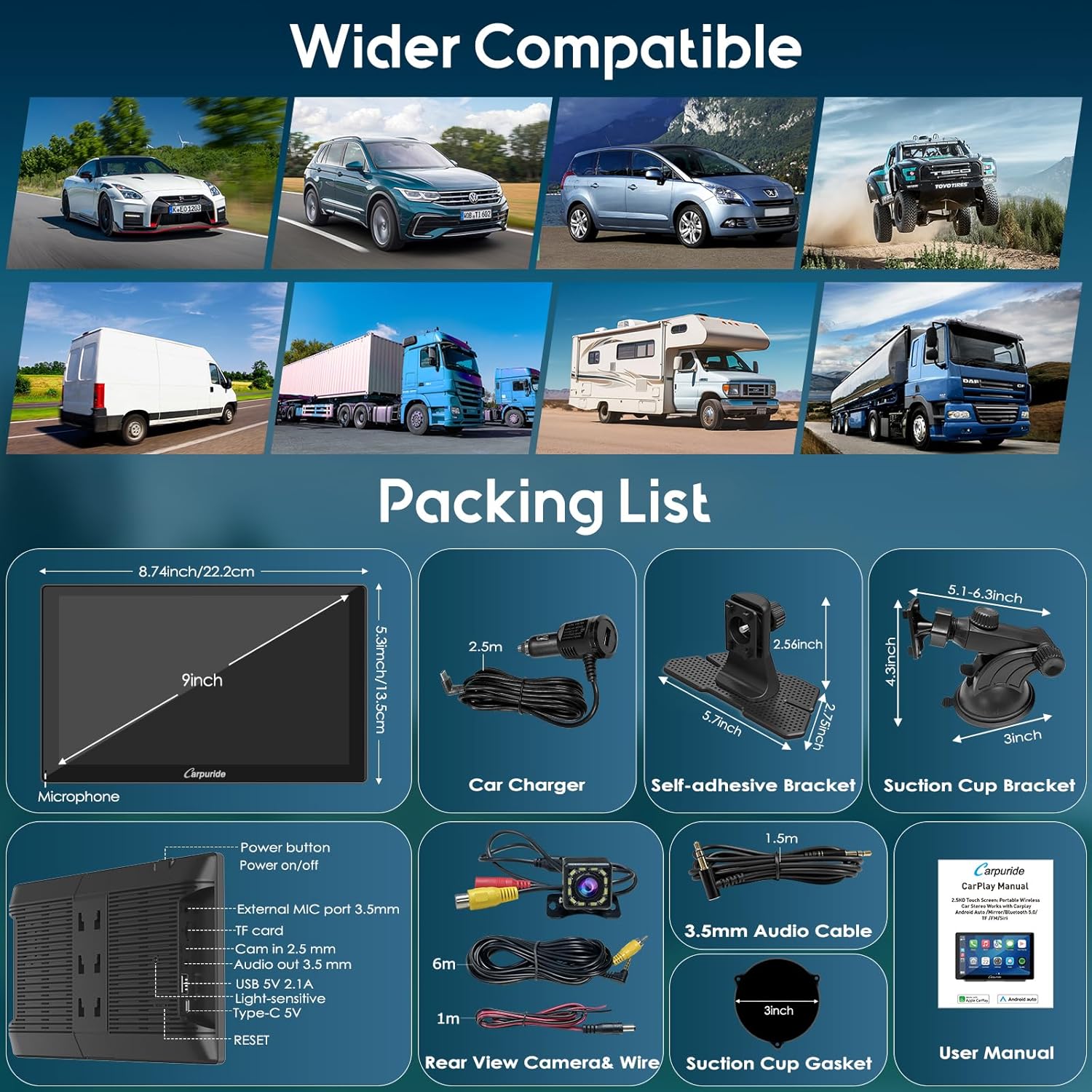
Image: Detailed view of the CARPURIDE C98 packing list, illustrating the main unit, car charger, rear view camera, audio cable, and various mounting brackets.
Product Overview
The CARPURIDE C98 features a high-resolution 9-inch display designed for intuitive interaction and clear visibility. It integrates seamlessly with your smartphone for navigation, communication, and entertainment.

Image: The main CARPURIDE C98 unit showcasing its 9-inch screen with a typical CarPlay interface, alongside the included backup camera and two types of mounting brackets.

Image: This image emphasizes the display technology of the C98, featuring HD IPS for wide viewing angles and a 2.5D curved touchscreen for a smooth feel. It also compares the 1024x600 resolution to lower standard resolutions.
Setup
Mounting Options
The CARPURIDE C98 offers flexible mounting solutions to suit various vehicle dashboards. Choose between the self-adhesive bracket or the suction cup bracket for secure placement. Ensure the chosen location does not obstruct your view or interfere with airbags.

Image: This diagram illustrates four different bracket types available for the C98: self-adhesive, suction mount, air outlet, and CD slot mount. Note that air outlet and CD slot mounts are sold separately.
Power Connection
Connect the provided Type-C car charger to the device and plug it into your vehicle's cigarette lighter socket. Ensure the power supply is 5V 2.5A or 5V 3A for stable operation.
Rear Camera Installation
The included backup camera provides a clear view when reversing. Connect the camera to the designated input on the C98 unit. Route the camera wire carefully to avoid kinks or damage. The display will automatically switch to the camera view when the vehicle is in reverse.

Image: This graphic demonstrates the functionality of the included rear view camera, showing a 1080P image quality, reverse reference lines, and its waterproof design with a 178-degree viewing angle.
Operating Instructions
Wireless Connectivity (Apple CarPlay & Android Auto)
The C98 supports both wireless and wired connections for Apple CarPlay and Android Auto. Simply enable Bluetooth and Wi-Fi on your smartphone and follow the on-screen prompts to pair with the device. Once connected, your phone's interface will be mirrored on the C98 screen, allowing access to navigation, music, calls, and messages.
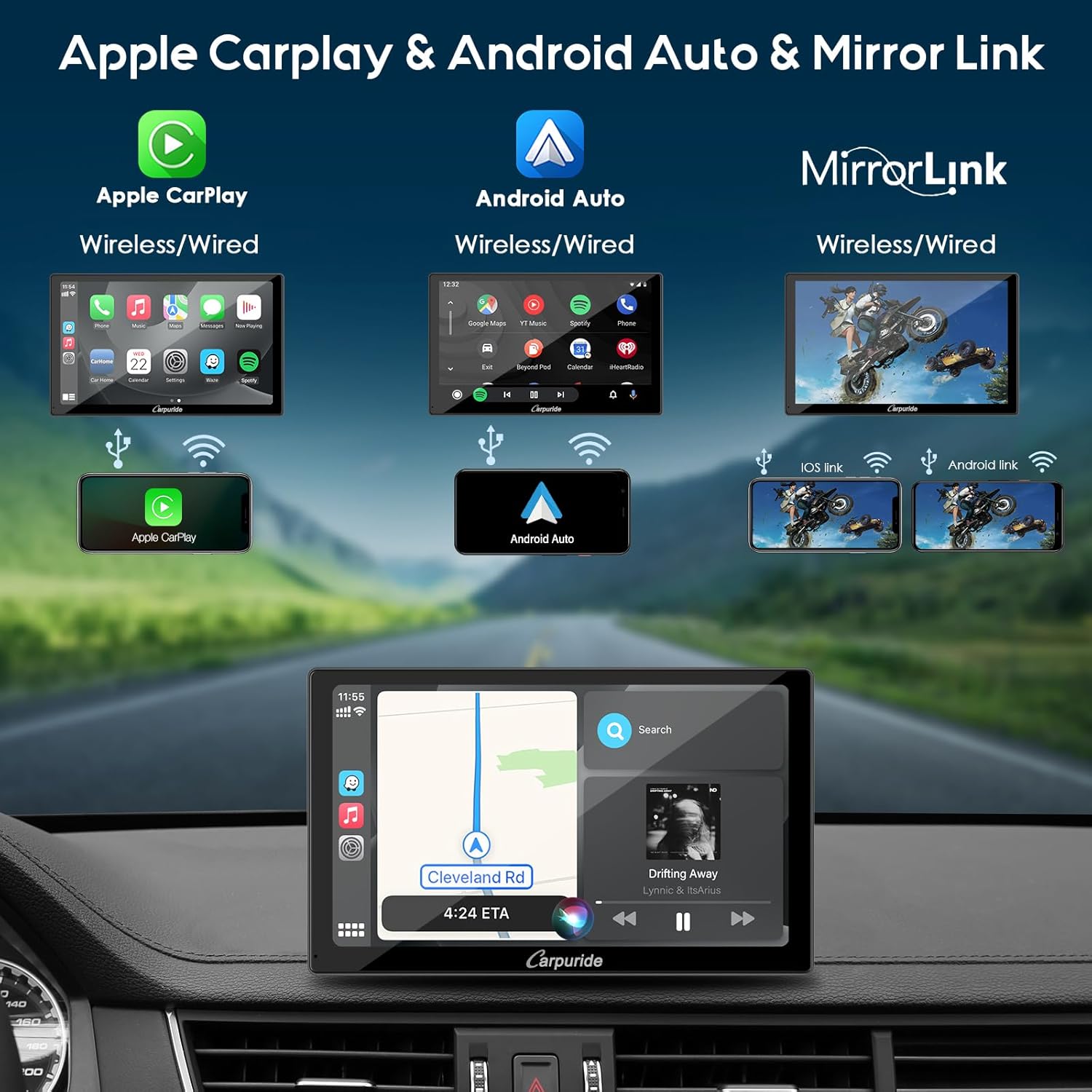
Image: This visual guide explains the connectivity options for the C98, showing how Apple CarPlay, Android Auto, and Mirror Link can be used wirelessly or via a wired connection, with examples of phone mirroring.
Mirror Link Function
For devices not supporting CarPlay or Android Auto, the Mirror Link function allows you to cast your smartphone's screen directly to the C98. This supports both wireless (Airplay for iOS) and wired (Autolink for Android 11+) connections, enabling you to view videos, games, and apps.
Navigation
Utilize your preferred navigation apps like Google Maps or Waze directly from the C98 screen via CarPlay or Android Auto. The large display enhances map visibility and provides real-time directions.

Image: This image is split into two sections. The top section demonstrates GPS navigation on the C98 screen, showing various compatible map applications. The bottom section illustrates the voice control feature, with a user interacting with Siri or Google Assistant.
Audio Modes
The C98 offers multiple audio output options to suit your vehicle's setup:
- Bluetooth Audio: Connect your phone to the C98 via Bluetooth for audio playback through your car's speakers (requires car's Bluetooth system).
- AUX Input: Use the provided 3.5mm audio cable to connect the C98 to your car's AUX input.
- FM Transmitter: Transmit audio wirelessly to your car's FM radio by tuning both devices to the same FM frequency.
- Built-in Speakers: The C98 has integrated speakers for direct audio output.

Image: This graphic details the four available audio output modes for the C98: Bluetooth Audio, AUX Input, FM Transmitter, and using the device's built-in local speakers.
Voice Control
With built-in microphone technology, you can activate Siri or Google Assistant for hands-free control. Simply say "Hey Siri" or "OK Google" to issue commands for music playback, phone calls, navigation, and more. An external mic (3.5mm Jack) is also supported for enhanced clarity.
EQ Settings
Customize your audio experience with the built-in preset EQ and user-customized 10-band HD EQ. Adjust frequency sections to match your preferred music style, whether it's rock, jazz, or classical.
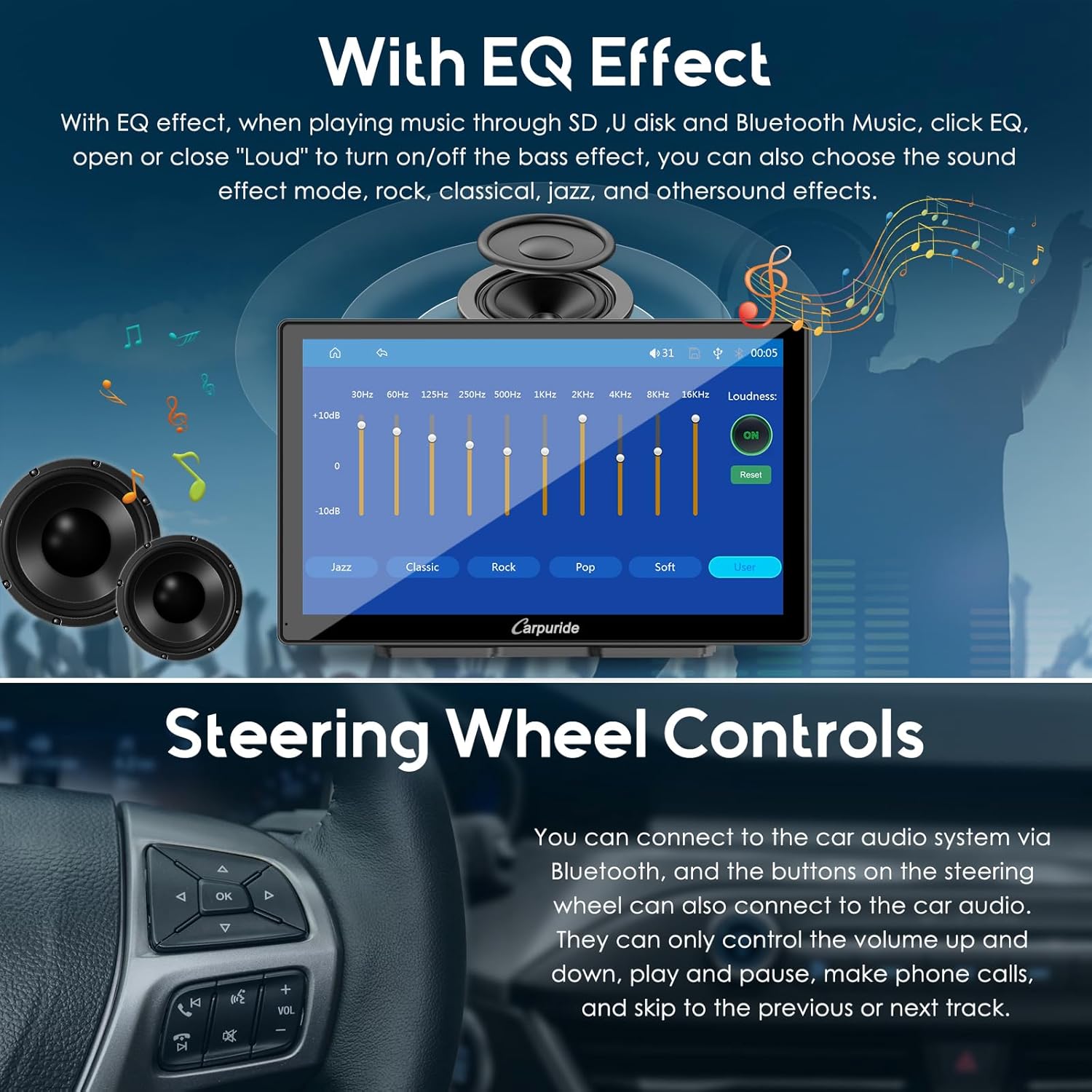
Image: This image is divided into two parts. The top part displays the EQ settings interface on the C98 screen, allowing users to adjust audio frequencies. The bottom part shows a car steering wheel, indicating that the C98 can connect to the car's audio system via Bluetooth for basic steering wheel control functions.
Steering Wheel Controls
If your original car has remote control buttons on the steering wheel, the C98 can connect to the car audio system via Bluetooth. This allows for basic controls such as volume adjustment, play/pause, making calls, and skipping tracks.
Maintenance
- Cleaning: Use a soft, dry cloth to clean the screen and exterior. For stubborn smudges, slightly dampen the cloth with water or a screen cleaner. Avoid abrasive materials or harsh chemicals.
- Storage: If storing the device for an extended period, disconnect it from power and store it in a cool, dry place away from direct sunlight.
- Cable Care: Regularly inspect all cables for signs of wear or damage. Replace any damaged cables immediately.
Troubleshooting
| Problem | Possible Cause | Solution |
|---|---|---|
| Device does not power on. | No power, insufficient power, or faulty connection. | Ensure the car charger is securely plugged into both the device and the cigarette lighter. Verify the vehicle's cigarette lighter is functional. Check if the power supply is 5V 2.5A/3A. |
| CarPlay/Android Auto not connecting wirelessly. | Bluetooth/Wi-Fi off on phone, incorrect pairing, or interference. | Ensure Bluetooth and Wi-Fi are enabled on your phone. Forget the device in your phone's Bluetooth settings and re-pair. Move closer to the device if possible. |
| No audio output. | Incorrect audio mode selected, volume too low, or faulty cable. | Check the selected audio output mode (Bluetooth, AUX, FM, Local Speakers). Increase volume on both the C98 and your car's audio system. Ensure AUX cable is fully inserted. |
| Backup camera image not displaying. | Camera not connected, faulty camera, or vehicle not in reverse. | Verify the camera is securely connected to the C98. Ensure the vehicle is in reverse gear. Check camera wiring for damage. |
| Screen flickering or dimming. | Automatic light sensor adjustment or low power. | The C98 has an automatic light sensor; this is normal behavior in changing light conditions. You can manually adjust brightness in settings. Ensure sufficient power supply (5V 2.5A/3A). |
Specifications
| Feature | Detail |
|---|---|
| Model Name | C98 |
| Screen Size | 9 Inches (23 cm diagonal) |
| Resolution | 1024 x 600 |
| Connectivity Technology | USB, Type-C, Bluetooth, Wi-Fi |
| Special Feature | Voice Recognition (Siri, Google Assistant), Anti-Glare Screen, Built-in EQ, Automatic Light Sensor |
| Audio Output Mode | Stereo (via Bluetooth, AUX, FM Transmitter, Built-in Speakers) |
| Compatible Vehicles | Cars, RVs, SUVs, Pickups, Trucks (12-24V) |
| Power Input | 5V 2.5A / 5V 3A (via Type-C) |
| Included Components | Backup Camera, Car Charger, 3.5mm Audio Cable, Mounting Brackets |
Warranty and Support
For warranty information and technical support, please refer to the contact details provided on the product packaging or the official Carpuride website. Keep your purchase receipt as proof of purchase for any warranty claims.