Introduction
Thank you for choosing the Generic Wireless Earbuds. These earbuds are designed for comfort, high-fidelity audio, and reliable connectivity, perfect for small ears and active lifestyles. Featuring a long-lasting battery, AI noise reduction for clear calls, IPX5 water resistance, and stable Bluetooth 5.3, they are built to enhance your audio experience. This manual provides detailed instructions on how to set up, operate, maintain, and troubleshoot your new earbuds.

The Generic Wireless Earbuds in their open charging case, displaying the battery percentage on the LED screen.
What's in the Box
Please check the package contents to ensure all items are present:
- User Manual
- Charging Station (Charging Case)
- USB-C Charging Cable
- Wireless Earbuds (Left and Right)
Setup Guide
1. Initial Charging
Before first use, fully charge the earbuds and the charging case. Connect the provided USB-C cable to the charging case and a power source. The LED display on the case will show the battery percentage, indicating charging progress. A full charge typically takes approximately 1.5 hours.

The charging case with earbuds inside, showing the LED power display and RGB lighting.
2. Bluetooth Pairing
- Open the charging case. The earbuds will automatically power on and enter pairing mode.
- On your device (smartphone, tablet, etc.), enable Bluetooth.
- Search for available Bluetooth devices and select "Generic Earbuds" (or similar name) from the list.
- Once connected, you will hear a confirmation tone, and the earbuds will be ready for use.
The earbuds utilize Bluetooth 5.3 for stable and fast connections up to 50 feet (15 meters).
3. Wearing the Earbuds
These earbuds are designed to be compact and comfortable, especially for small ears. Gently insert each earbud into the corresponding ear (L for left, R for right) and rotate slightly to find a secure and comfortable fit. The skin-friendly silicone tips ensure stability during various activities.
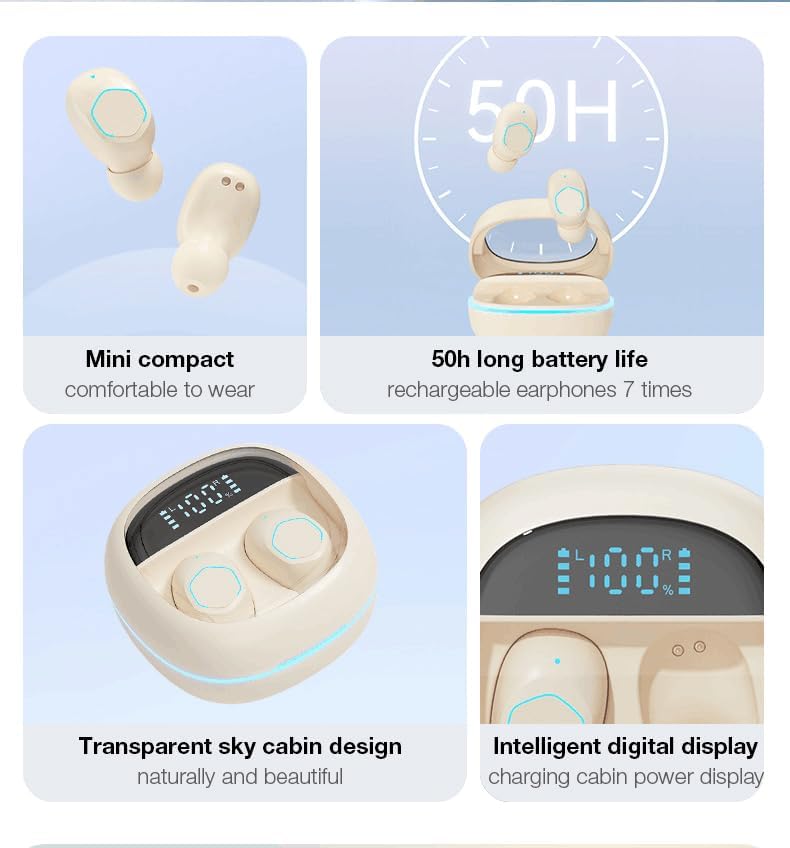
The earbud's compact design ensures a secure and comfortable fit, even for petite ears.
Operating Instructions
Touch Controls
The earbuds feature intuitive touch controls on their outer surface. Refer to the following table for common functions:
| Action | Function |
|---|---|
| Single Tap (Left or Right Earbud) | Play/Pause Music, Answer/End Call |
| Double Tap (Right Earbud) | Next Song |
| Double Tap (Left Earbud) | Previous Song |
| Triple Tap (Right Earbud) | Volume Up |
| Triple Tap (Left Earbud) | Volume Down |
| Long Press (2 seconds) | Reject Call |
| Long Press (3 seconds) | Activate Voice Assistant |

Visual representation of the smart button controls for music and calls.
LED Power Display
The charging case features an LED digital display that shows the exact battery percentage of the case and individual battery levels for the left and right earbuds. This allows you to monitor power levels at a glance.
Audio Features
- 360° Hi-Fi Sound: Custom-tuned drivers deliver rich, immersive audio with deep bass.
- AI HD Call Clarity: Equipped with 4 microphones and AI noise reduction technology, these earbuds reduce up to 60% of ambient noise, ensuring crystal-clear voice calls.

The 'Whale Cavity' design enhances 360° stereo sound for a more immersive listening experience.
Low Latency Gaming Mode
The earbuds feature a low-latency algorithm, providing minimal delay between audio and video, which is ideal for gaming and video playback. This ensures a synchronized and immersive experience.

Experience low game delay for instant audio-visual synchronization during gameplay.
Maintenance
Cleaning
Regular cleaning helps maintain sound quality and hygiene:
- Use a soft, dry, lint-free cloth to wipe the earbuds and charging case.
- For earwax or debris in the earbud tips, use a small, soft brush or cotton swab.
- Do not use abrasive cleaners, alcohol, or chemical solvents.
Storage
When not in use, always store the earbuds in their charging case to protect them from dust, damage, and to keep them charged.
Battery Care
To prolong battery life:
- Avoid fully discharging the battery frequently.
- Charge the earbuds and case regularly, even if not used for extended periods.
- Store in a cool, dry place away from extreme temperatures.
Water Resistance (IPX5)
The earbuds are rated IPX5 water-resistant, meaning they can withstand splashes and sweat. They are suitable for workouts and light rain. However, they are not designed for submersion in water or use during swimming. Ensure the earbuds are dry before placing them back in the charging case.
Troubleshooting
If you encounter issues with your earbuds, try the following solutions:
- No Sound:
- Ensure earbuds are charged.
- Check Bluetooth connection on your device.
- Adjust volume on both earbuds and your device.
- Earbuds Not Pairing:
- Ensure earbuds are in pairing mode (open case).
- Turn off and on Bluetooth on your device.
- Forget the device in your Bluetooth settings and re-pair.
- Ensure earbuds are fully charged.
- One Earbud Not Working:
- Place both earbuds back in the charging case, close it, and then open it again.
- Ensure both earbuds are charged.
- Charging Issues:
- Check the USB-C cable and power adapter.
- Ensure charging contacts on earbuds and case are clean and free of debris.
- Poor Call Quality:
- Ensure earbuds are properly seated in your ears.
- Move closer to your connected device.
- Check for environmental noise interference.
If the issue persists, please refer to the support information provided with your purchase or contact customer service.
Specifications
| Feature | Detail |
|---|---|
| Brand | Generic |
| Model | B0DH3DQ7TY |
| Color | Beige |
| Ear Placement | In Ear |
| Form Factor | In Ear |
| Impedance | 80 Ohm |
| Bluetooth Version | 5.3 |
| Water Resistance | IPX5 |
| Total Playtime (with case) | Up to 30 hours |
| Quick Charge | 10-minute charge = 2-hour playback |
| Weight (per earbud) | 3.8g |
Warranty and Support
These Generic Wireless Earbuds come with a standard manufacturer's warranty. Please refer to the warranty card included in your packaging for specific terms and conditions, including the warranty period and coverage details. For technical support, troubleshooting assistance beyond this manual, or warranty claims, please contact the retailer or manufacturer's customer service. Contact information can typically be found on the product packaging or the brand's official website.