
1. Introduction
The XFT AED Trainer XFT-120GA is a professional training device designed to simulate the operation of an Automatic External Defibrillator (AED). This device is intended for educational purposes only, providing realistic scenarios for first aid trainees and beginners to practice CPR and AED usage. It does not deliver high-voltage shocks and cannot be used for actual patient defibrillation. This manual provides essential information for the proper setup, operation, and maintenance of your XFT AED Trainer.
2. Package Contents
Please verify that all items listed below are included in your package:
- AED Trainer Unit (XFT-120GA)
- Remote Control
- 1 Pair Adult/Child Electrode Pads
- Wire Connector for Electrode Pads
- Rechargeable Lithium Battery
- Power Adapter
- Instruction Manual (this document)
- Storage Bag

The image above displays the complete set of items typically included with the XFT AED Trainer XFT-120GA. Ensure all components are present and undamaged upon unboxing.
3. Product Overview & Components
The XFT-120GA AED Trainer is designed for ease of use and effective training. Key features include:
- Configuration Saving Function: The last selected training mode (Semi/Full Auto, Scenario, Metronome, CPR Mode, Language, Volume) is remembered as the default for subsequent training sessions.
- Voice Prompting Operation: Provides real-time audio guidance for CPR quality and clear instructions throughout the training process.
- Open and Start Design: The trainer automatically powers on when the lid is opened, facilitating efficient training initiation.
- Adult/Pediatric Mode Switch: Allows accurate simulation for both adult and pediatric patients.
- Rechargeable Lithium Battery: Provides extended working time (up to 12 hours) and is easily removable for charging.
- AHA Guidelines Compliance: Features 8 basic training modes and 8 simulated realistic scenarios, meeting the latest AHA CPR guidelines.
- CPR Frequency Modes: Offers 100, 110, or 120 beeps per minute, with the option to turn off the beep sound.
- Multi-language Support: Supports English, Italian, French, and Chinese.

The diagram above identifies the various parts of the AED trainer. Familiarize yourself with these components for effective operation.
4. Setup
4.1. Battery Installation and Charging
- Locate the battery compartment on the side or bottom of the AED trainer.
- Insert the rechargeable lithium battery into the compartment, ensuring correct orientation.
- Close the battery compartment securely.
- Connect the power adapter to the trainer's charging port and plug it into a power outlet to charge the battery before first use or when the battery is low. A full charge provides up to 12 hours of operation.

This image demonstrates the correct procedure for inserting the battery into the device.
4.2. Connecting Electrode Pads
- Unpack the adult/child electrode pads.
- Connect the wire connector from the pads to the electrode socket on the AED trainer.
- Ensure the connection is firm.
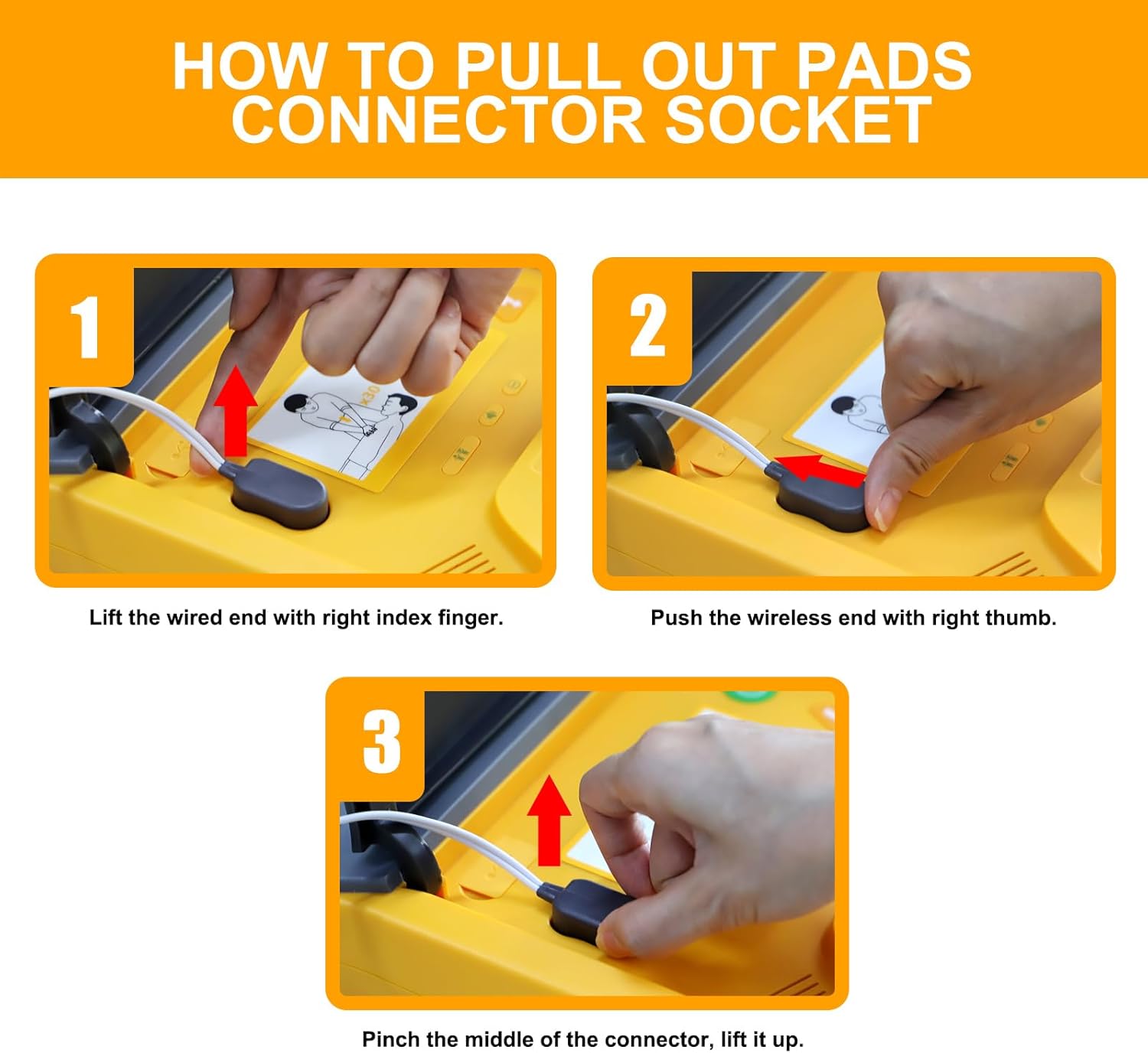
The image illustrates the correct method for detaching the electrode pad connector from the trainer, which is the reverse of connecting it.
5. Operating Instructions
5.1. Powering On/Off
- Power On: Open the lid of the AED trainer. The device will automatically power on. Alternatively, press the green power button.
- Power Off: Close the lid or press and hold the green power button.

This image highlights the power button for manual control of the device.
5.2. Basic Training Flow
Once powered on, the trainer will provide voice prompts guiding the user through a simulated AED rescue sequence. Follow these prompts carefully.

This image summarizes the core operational steps for conducting an AED training session.
5.3. Switching Adult/Pediatric Mode
The trainer can simulate scenarios for both adult and pediatric patients. Use the dedicated Adult/Child button on the device or the remote control to switch between modes.

This image demonstrates the adult/child mode selection feature, crucial for varied training.

This image provides a detailed view of the buttons used to switch between adult and child training modes.
5.4. Adjusting CPR Frequency and Metronome
The trainer supports CPR frequencies of 100, 110, and 120 beeps per minute. The compression metronome can also be turned on or off. These settings are adjustable via the remote control.

This image shows the CPR button on the remote, used for controlling compression rates.
5.5. Changing Language
The trainer supports multiple languages. Use the language switch button on the device or the remote control to select your preferred language.

This image details the language selection button on the device.
5.6. Using the Remote Control
The remote control allows instructors to manage training scenarios, adjust settings, and provide real-time feedback. It is stored in the bottom of the main unit.

This image shows the scenario selection buttons on the remote control.
6. Training Scenarios
The XFT-120GA offers 8 simulated scenarios, accessible via the remote control, to provide comprehensive training:

The image above provides a detailed breakdown of each training scenario and its corresponding remote control button.
- Scenario 1: Ventricular Fibrillation with single shock conversion. Shockable rhythm 1 shock, Non-shockable rhythm.
- Scenario 2: Troubleshooting Skills: Defibrillation pads. Poor pad connection. Shockable rhythm 1 shock, Non-shockable rhythm.
- Scenario 3: Ventricular Fibrillation with two shocks required for conversion. Non-shockable Rhythm, Shockable rhythm 2 shocks, Non-shockable rhythm.
- Scenario 4: Non-shockable rhythm. Non-shockable rhythm throughout.
- Scenario 5: Ventricular Fibrillation with two shocks required for conversion. Shockable rhythm 2 shocks, Non-shockable rhythm.
- Scenario 6: Troubleshooting Skills: Defibrillation pads with two shocks required for conversion. Poor pad connection. Shockable rhythm 2 shocks, Non-shockable rhythm.
- Scenario 7: Ventricular Fibrillation. Ventricular fibrillation throughout.
- Scenario 8: Troubleshooting Skills: Motion, low battery, with one shock required for conversion. Motion artifacts. Shockable rhythm 1 shock, Non-shockable rhythm.
7. Maintenance
7.1. Battery Care
- Regularly charge the lithium battery to ensure readiness for training.
- If the trainer will not be used for an extended period, remove the battery and store it in a cool, dry place.
- Replace the battery if it no longer holds a charge effectively.
7.2. Cleaning
- Wipe the exterior of the trainer and remote control with a soft, damp cloth.
- Do not use abrasive cleaners or immerse the device in water.
- Ensure the electrode pads are clean and free of debris for optimal contact during training.
7.3. Storage
- Store the AED trainer and its accessories in the provided storage bag when not in use.
- Keep the device in a cool, dry environment, away from direct sunlight and extreme temperatures.
- Ensure the remote control is stored in its designated slot at the bottom of the main unit.
8. Specifications
| Feature | Detail |
|---|---|
| Model | XFT-120GA |
| Package Dimensions | 12.76 x 11.77 x 4.92 inches |
| Weight | 4.19 Pounds |
| Battery Type | Rechargeable Lithium Polymer (2 included) |
| Battery Life (Operating) | Up to 12 hours (medium volume) |
| Training Modes | 8 basic training modes, 8 simulated scenarios |
| CPR Frequency Modes | 100, 110, 120 beeps per minute (adjustable) |
| Supported Languages | English, Italian, French, Chinese |
| Manufacturer | XFT |
9. Troubleshooting
If you encounter issues with your XFT AED Trainer, consider the following common solutions:
- No Power: Ensure the battery is correctly installed and fully charged. Connect the power adapter to charge the device.
- No Voice Prompts: Check the volume setting on the device or remote control. Ensure the language is set correctly.
- Pads Not Detected: Verify that the electrode pads are securely connected to the trainer's socket. Ensure the pads are clean and making proper contact with the training manikin.
- Remote Control Not Responding: Check the battery in the remote control. Ensure there are no obstructions between the remote and the trainer's signal receiving window.
- Incorrect Scenario: Use the remote control to select the desired training scenario (1-8).
If problems persist after attempting these steps, please refer to the support information section.
10. Support Information
For any questions, technical assistance, or issues not covered in this manual, please contact XFT customer support. Our team is available to provide solutions and guidance for your AED trainer device.
Please refer to the contact information provided with your product packaging or visit the official XFT website for the most up-to-date support channels.