
Oyajia YF001-DE
Oyajia Metal Bed Frame 140x200cm with RGB Light, USB Ports, and Storage Drawers User Manual
Model: YF001-DE
Introduction
This manual provides comprehensive instructions for the assembly, operation, and maintenance of your Oyajia Metal Bed Frame (Model YF001-DE). Designed for functionality and comfort, this bed frame features a 140x200cm sleeping area, integrated RGB lighting, two USB ports, two power outlets, and four spacious storage drawers. Please read all instructions carefully before assembly and use to ensure safe and proper operation.
Safety Warnings
- Maximum Load Capacity: Do not exceed the maximum load capacity of 365 kg (approximately 804 lbs). Overloading can cause structural damage and injury.
- Assembly: Follow all assembly instructions precisely. Incorrect assembly can lead to instability and potential hazards.
- Cleaning: Clean the bed frame with a damp cloth. Avoid harsh chemicals that may damage the finish or materials.
- Mattress and Bedding: This product does not include a mattress or bedding (duvets, sheets, pillows, etc.). Ensure your mattress fits the 140x200cm sleeping area.
- Electrical Components: Ensure all electrical connections for the RGB light, USB ports, and power outlets are secure and used according to standard electrical safety practices. Do not expose to water.
Product Overview
The Oyajia Metal Bed Frame is designed to enhance your bedroom with its modern features and practical storage solutions. Key components include a sturdy metal frame, a padded headboard, integrated RGB lighting, convenient charging ports, and four under-bed storage drawers.

Figure 1: Overview of the Oyajia Metal Bed Frame, showcasing the integrated RGB lighting in the headboard and the four pull-out storage drawers.
Key Features:
- Padded Headboard: Soft, skin-friendly upholstery for comfort.
- Integrated RGB Lighting: Customizable ambient lighting with remote or smartphone app control.
- USB Ports & Power Outlets: Two USB ports and two standard power outlets located on the headboard for convenient device charging.
- Four Storage Drawers: Spacious under-bed drawers for organizing clothes, bedding, or personal items.
- Sturdy Metal Construction: High-quality steel tubing with anti-rust and anti-wear treatment for durability and stability.
- Anti-Squeak Design: Engineered to minimize noise for a quiet sleeping environment.
Specifications
| Parameter | Value |
|---|---|
| Brand | Oyajia |
| Model Number | YF001-DE |
| Color | Grey |
| Material | Metal |
| Overall Dimensions (L x W x H) | 200 x 140 x 48 cm (78.7 x 55.1 x 18.9 inches) |
| Sleeping Area | 200 x 140 cm (78.7 x 55.1 inches) |
| Maximum Load Capacity | 365 kg (804 lbs) |
| Special Features | Anti-squeak, Anti-fouling, RGB Light Bar, 2 USB Interfaces, 2 Power Outlets, Four Drawers, Padded Headboard |

Figure 2: Detailed product dimensions and maximum weight capacity of 365 kg.
Package Contents
Your Oyajia Metal Bed Frame is shipped in two separate packages to ensure safe delivery. Please verify that all components are present before beginning assembly.
- 1 x Metal Bed Frame (components)
- 1 x Accessory Kit (hardware, tools)
- 1 x Assembly Instruction Manual
Setup and Assembly
The Oyajia Metal Bed Frame is designed for straightforward assembly. All parts are standardized, and detailed instructions along with necessary tools are included. It is recommended to assemble the bed frame with two people.
- Unpack Components: Carefully open both packages and lay out all components on a clean, soft surface to prevent scratches. Verify against the parts list in the included assembly manual.
- Assemble Frame: Follow the step-by-step diagrams and instructions provided in the separate assembly manual to construct the main bed frame. Ensure all bolts are tightened securely.
- Install Slats: Attach the wooden slats to the frame. The anti-squeak design ensures a quiet foundation for your mattress.
- Attach Headboard: Secure the padded headboard to the main frame.
- Insert Drawers: Assemble the four storage drawers according to their specific instructions and slide them into place under the bed frame.
- Connect Electrical: Plug in the power cord for the RGB lighting, USB ports, and power outlets to a suitable wall socket.
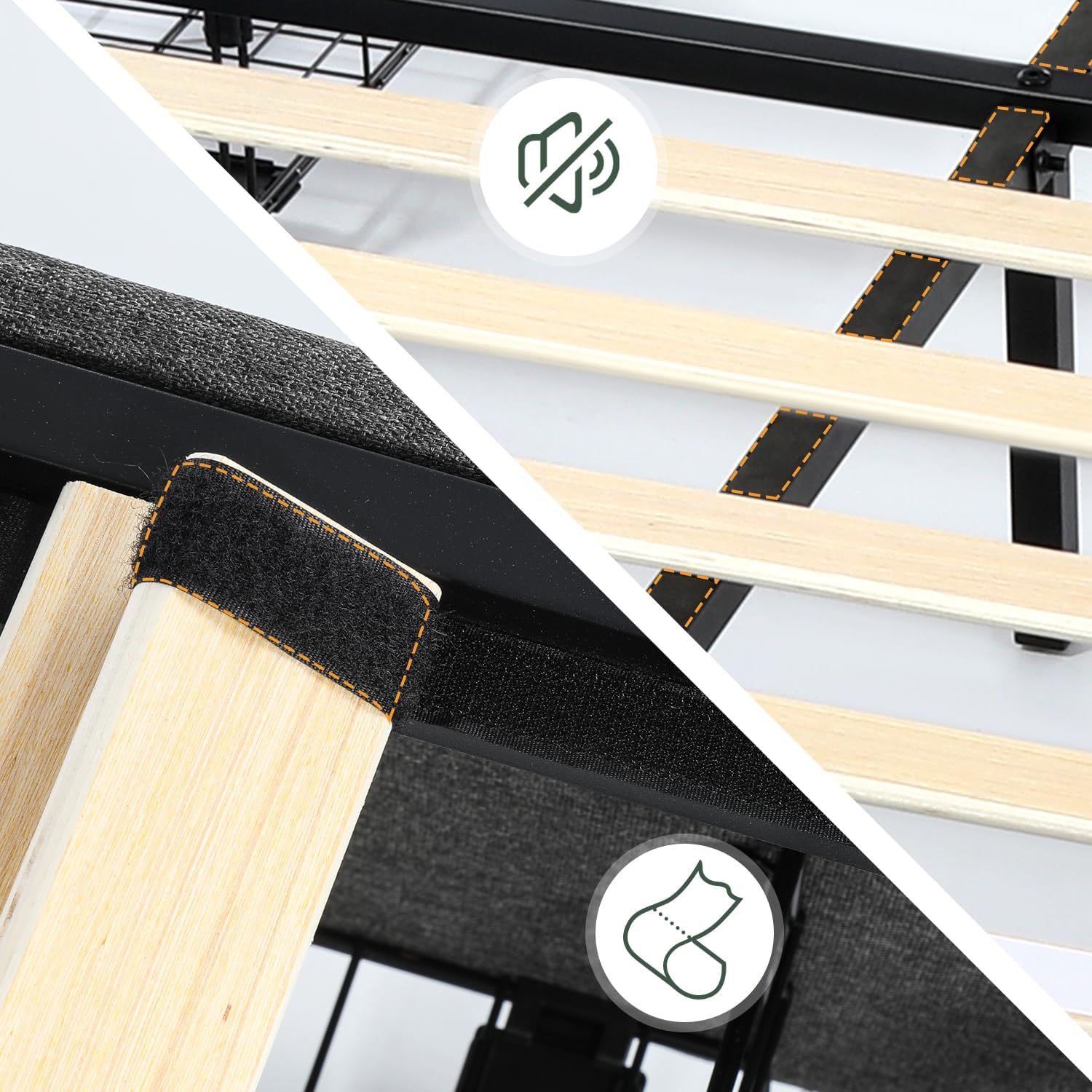
Figure 3: Close-up view of the bed slat system, highlighting the anti-squeak design for a stable and quiet mattress foundation.
Operating Instructions
1. RGB Lighting System
The integrated RGB light bar in the headboard allows you to customize the ambiance of your room.
- Control: The RGB lighting can be controlled via the included remote control or a compatible smartphone application.
- Functions: Adjust color (16 options), brightness, and choose from 25 functions and 4 lighting modes to create your desired atmosphere.

Figure 4: The RGB light bar in the headboard, demonstrating various color options and control via the remote.
2. USB Ports and Power Outlets
Conveniently located on the headboard, these ports allow you to charge your electronic devices without leaving your bed.
- USB Charging: Two USB ports are available for charging smartphones, tablets, and other USB-powered devices.
- Power Outlets: Two standard power outlets provide power for other electronic devices.
- Usage: Simply plug your device's charging cable or power adapter into the respective port.

Figure 5: Detail of the integrated USB charging ports and power outlets, showing a phone being charged.
3. Storage Drawers
The four spacious drawers provide ample storage space, helping to keep your bedroom tidy and organized.
- Access: Each drawer slides out smoothly for easy access to stored items.
- Capacity: Ideal for storing clothing, extra bedding, books, or other personal belongings.
Maintenance
- Cleaning the Frame: Wipe the metal frame and upholstered headboard with a soft, damp cloth. For stubborn stains on fabric, use a mild upholstery cleaner and follow product instructions. Avoid abrasive cleaners.
- Dusting: Regularly dust all surfaces, including the headboard and drawers, to prevent buildup.
- Tightening Fasteners: Periodically check all bolts and screws and tighten them if necessary to maintain stability and prevent squeaking.
- Electrical Components: Keep the USB ports and power outlets free from dust and debris. Do not attempt to clean them with liquids.
Troubleshooting
| Problem | Possible Cause | Solution |
|---|---|---|
| Bed frame squeaks | Loose fasteners; uneven floor. | Check and tighten all bolts and screws. Ensure the bed is on a level surface. |
| RGB light not working | Power cord unplugged; remote battery dead; light strip damaged. | Ensure the power cord is securely plugged in. Replace remote batteries. Contact customer support if the light strip is damaged. |
| USB ports/outlets not charging | Bed frame not plugged in; device cable faulty; device incompatible. | Verify the bed frame's main power cord is plugged into a working outlet. Try a different charging cable or device. |
| Drawers do not slide smoothly | Obstruction; misaligned runners; overloaded drawer. | Check for any items blocking the drawer path. Ensure drawers are correctly aligned on their runners. Do not overload drawers beyond their capacity. |
Warranty and Support
Oyajia is committed to providing high-quality products and excellent customer service.
- Customer Support: Oyajia offers 24/7 customer support. If you encounter any issues during purchase or use, please contact the customer service team for assistance.
- Spare Parts: Information regarding the availability of spare parts is currently unavailable. Please contact customer support for specific inquiries.
Related Documents - YF001-DE
 |
PEPIJN Metal Bed Assembly Instructions Step-by-step assembly guide for the PEPIJN metal bed by WOOD (De Eekhoorn Dutch Furniture). Includes parts list, component identification, and textual descriptions of assembly steps for building your metal bed frame. |
 |
Platform Bed Frame Assembly Instructions Detailed assembly instructions for a platform bed frame, including safety advice, parts list, hardware list, and step-by-step guidance. Ensure proper assembly for durability and safety. |
 |
Harper & Bright Designs GCCPWCCP435555 Platform Bed Frame Assembly Instructions Detailed assembly instructions for the Harper & Bright Designs GCCPWCCP435555 Platform Bed Frame. This guide provides step-by-step instructions, part lists, and hardware information for assembling your new bed frame. |
 |
Birch Lane Wood Panel Queen Bed Assembly Instructions Comprehensive assembly instructions and care guide for the Birch Lane Wood Panel Queen Bed. Includes parts list, hardware details, step-by-step assembly, and maintenance tips. |
 |
Costway Twin Size House Floor Bed Assembly Instructions & Parts List Comprehensive guide for assembling the Costway HU11229-T Twin Size House Floor Bed. Includes part list, hardware list, and step-by-step assembly instructions. |
 |
Costway HU10482-T Twin Size Bed Frame Assembly Instructions Comprehensive assembly guide for the Costway HU10482-T Twin Size Bed Frame. Includes parts list, hardware list, step-by-step instructions, safety precautions, and return/damage claim procedures. |