
1. Introduction
The Contixo F28 Premium is a sophisticated two-axis gimbal drone designed for both beginners and experienced pilots. It features a 4K zoom camera, brushless motors for stable flight, and advanced GPS functionalities such as Auto Return and Follow Me. Its portable, foldable design makes it convenient for transport and storage. This manual provides essential information for safe operation, setup, and maintenance of your F28 Premium drone.
2. Safety Guidelines
Before operating the Contixo F28 Premium drone, please read and understand all safety instructions. Failure to follow these guidelines may result in injury, damage to the drone, or property damage.
- Pre-Flight Check: Always ensure the drone and remote control batteries are fully charged. Inspect propellers for damage and ensure they are securely attached.
- Flight Environment: Fly in open areas, away from people, buildings, trees, and power lines. Avoid flying in strong winds, rain, or snow. Maintain a safe distance from crowds.
- Line of Sight: Always keep the drone within your visual line of sight during flight.
- Battery Safety: Use only original Contixo batteries and chargers. Do not overcharge or short-circuit batteries. Store batteries in a cool, dry place.
- Propeller Safety: Keep hands, face, and loose clothing away from rotating propellers. Do not attempt to catch the drone while it is flying.
- Respect Privacy: Be mindful of privacy laws and regulations when using the camera.
- Local Regulations: Familiarize yourself with local drone regulations and obtain any necessary permits or registrations before flying.
3. Package Contents
Verify that all items listed below are included in your Contixo F28 Premium package:
- F28 Premium Drone x 1
- Transmitter (Remote Control) x 1
- Battery (Installed) x 1
- Replacement blades x 8
- Landing Pad x 1
- Charging Cord x 1
- User Manual x 1
- Waterproof Carry Case x 1

Figure 3.1: Included components of the Contixo F28 Premium Drone.
4. Product Overview
4.1 Drone Components
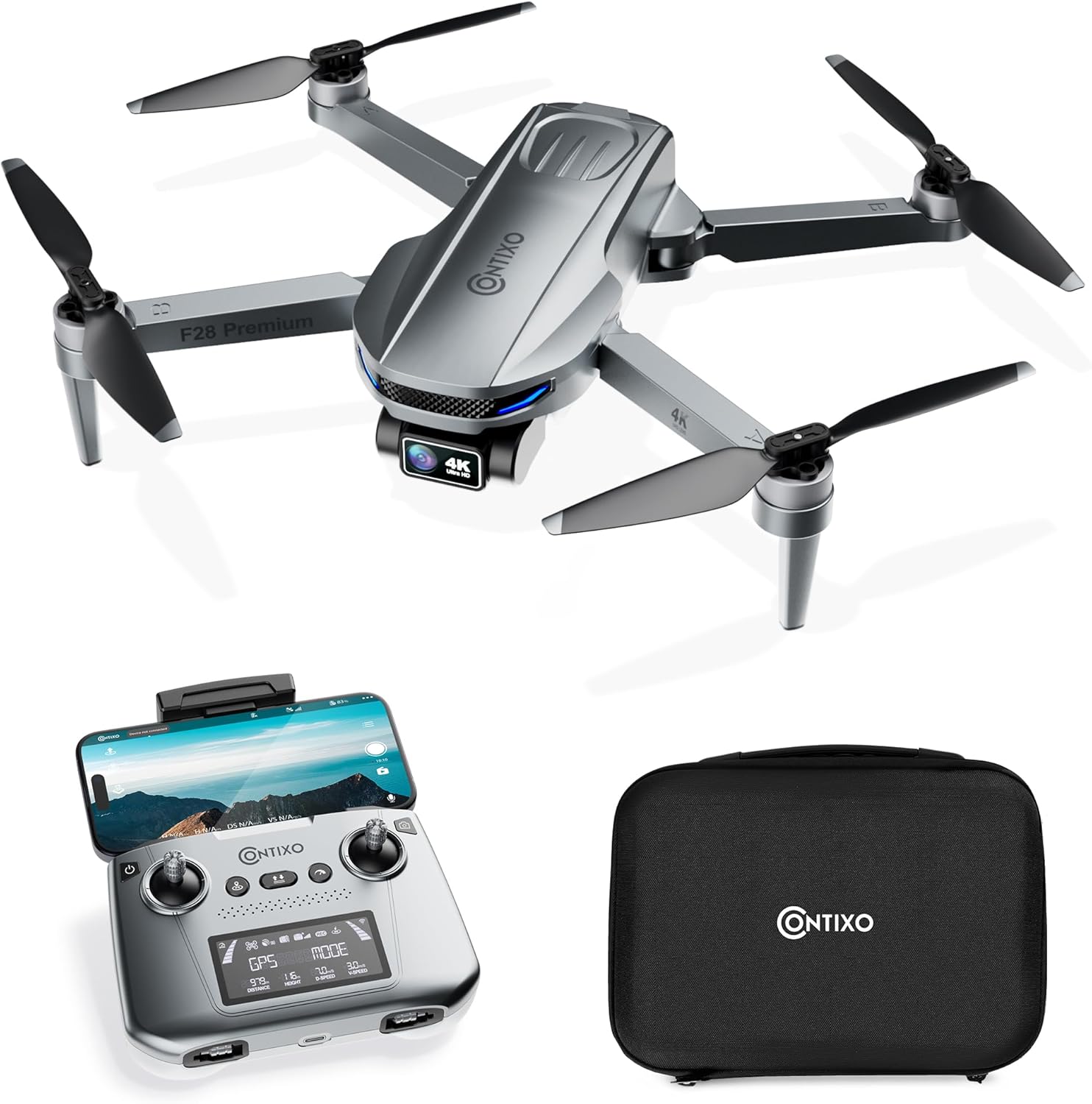
Figure 4.1: The Contixo F28 Premium Drone, remote control, and carry case.
The F28 Premium drone features a sleek, foldable design with four arms, each equipped with a brushless motor and propeller. The front of the drone houses the 4K camera with a two-axis gimbal for stabilized footage. LED lights indicate drone status.
4.2 Remote Control
The remote control provides intuitive flight control and features a smartphone holder for real-time FPV viewing. It includes joysticks for movement, buttons for various flight functions, and a display for flight information.
4.3 Foldable Design and Dimensions
The drone's arms and propeller blades can be folded for compact storage and portability. When folded, the drone measures approximately 6 inches (14.5 cm) in length, 3 inches (8.5 cm) in width, and 2 inches (5.6 cm) in height. When unfolded, it measures approximately 13 inches (32 cm) in length and 13 inches (30 cm) in width.

Figure 4.2: Folded and unfolded dimensions of the Contixo F28 Premium Drone.
5. Setup
5.1 Charging the Battery
The drone is powered by a 7.7V 1820 mAh Lithium Polymer battery, providing up to 23 minutes of flight time. Use the provided charging cord to charge the drone battery and the remote control. Ensure both are fully charged before each flight.

Figure 5.1: The drone's intelligent flight battery.
5.2 Installing Propellers
Attach the propellers to the corresponding motor shafts. Ensure the correct propellers (marked A or B) are installed on the correct motors as indicated in the manual or on the drone's arms. Secure them firmly.
5.3 App Installation and Connection
Download the official Contixo drone application from your device's app store. Power on the drone and connect your smartphone to the drone's Wi-Fi network. Open the app to establish a connection and access FPV view and advanced flight features.
6. Operating Instructions
6.1 Basic Flight Controls
Familiarize yourself with the remote control's joysticks for basic movements: ascend/descend, forward/backward, left/right, and rotation. Practice in an open area until comfortable with the controls.
6.2 GPS and Smart Flight Modes
The F28 Premium drone is equipped with accurate GPS positioning for stable flight and advanced features:
- Auto Return (RTH): The drone can automatically return to its take-off point if the signal is lost, battery is low, or initiated manually via a button.
- Follow Me: The drone will automatically follow the remote controller or your mobile device, capturing footage as you move.
- Waypoint Flight: Plan a custom flight path by tapping multiple points on the app's map, and the drone will fly along the designated route.
- Orbit Mode: The drone will circle around a designated point of interest, maintaining a set radius and altitude.

Figure 6.1: GPS Intelligent Return features for safe drone operation.

Figure 6.2: The drone's Follow Me function in action.

Figure 6.3: Waypoint flight mode, allowing custom flight paths.

Figure 6.4: Orbit Mode, where the drone circles a point of interest.
6.3 Camera Operation and FPV
The F28 Premium features a 4K UHD camera with a 2-axis gimbal and Electronic Image Stabilization (EIS) for smooth, high-resolution video and photos. The 110° wide-angle lens provides an expansive field of view. Real-time FPV (First Person View) streaming is available through the connected mobile app.

Figure 6.5: Details of the drone's 4K camera capabilities.

Figure 6.6: Visual comparison of video stability with and without the 2-Axis Gimbal and EIS technology.
6.4 Gesture Control
Utilize gesture control for convenient photo and video capture. Specific hand gestures can trigger the camera to take a photo or start/stop video recording.

Figure 6.7: Examples of Photo Gesture and Video Gesture controls.
6.5 Brushless Motors
The F28 Premium is equipped with brushless motors, which offer increased durability, efficiency, and quieter operation compared to brushed motors. This technology contributes to longer flight times and a more reliable flight experience.

Figure 6.8: Illustration of the brushless motor technology.
7. Maintenance
Proper maintenance ensures the longevity and optimal performance of your drone.
- Cleaning: Regularly wipe down the drone and remote control with a soft, dry cloth. Avoid using harsh chemicals or solvents.
- Propeller Inspection: Before each flight, check propellers for any cracks, bends, or chips. Replace damaged propellers immediately using the provided spares.
- Battery Care: Store batteries in a cool, dry place. If storing for extended periods, charge them to approximately 50% capacity. Do not expose batteries to extreme temperatures.
- Storage: When not in use, store the drone and its components in the provided carry case to protect them from dust and physical damage.
8. Troubleshooting
This section addresses common issues you might encounter with your Contixo F28 Premium drone.
- Drone Not Powering On: Ensure the battery is fully charged and correctly inserted. Check the power button for proper function.
- No Signal/Connection Issues: Ensure the remote control and drone are paired correctly. Move closer to the drone. Check for Wi-Fi interference and ensure your phone is connected to the drone's Wi-Fi.
- Unstable Flight: Calibrate the drone's gyroscope and compass as per the app's instructions. Check for damaged propellers and replace if necessary. Avoid flying in strong winds.
- Poor Camera Quality: Ensure the camera lens is clean. Check lighting conditions. Verify that the camera settings in the app are configured for 4K resolution.
- GPS Not Locking: Ensure you are in an open outdoor area with a clear view of the sky. Wait for the drone to acquire sufficient GPS satellites before attempting flight.
- Short Flight Time: Ensure the battery is fully charged. Flight time can be affected by aggressive flying, strong winds, and cold temperatures.
If you encounter issues not covered here, please refer to the official Contixo support resources.
9. Specifications
| Feature | Specification |
|---|---|
| Brand | Contixo |
| Model Name | F28 Premium |
| Special Features | Auto Follow, First Person View (FPV), GPS Control, Optical Flow, Selfie Mode |
| Color | Deep Space Gray |
| Video Capture Resolution | 4K |
| Connectivity Technology | Wi-Fi |
| Skill Level | All |
| Item Weight | 8.8 Ounces |
| Battery Capacity | 1820 Milliamp Hours |
| Battery Cell Composition | Lithium Polymer |
| Product Dimensions | 11.8"L x 12.6"W x 2.2"H (unfolded) |
| Material | ABS, Plastic |
| Flight Time | Up to 23 minutes |
10. Warranty and Support
Contixo is committed to customer satisfaction. While specific warranty details are not provided in this manual, Contixo aims to ensure customers are 100% satisfied with their products. For any product-related inquiries, technical support, or warranty claims, please contact Contixo customer service directly. Support is available via phone or email.
For the most up-to-date support information and contact details, please visit the official Contixo website or refer to the contact information provided with your product packaging.