
1. Introduction
Thank you for choosing the MZZYG FJ3362G Touchscreen Weather Station. This device provides comprehensive environmental monitoring, including indoor and outdoor temperature and humidity, weather forecasting, time, date, alarm functions, and more. Please read this manual carefully to ensure proper setup and operation.
2. Package Contents
Upon unpacking, please verify that all items listed below are present and in good condition:
- 1 x MZZYG FJ3362G Weather Station (Main Unit)
- 1 x Wireless Outdoor Sensor
- 1 x User Manual (this document)
- Power Adapter (DC5V/1.2A) - (Note: 2 x LR6 AA batteries for main unit and 2 x LR6 AA batteries for outdoor sensor are not included)

Image 1: MZZYG FJ3362G Weather Station main unit and wireless outdoor sensor.
3. Product Features
The MZZYG FJ3362G Weather Station offers a range of functionalities designed for comprehensive environmental monitoring and convenience:
- Large Touchscreen Display: Backlit display for clear visibility of time, date, calendar, temperature, humidity, air pressure, moon phases, tides, sunrise/sunset times, and more.
- Clock Functionality: 12/24-hour time format, two daily alarms, and an automatic snooze function (adjustable from 5 to 60 minutes or OFF). Perpetual calendar up to the year 2099.
- Thermo-Hygrometer Function: Displays indoor and outdoor temperature and humidity.
- Indoor Humidity Range: 20% ~ 95% RH
- Outdoor Humidity Range: 20% ~ 95% RH
- Indoor Temperature Range: -9.9°C ~ 50°C (15°F ~ 122°F)
- Outdoor Temperature Range: -40°C ~ 70°C (-40°F ~ 158°F)
- Minimum/Maximum humidity and air temperature display.
- Temperature/humidity trend indication.
- Weather Station Function: Weather forecast, sunrise and sunset times (city selectable), moon phases and tides, outdoor temperature upper and lower limit alarms, frost warning, indoor comfort display, and mold risk indication.
- Wireless Outdoor Sensor: Wall-mountable or table-standing sensor with 433.92 MHz RF transmission frequency. Transmission range up to 60 meters in open areas. Supports connection of up to 3 wireless outdoor sensors (one included).
- Barometric Pressure Function: Measurement range of 600 ~ 1100 hPa/mb (17.72 ~ 32.50 inHg). Histogram displays 24-hour historical barometric pressure trends.
- Data Logging: Records data for trend analysis.
- Low Power Consumption: Designed for energy efficiency, high stability, and accuracy.

Image 2: Overview of the main functions displayed on the weather station screen.
4. Setup
4.1 Powering the Main Unit
- Insert 2 x LR6 AA batteries into the battery compartment on the back of the main unit, observing correct polarity (+/-).
- Alternatively, connect the DC5V/1.2A power adapter to the main unit and plug it into a power outlet.
- The display will light up, and the unit will begin initialization.
4.2 Powering the Wireless Outdoor Sensor
- Open the battery compartment of the wireless outdoor sensor.
- Insert 2 x LR6 AA batteries, ensuring correct polarity.
- Close the battery compartment securely.
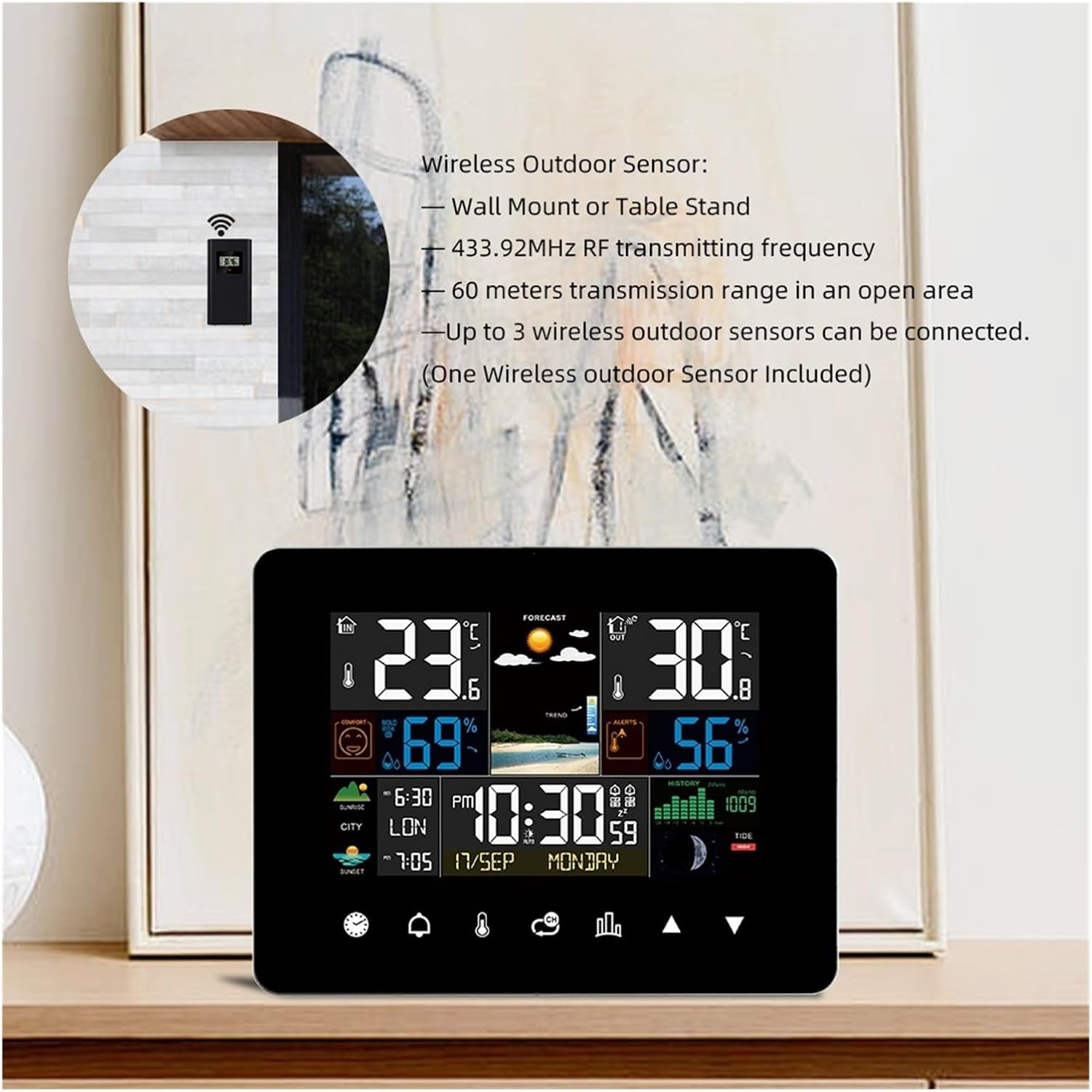
Image 3: Wireless outdoor sensor, showing wall mount and table stand options. It operates on 433.92MHz RF frequency with a 60-meter range.
4.3 Pairing the Outdoor Sensor with the Main Unit
The main unit will automatically attempt to connect with the outdoor sensor upon initial power-up.
- Place the outdoor sensor within 3 meters of the main unit during the initial pairing process.
- Once connected, the outdoor temperature and humidity will appear on the main unit's display.
- If the connection is not established, press and hold the "Sensor" button on the main unit to initiate a manual search.
4.4 Placement of the Outdoor Sensor
- Choose a shaded location to avoid direct sunlight, which can affect temperature readings.
- Ensure the sensor is protected from direct rain or snow.
- Mount the sensor vertically to allow for proper drainage.
- Keep the sensor within the 60-meter transmission range of the main unit, minimizing obstructions like thick walls or metal structures.
5. Operating Instructions
The MZZYG FJ3362G features a touchscreen interface for easy navigation and setting adjustments.

Image 4: Touchscreen diagram illustrating various touch-sensitive areas for interaction.
5.1 Basic Settings (Time, Date, Unit)
- Access Settings: Tap the "SET" icon (often represented by a gear or similar symbol) on the touchscreen.
- Time Format: Select 12-hour or 24-hour format.
- Time Adjustment: Use the UP/DOWN arrows to set the hour and minute. Tap "SET" to confirm and move to the next setting.
- Date Adjustment: Set the year, month, and day using the UP/DOWN arrows.
- Temperature Unit: Select between Celsius (°C) and Fahrenheit (°F).
- Pressure Unit: Select between hPa/mb and inHg.
5.2 Alarm Clock Function
- Set Alarm: Tap the "ALARM" icon. Use UP/DOWN arrows to set Alarm 1 and Alarm 2 times.
- Activate Alarm: Tap the alarm icon again to toggle the alarm ON/OFF. An alarm symbol will appear on the display when active.
- Snooze Function: When the alarm sounds, tap any button (except "ALARM OFF") to activate snooze. The snooze duration can be set in the settings (5-60 minutes).
- Turn Off Alarm: Tap the "ALARM OFF" area on the screen when the alarm sounds to stop it for the day.
5.3 Weather Forecast
The weather station predicts weather conditions for the next 12-24 hours based on barometric pressure changes. The forecast icons (sunny, partly cloudy, cloudy, rainy, snowy) are displayed prominently.
5.4 Sunrise and Sunset Times
This feature displays sunrise and sunset times for 251 pre-programmed cities.
- Select City: In the settings menu, navigate to the city selection option.
- Enter City Code: Use the UP/DOWN arrows to select the appropriate city code from the provided list in the full manual (if available).
- The display will update with the sunrise and sunset times for the selected city.

Image 5: Display showing sunrise and sunset times for a selected city.
5.5 Temperature and Humidity Alerts
You can set upper and lower temperature limits for the outdoor sensor. If the temperature goes outside these limits, an alarm will sound.
- Set Alerts: Tap the "ALERT" icon.
- Adjust Limits: Use UP/DOWN arrows to set the desired upper and lower temperature thresholds for outdoor readings.
- Activate Alert: Toggle the alert ON/OFF.
6. Maintenance
- Cleaning: Wipe the display and unit surfaces with a soft, damp cloth. Do not use abrasive cleaners or solvents.
- Battery Replacement: Replace batteries in both the main unit and outdoor sensor when the low battery indicator appears on the display. Ensure correct polarity.
- Storage: If storing the device for an extended period, remove all batteries to prevent leakage.
- Environmental Protection: Keep the main unit away from direct sunlight, extreme temperatures, and moisture. Ensure the outdoor sensor is protected from direct weather elements.
7. Troubleshooting
| Problem | Possible Cause | Solution |
|---|---|---|
| No display on main unit | Batteries are dead or incorrectly inserted; power adapter not connected or faulty. | Check battery polarity and replace if necessary. Ensure power adapter is securely connected and functional. |
| Outdoor temperature/humidity not displayed | Outdoor sensor batteries are dead; sensor out of range; interference; sensor not paired. | Replace sensor batteries. Move sensor closer to the main unit. Reduce interference sources. Manually re-pair the sensor (refer to Section 4.3). |
| Inaccurate readings | Sensor exposed to direct sunlight or moisture; unit placed near heat sources. | Relocate the sensor to a shaded, protected area. Move the main unit away from direct heat or cold sources. |
| Weather forecast seems incorrect | Weather forecasts are predictions based on barometric pressure and may not always be 100% accurate. | This is normal. The forecast is an estimation for the next 12-24 hours. |
8. Specifications
| Feature | Detail |
|---|---|
| Model | FJ3362G |
| Brand | MZZYG |
| Indoor Humidity Range | 20% ~ 95% RH |
| Outdoor Humidity Range | 20% ~ 95% RH |
| Indoor Temperature Range | -9.9°C ~ 50°C (15°F ~ 122°F) |
| Outdoor Temperature Range | -40°C ~ 70°C (-40°F ~ 158°F) |
| Temperature Accuracy | ±1°C |
| Barometric Pressure Range | 600 ~ 1100 hPa/mb (17.72 ~ 32.50 inHg) |
| Wireless Transmission Frequency | 433.92 MHz |
| Wireless Transmission Range | Up to 60 meters (open area) |
| Power Supply (Main Unit) | 2 x LR6 AA batteries or DC5V/1.2A power adapter |
| Power Supply (Outdoor Sensor) | 2 x LR6 AA batteries |
| Main Unit Dimensions | 167 x 128 x 30 mm (6.57 x 5.04 x 1.18 inches) |
| Sensor Dimensions | 97 x 50 x 30 mm (3.82 x 1.97 x 1.18 inches) |
| Product Weight | Main Unit: 260 g / Sensor: 10 g |
9. Warranty and Support
For warranty information and technical support, please refer to the retailer's policy or contact MZZYG customer service through their official channels. Keep your purchase receipt as proof of purchase.