
1. Product Overview
The AIRMARS Smart Glasses combine advanced audio technology with protective eyewear. Designed for comfort and versatility, these smart glasses feature integrated speakers, Bluetooth 5.4 connectivity, and specialized lenses to enhance your daily activities while protecting your eyes.

Overview of AIRMARS Smart Glasses highlighting key features such as voice assistant, Bluetooth 5.4, HD calls, comfortable design, long battery life, and UV protection.
Key Features:
- Photochromic & Blue Light Filter Lenses: Lenses change from clear to light grey in sunlight and filter harmful blue light indoors.
- Voice Control Smart Assistant: Easy access to Siri and Google Assistant.
- Latest Bluetooth 5.4 Version: Provides quick, consistent, and high-speed connections over 10-15 meters.
- Powerful Battery Life: Up to 7 hours talk time, 8 hours music playback, and 240 hours standby time.
- IPX2 Water Resistance: Suitable for outdoor sports, resistant to sweat and light rain.
- Lightweight and Durable Design: Weighs only 43g, made with PC frame and TR90 temples.
2. What's in the Box
Upon opening your AIRMARS Smart Glasses package, please ensure all the following items are present:
- AIRMARS Smart Glasses
- Charging Cable
- User Manual (this document)
3. Product Diagram and Controls
Familiarize yourself with the different parts and controls of your AIRMARS Smart Glasses:

Detailed diagram of the AIRMARS Smart Glasses with key components labeled.
- UV Protection Lenses: Provides protection against harmful UV rays.
- Multi-function Key and Power Button: Used for power on/off, pairing, call management, and music control.
- Charging Port: Connect the charging cable here to recharge the glasses.
- Built-in Speaker: Delivers audio directly to your ears.
- Charging Indicator Light: Shows charging status and battery level.
4. Setup
4.1 Charging Your Smart Glasses
Before first use, fully charge your AIRMARS Smart Glasses. Connect the provided charging cable to the charging port (3) on the glasses and a compatible USB power source. The charging indicator light (5) will show the charging status. A full charge takes approximately 2 hours.
Once fully charged, the glasses offer up to 7 hours of talk time, 8 hours of music playback, and 240 hours of standby time.
4.2 Bluetooth Pairing
To connect your AIRMARS Smart Glasses to your device (smartphone, tablet, PC):
- Ensure the glasses are charged and powered on.
- Activate Bluetooth on your device.
- On your device, search for available Bluetooth devices.
- Select "AIRMARS SG8" from the list to pair.
- Once paired, the glasses will automatically connect to your device when in range and Bluetooth is active.
The latest Bluetooth 5.4 technology ensures a fast and stable connection over a transmission distance of 10-15 meters. These glasses are compatible with iOS, Android, and Windows devices.

Bluetooth 5.4 connection and device compatibility.
5. Operating Your Smart Glasses
5.1 Voice Control and Assistant
The smart glasses feature integrated voice assistant technology. Simply use the multi-function key (2) or a voice command to activate Siri or Google Assistant, allowing for hands-free control of your device.

Easy activation of voice assistants like Siri for hands-free operation.
5.2 Music Playback and Call Handling
Use the multi-function key (2) to control your audio and calls:
- Play/Pause Music: Press the multi-function key once.
- Adjust Volume: Specific gestures or presses on the multi-function key (refer to quick start guide for detailed actions).
- Answer/End Calls: Press the multi-function key once during an incoming call.
- Reject Calls: Press and hold the multi-function key.
The built-in 3D stereo speakers provide clear sound for both music and calls, ensuring you can hear clearly even in various environments.

Internal view of the 3D stereo speaker for enhanced audio experience.
5.3 Lens Technology: Photochromic and Blue Light Filter
Your AIRMARS Smart Glasses are equipped with advanced lenses:
- Photochromic Lenses: These lenses automatically adjust their tint based on UV light exposure. They change from clear indoors to a light grey tint in sunlight, providing comfortable vision in varying light conditions. Note that they will not become completely black like traditional sunglasses.
- Blue Light Filter Lenses: Designed to protect your eyes from harmful blue light emitted by digital screens (TVs, computers, phones). This feature helps reduce eye strain during prolonged indoor activities.

Demonstration of photochromic lens transition from clear to dark grey based on light exposure.
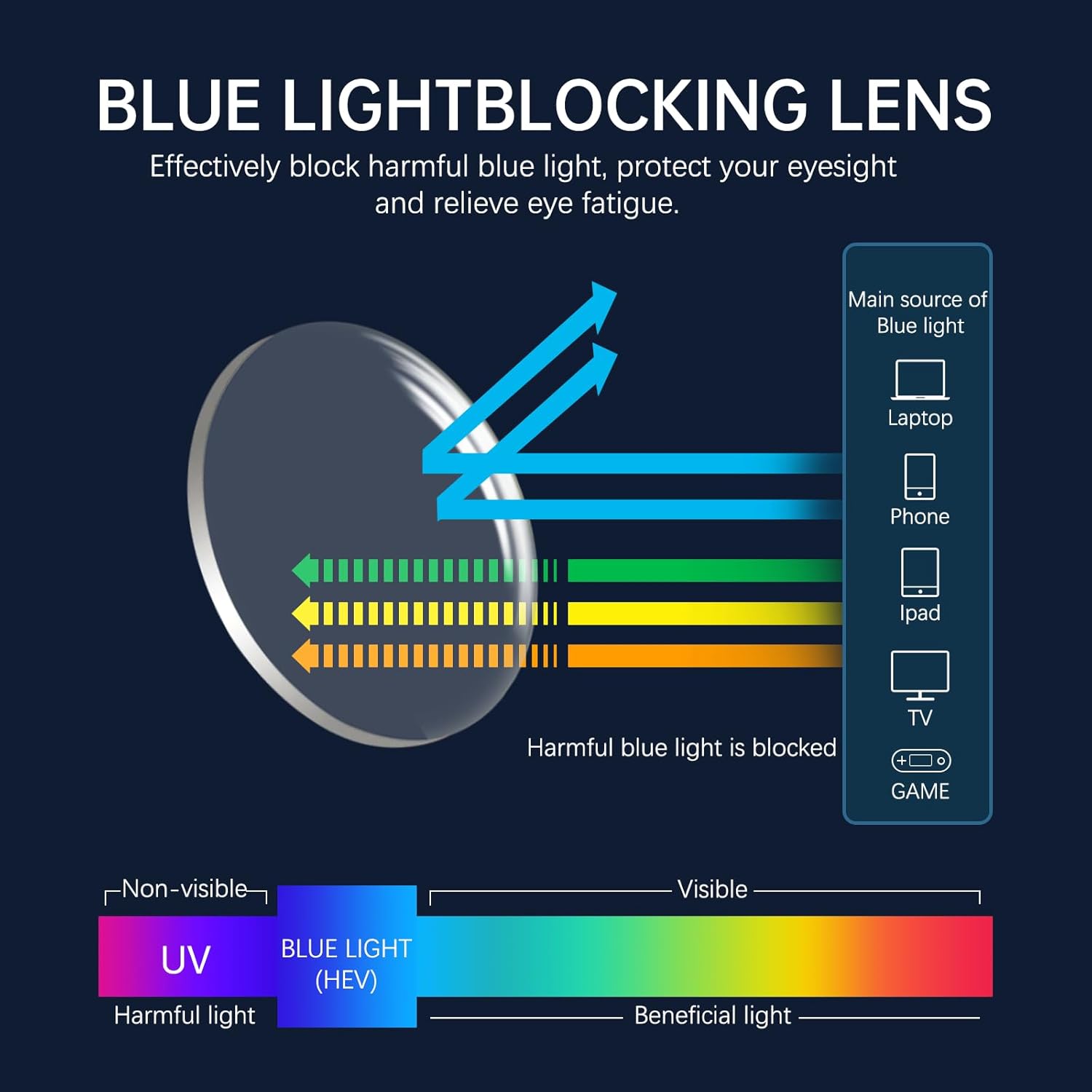
Explanation of blue light blocking technology and its benefits for eye protection.
5.4 Application Scenes
The AIRMARS Smart Glasses are versatile and suitable for various activities:

Various application scenarios for the smart glasses, including driving, gaming, working, meetings, and hiking.
- Driving: Hands-free calls and navigation audio for safer driving.
- Working: Blue light protection and discreet audio for calls or music.
- Gaming: Immersive audio experience without external headphones.
- Hiking/Outdoor Sports: IPX2 water resistance and photochromic lenses adapt to changing light.
6. Maintenance and Care
6.1 Cleaning
To clean your smart glasses, use a soft, lint-free cloth. For lenses, a specialized lens cleaning solution can be used. Avoid harsh chemicals or abrasive materials that could damage the lenses or frame.
6.2 Water Resistance (IPX2)
The AIRMARS Smart Glasses are rated IPX2, meaning they are protected against dripping water when tilted up to 15 degrees. This makes them suitable for light outdoor activities and can withstand sweat and light rain. Do not submerge the glasses in water or expose them to heavy rain.
6.3 Storage
When not in use, store your smart glasses in a protective case to prevent scratches and damage. Avoid exposing them to extreme temperatures (hot or cold) or direct sunlight for prolonged periods.
7. Troubleshooting
If you encounter any issues with your AIRMARS Smart Glasses, please refer to the following common solutions:
| Problem | Possible Cause | Solution |
|---|---|---|
| Cannot power on | Low battery | Charge the glasses fully (approx. 2 hours). |
| Cannot pair via Bluetooth | Bluetooth off on device; glasses not in pairing mode; too far from device | Ensure Bluetooth is on; power cycle glasses; ensure glasses are within 10-15m of device. |
| No sound or poor sound quality | Volume too low; glasses not connected; environmental noise | Increase volume on glasses/device; re-pair glasses; use in quieter environments for optimal sound. |
| Left side not working/charging | Connection issue; internal fault | Ensure charging cable is securely connected. If issue persists after charging and restarting, contact customer support for assistance as this may indicate a hardware issue. |
| Lenses not changing tint | Insufficient UV light exposure | Ensure you are in direct sunlight. Photochromic lenses react to UV light, not just visible light. |
If the problem persists after trying these solutions, please refer to the Warranty and Support section for further assistance.
8. Technical Specifications
Detailed specifications for your AIRMARS Smart Glasses:

Product dimensions and measurements for the AIRMARS Smart Glasses.
| Specification | Value |
|---|---|
| Model Number | AIRMARS-SG8 |
| Item Weight | 8.1 ounces (approx. 43g for glasses only) |
| Package Dimensions | 7.8 x 3.19 x 2.72 inches |
| Connectivity Technology | Bluetooth 5.4 |
| Operating System Compatibility | iOS/Android/PC |
| Battery Capacity | 160 mAh / 3.7V (Lithium Polymer) |
| Talk Time | Up to 7 hours |
| Music Playback Time | Up to 8 hours |
| Standby Time | Up to 240 hours |
| Charging Time | Approx. 2 hours |
| Water Resistance Rating | IPX2 |
| Special Features | Music Player, Voice Control, Photochromic Lenses, Blue Light Filter |
| Lens Type | Photochromic, Blue Light Filter |
| Frame Material | PC (Polycarbonate) |
| Temple Material | TR90 |
9. Warranty and Support
AIRMARS provides a one-year after-sales service for your smart glasses. If you encounter any compatibility problems or other issues during use, please do not hesitate to contact the seller directly through your purchase platform.
For assistance, please locate your order and use the contact seller option. Our support team is committed to helping you resolve any problems as soon as possible.