
1. Product Overview
The Coleshome REX-09 L-Shaped Desk is designed for home office and gaming environments, offering a spacious work surface and integrated storage solutions. This desk features a reversible design, allowing for flexible configuration to suit various room layouts. It includes built-in power outlets and USB charging ports for convenient device power and charging.

Image: Coleshome L-Shaped Desk in a typical home office setup.
2. Safety Warnings
Attention: Assembly is required for this product. Please follow all assembly instructions carefully to ensure safe and stable use of the desk. Failure to follow instructions may result in injury or damage to the product.
- Keep all small parts and packaging materials away from children during assembly.
- Ensure all screws and fasteners are tightened securely before use. Periodically check and re-tighten as needed.
- Do not overload the desk or drawers beyond their stated weight capacity.
- Avoid placing hot items directly on the desk surface without protection.
- Use the integrated power outlets and USB ports only with compatible devices and within specified voltage/current limits.
3. Setup and Assembly
This L-shaped desk features a reversible design, allowing you to configure the longer and shorter sections to your preference (left or right orientation). All necessary tools and detailed instructions are included with your desk. Please refer to the printed manual for step-by-step assembly.
3.1. Pre-Assembly Checklist
- Unpack all components and verify against the parts list in the included manual.
- Ensure you have adequate space for assembly.
- Have a soft, clean surface (e.g., a blanket or cardboard) to protect desk components during assembly.
3.2. Reversible Design
The desk can be assembled with the storage unit and shorter desk section on either the left or right side. Decide your preferred orientation before beginning assembly.
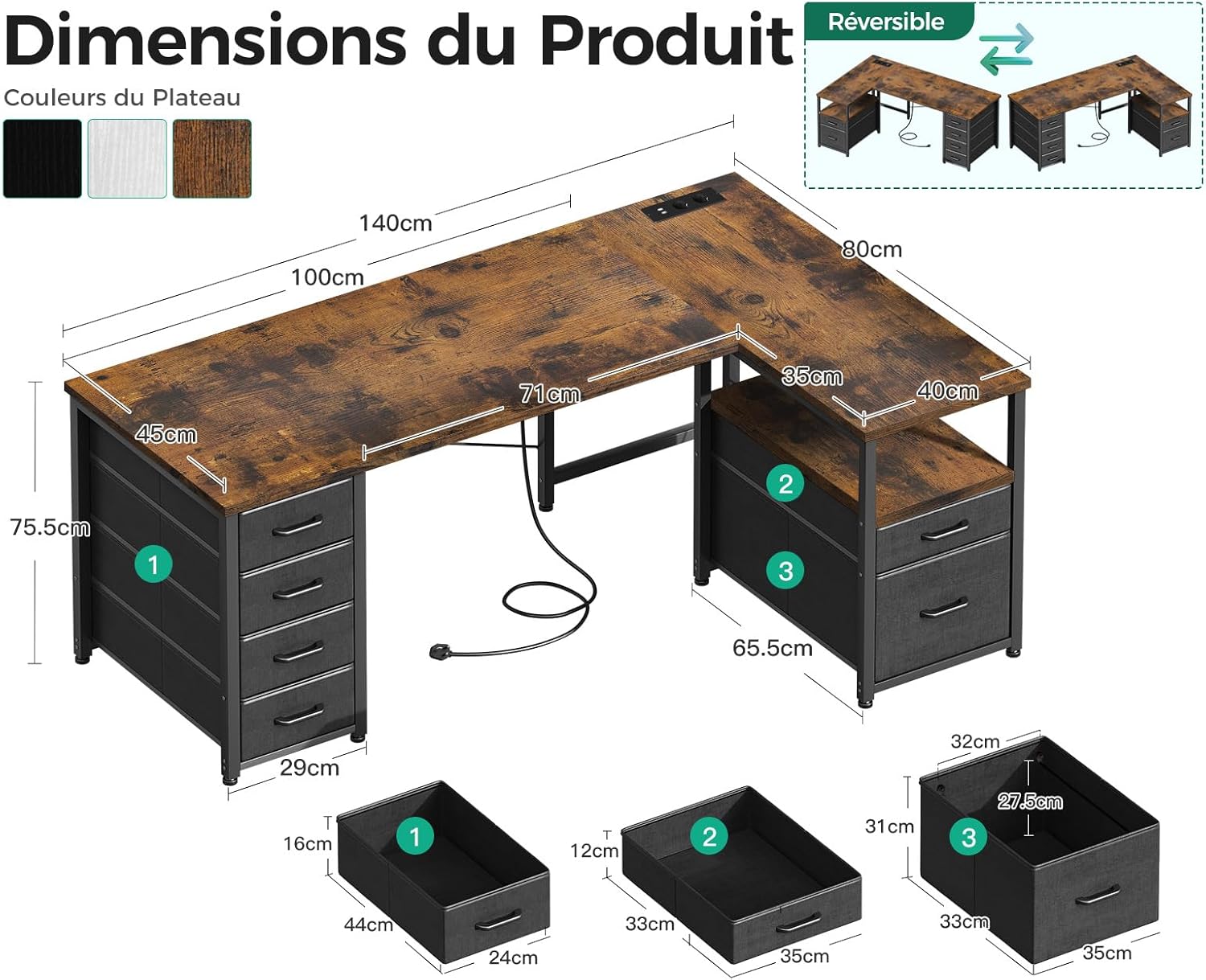
Image: Product dimensions and reversible design options.
3.3. Drawer Assembly
The desk includes fabric drawers and a file drawer. Follow the specific instructions in your manual for assembling the drawer frames and inserting the fabric drawers. Ensure the smooth glide mechanism for the fabric drawers is correctly installed.

Image: Detail of the fabric drawers and their smooth operation.
4. Operating Instructions
The Coleshome REX-09 desk is equipped with an integrated power strip for convenient access to electricity and charging.
4.1. Integrated Power Outlets and USB Ports
- The desk includes 2 AC power outlets (110-240V) and 2 USB charging ports (5V/2A).
- To use, connect the desk's power cable (200cm length) to a wall outlet.
- Plug your devices (laptops, monitors, smartphones, gaming devices) directly into the integrated outlets or USB ports.
- This feature eliminates the need for external power strips, helping to keep your workspace organized.

Image: Integrated power outlets and USB charging ports.
4.2. Storage Usage
The desk offers ample storage with 5 fabric drawers and 1 spacious file drawer. These are designed for classified storage of office supplies, gaming accessories, documents, and other items to prevent clutter.

Image: Multifunctional storage with fabric and file drawers.
5. Maintenance
Proper care and maintenance will extend the life and appearance of your Coleshome desk.
- Cleaning the Surface: Wipe the particle board surface with a soft, damp cloth. Avoid abrasive cleaners or harsh chemicals that could damage the finish.
- Cleaning Fabric Drawers: For light cleaning, use a lint roller or a soft brush. For stains, spot clean with a mild fabric cleaner and a damp cloth, then air dry. Do not machine wash.
- Metal Frame: Clean the metal frame with a soft, dry cloth.
- Spills: Immediately wipe up any spills to prevent water damage or staining.
- Sunlight Exposure: Avoid prolonged direct sunlight exposure to prevent fading or discoloration of the desk surface.
- Regular Checks: Periodically check all screws and connections to ensure they remain tight and secure.
6. Troubleshooting
If you encounter any issues with your Coleshome desk, refer to the following common troubleshooting steps.
| Problem | Possible Cause | Solution |
|---|---|---|
| Desk is wobbly/unstable | Loose screws or uneven floor. | Ensure all assembly screws are tightened. Adjust the leveling feet (if present) or place shims under the legs on an uneven floor. |
| Power outlets/USB ports not working | Desk power cable not plugged in, circuit breaker tripped, or device issue. | Verify the desk's power cable is securely plugged into a functional wall outlet. Check your home's circuit breaker. Test with a different device. |
| Drawers do not slide smoothly | Improper assembly of drawer slides or obstruction. | Review assembly instructions for drawer slide installation. Check for any items obstructing the drawer's path. |
| Missing parts during assembly | Packaging oversight. | Carefully re-check all packaging materials. If parts are genuinely missing, contact Coleshome customer support. |
7. Specifications
| Feature | Detail |
|---|---|
| Brand | Coleshome |
| Model Number | REX-09 |
| Color | Brown |
| Product Dimensions (L x W x H) | 140 x 80 x 75.2 cm |
| Material | Particle Board and Metal |
| Item Weight | 18.6 Kilograms |
| Special Feature | Integrated USB Port, Integrated AC Outlets |
| Power Outlets | 2 AC Outlets (110-240V) |
| USB Ports | 2 USB Ports (5V/2A) |
| Power Cable Length | 200 cm |
| Desk Design | Computer Desk, L-Shape |
| Storage | 5 Fabric Drawers, 1 File Drawer |
| Reversible | Yes |
8. Warranty and Support
Coleshome strives to provide high-quality products. While specific warranty details are not provided in this manual, most products come with a standard manufacturer's warranty against defects in materials and workmanship.
8.1. Warranty Information
Please retain your proof of purchase for any warranty claims. For detailed warranty terms and conditions, refer to the documentation included with your purchase or contact Coleshome customer service.
8.2. Customer Support
If you have any questions regarding assembly, missing parts, product functionality, or require technical assistance, please contact Coleshome customer support. Contact information can typically be found on the product packaging, the seller's website, or through the platform where the product was purchased.
When contacting support, please have your model number (REX-09) and purchase details readily available.