
1. Setup Instructions
Follow these steps to correctly assemble your PURPLE LEAF Patio Market Umbrella.
1.1 Base Assembly
- Connect the four base pieces to form the base frame.
- Place the sandbags into the base frame. Each sandbag can hold up to 45 pounds of sand. Ensure both sandbags are filled for optimal stability.
- Cover the filled sandbags with the provided base cover.
- Insert the umbrella pole into the center of the assembled base.
- Tighten the screws on the base to secure the umbrella pole firmly in place.

Figure 1.1: Easy Base Assembly Steps. Each sandbag holds up to 45 pounds of sand.
1.2 Umbrella Attachment and Solar Panel Setup
- Carefully lift the umbrella canopy and slide it onto the secured pole.
- Locate the solar panels on top of the umbrella. Connect any loose wires and twist the solar panels to lock them into their designated positions. These panels will charge the LED lights.

Figure 1.2: Attaching the Solar Panels to the Umbrella Canopy.
1.3 Setup Videos
Video 1.1: Assembly guide for the PURPLE LEAF Patio Market Umbrella base. This video demonstrates how to put together the base components and secure the umbrella pole.
Video 1.2: Detailed setup of the PURPLE LEAF Patio Market Umbrella, including solar LED integration. This video shows the full assembly process from base to canopy.
2. Operating Instructions
2.1 Opening and Closing the Umbrella
Your umbrella features an easy-to-use crank lift mechanism for smooth operation.
- To Open: Rotate the aluminum crank handle clockwise until the canopy is fully extended.
- To Close: Rotate the aluminum crank handle counter-clockwise until the canopy is fully retracted.
- To Tilt: Use the manual tilt mechanism located on the pole to adjust the canopy angle for optimal shade.

Figure 2.1: Aluminum Crank Handle for easy operation.
2.2 Solar LED Lighting
The umbrella is equipped with solar-powered LED lights for evening illumination.
- Charging: The solar panels on top of the umbrella automatically charge the integrated LED lights during daylight hours. Ensure the solar panels are exposed to direct sunlight for efficient charging.
- Activation: A built-in safety switch is located on the umbrella pole. Flip the switch to the 'ON' position to activate the LED lights.
- Illumination: The 84 LED lights provide up to 4 hours of continuous illumination on a full charge.
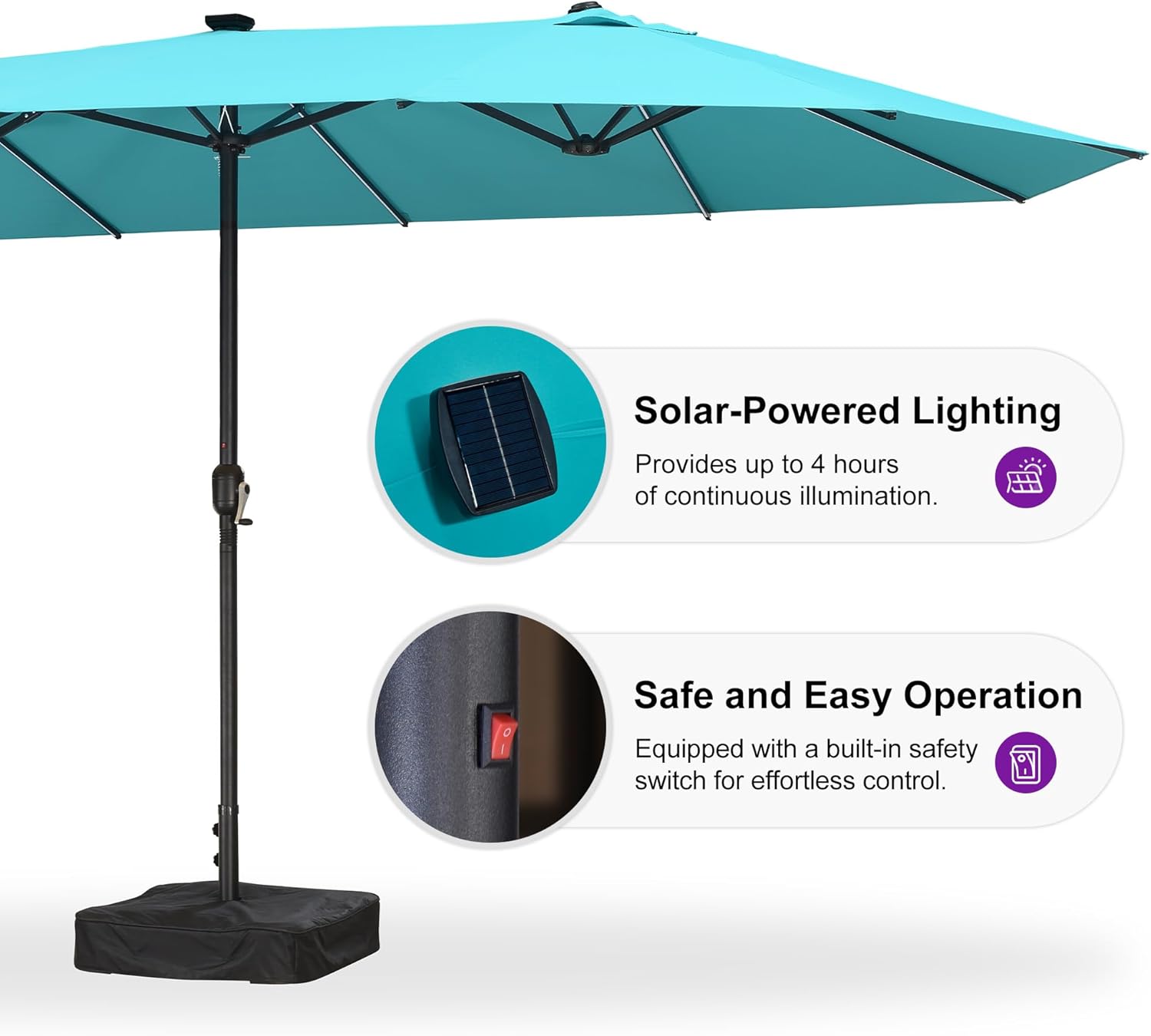
Figure 2.2: Solar Panel and LED Light Switch.
2.3 Built-in Hook Design
Each umbrella pole includes a concealed hook for hanging light strips or other accessories.

Figure 2.3: Built-in Hook for accessories.
3. Maintenance
Proper maintenance ensures the longevity and appearance of your umbrella.
- Cleaning: Wipe the canopy and pole with a damp cloth to remove dirt and debris. Avoid harsh chemicals that may damage the fabric or finish.
- Fabric Care: The 180/gsm high-quality polyester fabric is designed for UV protection and water resistance. To maintain its color vibrancy and integrity, ensure the umbrella is dry before closing for extended periods to prevent mildew.
- Storage: In extreme weather conditions (heavy winds, storms) or during off-season, it is recommended to close and secure the umbrella, or store it indoors if possible, to prevent damage.
4. Troubleshooting
Refer to this section for common issues and their solutions.
- LED Lights Not Working:
- Ensure the solar panels are clean and receiving direct sunlight for several hours to charge.
- Check that the LED power switch on the umbrella pole is in the 'ON' position.
- Umbrella Instability:
- Verify that the base sandbags are fully filled (up to 45 lbs each) and properly placed.
- Confirm that the screws securing the umbrella pole to the base are tightened.
- Always close the umbrella in windy conditions to prevent tipping or damage.
- Difficulty Opening/Closing:
- Inspect the crank mechanism for any obstructions or debris.
- Ensure the canopy fabric is not caught in the frame during operation.
5. Specifications
| Feature | Detail |
|---|---|
| Brand | PURPLE LEAF |
| Model | 13' X 7' with Lights |
| Color | Turquoise Blue |
| Shape | Rectangular |
| Canopy Material | 180/gsm Polyester (UV protection, water resistance, AATCC level 4 colorfastness) |
| Frame Material | Alloy Steel (1.5-inch diameter powder-coating pole) |
| Ribs | 12 Sturdy Ribs |
| LED Lights | 84 Solar-Powered LEDs (up to 4 hours continuous illumination) |
| Opening Mechanism | Crank Lift |
| Tilt Mechanism | Manual Tilt |
| Included Components | Umbrella, Base, 12 Ribs |
| Product Care | Wipe With Damp Cloth |
| Canopy Diameter | 157.6 Inches |
| Item Dimensions (W x H) | 157.6"W x 95.3"H |
Figure 5.1: Umbrella Size Information.

Figure 5.2: Sturdy Steel Rib Structure.
6. Warranty
Your PURPLE LEAF Patio Market Umbrella comes with a 1-year warranty for support.
Please retain your proof of purchase for any warranty claims.
7. Customer Support
For further assistance, questions, or to report any issues, please contact PURPLE LEAF customer support:
- Website: Visit the official PURPLE LEAF website for FAQs and contact forms.
- Email: Refer to your product packaging or the official website for direct email support.
- Phone: Contact numbers can be found on the official PURPLE LEAF website.
Please have your model number (13' X 7' with Lights) and purchase date ready when contacting support.