
1. Introduction
This manual provides detailed instructions for the installation, operation, and maintenance of your Huacaoe 1CH Tuya Smart Temperature and Humidity Sensor. This device is a smart module designed for real-time temperature and humidity monitoring, featuring a dry contact relay and compatibility with smart home platforms like Tuya Smart/Smart Life, Amazon Alexa, and Google Home.
The sensor allows for intelligent control of connected electrical equipment based on environmental conditions, making it suitable for various applications such as home brewing, fermentation, cultivation, greenhouse monitoring, and general climate control.
2. Product Features
- Dry Contact Output Versatility: Input voltage AC 85-250V or USB 5V. Features a 10A maximum input current. The dry contact output provides no current or voltage, making it suitable for controlling various external circuits.
- Temperature and Humidity Monitoring: Equipped with high-precision sensors to detect and respond to changes in ambient temperature and humidity. Measuring range: -40~80°C for temperature, 0~100%RH for humidity.
- Convenient Timer Functions: Built-in automatic and manual timer functions, including preset, countdown, and cycle timing options for automated equipment operation.
- Device Sharing and Compatibility: Works with popular voice assistants such as Amazon Alexa, Google Home, and Siri for voice control. Supports device sharing within the Tuya Smart/Smart Life app.
- Real-Time Monitoring: Provides real-time device status and environmental data to the application.
- Intelligent Scene Triggering: Temperature and humidity values can be used as trigger conditions for intelligent scenes to control other smart devices.
- Easy Installation: Quick pairing process with the Tuya Smart or Smart Life app.

Image: Overview of the Wi-Fi Smart Switch highlighting APP remote control, temperature monitoring, humidity monitoring, electricity statistics, and timer functions.
3. Package Contents
Please check the package contents upon receipt to ensure all items are present:
- 1 x Huacaoe 1CH Smart Switch
- 1 x Dry Contact Relay and Temperature Humidity Sensor Probe (1m length)
- 1 x User Manual
4. Specifications
| Input Voltage | AC 85-250V / USB 5V |
| Input Current | Max. 10A |
| Wireless Standards | 2.4GHz, 802.11b/g/n |
| Security Mechanism | WPA-PSK/WPA2-PSK |
| Control Mode | Mobile APP Tuya Smart/Smart Life |
| Supported Platforms | Android, iOS |
| Gang | 1 |
| Housing Material | Flame retardant ABS V0 |
| Operating Temperature | -20℃ ~ 80℃ |
| Working Humidity | ≤80%RH (non-condensing) |
| Sensor Length | 1m |
| Temperature Measurement Range | -40℃ ~ 80℃ (Accuracy: ±0.5°C) |
| Humidity Measurement Range | 0 ~ 100%RH (Accuracy: ±2%RH) |
| Product Dimensions | 2.87 x 1.81 x 1.14 inches |
| Item Weight | 1.76 ounces |
| Model Number | TYTHWB1CH-D1RF |
5. Setup
5.1 Physical Installation and Wiring
Before proceeding with installation, ensure the power supply is disconnected to prevent electrical shock. This device requires either AC 85-250V or USB 5V for power input.

Image: Wiring diagram showing AC 85-250V input (L, N) and dry contact output (NO, COM, NC) terminals. Also indicates the reset/RF pairing button, manual button, network indicator, RF indicator, and USB 5V input.
Wiring Instructions:
- Connect the AC 85-250V power supply to the 'L' (Live) and 'N' (Neutral) terminals on the input side. Alternatively, connect a USB 5V power supply to the USB port.
- Connect the device to be controlled to the dry contact output terminals: 'NO' (Normally Open), 'COM' (Common), and 'NC' (Normally Closed). The specific connection depends on whether you want the device to be ON or OFF when the relay is activated.
- Plug in the temperature and humidity sensor probe into its designated port.
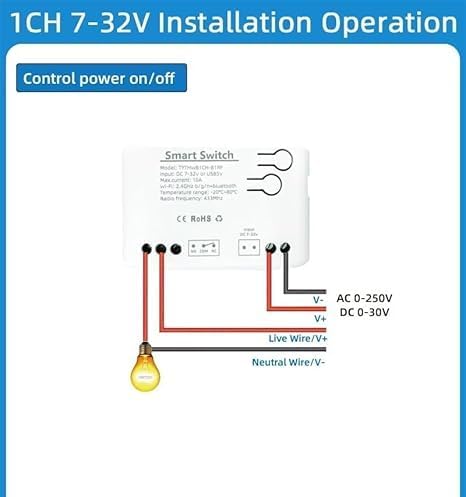
Image: Installation diagram illustrating how to connect the smart switch to control a light bulb, showing Live Wire/V+ and Neutral Wire/V- connections for the load, and AC 0-250V / DC 0-30V output.
5.2 App Installation and Device Pairing
- Download the App: Search for "Tuya Smart" or "Smart Life" in your mobile app store (App Store for iOS, Google Play Store for Android) and install it.
- Register/Log In: Open the app and register for a new account or log in with an existing one.
- Add Device: Ensure your mobile device is connected to a 2.4GHz Wi-Fi network. Power on the Huacaoe Smart Switch. The network indicator light should flash quickly.
- Pairing: In the app, tap the "+" icon (usually in the top right corner) to add a device. The app should automatically discover the new device. If not, manually select "Electrical Switch" or "Temperature and Humidity Sensor" from the device list. Follow the on-screen prompts to connect the device to your Wi-Fi network.
- Rename Device: Once connected, you can rename the device for easier identification in the app (e.g., "Greenhouse Temp/Humid").
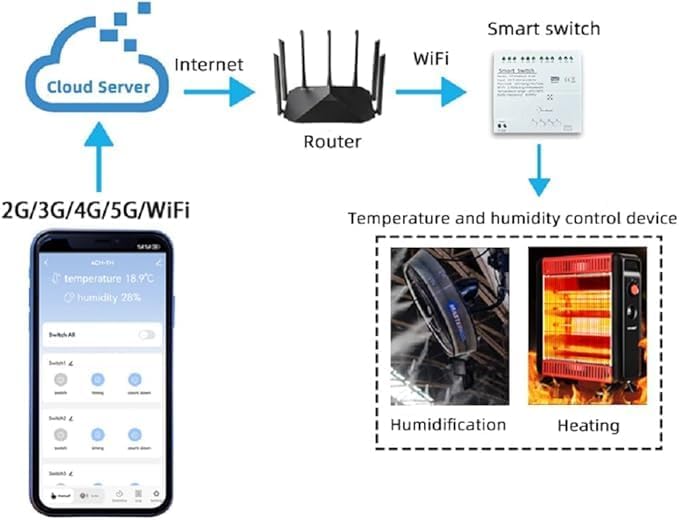
Image: Diagram illustrating the connection flow from the mobile app via 2G/3G/4G/5G/WiFi to a cloud server, then through a router and WiFi to the smart switch, which controls a temperature and humidity control device.
6. Operating
6.1 App Control
The Tuya Smart/Smart Life app provides comprehensive control and monitoring capabilities:
- Real-Time Monitoring: View current temperature and humidity readings directly on the app's main screen for the device.
- Manual Switching: Use the 'switch' button in the app to manually turn the connected device ON or OFF.
- Timing Functions: Access 'timing' and 'countdown' options to set schedules for automatic operation. This includes single, repeat, and countdown timers.
- Automatic Mode: Configure the device to automatically turn ON/OFF within a specified temperature or humidity range.
- Manual Mode: Set the device to open or close immediately, overriding automatic settings.
- Settings: Access advanced settings such as temperature/humidity calibration, sensitivity adjustments, and relay status.
- Statistics: View temperature and humidity statistics over time.

Image: Screenshot of the Tuya Smart/Smart Life app interface displaying current temperature (15.4°C) and humidity (36%), along with controls for switching, timing, and countdown. Settings for calibration and sensitivity are also indicated.

Image: A woman using a smartphone to manually control a device via the Tuya Smart/Smart Life app, demonstrating remote operation.
6.2 Voice Control
The Huacaoe Smart Switch is compatible with Amazon Alexa and Google Home. To enable voice control:
- Link your Tuya Smart/Smart Life account to your Alexa or Google Home app.
- Discover devices in your Alexa/Google Home app.
- Use voice commands such as:
- "Alexa, what is the temperature in [Device Name]?"
- "Hey Google, turn on [Device Name]."
- "Alexa, set [Device Name] to automatic mode."
6.3 Intelligent Scene Triggering
You can create intelligent scenes within the Tuya Smart/Smart Life app to automate actions based on temperature and humidity changes. For example:
- If temperature rises above 28°C, turn on a fan.
- If humidity drops below 40%RH, turn on a humidifier.
7. Maintenance
To ensure optimal performance and longevity of your Huacaoe Smart Temperature and Humidity Sensor, follow these maintenance guidelines:
- Cleaning: Periodically wipe the device and sensor probe with a soft, dry cloth. Do not use harsh chemicals or abrasive cleaners.
- Environmental Conditions: Avoid exposing the device to extreme temperatures, direct sunlight, or high humidity levels outside its specified operating range.
- Firmware Updates: Regularly check the Tuya Smart/Smart Life app for available firmware updates to ensure the device has the latest features and security enhancements.
- Sensor Care: Keep the sensor probe clean and free from dust or debris, which can affect measurement accuracy.
8. Troubleshooting
If you encounter issues with your Huacaoe Smart Temperature and Humidity Sensor, refer to the following troubleshooting steps:
- Device Not Connecting to Wi-Fi:
- Ensure your Wi-Fi network is 2.4GHz. The device does not support 5GHz Wi-Fi.
- Check that the Wi-Fi signal strength is adequate where the device is installed.
- Restart your Wi-Fi router and the smart switch.
- Try re-pairing the device by holding the reset button until the indicator flashes quickly.
- Inaccurate Temperature/Humidity Readings:
- Ensure the sensor probe is clean and not obstructed.
- Verify the sensor is placed in an area representative of the environment you wish to monitor, away from direct heat sources or drafts.
- Use the calibration feature in the app settings if you have a reference thermometer/hygrometer.
- App Displaying Incorrect Units (e.g., Celsius instead of Fahrenheit):
- Check the unit settings within the Tuya Smart/Smart Life app. Ensure Fahrenheit is selected if desired.
- If the issue persists, especially with voice assistants or automation rules, it may indicate a software limitation from the manufacturer. Ensure the device firmware and app are up to date. Contact customer support if the problem continues after verifying all settings.
- Connected Device Not Responding:
- Check the wiring connections to the dry contact terminals (NO, COM, NC).
- Verify that the connected device itself is functioning correctly.
- Ensure the smart switch is receiving power and is connected to Wi-Fi.
9. Warranty and Support
Warranty Information: Please refer to the product packaging or the official Huacaoe website for detailed warranty terms and conditions.
Technical Support: For technical assistance, troubleshooting beyond this manual, or inquiries regarding your product, please contact Huacaoe customer service through their official channels. Contact information can typically be found on the product packaging or the manufacturer's website.