1. Introduction
1.1 About This Manual
This manual provides essential instructions for the setup, operation, and maintenance of your Generic IR replacement remote control. Please read this manual carefully before use to ensure proper functionality and to understand its features.
1.2 Important Compatibility Note
This remote control is an IR replacement and is specifically designed for the Aiwa TV models listed in the product description. It is not a universal remote. Ensure your original remote matches the appearance of this replacement for proper functionality. If your TV model is not listed or your current remote differs significantly in layout, this replacement may not be compatible.
2. Product Overview
2.1 Remote Control Layout
Familiarize yourself with the buttons and their functions as shown in the image below.

Image: Front view of the Generic replacement remote control, showing all buttons including power, source, number pad, navigation, volume, channel, and dedicated app buttons for Netflix and YouTube.
3. Setup
3.1 Battery Installation
Your remote control requires two AAA batteries (not included).
- Locate the battery compartment on the back of the remote control.
- Slide the battery compartment cover downwards to open it.
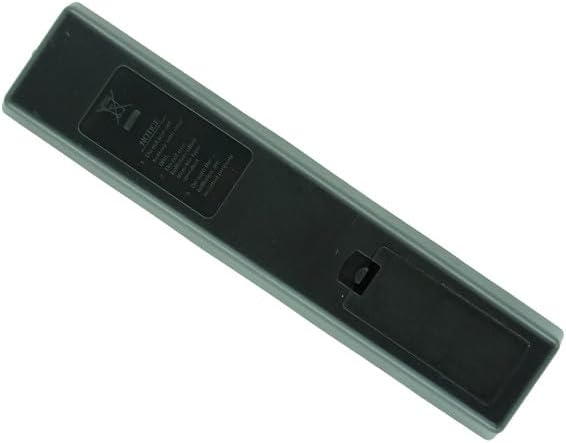
Image: Rear view of the remote control with the battery compartment cover closed.

Image: Rear view of the remote control with the battery compartment cover removed, showing the empty battery slots.
- Insert two AAA batteries, ensuring the positive (+) and negative (-) terminals align correctly with the markings inside the compartment.
- Slide the battery compartment cover back into place until it clicks securely.
3.2 First Use
No programming or code setup is required for this IR replacement remote. Once batteries are installed, point the remote directly at your Aiwa TV and begin operation.
4. Operating Instructions
4.1 Basic Functions
- Power Button (Red): Turns the TV on or off.
- Source Button: Selects input sources (e.g., HDMI 1, AV, TV).
- Number Pad (0-9): Directly enters channel numbers.
- Volume Up/Down (+/-): Adjusts the TV volume.
- Channel Up/Down (P+/-): Changes TV channels.
- Navigation Buttons (Up, Down, Left, Right, OK): Navigates menus and confirms selections.
- Back Button: Returns to the previous screen or menu.
- Home Button: Accesses the TV's main home screen or smart features.
- Exit Button: Exits current menu or application.
- Netflix Button: Direct access to the Netflix application.
- YouTube Button: Direct access to the YouTube application.
- Guide Button: Displays the electronic program guide.
- Q.MENU Button: Accesses quick menu options.
4.2 Advanced Functions
Refer to your Aiwa TV's original user manual for specific functions related to your television model, as this remote replicates the original remote's IR signals.
5. Maintenance
5.1 Battery Replacement
Replace batteries when the remote's response becomes sluggish or stops working. Always replace both batteries simultaneously with new AAA batteries. Do not mix old and new batteries, or different types of batteries.
5.2 Cleaning
Wipe the remote control with a soft, dry cloth. Do not use liquid cleaners or abrasive materials.
6. Troubleshooting
6.1 Common Issues and Solutions
- Remote not responding:
- Ensure batteries are inserted correctly with proper polarity.
- Replace old batteries with new ones.
- Ensure there are no obstructions between the remote and the TV's IR sensor.
- Point the remote directly at the TV.
- Some buttons not working:
- Verify that the remote is compatible with your specific Aiwa TV model. This remote is not universal.
- Clean any debris around the buttons.
- TV not turning on/off:
- Check the TV's power connection.
- Ensure the remote is within effective range and pointed at the TV.
If issues persist after following these steps, confirm the compatibility of the remote with your TV model.
7. Specifications
7.1 Product Specifications
| Feature | Detail |
|---|---|
| Brand | Generic |
| Model | IR Replacement Remote (B0DH1Y1155) |
| Compatible Devices | Aiwa AW65B4K, AW32B4SM, AW58B4K, AW55B4KFL, AW42B4SM, AW39B4SM, AW43B4SMFL, AW50B4K, AW55B4KF, AW75B4K, AW40B1SM Smart 4K UHD LED HDTV TVs |
| Power Source | 2 x AAA Batteries (not included) |
| Special Feature | Ergonomic design, direct IR replacement |
| Color | Black |
| Max Number of Supported Devices | 1 |
8. Warranty and Support
8.1 Warranty Information
This product is an IR replacement remote control. Please refer to the seller's return policy for information regarding returns or exchanges. Specific warranty details are not provided with this replacement unit.
8.2 Customer Support
For further assistance, please contact the seller directly through the platform where the purchase was made.