
1. Introduction
This manual provides instructions for the installation, operation, and maintenance of the Huacaoe 1CH Tuya Intelligent Temperature Sensor and Dry Contact Relay. This device is designed for intelligent temperature monitoring and control across various applications, offering remote management via Wi-Fi and Bluetooth.
2. Safety Information
- Electrical Safety: Ensure the input voltage (DC 7-32V or USB 5V) and current (Max. 10A) do not exceed the device's specifications. For high-current devices or motors, consult a qualified professional for installation.
- Installation Environment: Install the device in a dry environment, away from direct sunlight, high temperatures, and corrosive substances.
- Sensor Handling: The DS18B20 temperature probe is waterproof; however, avoid unnecessary bending or stressing the cable.
- Disassembly: Do not attempt to disassemble or modify the device, as this may void the warranty and pose safety risks.
3. Product Overview
3.1 Features
- Remote operation and automatic control via mobile application.
- Supports Wi-Fi (2.4GHz only) and Bluetooth connectivity.
- Compatible with Alexa and Google Home for voice control.
- Adjustable temperature control range: -20°C to 80°C.
- Includes a waterproof DS18B20 temperature probe.
- Timing functions: schedule, countdown, and cycle timers.
- Device sharing capabilities within the application.
3.2 Package Contents
- 1 x 10A Wi-Fi Smart Switch
- 1 x 1m Waterproof DS18B20 Temperature Probe Sensor Cable
- 1 x User Manual
3.3 Device Components

Image: Device Layout and Connections. This diagram illustrates the physical layout of the device, highlighting the Reset/RF pairing button, Manual button, Network indicator, RF indicator, USB 5V input, DC 7-32V input, and relay terminals (NO, COM, NC). A self-locking wiring diagram is also shown.
4. Setup
4.1 Wiring Instructions
Connect the device according to the following diagram. Ensure all connections are secure before applying power.

Image: 1CH 7-32V Installation Operation - Control Power On/Off. This diagram shows how to wire the device to control a load (e.g., a light bulb) using a DC 7-32V power supply. The V+ and V- terminals are for input power, and NO (Normally Open), COM (Common), and NC (Normally Closed) are for the relay output.
4.2 App Download and Pairing
- Download the Tuya Smart or Smart Life application from your mobile device's app store (available for Android and iOS).
- Register or log in to your account.
- Ensure your mobile device is connected to a 2.4GHz Wi-Fi network. 5GHz networks are not supported.
- Power on the Huacaoe temperature sensor. The network indicator should blink, indicating pairing mode. If not, press and hold the Reset/RF pairing button for 5 seconds until it blinks rapidly.
- Open the Tuya Smart/Smart Life app. The app may automatically detect the new device. If not, tap the "+" icon to add a device and follow the on-screen instructions for adding a sensor or switch.
- During pairing, keep the device close to your Wi-Fi router.
5. Operating Instructions
5.1 App Interface Overview

Image: Tuya/SmartLife App Interface Overview. This screenshot displays the main control interface within the app, showing options for renaming the device, managing offline notifications, sharing device control, creating device groups, and removing the device. It also shows controls for manual switching, timing, countdown, temperature calibration, sensitivity settings, and relay status.
5.2 Basic Control and Temperature Settings
- Remote On/Off: Use the "switch" button in the app to manually turn the connected device on or off from anywhere.
- Automatic Mode: Set desired temperature thresholds in the app. The device will automatically activate or deactivate the connected appliance to maintain the temperature within the specified range.
- Temperature Calibration: If the displayed temperature is inaccurate, use the "Temperature calibration" setting in the app to adjust it.
- Temperature Sensitivity: Adjust the "Temp Sensitivity" to define the acceptable deviation from the set temperature before the relay triggers.
5.3 Timing Functions
The device supports various timing functions for automated control:
- Schedule: Set specific times for the device to turn on or off daily or on selected days.
- Countdown: Set a timer for the device to turn on or off after a specified duration.
- Cycle Timers: Configure repetitive on/off cycles.

Image: Timing Function and Product Application Examples. This image illustrates the timing capabilities of the device, showing it can be used to automate control for various appliances such as humidifiers, fish tanks, electric kettles, and lamps.
5.4 Smart Home Integration
The Huacaoe temperature sensor can be integrated with popular smart home platforms:
- Voice Control: Manage devices using Amazon Echo, Echo Dot, Amazon Tap (Alexa) or Google Home.
- Siri Integration: Utilize Siri for voice-activated scene control through the Tuya App.
5.5 Wide Application Scenes

Image: Wide Application Scenes. This image showcases diverse environments where the temperature sensor can be effectively used, such as heated swimming pools, home heating systems, fermentation rooms, reptile terrariums, greenhouses, and irrigation systems. It also highlights additional features like Schedule, Timer, Loop Timer, Inching, Power-on State, Share Control, and Switching Wi-Fi.

Image: Automatic Temperature Control Example: Fish Tank. This image demonstrates the intelligent control of a fish tank environment, where the Huacaoe device monitors the water temperature in real-time and adjusts connected equipment (e.g., a heater or cooler) via the mobile app to maintain optimal conditions.
6. Maintenance
6.1 Cleaning
Wipe the device with a dry, soft cloth. Do not use abrasive cleaners or solvents. Ensure the device is powered off before cleaning.
6.2 Sensor Care
The DS18B20 temperature probe is waterproof. Periodically inspect the sensor cable for any signs of damage or wear. Avoid sharp bends or excessive pulling on the cable.
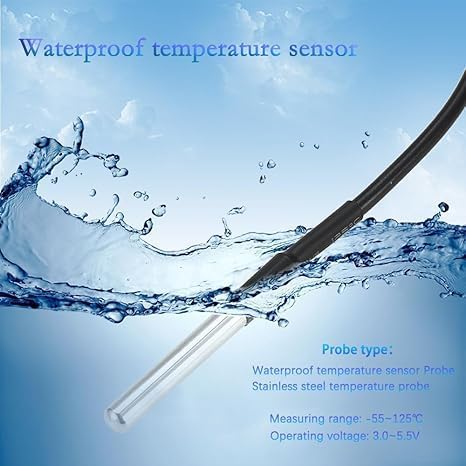
Image: Waterproof Temperature Sensor Probe. This close-up image highlights the waterproof design of the DS18B20 temperature sensor probe, detailing its type (stainless steel), measuring range (-55~125°C), and operating voltage (3.0~5.5V).
7. Troubleshooting
- Device not connecting to Wi-Fi:
- Ensure your Wi-Fi network is 2.4GHz. 5GHz networks are not compatible.
- Verify the Wi-Fi password is correct.
- Keep the device close to the router during the pairing process.
- Reset the device by holding the Reset/RF pairing button for 5 seconds and attempt pairing again.
- Temperature display issues (Fahrenheit/Celsius):
- While the Tuya/SmartLife app allows setting Fahrenheit units, some devices or integrations (like Alexa) may default to Celsius or display inconsistencies. Ensure unit settings are consistent across the app and any integrated smart home platforms. If issues persist, this may indicate a firmware limitation from the manufacturer.
- Device not responding to commands:
- Check Wi-Fi connectivity.
- Ensure the device has stable power.
- Verify the app is updated to the latest version.
- Inaccurate temperature readings:
- Check if the sensor probe is properly connected and not damaged.
- Use the "Temperature calibration" feature in the app to adjust for minor discrepancies.
8. Specifications
| Parameter | Value |
|---|---|
| Input Voltage | DC 7-32V / USB 5V |
| Input Current | Max. 10A |
| Wireless Standards | 2.4GHz, 802.11b/g/n |
| Security Mechanism | WEP/WPA-PSK/WPA2-PSK |
| Control Mode | Mobile APP (Tuya Smart/Smart Life) |
| Operating Temperature | -20°C ~ 80°C |
| Sensor Type | DS18B20 Waterproof Temperature Probe |
| Sensor Length | 1m |
| Housing Material | Flame Retardant ABS V0 |
| Product Dimensions | 2.8 x 1.8 x 1.1 inches |
| Item Weight | 1.76 ounces |
| Model Number | TYTHWB1CH-B1RF |
9. Warranty and Support
For warranty information and technical support, please refer to the product packaging or contact the seller directly. Keep your purchase receipt for warranty claims.