
Introduction
The WS5-10HW-301 Electronic Saddle Air Conditioner is designed to provide efficient cooling, heating, and dehumidification for your living space. Its innovative saddle design allows for secure and stable installation over window sills up to 12.5 inches thick, preserving your window view and eliminating the need for external support brackets. This manual will guide you through the proper setup, operation, and maintenance of your air conditioner to ensure long-lasting performance and comfort.
Safety Information
Please read all safety warnings and instructions carefully before installing or operating this appliance. Failure to follow these instructions may result in electric shock, fire, property damage, or personal injury.
- Ensure the power supply matches the specifications of the unit (1 Ph / 115V / 60 Hz).
- Always plug the unit into a grounded 3-prong outlet. Do not use extension cords or adapter plugs.
- Do not operate the air conditioner with a damaged power cord or plug.
- Keep the air intake and exhaust vents clear of obstructions.
- Do not insert fingers or objects into the air discharge area.
- Unplug the unit before cleaning or performing any maintenance.
- This appliance is not intended for use by persons (including children) with reduced physical, sensory or mental capabilities, or lack of experience and knowledge, unless they have been given supervision or instruction concerning use of the appliance by a person responsible for their safety.
Product Features
- DEHUMIDIFIER MODE: Effectively removes excess moisture from the air, improving indoor comfort and preventing mold growth.
- ENERGY SAVER MODE: Optimizes operation to maintain a comfortable room temperature while minimizing energy consumption, leading to lower utility bills.
- MyTemp SENSOR: Utilizes a sensor in the remote control to ensure the unit operates until the desired temperature is achieved at your location, not just at the unit itself.
- SLEEP MODE: Gradually adjusts the set temperature overnight to conserve energy and provide a comfortable sleeping environment.
- DIGITAL TEMPERATURE: Provides precise temperature control for accurate climate management.
- AUTO MODE: Automatically selects the appropriate operating mode (cooling, heating, or fan) to maintain the set temperature, ensuring continuous comfort without overcooling or overheating.
- Wi-Fi Connectivity: Control your air conditioner remotely from your smart device using the dedicated app, allowing you to adjust settings from anywhere.
- Washable Filter: Easy-to-clean filter captures dust and particles, ensuring cleaner air and maintaining the unit's efficiency.
Components and Parts
Familiarize yourself with the main components of your air conditioner:

Figure 1: Front view of the air conditioner, showing the control panel and air vents.
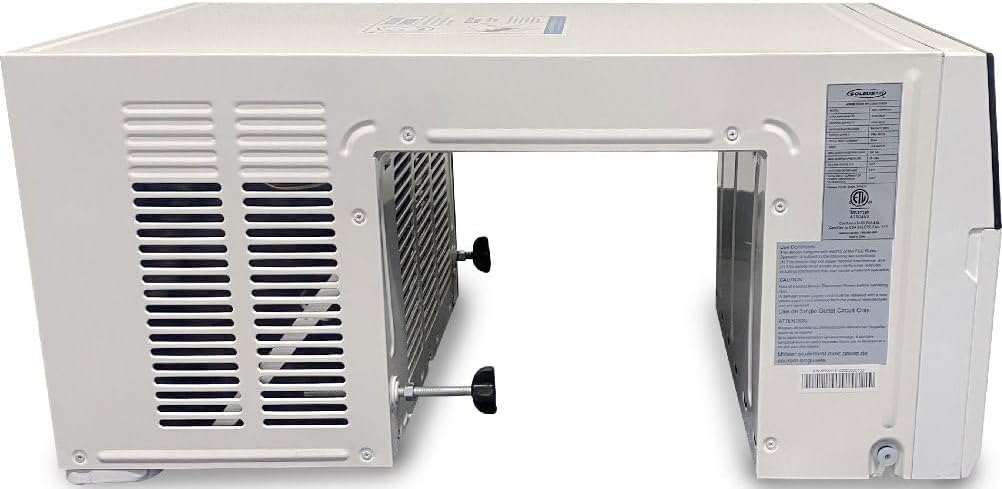
Figure 2: Side view illustrating the unique saddle design, which allows the unit to sit over the window sill.

Figure 3: Angled view of the unit, highlighting the overall compact structure.

Figure 4: Rear view of the air conditioner, displaying the condenser coils.

Figure 5: Close-up of an adjustment screw, used for securing the unit in the window.
Setup and Installation
The WS5-10HW-301 is designed for easy installation in double-hung windows with sills up to 12.5 inches thick. No drilling or external support brackets are typically required due to its unique saddle design.
Installation Steps:
- Prepare the Window: Ensure the window opening is clean and clear of any obstructions. Measure the window width to confirm compatibility.
- Position the Unit: Carefully lift the air conditioner and place it over the window sill. The saddle portion of the unit should rest securely on the sill, with the main body inside the room and the condenser section outside.
- Secure the Unit: Extend the side panels of the unit to fill the window opening. Use the provided screws or locking mechanisms to secure the unit firmly in place within the window frame. Adjust the leveling feet if necessary to ensure the unit is level or slightly tilted outwards for proper condensation drainage.
- Seal Gaps: Use foam insulation strips or weatherstripping (not included) to seal any gaps around the unit and the window frame. This prevents air leakage and improves efficiency.
- Plug In: Once securely installed, plug the power cord into a standard 115V, 3-prong grounded electrical outlet.
Operating Instructions
Your air conditioner features a digital control panel and can also be controlled via a remote or a Wi-Fi enabled smart device.
Control Panel and Remote:
- Power Button: Turns the unit On or Off.
- Mode Button: Cycles through available modes: Cool, Heat, Fan, Dehumidifier, Auto.
- Temperature Up/Down Buttons: Adjust the desired temperature setting.
- Fan Speed Button: Selects fan speed (Low, Medium, High, Auto).
- Sleep Button: Activates Sleep Mode.
- Timer Button: Sets the auto On/Off timer.
- MyTemp Button: Activates the MyTemp sensor function (requires remote control).
Wi-Fi Control:
Download the dedicated app on your smartphone or tablet. Follow the in-app instructions to connect your air conditioner to your home Wi-Fi network. Once connected, you can control all functions of the unit remotely.
Maintenance
Regular maintenance ensures optimal performance and extends the lifespan of your air conditioner.
Cleaning the Washable Filter:
The air filter should be cleaned every two weeks or more frequently depending on usage and air quality.
- Turn Off and Unplug: Always turn off the unit and unplug it from the power outlet before cleaning.
- Remove Filter: Locate the air filter, typically behind the front grille. Gently slide or pull it out.
- Clean Filter: Wash the filter with warm, soapy water. Rinse thoroughly under running water. For heavily soiled filters, a vacuum cleaner can be used to remove loose dust before washing.
- Dry Filter: Allow the filter to air dry completely before reinserting it. Do not use direct heat to dry the filter.
- Reinstall Filter: Slide the dry filter back into its original position.
General Cleaning:
- Wipe the exterior of the unit with a soft, damp cloth. Do not use harsh chemicals or abrasive cleaners.
- Ensure the air intake and exhaust vents are free of dust and debris.
Troubleshooting
Before contacting customer support, please refer to the following common issues and solutions:
| Problem | Possible Cause | Solution |
|---|---|---|
| Unit does not turn on | No power; Power cord not fully plugged in; Circuit breaker tripped. | Check power outlet; Ensure plug is secure; Reset circuit breaker. |
| Insufficient cooling/heating | Dirty air filter; Blocked air intake/exhaust; Room too large; Doors/windows open. | Clean air filter; Clear obstructions; Close doors/windows; Consider room size. |
| Unit is noisy | Loose parts; Unit not level; Fan hitting something. | Check for loose screws; Ensure unit is level; Contact support if noise persists. |
| Water dripping outside | Normal condensation drainage. | This is normal. Ensure proper drainage away from the building foundation. |
| Remote control not working | Dead batteries; Obstruction between remote and unit. | Replace batteries; Remove obstructions. |
Specifications
| Feature | Specification |
|---|---|
| Model Info | WS5-10HW-301 |
| Power Supply | 1 Ph / 115V / 60 Hz |
| Rated Cooling & Heating Capacity | 10,000/10,000 BTU/h |
| Cooling / Heating Power Input | 1070 Watts |
| Rated Current Cooling | 11.4A |
| CEER | 13 |
| Noise Level (Indoor/Outdoor) | 38-48 dB(A) / 51-63 dB(A) |
| Airflow | 218/250/270 CFM |
| Dehumidifying Capacity | 74 Pints per day |
| Refrigerant Type | R32 |
| Plug Type | NEMA 5-15P |
| Dimensions (WxHxD) | 18.7" x 15.2" x 31.8" |
| Net Weight | 64.6 lbs |
| Installation Type | Window (Saddle Design) |
| Color | White |
| Filter Type | Washable |
Warranty and Support
For product support, troubleshooting assistance beyond this manual, or warranty inquiries, please contact the manufacturer's customer support. Refer to your purchase documentation or the manufacturer's website for specific contact details and warranty terms.
This product is backed by customer support to assist with any questions or issues you may encounter.