
OSCWAZZS GN701
GN701 Digital Smart SMD Tester User Manual
Model: GN701 | Brand: OSCWAZZS
1. Introduction
The GN701 Smart SMD Tester is a handheld, battery-operated digital multimeter designed for convenient testing of Surface Mount Devices (SMD) and other electronic components. It features automatic range selection, automatic scan mode, and a clear LCD display, making it an essential tool for electricians and electronics enthusiasts for measuring resistance, capacitance, continuity, and performing diode checks.

Figure 1.1: GN701 Smart SMD Tester, showing the device, its protective cover, replacement test needles, and the user manual.
2. Package Contents
Please check the package contents upon opening to ensure all items are present:
- 1 x GN701 Smart SMD Tester
- 1 x User Manual
- (Optional: Replacement Gold Plated Test Needles, if included in specific package variant)
3. Product Features
- Auto Range: Automatically selects the appropriate measurement range.
- Automatic Scan Mode: Simplifies component identification and measurement.
- Low Battery Indicator: Alerts the user when battery replacement is needed.
- LCD Display: Clear 3000-count digital display for precise readings.
- Data Retention: Allows holding the displayed measurement value.
- Auto Power Off: Conserves battery life by automatically shutting down after a period of inactivity.
4. Parts Identification
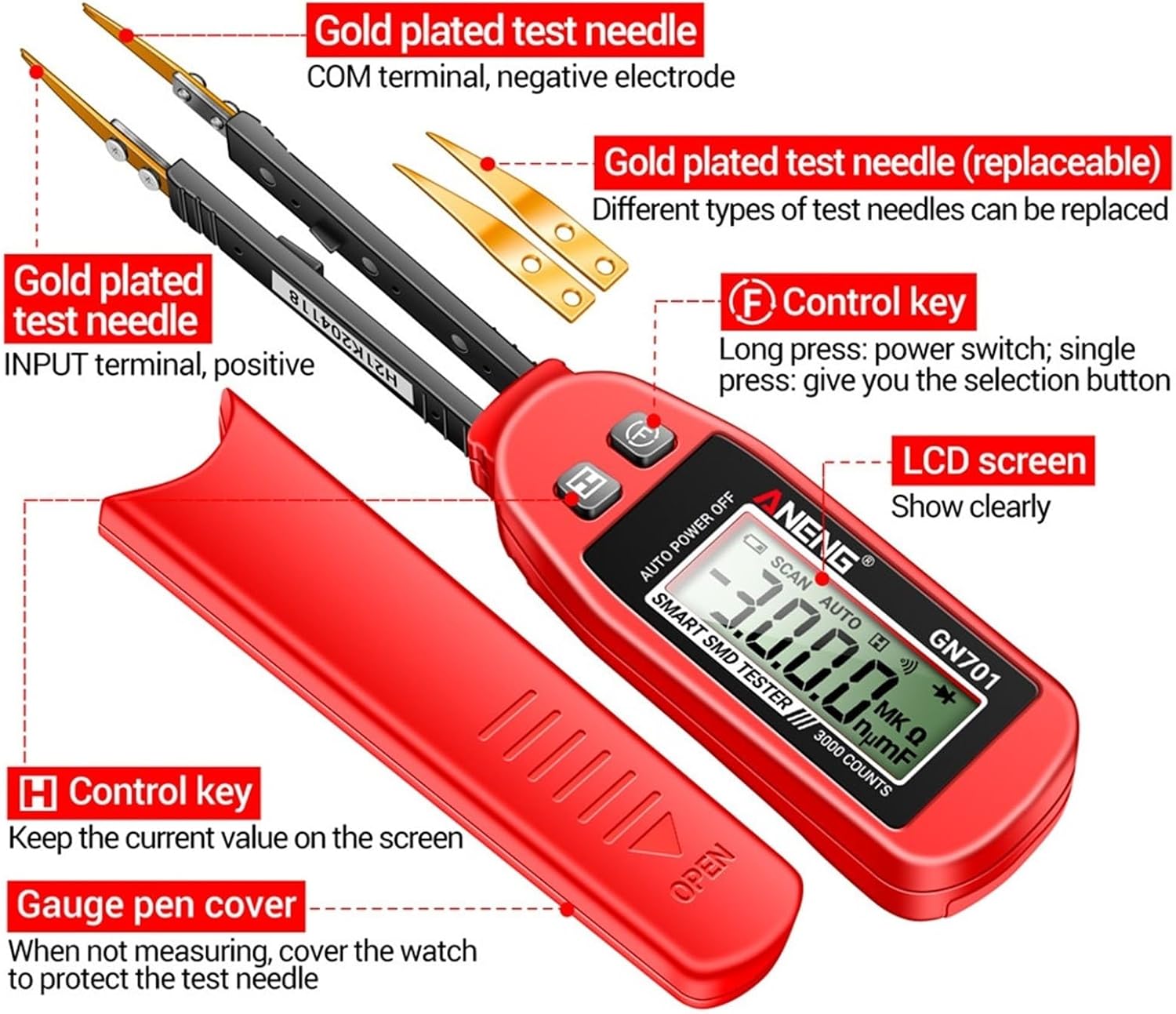
Figure 4.1: Key components of the GN701 Smart SMD Tester.
- Gold Plated Test Needle (INPUT terminal, positive): The positive probe for measurements.
- Gold Plated Test Needle (COM terminal, negative electrode): The negative probe for measurements.
- Gold Plated Test Needle (Replaceable): Indicates that different types of test needles can be interchanged.
- Control Key (F): Long press to power on/off. Single press to cycle through selection options.
- LCD Screen: Displays measurement readings and function indicators clearly.
- Control Key (H): Used to hold the current measurement value on the screen.
- Gauge Pen Cover: A protective cover for the test needles when the device is not in use.
5. Setup
5.1 Battery Installation
The GN701 tester requires a 3V CR3032 button battery. To install or replace the battery:
- Locate the battery compartment on the back of the device.
- Open the battery cover using a small screwdriver or coin.
- Insert the CR3032 battery with the positive (+) side facing up.
- Close the battery cover securely.
5.2 Powering On/Off
- To Power On: Long press the "F" Control Key until the LCD screen illuminates.
- To Power Off: Long press the "F" Control Key again until the display turns off. The device also features an auto power-off function to conserve battery life.
6. Operating Instructions
The GN701 Smart SMD Tester operates primarily in an automatic scan mode, simplifying the measurement process. Simply touch the component with the test needles, and the device will automatically identify the component type and display the relevant measurement.

Figure 6.1: Demonstrations of testing various components.
6.1 Resistance Measurement
The tester can measure resistance from 0Ω up to 30MΩ. In automatic scan mode, simply contact the two ends of the resistor with the test needles. The device will automatically identify it as a resistor and display its resistance value.
6.2 Capacitance Measurement
The tester can measure capacitance from 0nF up to 30mF. Touch the two ends of the capacitor with the test needles. The device will automatically identify it as a capacitor and display its capacitance value.
6.3 Diode Check
To perform a diode check, touch the anode and cathode of the diode with the respective positive and negative test needles. The device will indicate the diode's forward voltage drop or an open/short circuit condition.
6.4 Continuity Test (Buzzer)
For continuity testing, touch the two points you wish to test with the needles. If the measured resistance value is less than 30Ω, the buzzer will sound, indicating continuity.
6.5 Data Hold Function
Press the "H" Control Key to hold the current reading on the display. Press it again to release the hold and resume live measurements.
7. Specifications
The following table outlines the technical specifications of the GN701 Smart SMD Tester. Please note that these parameters are for reference only, and actual measurements of the specific equipment shall prevail.

Figure 7.1: Detailed function table of the GN701 tester.
| Parameter | Value |
|---|---|
| Model Number | GN701 |
| Display Type | Digital display (3000 counts) |
| Operating Mode | Auto |
| Battery Type | 3V CR3032 button battery |
| Operating Temperature | 0 - 40°C (32 - 104°F) |
| Operating Humidity | <80% RH |
| Storage Temperature | -10 - 50°C (14 - 122°F) |
| Storage Humidity | <70% RH |
| Dimensions | 175 x 32 x 20mm (6.89 x 1.26 x 0.79 inches) |
| Item Weight | 1.76 ounces (approx. 50g) |
| Security Level | CAT II (2014/30/EU) |

Figure 7.2: Physical dimensions of the GN701 Smart SMD Tester and its components.
8. Maintenance
8.1 Cleaning
Wipe the device with a dry, soft cloth. Do not use abrasive cleaners or solvents. Ensure the device is powered off before cleaning.
8.2 Battery Replacement
When the low battery indicator appears on the LCD, replace the 3V CR3032 button battery as described in Section 5.1. Remove the battery if the device will not be used for an extended period to prevent leakage.
8.3 Storage
Store the tester in a cool, dry place, away from direct sunlight and extreme temperatures. Always use the gauge pen cover to protect the test needles when storing.
9. Troubleshooting
| Problem | Possible Cause | Solution |
|---|---|---|
| Device does not power on. | Low or dead battery; incorrect battery installation. | Replace battery (CR3032). Ensure battery is installed with correct polarity. |
| Inaccurate readings. | Dirty test needles; component not properly contacted; out of measurement range. | Clean test needles. Ensure firm contact with component. Verify component is within the tester's specified range. |
| Low battery indicator is on. | Battery voltage is low. | Replace the 3V CR3032 button battery. |
| No buzzer sound during continuity test. | Resistance is above 30Ω; open circuit. | Check the circuit for breaks. The buzzer only activates for resistance below 30Ω. |
10. Safety Information
Please read and understand all safety warnings and operating instructions before using this device. Failure to do so may result in injury or damage to the tester or the equipment under test.
- Do not attempt to measure voltages or currents beyond the specified limits of the device.
- Do not use the tester if it appears damaged or if the test needles are broken.
- Always ensure proper contact with the component being tested to avoid inaccurate readings or damage.
- This device is rated CAT II, meaning it is suitable for measurements performed on circuits directly connected to the low-voltage installation. Do not use for measurements on high-energy circuits.
- Keep the device away from water and excessive moisture.
- Do not disassemble or modify the tester. Repairs should only be performed by qualified personnel.
11. Warranty and Support
For warranty information, technical support, or service inquiries, please contact the seller or manufacturer directly through the platform where the product was purchased. Please retain your purchase receipt as proof of purchase.
Ask a question about this manual
Ask about setup, troubleshooting, compatibility, parts, safety, or missing instructions. Manuals+ will review the question and use this page’s manual context to help answer it.