Introduction
Thank you for choosing the edx Electric Adjustable Height Desk. This manual provides essential information for the proper assembly, operation, maintenance, and troubleshooting of your new desk. Please read it thoroughly before use to ensure optimal performance and safety.

Image: The edx Electric Adjustable Height Desk, showcasing its spacious desktop and ergonomic design with two monitors and various office accessories.
Setup and Assembly
The edx Electric Adjustable Height Desk is designed for straightforward assembly. All necessary tools and an instruction manual are included in the package. For detailed step-by-step guidance, please refer to the provided assembly instructions. Ensure all components are present and undamaged before beginning assembly.
Key Components:
- Desktop (55.1"D x 23.6"W)
- T-shaped metal frame and legs
- Electric motor and control panel
- Power adapter and cables
- Assembly hardware (screws, bolts, etc.)
- 2 hooks for accessories
- 2 cord collection holes
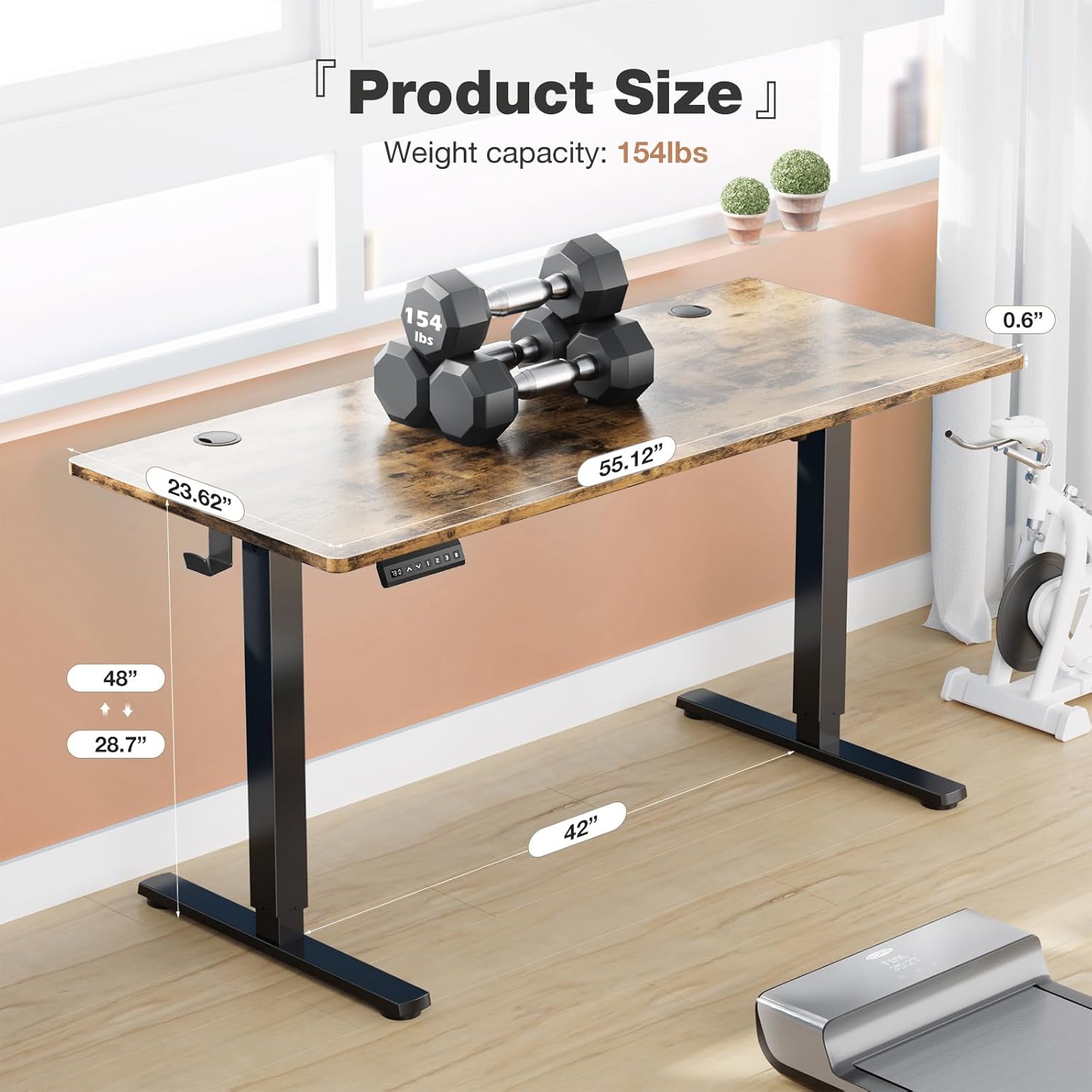
Image: A diagram illustrating the product dimensions of the edx desk, including desktop length (55.12 inches), width (23.62 inches), and thickness (0.6 inches). The maximum weight capacity is 154 lbs.
Operating Instructions
Your edx Electric Adjustable Height Desk features an intuitive control panel for easy height adjustments and memory presets.
Control Panel Functions:

Image: A detailed view of the multi-function control panel. It features an LED display, Up/Down arrows, three memory preset buttons (1, 2, 3), and an 'S' (Save) button.
- LED Display: Shows the current desk height in inches.
- Up & Down Arrows (▲ ▼): Press and hold to manually adjust the desk height. Release to stop at the desired height.
- Memory Presets (1, 2, 3):
- To save a height: Adjust the desk to your desired height using the Up/Down arrows. Press the 'S' button, then press one of the number buttons (1, 2, or 3) within 3 seconds. The display will show 'S-' followed by the number to confirm.
- To recall a saved height: Press the corresponding number button (1, 2, or 3). The desk will automatically move to the saved height.
- 'S' Button (Save): Used in conjunction with memory preset buttons to save desired heights.
Height Adjustment Range:
- Minimum Height: Approximately 28.7 inches
- Maximum Height: Approximately 48 inches

Image: A visual representation of the desk's height adjustment capabilities, showing a person comfortably using the desk in both standing (48 inches) and sitting (28.7 inches) positions.
Quiet Operation:
The desk's motor operates quietly, typically below 55 decibels, ensuring minimal disruption in any environment.

Image: A graphic comparing the noise level of the edx desk (55dB) to other common sounds like a quiet bedroom (35dB), talking (65dB), and a truck (80dB), highlighting its quiet operation.
Maintenance
Regular maintenance ensures the longevity and smooth operation of your edx Electric Adjustable Height Desk.
- Cleaning: Wipe the desktop and frame with a soft, damp cloth. Avoid abrasive cleaners or harsh chemicals that could damage the finish.
- Cable Management: Utilize the integrated cord collection holes and hooks to keep cables tidy and prevent them from interfering with the desk's movement.
- Inspection: Periodically check all screws and bolts to ensure they are tight. Do not overtighten.
- Weight Capacity: Do not exceed the maximum weight capacity of 176 lbs (80 kg) to prevent damage to the motor and frame.
Troubleshooting
If you encounter any issues with your edx Electric Adjustable Height Desk, please refer to the following common solutions:
| Problem | Possible Cause | Solution |
|---|---|---|
| Desk does not move | Power cable disconnected; Overload; Motor error | Check power connection; Reduce weight on desk; Unplug for 10 seconds and replug. |
| Desk moves unevenly | Obstruction; Uneven weight distribution | Remove any obstructions; Redistribute weight evenly. |
| Memory presets not working | Not saved correctly | Re-save the desired height following the instructions in the 'Operating Instructions' section. |
| Error code on display | Specific system error | Refer to the full assembly manual for specific error code meanings or contact customer support. |
If the problem persists after attempting these solutions, please contact edx customer support for further assistance.
Specifications
Detailed technical specifications for the edx Electric Adjustable Height Desk:
- Brand: edx
- Model: 55x24 Inch Electric Adjustable Height Desk
- Product Dimensions (D x W x H): 55.1" x 23.6" x 28.7" - 46.4"
- Color: Rust
- Style: Modern
- Base Material: Metal
- Top Material Type: Wood (Engineered Wood finish)
- Special Feature: Adjustable Height, Memory Presets
- Maximum Weight Capacity: 176 lbs (80 kg)
- Motor Noise Level: < 55 dB
- UPC: 702417958607
- ASIN: B0DGXZRGHS

Image: A close-up of the desk's eco-friendly desktop, highlighting its wood grain finish and a certification indicating compliance with TSCA Title VI standards for healthy indoor air quality.
Warranty Information
edx products are manufactured to high-quality standards. This product comes with a limited warranty covering manufacturing defects. Please refer to the warranty card included in your product packaging for specific terms, conditions, and duration of coverage. Keep your purchase receipt as proof of purchase for any warranty claims.
Customer Support
For any questions, technical assistance, or warranty claims, please contact edx customer support. Our team is available to help you with any issues you may encounter.
- Online Support: Visit the official edx website for FAQs and support resources.
- Email: Refer to your product packaging or the edx website for contact email.
- Phone: Refer to your product packaging or the edx website for contact phone number.