
Introduction
The Alcatel Epure Premium is an innovative cordless DECT phone designed for clear communication and ease of use. It features an integrated answering machine, hands-free functionality, and advanced call blocking capabilities, all presented in a timeless design. The multi-function base displays the date, time, caller ID, and the number of messages on the answering machine. A dedicated call blocking button on the base allows for immediate rejection of unwanted calls. The handset features a high-quality 3-line dot matrix display with white backlighting and large characters for excellent readability. Enjoy clear calls with the high-quality hands-free speaker without needing to hold the phone.
Key features include:
- Multi-function base with date, time, caller ID display, and answering machine message count.
- Dedicated call blocking button on the base for rejecting calls without answering.
- 30-minute answering machine with easy control from both base and handset.
- High-definition handset display with white backlight and large characters.
- High-quality hands-free speaker.
- Manual and automatic call blocking for up to 100 numbers.
- 100-contact directory with VIP ringtone options.
- Expandable up to 4 handsets per base, with automatic directory copying.
Package Contents
Please check that your package contains the following items:
- 1 x Handset
- 1 x Base Unit
- 1 x User Manual
- 1 x AAA Rechargeable Battery
- 1 x Telephone Line Cord
- 1 x Power Adapter

Image: Contents of the Alcatel Epure Premium package, showing the handset, base unit, power adapter, telephone line cord, and user guide.
Setup
1. Battery Installation
- Open the battery compartment cover on the back of the handset.
- Insert the supplied AAA rechargeable battery, ensuring correct polarity (+ and -).
- Close the battery compartment cover.
2. Connecting the Base Unit
- Connect the power adapter to the DC IN socket on the base unit and plug it into a wall outlet.
- Connect one end of the telephone line cord to the LINE socket on the base unit.
- Connect the other end of the telephone line cord to your telephone wall socket.
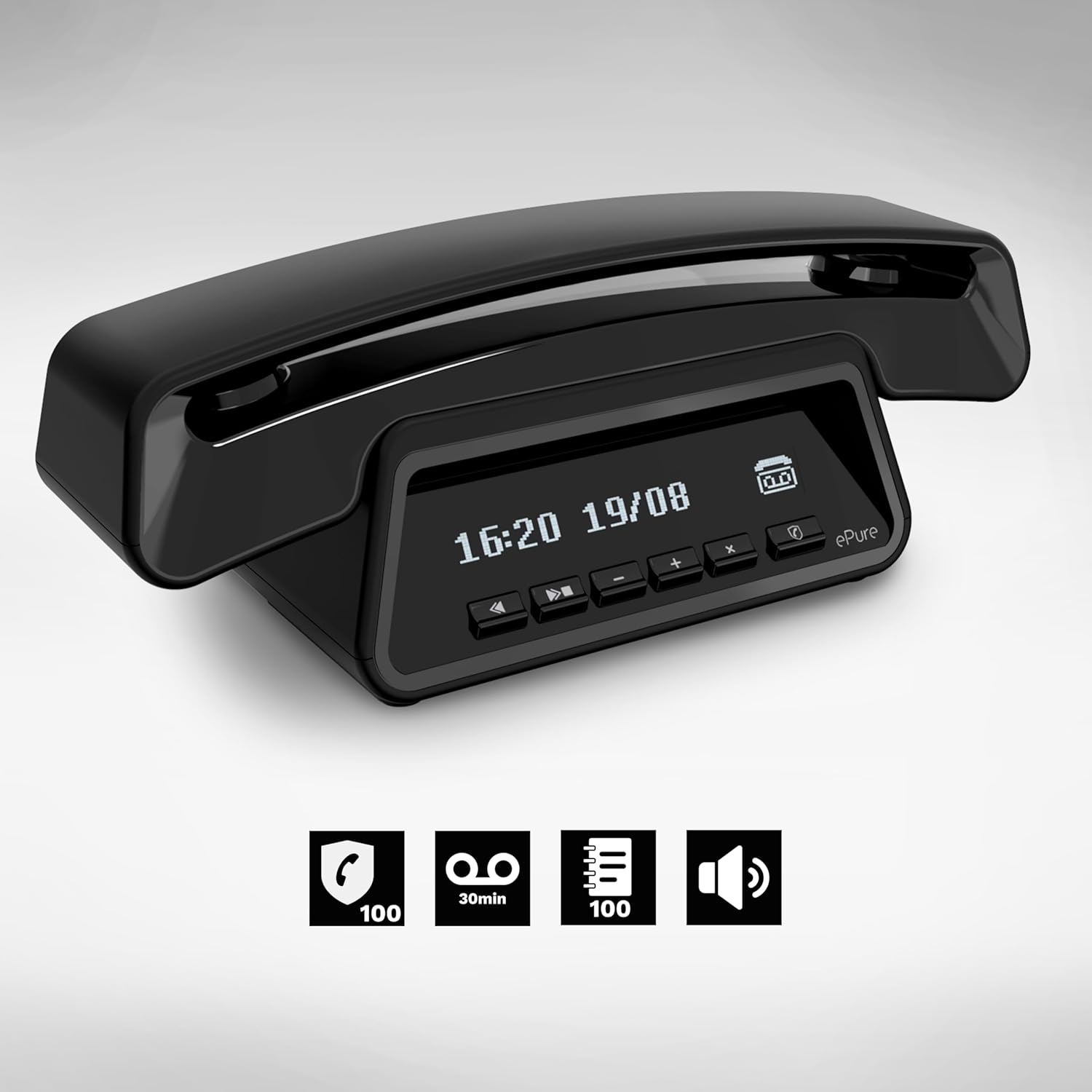
Image: The Alcatel Epure Premium base unit, featuring a digital display for time and date, and control buttons for the answering machine.
3. Charging the Handset
Place the handset on the base unit. The handset will begin charging. For optimal battery performance, charge the handset for at least 16 hours before its first use.
4. Initial Setup (Date and Time)
Follow the on-screen prompts on the handset to set the date and time. This ensures accurate time-stamping for calls and answering machine messages. Refer to the detailed user manual for specific menu navigation steps.
Operating Instructions
Making and Receiving Calls
- To Make a Call: Pick up the handset or press the Call button, then dial the number.
- To Receive a Call: When the phone rings, pick up the handset or press the Call button.
- To End a Call: Place the handset back on the base or press the End Call button.
Hands-Free Function
During a call, press the Hands-Free button on the handset to activate the speakerphone. Press it again to switch back to normal handset mode.

Image: Close-up of the Alcatel Epure Premium handset, displaying contact names and menu navigation buttons.
Answering Machine
The integrated answering machine can record up to 30 minutes of messages. You can control the answering machine from both the base unit and the handset.
- Playing Messages: Press the Play button on the base or navigate to the answering machine menu on the handset.
- Recording Outgoing Message: Access the answering machine settings via the handset menu to record your personalized outgoing message.
- Deleting Messages: Follow the on-screen instructions on the handset or use the dedicated button on the base to delete messages.
Call Blocking
The phone offers manual and automatic call blocking for up to 100 numbers.
- Manual Blocking: During an incoming call or from the call log, press the dedicated Call Block button on the base or handset to add the number to the block list.
- Automatic Blocking: Configure settings in the handset menu to block anonymous calls or specific number ranges.
Phonebook (Directory)
Store up to 100 names and numbers in the phonebook. You can assign distinctive VIP ringtones to important contacts.
- Adding a Contact: Navigate to the phonebook menu on the handset and select 'Add New Contact'.
- Calling a Contact: Access the phonebook, select the desired contact, and press the Call button.
Multi-Handset Operation
The base unit supports up to 4 handsets. When additional handsets are registered, the phonebook automatically copies to all registered handsets.
- Registering a New Handset: Follow the instructions in the full user manual to register additional handsets to the base unit.
- Intercom Calls: Make internal calls between registered handsets.
Maintenance
- Cleaning: Use a soft, damp cloth to clean the handset and base unit. Do not use abrasive cleaners or solvents.
- Avoid Liquids: Keep the phone away from water and other liquids.
- Battery Care: Use only the specified rechargeable battery. If the phone will not be used for an extended period, remove the battery.
- Placement: Place the base unit on a stable, flat surface, away from direct sunlight, heat sources, and other electronic devices that may cause interference.
Troubleshooting
| Problem | Possible Solution |
|---|---|
| No dial tone | Ensure the telephone line cord is securely connected to both the base unit and the wall socket. Check if the phone line is active. |
| Handset display is blank | Ensure the battery is correctly installed and charged. Place the handset on the base unit to charge. Check if the power adapter is connected to the base unit and a working power outlet. |
| Poor sound quality | Move the handset closer to the base unit. Ensure there are no large metal objects or other electronic devices interfering with the signal. Check the telephone line cord connection. |
| Cannot make/receive calls | Check the telephone line connection. Ensure the handset is registered to the base. If call blocking is active, check the blocked numbers list. |
Specifications
- Model Number: ATL1428117
- Brand: Alcatel
- Color: Black
- Phone Type: Cordless DECT Phone
- Batteries: 1 x AAA rechargeable battery (included)
- Material: Plastic
- Power Source: AC Adapter
- Answering System Type: Digital
- Recording Capacity: 30 minutes
- Talk Time: Up to 10 hours
- Standby Time: Up to 100 hours
- Caller ID: Yes (subject to operator service)
- Dimensions (L x W x H): 20.5 x 5.4 x 5 cm
- Weight: 400 Grams
- Manufacturer: ATLINKS
- Country of Origin: China
- Compatible Devices: PSTN Network
Warranty and Support
This product comes with a 2-year availability for spare parts, indicating support for potential repairs and component replacements within this period.
For further assistance, technical support, or warranty claims, please refer to the contact information provided in the full user manual or visit the official Alcatel support website.


