1. Introduction
This document provides instructions for the Generic Replacement IR Remote Control. This remote is designed as a direct infrared (IR) replacement for the original remote controls of specific projector models. It is crucial to verify compatibility before use.
Important Note: This is a replacement remote control. While it is designed to replicate the functions of your original remote, some advanced or specific functions may vary or not be fully supported depending on your projector model. Always refer to your projector's original manual for detailed functionality of your device.
2. Compatibility Verification
Before proceeding with setup, ensure this remote control is compatible with your projector. This remote is intended for use with the following projector models:
- Ekasn: AN28, A29, A10, A12
- BloBlo: CP801
- Blaupunkt: BPS1080WPS
- Elephas: T20, W13
- Everycom: M7
Visually compare this replacement remote with your original remote control. The appearance and button layout should be identical or very similar for optimal functionality.
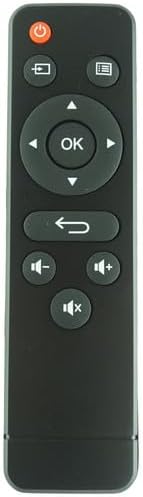
Image 1: Front view of the replacement remote control. This image displays the power button, navigation pad with OK button, back button, and volume controls.
3. Setup: Battery Installation
The remote control requires two (2) AAA batteries (not included) for operation. Follow these steps to install the batteries:
- Locate the battery compartment cover on the back of the remote control.
- Gently slide the battery compartment cover downwards or in the direction indicated by an arrow to open it.
- Insert two AAA batteries, ensuring the positive (+) and negative (-) terminals align correctly with the markings inside the compartment. Incorrect insertion can prevent the remote from functioning.
- Slide the battery compartment cover back into place until it clicks securely.

Image 2: Rear view of the remote control with the battery cover detached, revealing the two AAA battery slots. This illustrates the correct orientation for battery insertion.
4. Operating Instructions
This remote control operates using infrared (IR) technology. Ensure there is a clear line of sight between the remote's IR emitter (located at the top of the remote) and the IR receiver on your projector.
Basic Functions:
- Power Button (●): Press to turn the projector on or off.
- Navigation Pad (Arrows): Use the Up, Down, Left, and Right arrows to navigate through menus and selections.
- OK Button: Press to confirm a selection or enter a menu item.
- Back/Return Button (↶): Returns to the previous screen or menu.
- Volume Controls (− / +): Adjusts the audio volume of the projector.
- Mute Button (🔇): Mutes or unmutes the audio.
- Source/Input Button (⌘): Selects the input source (e.g., HDMI, USB).
- Menu Button (☰): Accesses the projector's main menu.
Point the remote directly at the projector's IR receiver for best performance. Obstructions between the remote and the projector can interfere with the signal.
5. Maintenance
Battery Replacement:
When the remote control's range decreases or it becomes unresponsive, it is time to replace the batteries. Follow the battery installation steps in Section 3.
- Always replace both AAA batteries at the same time.
- Do not mix old and new batteries, or different types of batteries.
- Remove batteries if the remote will not be used for an extended period to prevent leakage.
- Dispose of used batteries responsibly according to local regulations.
Cleaning:
To clean the remote control, use a soft, dry cloth. Do not use liquid cleaners, sprays, or abrasive materials, as these can damage the remote's surface or internal components.
6. Troubleshooting
- Remote not responding:
- Ensure batteries are correctly installed with the correct polarity (+/-).
- Replace old batteries with fresh AAA batteries.
- Check for any obstructions between the remote and the projector's IR receiver.
- Ensure you are within the effective range of the projector's IR receiver.
- Verify that the remote control is indeed compatible with your specific projector model (refer to Section 2).
- Some functions do not work:
- As a replacement remote, some specific or advanced functions of your original projector remote may not be fully replicated. This is normal for universal or replacement remotes.
- Ensure you are pointing the remote directly at the projector.
7. Specifications
| Product Type | Replacement IR Remote Control |
| Power Source | 2 x AAA Batteries (not included) |
| Color | Black |
| Max Supported Devices | 1 (Specific Projector) |
| Compatible Projector Models | Ekasn AN28, A29, A10, A12; BloBlo CP801; Blaupunkt BPS1080WPS; Elephas T20, W13; Everycom M7 |
| Manufacturer | Easytry (Brand: Generic) |
8. Support
For further assistance or inquiries regarding this replacement remote control, please refer to the seller's contact information on the platform where the product was purchased. It is recommended to have your order details and projector model information ready when contacting support.


