
1. Introduction
The KingMa SR4-KMJP Camera Grip Tripod is a versatile accessory designed for photographers and videographers. It functions as both a stable tripod and a comfortable handgrip, offering enhanced control and flexibility for various shooting scenarios. This manual provides essential instructions for the setup, operation, and maintenance of your device.
Key Features:
- Multi-Brand Compatibility: Supports a wide range of cameras from Sony, Canon, Nikon, and Fujifilm.
- Detachable Bluetooth Remote: Control your camera from up to 15 meters away for photos, videos, zoom, and custom functions.
- Flexible Shooting Angles: Offers 360° horizontal rotation and 180° vertical tilt for diverse perspectives.
- High Stability: Constructed from durable ABS resin and aluminum alloy with anti-slip rubber feet for secure placement on various surfaces.
- Compact and Portable: Foldable and lightweight design for easy transport.
2. Package Contents
Please ensure all items are present in your package:
- KingMa Camera Grip Tripod
- Detachable Bluetooth Remote Control
- Type-C Cable
3. Product Diagram
An overview of the KingMa Camera Grip Tripod.
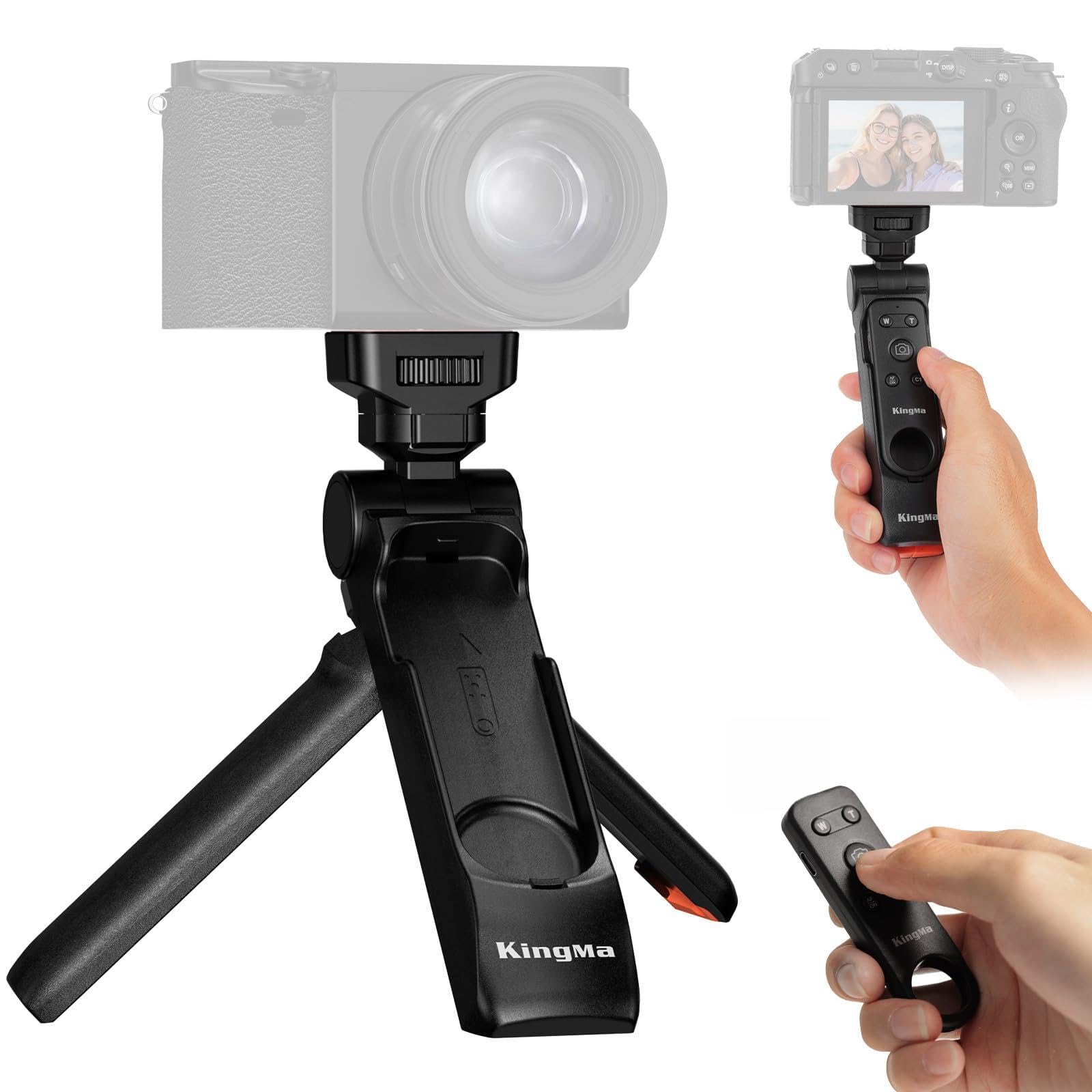
Figure 3.1: KingMa Camera Grip Tripod
4. Setup
4.1 Attaching Your Camera
- Locate the standard 1/4-inch screw on the tripod head.
- Align your camera's tripod mount with the screw.
- Rotate the camera clockwise until it is securely fastened. Ensure it is tight but do not overtighten.

Figure 4.1: Camera securely attached to the tripod.
4.2 Pairing the Bluetooth Remote Control
- Ensure the remote control is charged (if rechargeable) or has a working battery.
- On the remote, long press the AE button to power it on. The indicator light will flash.
- On your camera, navigate to the Bluetooth settings menu.
- Select "Pairing" or "Add Device" and choose "KingMa Remote" or a similar name from the list of available devices.
- Confirm pairing on both the camera and the remote. The indicator light on the remote should become solid or turn off, indicating a successful connection.
Note: If the remote does not connect, check your camera's firmware for updates.

Figure 4.2: Detachable Bluetooth Remote Control.
5. Operating Instructions
5.1 Using as a Handgrip
- Fold the tripod legs together to form a comfortable grip.
- Hold the grip firmly for stable handheld shooting.
- The detachable remote can be used while attached to the grip or removed for remote operation.

Figure 5.1: Using the device as a handheld camera grip.
5.2 Using as a Tripod
- Extend the three legs of the tripod fully.
- Place the tripod on a flat, stable surface. The anti-slip rubber feet provide enhanced stability.

Figure 5.2: Tripod legs extended for stable placement.
5.3 Adjusting Shooting Angles
- The tripod head allows for 360° horizontal rotation and 180° vertical tilt.
- Loosen the adjustment knob (if present) or pivot the camera to achieve the desired angle.
- Tighten the knob to secure the camera in position.

Figure 5.3: Adjusting the camera angle on the tripod.
5.4 Remote Control Functions
- Shutter Button: Press to take a photo.
- Video Record Button: Press to start/stop video recording.
- Zoom Buttons (+/-): Use to zoom in or out. Note: Zoom function may not be available with mechanical lenses.
- Custom Function Buttons (AF/C1): These buttons may have different functions depending on your camera model. Note for Fujifilm Cameras: Due to the absence of FN function settings, the AF and C1 buttons on the remote will function for focus adjustment.
6. Maintenance
- Clean the tripod and remote with a soft, dry cloth.
- Avoid exposing the device to extreme temperatures, moisture, or harsh chemicals.
- Store in a dry, cool place when not in use.
7. Troubleshooting
- Remote Control Not Connecting/Responding:
- Ensure the remote control is sufficiently charged or has fresh batteries.
- Verify that Bluetooth is enabled on your camera and the remote.
- Re-attempt the pairing process (refer to Section 4.2).
- Check your camera's firmware for any available updates.
- Confirm the remote's shooting mode (still photo or video) matches the camera's mode.
- Zoom Function Not Working:
- The zoom function on the remote may not be compatible with cameras using mechanical lenses. This is a limitation of the lens type, not a defect of the remote.
- Remote Control Difficult to Remove from Grip:
- The remote is designed to fit snugly. Apply firm, steady pressure to slide it out. Over time, it may become easier to remove. Avoid excessive force to prevent damage.
8. Specifications
| Feature | Description |
|---|---|
| Brand | KingMa |
| Model Name | SR4-KMJP |
| Compatible Devices | Cameras (Sony, Canon, Nikon, Fujifilm) |
| Material | ABS Resin, Aluminum Alloy, Rubber |
| Special Feature | Detachable Bluetooth Remote Control |
| Tripod Head Type | Pan Handle Head |
| Included Components | Camera Grip, Remote Control, Type-C Cable |
| Manufacturer Warranty | 1 Year |
9. Warranty and Support
Warranty: This KingMa product comes with a 1-year manufacturer's warranty. Please retain your proof of purchase for any warranty claims.
Support: For further assistance or inquiries, please contact KingMa customer support. Refer to the product packaging or the official KingMa website for contact details.