Introduction
This manual provides detailed instructions for the setup, operation, and maintenance of your Generic 16-in-1 Smart WiFi Air Quality Monitor (Model 2CO15). This device is designed to monitor various indoor and outdoor air quality parameters, including PM2.5, PM10, CO2, CO, HCHO, TVOC, and also functions as a weather station with temperature and humidity sensors. It features a 2.8-inch color TFT screen and smartphone app connectivity for real-time and historical data viewing.
What's in the Box
Upon opening the package, ensure all the following components are present:
- Main Host Unit (with 3 Sensor)
- USB Type-C Charging Cable
- Lanyard
- Velcro for mounting
- Instruction Manual (this document)
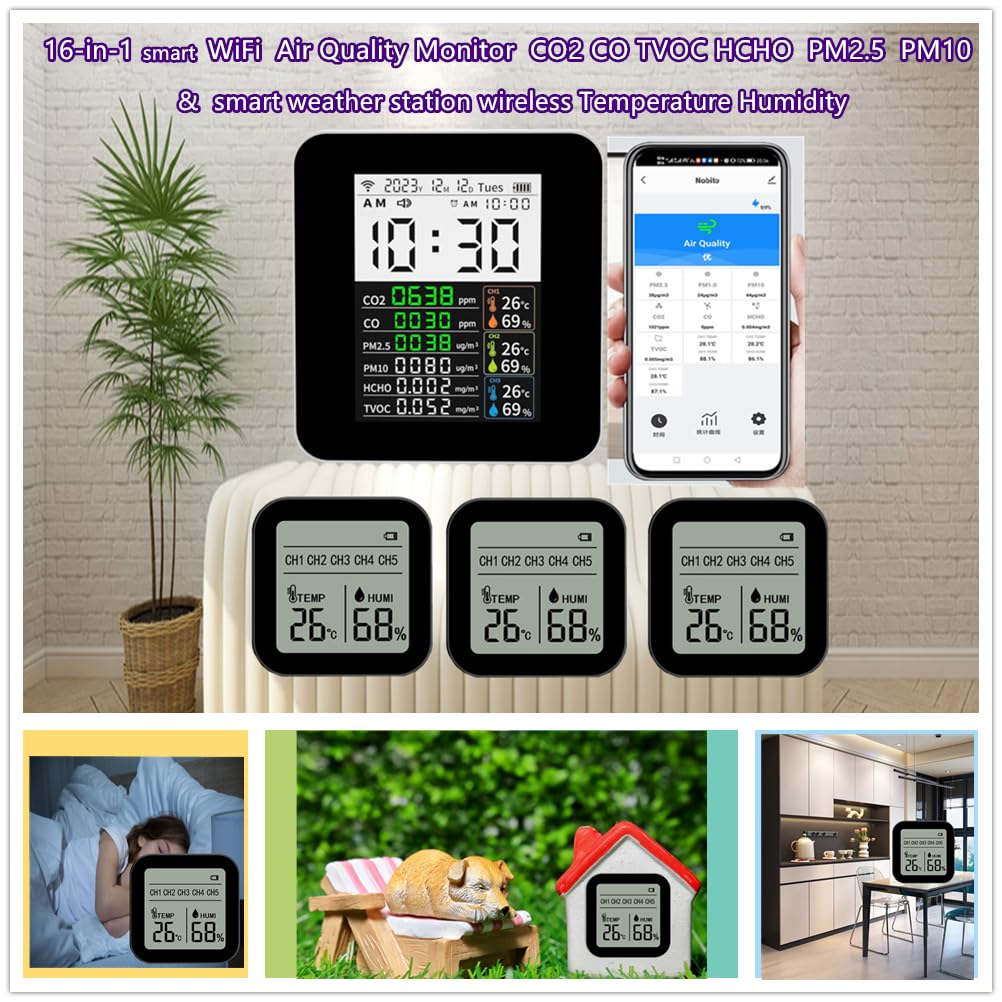
Image: Main unit, three remote sensors, and accessories included in the package.
Product Features
The Generic 16-in-1 Smart WiFi Air Quality Monitor offers a comprehensive suite of features for environmental monitoring:
- 16-in-1 Multifunctionality: Monitors PM2.5, PM10, CO2 (NDIR infrared sensor), CO (electrochemical sensor), HCHO (formaldehyde), TVOC (volatile organic compound sum).
- Integrated Weather Station: Displays time, date, alarm clock, and temperature/humidity data from up to 3 wireless sensors.
- Clear Display: Features a 2.8-inch color TFT screen for easy-to-read real-time and historical data.
- Multi-Sensor Support: Connects with up to 3 wireless temperature and humidity sensors for monitoring different areas.
- Smart App Connectivity: Mobile phone app (Tuya Smart APP) allows remote real-time monitoring, historical data viewing (up to 1 year), and adjustment of display brightness and temperature units (Celsius/Fahrenheit).
- Portable and Rechargeable: Compact design suitable for various environments, with a built-in 2000mAh lithium battery (non-removable) supporting USB Type-C charging.
- Multiple Mounting Options: Sensors can be placed using a stand, wall mount, or paste mount (double-sided tape and suspension holes).

Image: Overview of the 16 functions and features of the monitor.
Setup
1. Initial Power-Up and Charging
The main host unit has a built-in 2000mAh lithium battery. Before first use, it is recommended to fully charge the device. Connect the provided USB Type-C cable to the main unit and a suitable USB power adapter (not included). A full charge typically takes 3-4 hours and provides approximately 6 hours of operation.

Image: Main unit charging information.
2. Installing Batteries in Wireless Sensors
Each wireless temperature and humidity sensor (slave unit) requires two AAA batteries (not included). Open the battery compartment on the back of each sensor and insert the batteries, ensuring correct polarity. The sensor will automatically power on once batteries are installed.

Image: Close-up of a wireless sensor.
3. Pairing Wireless Sensors with the Main Unit
To pair the wireless sensors with the main unit:
- Ensure the main unit is powered on.
- Press the button on the main unit for 1 second. The unit will emit a buzzer sound and enter wireless pairing mode.
- For each wireless sensor (CH1, CH2, CH3), press its CH button 4 times in a row. The corresponding channel symbol (e.g., CH1) on the main unit's display will flash. If the symbol stops flashing within 20 seconds, the pairing is successful.
- Repeat the process for all three sensors.
The transmission distance between the host and slave units is approximately 30 meters indoors. In open, unobstructed areas, this distance can extend up to 60 meters.
Video: Demonstrates the unboxing, battery installation for sub-sensors, and the pairing process between the main unit and wireless sensors.
4. Connecting to the Tuya Smart APP
To utilize the smart features and remote monitoring, download the "Tuya Smart" app on your smartphone. Follow the in-app instructions to connect your main unit to your 2.4G WiFi network (5G WiFi is not supported). Once connected, the main unit's time and date will automatically synchronize with your smartphone.

Image: Tuya Smart App interface showing air quality data.
Operating Instructions
1. Reading Data on the Main Unit
The 2.8-inch TFT screen displays real-time data for all monitored parameters. Air quality levels for CO2 are indicated by color: green for good, yellow for moderate (above 800 ppm), and orange for higher levels (above 900 ppm).

Image: Detailed view of the main unit's display.
2. Using the Tuya Smart APP
The Tuya Smart APP provides enhanced control and data visualization:
- Real-time Monitoring: View all air quality and weather data remotely.
- Historical Data: Access daily, monthly, and yearly historical data curves for all parameters.
- Settings: Adjust display brightness, mute sounds, and switch temperature units between Celsius and Fahrenheit.
- Alarm Clock: Set and manage alarm clock functions.
3. Switching Temperature Units on Sensors
You can switch the temperature display unit (Celsius/Fahrenheit) directly on the wireless sensors by pressing the CH button repeatedly. Each press will cycle through the available units.
Maintenance
To ensure optimal performance and longevity of your air quality monitor:
- Keep the device clean by wiping it with a soft, dry cloth. Avoid using abrasive cleaners or solvents.
- Ensure the ventilation holes on the main unit and sensors are not obstructed.
- Replace AAA batteries in the wireless sensors when the low battery indicator appears.
- Store the device in a cool, dry place when not in use for extended periods.
Troubleshooting
| Problem | Possible Cause | Solution |
|---|---|---|
| Wireless sensor not displaying data on main unit. | Sensor not paired or out of range. | Re-pair the sensor with the main unit (refer to "Pairing Wireless Sensors" in Setup). Ensure sensors are within range (up to 30m indoors, 60m outdoors). Check sensor batteries. |
| Main unit not connecting to WiFi. | Incorrect WiFi password, 5G WiFi network, or password visibility issue during setup. | Ensure you are connecting to a 2.4G WiFi network. Double-check the WiFi password. Some users have reported success by temporarily unhiding the password during the app setup process. |
| Inaccurate readings. | Sensor obstruction or environmental factors. | Ensure sensors are placed in an area with good airflow and away from direct heat sources, strong drafts, or chemical fumes. Allow the device to stabilize for a few minutes after placement. |
| Main unit screen is dim. | Backlight setting is low. | Adjust the backlight brightness via the Tuya Smart APP settings. |
Specifications
| Feature | Detail |
|---|---|
| Brand | Generic |
| Model Number | 2CO15-with 3 Sensor |
| Monitored Parameters | CO2, CO, TVOC, HCHO, PM2.5, PM10, Temperature, Humidity |
| CO2 Sensor Type | NDIR Infrared Sensor |
| CO Sensor Type | Electrochemical Sensor |
| Display Type | 2.8-inch Color TFT |
| Connectivity | Wi-Fi (2.4G only) |
| Main Unit Power Source | Built-in 2000mAh Lithium Ion Battery (rechargeable via USB Type-C) |
| Wireless Sensor Power Source | 2 x AAA Batteries (not included) |
| Temperature Accuracy | ±1 °C |
| Product Dimensions (Main Unit) | 1.4"D x 3.5"W x 3.3"H (approx. 36mm D x 89mm W x 83mm H) |
| Product Dimensions (Sensor) | Approx. 19mm D x 59mm W x 59mm H |
| Item Weight | 0.9 Pounds (with 3 sensors) |
| Manufacturer | Nobito (Shenzhen) Technology Co., LTD |

Image: Dimensions of the main unit and wireless sensors.
Warranty and Support
For warranty information, technical support, or service inquiries, please contact the manufacturer, Nobito (Shenzhen) Technology Co., LTD, or refer to the contact information provided with your purchase documentation. Keep your purchase receipt as proof of purchase for any warranty claims.
Product Overview Video
Video: A brief overview of the 16-in-1 Smart WiFi Air Quality Monitor's features and capabilities.


