
Introduction
This manual provides comprehensive instructions for the operation and maintenance of your BAOFENG UV-K61 Ham Radio. The UV-K61 is a multi-band AM/FM walkie-talkie designed for versatile communication, featuring USB-C charging, NOAA weather reception, and wireless frequency copying capabilities. Please read this manual thoroughly before using the device to ensure proper function and safety.
What's in the Box

Image: Contents of the BAOFENG UV-K61 full kit, including the radio, battery, antennas, charging accessories, and cables.
Upon opening the package, verify that all components are present:
- 1x BAOFENG UV-K61 Radio
- 1x 2600mAh High Capacity Battery
- 1x High Gain Antenna
- 1x USB-C Charger Cable
- 1x Charger Dock
- 1x Belt Clip
- 1x Hand Strap
- 1x User Manual (this document)
- 1x 48cm/18.89in Foldable Tactical Antenna
- 1x Programming Cable
- 1x Shoulder Speaker Microphone
- 1x USB-C 12V Car Charger Cable
Product Overview
Familiarize yourself with the main components and controls of the UV-K61 radio.

Image: Front and side views of the BAOFENG UV-K61 radio with key components labeled, including Antenna, Volume & Power knob, 1.44" LCD Screen, PTT Key, Flashlight, Alarm Switch, Radio/Monitor button, Sweep Key, Menu Key, 2-pin K Port, V/M-VFO/MR button, A/B Select Key, Speaker, Exit Key, and Keypad. Dimensions are also indicated.
- Antenna: For transmitting and receiving signals.
- Volume & Power Knob: Turns the radio on/off and adjusts volume.
- 1.44" LCD Screen: Displays channel, frequency, battery status, and menu options.
- PTT (Push-to-Talk) Key: Press and hold to transmit, release to receive.
- Flashlight: Built-in LED light.
- Alarm Switch: Activates an emergency alarm.
- Radio / Monitor Button: Toggles between radio functions and monitoring.
- Sweep Key: Initiates frequency scanning.
- Menu Key: Accesses the radio's menu settings.
- 2-pin K Port: For connecting accessories like speaker microphones or programming cables.
- V/M-VFO/MR Button: Switches between VFO (Frequency Mode) and MR (Channel Mode).
- A/B Select Key: Selects between upper and lower display frequencies.
- Speaker: Outputs audio.
- Exit Key: Exits menu or current function.
- Keypad: For entering frequencies, channel numbers, and menu selections.
Setup
1. Battery Installation and Charging
The UV-K61 comes with a 2600mAh Lithium Ion battery. Ensure the battery is fully charged before first use.

Image: Depiction of the 2600mAh high-capacity battery, USB-C charging port, and LED indicators for charging status (Red for Charging, Green for Charged).
- Install Battery: Align the battery with the back of the radio and slide it into place until it clicks securely.
- Charging Options:
- Charger Dock: Place the radio in the provided charger dock. Connect the dock to a power source using the AC adapter.
- USB-C Direct Charging: Connect the USB-C cable directly to the radio's USB-C port. This allows charging from a power bank, laptop, car charger, or any standard USB power adapter.
- Charging Indicator: The LED indicator on the radio or charger dock will show RED during charging and turn GREEN when fully charged.
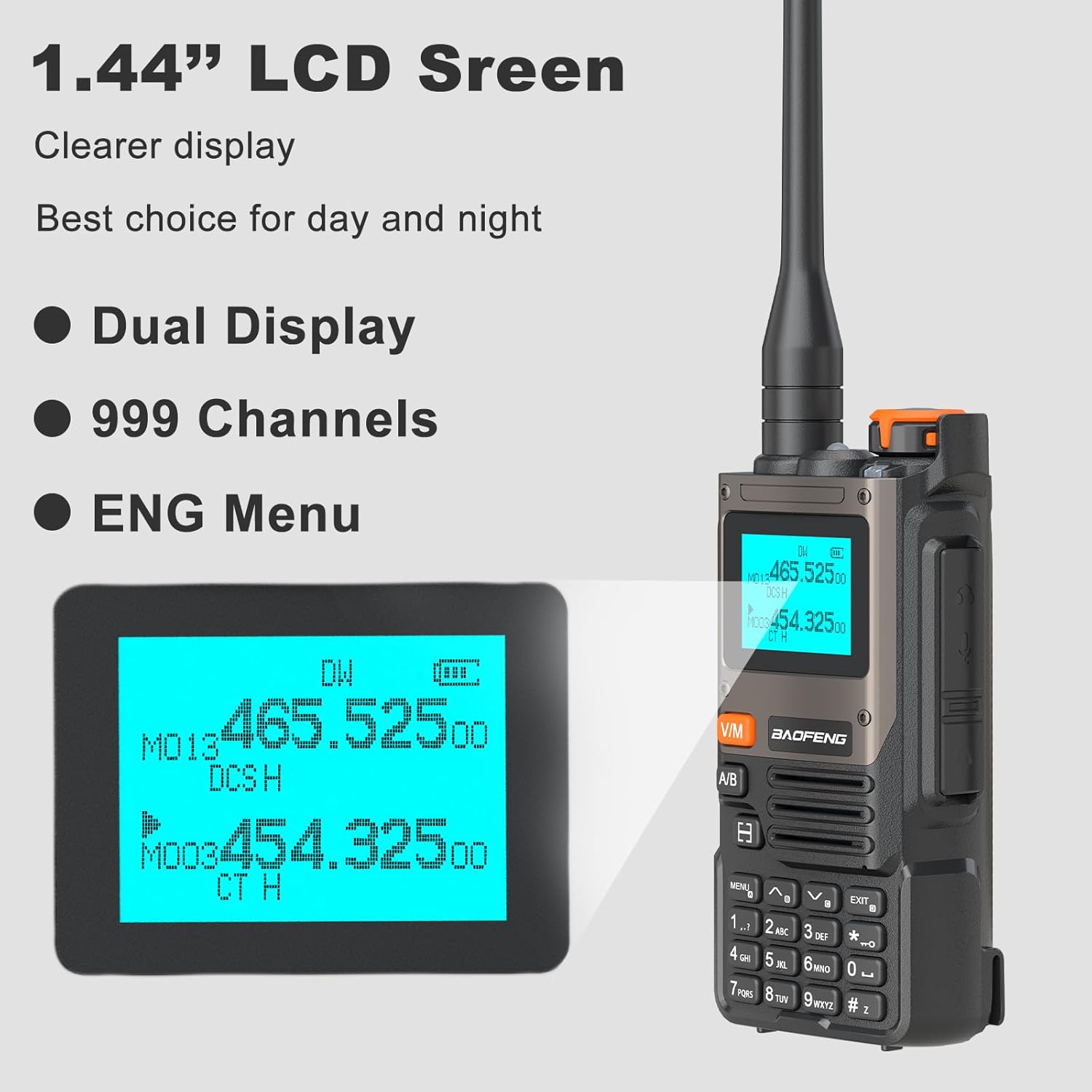
Image: Various charging methods for the BAOFENG UV-K61, including charging via laptop, USB power adapter, car charger, power bank, and the dedicated charger dock.
2. Antenna Attachment
Screw the provided antenna clockwise onto the antenna connector at the top of the radio until it is finger-tight. Do not overtighten.
Operating Instructions
1. Power On/Off and Volume
Rotate the Volume & Power knob clockwise to turn the radio on. Continue rotating to increase the volume. Rotate counter-clockwise to decrease volume and turn off the radio.
2. Display and Menu Navigation

Image: Close-up of the 1.44" LCD screen on the BAOFENG UV-K61, highlighting its clearer display, dual display capability, 999 channel support, and English menu interface.
The 1.44" LCD screen provides a clear display of frequencies, channels, and settings. Use the MENU key to access settings and the keypad for navigation and input. The EXIT key returns to the previous screen or exits the menu.
- Dual Display: The radio supports displaying two frequencies simultaneously. Use the A/B Select Key to switch between the upper and lower display for active operation.
- 999 Channels: The UV-K61 supports up to 999 programmable memory channels.
- English Menu: All menu options are presented in English for ease of use.
3. Wireless Frequency Copying
This feature allows for quick and easy replication of frequencies from another radio.

Image: Step-by-step guide for the "One Key Match Frequency" feature on the BAOFENG UV-K61. Step 1: Turn on radio, press and hold to search. Step 2: Press and hold transmit on other radio; UV-K61 displays frequency and decode. Step 3: Switch to channel mode to select channel and communicate.
- Step 1: Turn on the UV-K61 radio. Press and hold the designated button (refer to the image for specific button, typically a function key) to initiate the search mode. The screen will display "SEARCH".
- Step 2: On the other radio you wish to copy from, press and hold its transmit (PTT) button. The UV-K61 will detect and display the frequency and decode information. Confirm the displayed information.
- Step 3: Switch the UV-K61 to channel mode. Select the desired channel to save the copied frequency. You can now communicate on this frequency.
4. NOAA Weather Channels
The UV-K61 includes a built-in NOAA receiver for real-time weather alerts.
- Access the NOAA weather channel function through the menu.
- The radio can scan and deliver weather reports on 10 dedicated NOAA channels.
- This feature helps you stay informed about changing weather conditions.
5. AM/FM Radio
The UV-K61 can also function as a standard AM/FM broadcast radio.
- Navigate to the FM radio mode via the menu.
- Use the keypad to tune to desired frequencies or the scan function to find stations.
6. VOX Function
VOX (Voice Operated Transmit) allows for hands-free operation.
- Enable VOX in the menu settings.
- Adjust the VOX sensitivity level to prevent accidental transmissions or missed voice activations.
- When VOX is active, the radio will automatically transmit when it detects your voice.
7. Flashlight
The built-in flashlight can be activated for illumination in low-light conditions. Refer to the product overview section for the location of the flashlight button/switch.
Maintenance
- Cleaning: Use a soft, damp cloth to clean the radio's exterior. Do not use harsh chemicals or abrasive cleaners.
- Battery Care:
- Avoid fully discharging the battery frequently.
- Store the radio and battery in a cool, dry place when not in use for extended periods.
- Do not expose the battery to extreme temperatures.
- Antenna: Ensure the antenna is securely attached but do not overtighten. Avoid bending or stressing the antenna.
- Water Resistance: This product is NOT water resistant. Avoid exposure to water or high humidity.
Troubleshooting
| Problem | Possible Cause | Solution |
|---|---|---|
| Radio does not power on. | Battery is dead or not properly installed. | Charge the battery. Reinstall the battery, ensuring it clicks into place. |
| Cannot transmit or receive. | Incorrect frequency/channel, antenna not connected, or low battery. | Verify frequency/channel settings. Ensure antenna is securely attached. Charge battery. |
| Poor audio quality or static. | Weak signal, interference, or antenna issue. | Move to an area with better signal. Check antenna connection. Adjust squelch level in menu. |
| Battery drains quickly. | Frequent transmission, high volume, or battery nearing end of life. | Reduce transmission time. Lower volume. Consider replacing battery if old. |
Specifications
| Feature | Detail |
|---|---|
| Model Number | UV-K61 |
| Brand | BAOFENG |
| Item Weight | 1.76 pounds |
| Product Dimensions | 1.37 x 2.16 x 4.72 inches |
| Country of Origin | China |
| Battery Type | 1 Lithium Ion battery (included) |
| Battery Capacity | 2600mAh |
| Number of Channels | 999 |
| Tuner Technology | AM/FM |
| Voltage | 7.4 Volts (DC) |
| Water Resistance Level | <Not Water Resistant |
| Talking Range Maximum | 5 Kilometer (approx. 3.1 miles) |
| Special Features | Multi-Band (AM/FM), One Key Match Frequency, 10 NOAA Weather Alarm, USB-C Charging |
Warranty Information
The BAOFENG UV-K61 radio comes with a 1-year warranty provided exclusively through "Shiqun Electronics Co., Ltd". Please retain your proof of purchase for warranty claims.
Customer Support
For further assistance, technical support, or inquiries regarding your BAOFENG UV-K61 radio, please contact the manufacturer or authorized seller. Refer to the contact information provided with your purchase documentation.
Manufacturer: BAOFENG Electronics Co., Ltd