
ELIVED B0DGX6DYTV
ELIVED TV Wall Mount Instruction Manual
For Most 37-82 Inch OLED QLED TVs (Model: B0DGX6DYTV)
1. Product Overview
The ELIVED Full Motion TV Wall Mount is designed to securely hold most 37-82 inch OLED, QLED, LCD, and Plasma TVs weighing up to 100 lbs. It supports VESA mounting patterns from 150x100mm to 600x400mm and is suitable for installation on 16-inch wood studs or concrete/brick walls. Featuring 8 ball bearings and enhanced arm hinges, this mount provides smooth, effortless motion for optimal viewing angles.

Figure 1: ELIVED Full Motion TV Wall Mount with included accessories.
2. Important Safety Information
- Read all instructions carefully before installation. If you have any questions, consult a qualified professional.
- Do not install into drywall alone. Ensure the mount is secured to wood studs or solid concrete/brick walls.
- Verify your TV's weight and VESA pattern are within the mount's specifications (Max 100 lbs, VESA 150x100mm to 600x400mm).
- Use only the provided hardware. Do not overtighten screws.
- Ensure all connections are secure before mounting the TV.
- Keep children and pets away during installation.
3. Package Contents
Please check that all components are present and undamaged before proceeding with installation.
- Wall Plate Assembly
- TV Brackets (2x)
- Mounting Hardware Kit (various screws, washers, spacers, concrete anchors)
- Bubble Level
- Cable Ties
- Instruction Manual
4. Setup and Installation
The installation process is designed to be straightforward. It is recommended to have a second person assist with lifting the TV.
4.1 Tools Required (Not Included)
- Pencil
- Phillips Head Screwdriver
- Electric Drill
- Stud Finder (essential for wood stud installation)
- Tape Measure
- Hammer (for concrete anchors)
4.2 Wall Preparation
- Locate Studs: Use a stud finder to locate the edges and center of two adjacent wood studs (16-inch spacing is ideal). Mark the center of the studs. For concrete/brick walls, mark desired drill points.
- Determine Height: Decide on the desired height for your TV. Consider eye-level viewing from your primary seating position.
- Position Wall Plate: Hold the wall plate assembly against the wall, aligning it with your marked stud centers and desired height. Use the included bubble level to ensure it is perfectly horizontal. Mark the drilling points through the holes on the wall plate.
4.3 Attaching Wall Plate to Wall
- Drill Pilot Holes: For wood studs, drill pilot holes (recommended size in manual) at the marked locations. For concrete/brick walls, drill holes and insert concrete anchors (if needed, request additional anchors from ELIVED).
- Secure Wall Plate: Attach the wall plate assembly to the wall using the provided lag bolts and washers. Tighten securely, but do not overtighten.
4.4 Attaching Brackets to TV
- Select Screws/Spacers: Choose the correct diameter and length screws, washers, and spacers from the hardware kit that fit your TV's VESA mounting holes.
- Attach Brackets: Carefully lay your TV face down on a soft, clean surface. Attach the two vertical TV brackets to the back of your TV using the selected hardware. Ensure the brackets are centered and securely fastened.
4.5 Mounting TV to Wall Plate
- Hook TV: With assistance, carefully lift the TV and hook the attached brackets onto the horizontal arms of the wall plate assembly.
- Secure TV: Locate the locking screws or mechanisms on the bottom of the TV brackets. Tighten these to secure the TV to the wall mount, preventing accidental dislodgement.
Video 1: Official ELIVED demonstration of TV wall mount movement and installation.
5. Operating the TV Wall Mount
The ELIVED TV Wall Mount offers flexible viewing options:
- Smooth Motion: The 8 ball bearings and enhanced arm hinge design allow for smooth extension up to 16.3 inches and swivel +/-45°.
- Flexible Viewing Angle: Articulating TV wall brackets tilt +5°/-13° to reduce screen glare.
- Level Adjustment: The mount allows for a +/-3° level adjustment after installation to correct any minor alignment errors.
- Low-Profile Look: The mount retracts back to 2.4 inches from the wall for a clean, low-profile appearance.
- Secure Positioning: Unique arm clamps are designed to lock the TV against the wall and prevent heavy TV sliding out when retracted.

Figure 2: Illustration of 8 ball bearings for smooth motion.

Figure 3: Demonstration of one-handed swivel capability.

Figure 4: Visualizing tilt (+5°/-13°) and extension (16.3 inches) for optimal viewing.

Figure 5: Post-installation level adjustment of +/-3°.
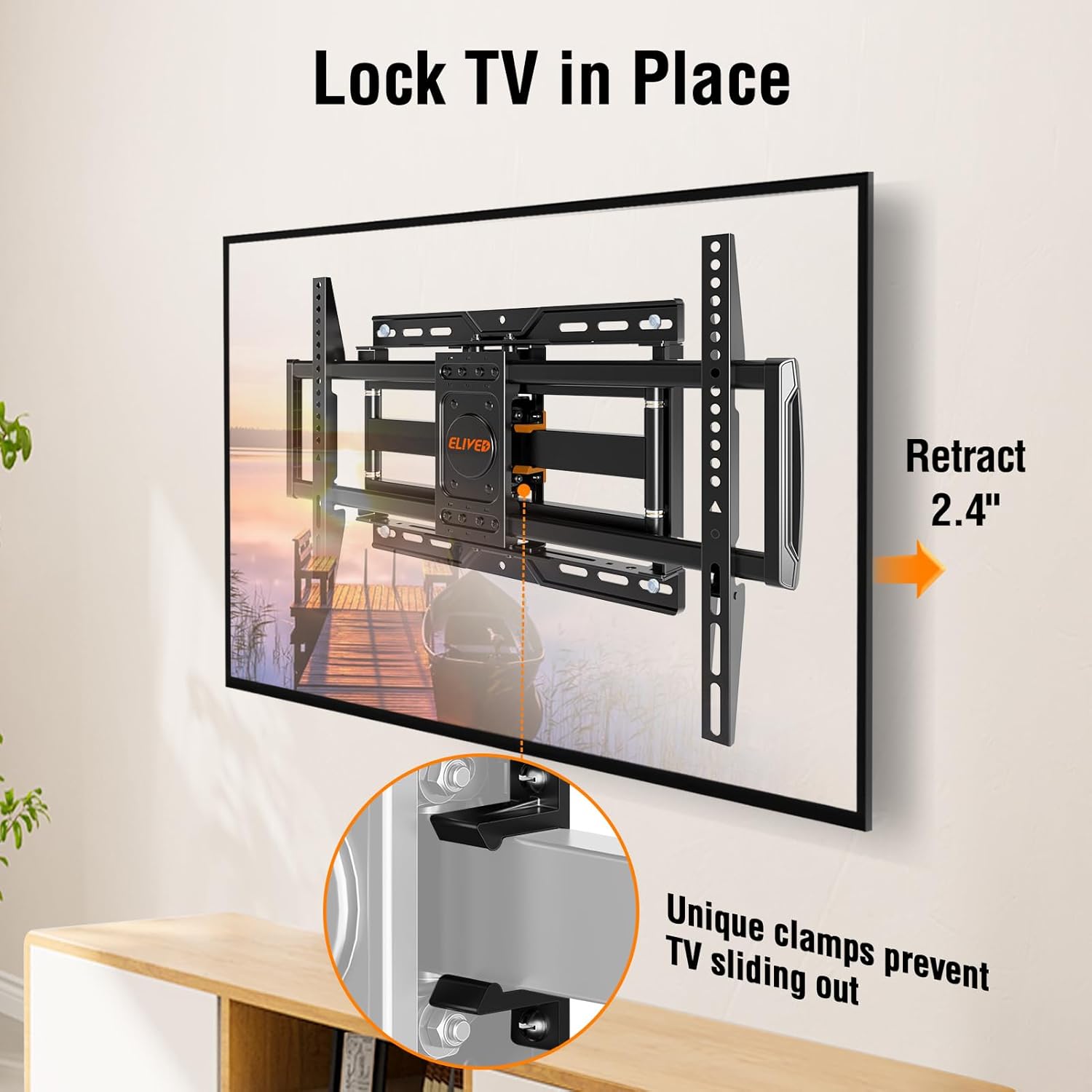
Figure 6: Detail of arm clamps preventing TV sliding out when retracted to 2.4 inches.
6. Maintenance
To ensure the longevity and safe operation of your ELIVED TV Wall Mount, follow these maintenance guidelines:
- Regular Inspection: Periodically check all screws and bolts to ensure they remain tight. Re-tighten if necessary.
- Cleaning: Wipe the mount with a soft, dry cloth to remove dust. Avoid abrasive cleaners or solvents that could damage the finish.
- Smooth Movement: If movement becomes stiff, apply a small amount of silicone-based lubricant to the articulating joints. Do not use oil-based lubricants.
- Weight Limits: Do not exceed the maximum weight capacity of 100 lbs.
7. Troubleshooting
If you encounter any issues with your TV wall mount, refer to the following common solutions:
- TV Not Level: Use the +/-3° post-installation level adjustment feature to correct the TV's horizontal alignment.
- Stiff Movement: Ensure all bolts are not overtightened. Apply silicone lubricant to the joints if needed.
- TV Sliding Out: Verify that the unique arm clamps are properly engaged and tightened to secure the TV against the wall.
- Mount Feels Unstable: Recheck all wall mounting bolts and TV bracket screws for tightness. Ensure the mount is properly installed into studs or concrete.
For further assistance, please contact ELIVED customer support.
8. Specifications
| Feature | Detail |
|---|---|
| Brand | ELIVED |
| Model | B0DGX6DYTV |
| Compatible TV Sizes | 37-82 inches |
| Maximum Weight Capacity | 100 lbs |
| VESA Compatibility | 150x100mm to 600x400mm |
| Wall Stud Spacing | Max 16 inches |
| Extension from Wall | 2.4 inches (retracted) to 16.3 inches (extended) |
| Swivel Angle | +/-45° |
| Tilt Angle | +5°/-13° |
| Level Adjustment | +/-3° |
| Material | Metal |
| Color | Black |
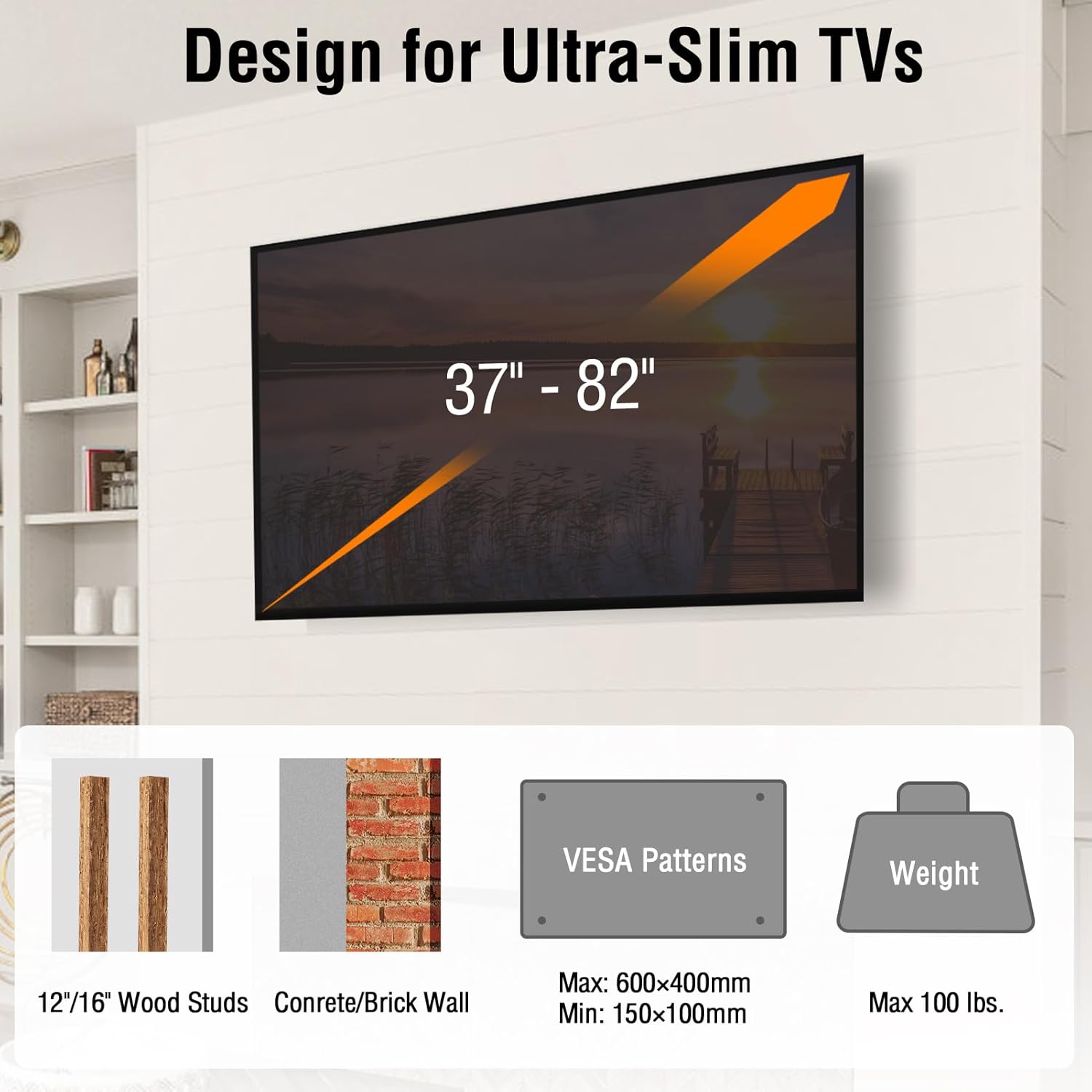
Figure 7: Visual summary of compatible TV sizes, VESA patterns, and weight capacity.
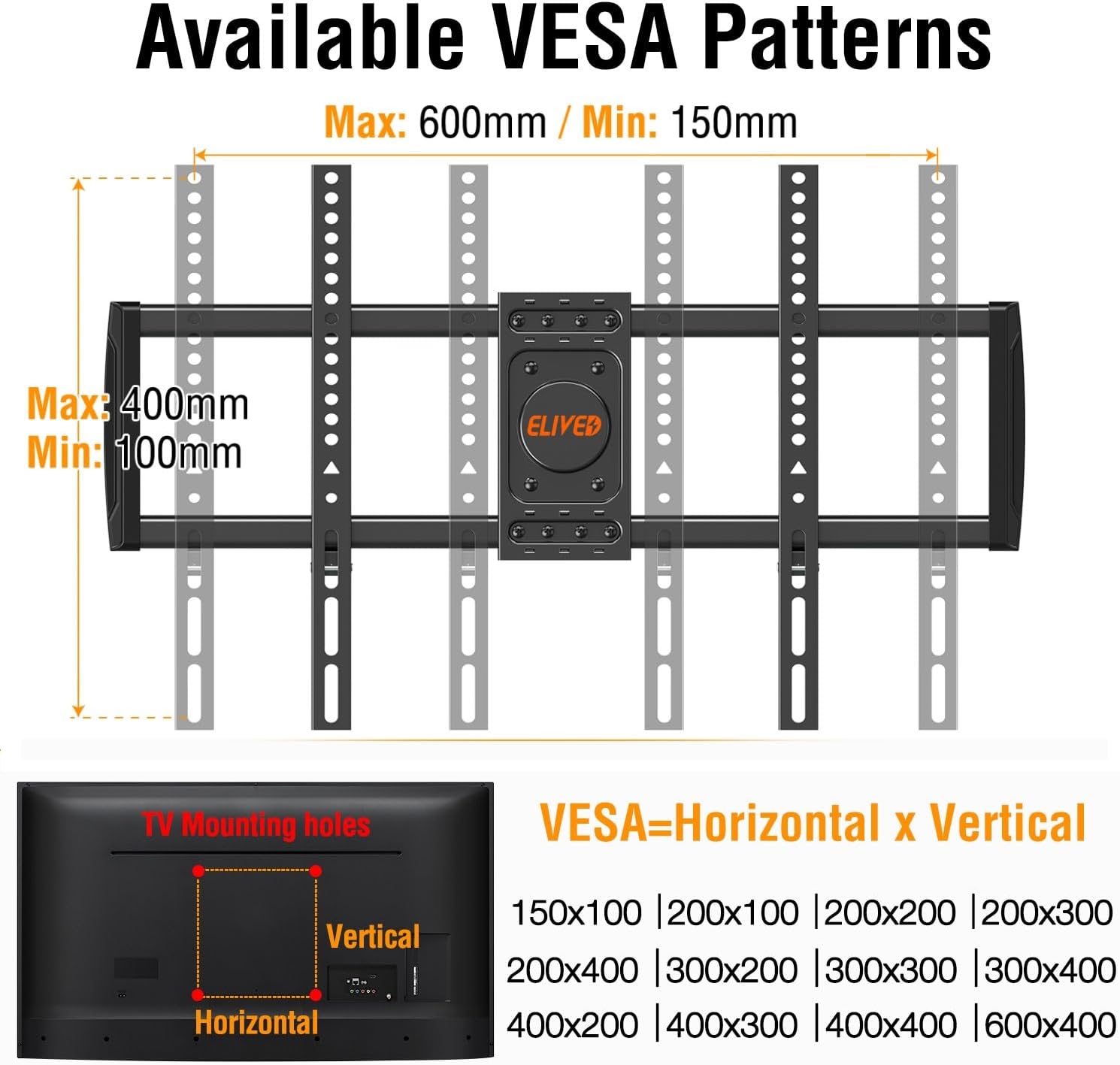
Figure 8: Detailed diagram of VESA mounting hole patterns.
9. Warranty and Support
ELIVED is committed to providing high-quality products and customer satisfaction. For any questions, concerns, or to request additional concrete anchors, please contact ELIVED customer support through the official brand store or the contact information provided in your product packaging.
Please retain your proof of purchase for any warranty claims.
Related documentsB0DGX6DYTV


Ask a question about this manual
Ask about setup, troubleshooting, compatibility, parts, safety, or missing instructions. Manuals+ will review the question and use this page’s manual context to help answer it.