
Introduction
This instruction manual provides detailed guidance for the installation, operation, and maintenance of your ZORSOME Hinge Case for the Huawei Honor Magic V3. This case is designed to offer comprehensive protection, including a built-in screen protector, magnetic hinge protection, and an integrated kickstand.
Product Overview
The ZORSOME Hinge Case is engineered for the Huawei Honor Magic V3, providing robust protection without compromising functionality. Key features include:
- Full-Body Protection: Constructed from hard PC materials to guard against collisions, scratches, and daily wear.
- Integrated Screen Protector: A 9H HD tempered glass screen protector is built into the front frame, offering high-definition clarity and scratch resistance for the front display.
- Magnetic Hinge Protection: Features a strong magnetic design that securely holds the case sections together, providing 360-degree protection for the phone's hinge mechanism. This design does not interfere with the phone's folding function.
- Lens Protection: Precise camera cutouts protect the camera lenses from scratches and drops.
- Adjustable Kickstand: An innovative, hidden kickstand allows for hands-free viewing and can be folded away when not in use.
- Precise Cutouts: Ensures full access to all controls, ports, and features, including cameras and speakers.

Image: Overview of the ZORSOME Hinge Case, demonstrating its design and functionality on the Huawei Honor Magic V3 in different color options.
Package Contents
Verify that all items are present in the package:
- 1 x Screen Frame with Built-in Screen Protector
- 1 x Rear Case with Adjustable Kickstand
Setup and Installation
Follow these steps to properly install the ZORSOME Hinge Case on your Huawei Honor Magic V3:
- Clean Your Device: Ensure your Huawei Honor Magic V3 is clean and free of dust or smudges before installation.
- Install the Front Screen Frame:
- Carefully align the screen frame (with the built-in screen protector) with the front screen of your phone.
- Gently press around the edges to ensure a secure fit and to remove any air bubbles under the screen protector.

Image: Demonstrates the front screen frame with its integrated screen protector being installed onto the phone's front display.
- Install the Rear Case:
- Slide your phone's rear section into the rear case, ensuring the camera cutouts align correctly.
- The magnetic hinge mechanism will automatically secure the two parts of the case around the phone's hinge when the phone is folded.
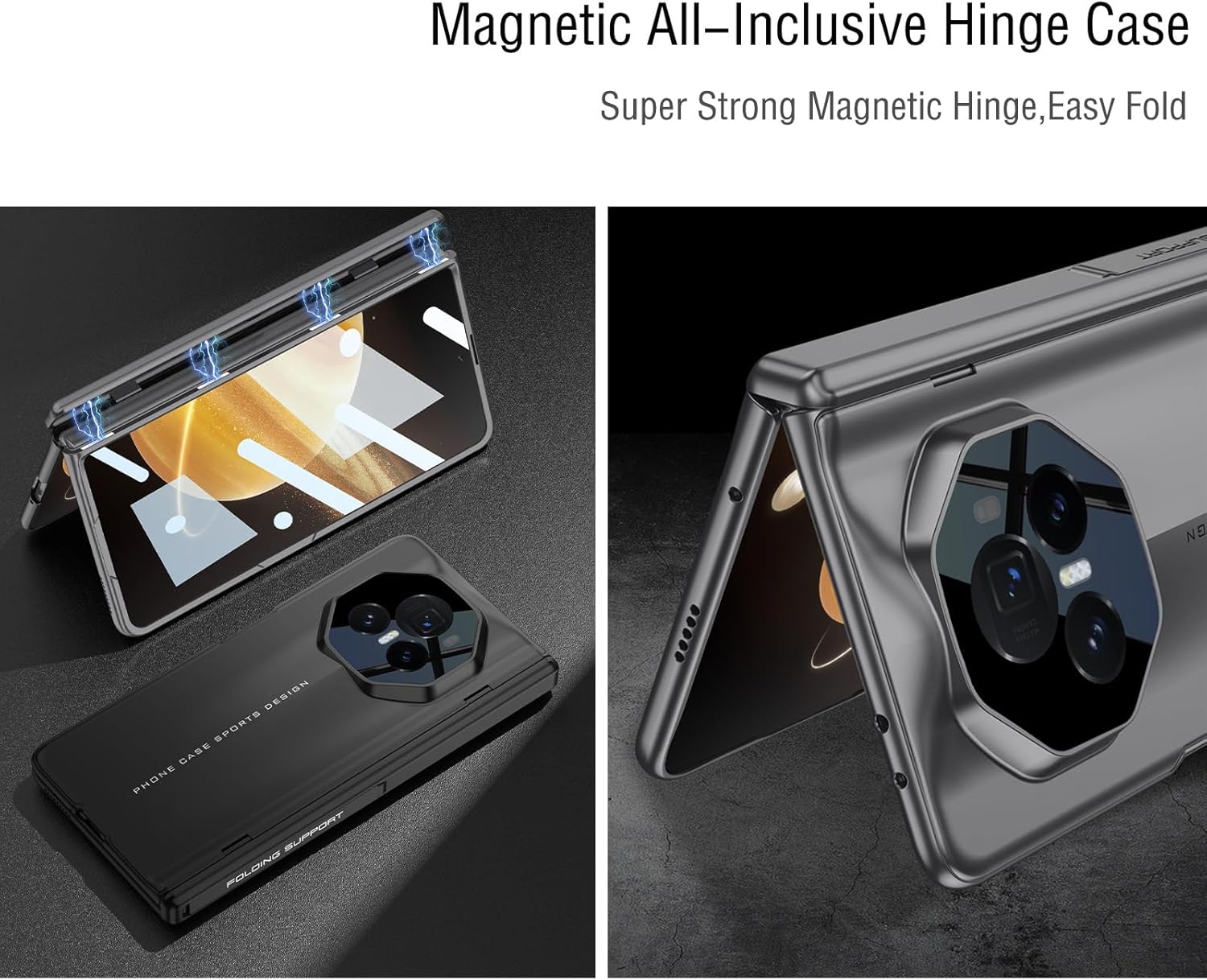
Image: Illustrates the magnetic hinge protection, showing how the case components align and secure the phone's hinge.
- Verify Fit: Ensure the case is snugly fitted around your phone, with no gaps or loose areas. Test the folding mechanism to confirm smooth operation.
Operating Instructions
Using the Adjustable Kickstand
The ZORSOME Hinge Case features a hidden kickstand for convenient hands-free viewing.
- To Deploy: Locate the kickstand on the rear of the case. Gently pull it outwards until it locks into position.
- To Adjust: The kickstand can be adjusted to various angles to suit your viewing preference.
- To Retract: Push the kickstand back into its recess until it sits flush with the case.

Image: Shows the case with the kickstand extended, supporting the phone in a viewing position.
Maintenance
To ensure the longevity and appearance of your ZORSOME Hinge Case, follow these maintenance guidelines:
- Cleaning: Wipe the case with a soft, damp cloth. Avoid using harsh chemicals or abrasive cleaners, as these can damage the material or finish.
- Screen Protector: For the built-in screen protector, use a microfiber cloth to gently clean fingerprints and smudges.
- Avoid Extreme Conditions: Do not expose the case to extreme temperatures or direct sunlight for prolonged periods.
- Inspection: Periodically inspect the case for any signs of wear or damage, especially around the hinge area and kickstand mechanism.
Troubleshooting
If you encounter any issues with your ZORSOME Hinge Case, refer to the following common solutions:
- Case Not Fitting Properly:
- Ensure you have the correct model case for your phone (Huawei Honor Magic V3).
- Remove the case and re-install it carefully, ensuring all edges snap into place.
- Screen Protector Bubbles:
- Small bubbles may disappear over time. For larger bubbles, gently push them towards the edge with a soft cloth.
- Ensure the screen was clean before installation. Dust particles can cause persistent bubbles.
- Kickstand Not Deploying/Retracting Smoothly:
- Check for any debris or obstructions in the kickstand mechanism.
- Apply gentle, even pressure when deploying or retracting. Avoid forcing it.
- Hinge Protection Issues:
- Ensure the phone is correctly seated within both halves of the case.
- The magnetic connection should be firm when the phone is folded. If not, re-seat the phone.
Specifications
| Feature | Detail |
|---|---|
| Brand | ZORSOME |
| Compatible Phone Model | Huawei Honor Magic V3 |
| Model Number | GKK-11186-Magic V3 |
| Material | Hard Polycarbonate (PC) |
| Screen Protector | Built-in 9H HD Tempered Glass |
| Hinge Protection | Magnetic Adsorption |
| Additional Features | Integrated Kickstand, Slim Fit, Lens Protection |
| Water Resistance Level | Not Water Resistant |
Warranty and Support
For warranty information or technical support, please refer to the retailer's policy or contact ZORSOME customer service through their official channels. Keep your purchase receipt for warranty claims.