
1. Introduction
Thank you for purchasing the HUANLEGO Makeup Vanity Desk with Mirror and Lights. This manual provides essential information for the safe assembly, operation, and maintenance of your new vanity desk. Please read these instructions thoroughly before beginning assembly or use to ensure proper function and longevity of the product. Keep this manual for future reference.
2. Safety Information
Please observe the following safety precautions:
- Use caution when assembling and using this makeup vanity.
- Do not exceed the weight limit of the vanity or drawers.
- Handle glass cabinets with care to prevent breakage.
- Ensure electrical outlets and USB ports are used safely and are not overloaded.
- Keep children away from LED lights and electrical components.
- Follow assembly instructions carefully to ensure stability and prevent injury.
- Do not place hot styling tools directly on surfaces without protective mats.
3. Package Contents
Verify that all components are present before assembly. Detailed part lists are included in the separate assembly guide. Key components include:
- Vanity Desk Frame (Engineered Wood)
- Mirror with Integrated LED Lights
- 7 Drawers with Gold Handles
- 2 LED Glass Display Cabinets with Adjustable Glass Panels
- Power Outlet Unit (2 AC outlets, 2 USB ports)
- Hair Dryer Rack
- Assembly Hardware and Tools
4. Setup and Assembly
Assembly is required for this product. A detailed instruction manual with numbered labels for all components is included in the packaging to facilitate the process. It is recommended to assemble the vanity in the location where it will be used due to its weight and size.
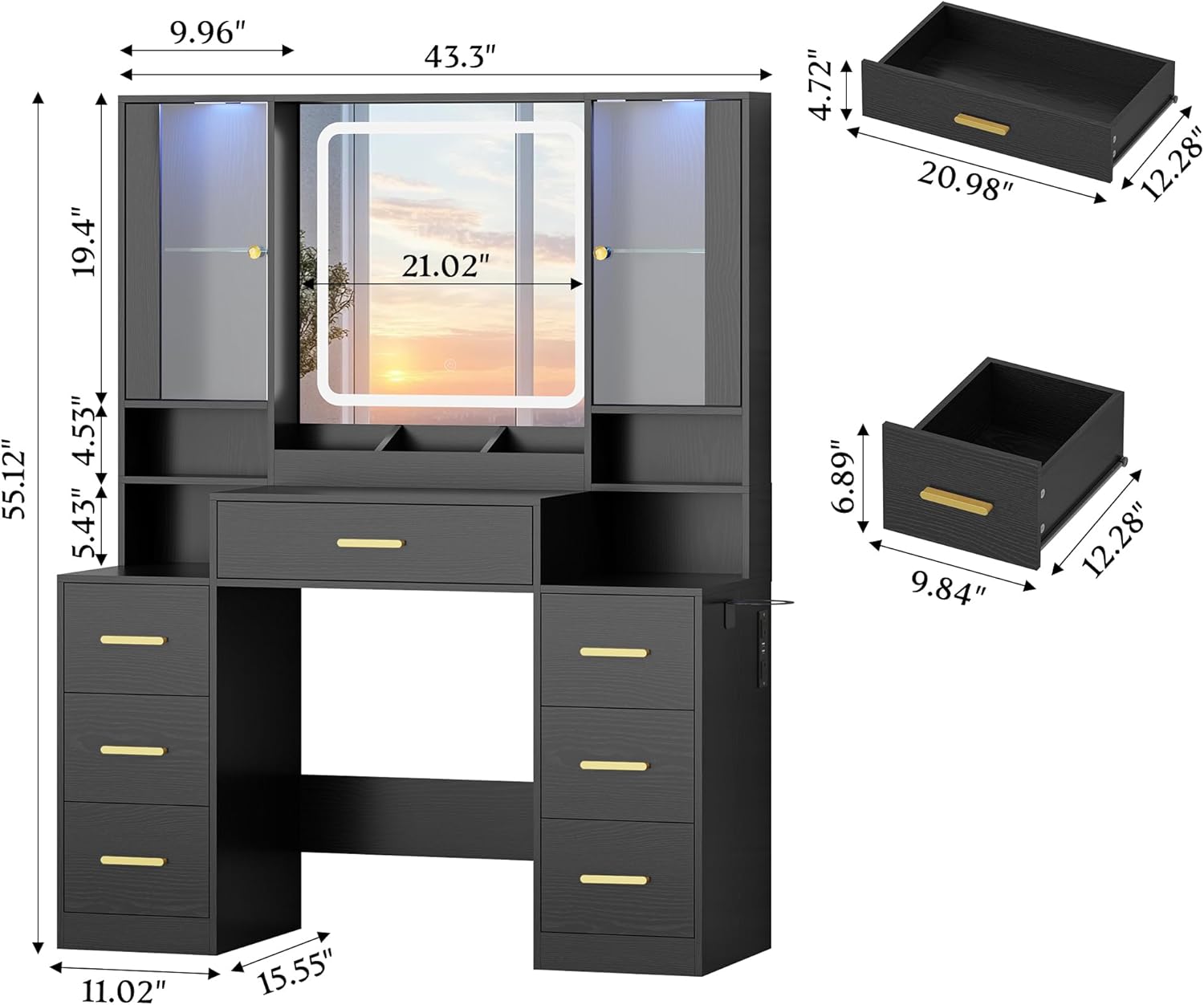
Figure 4.1: Product Dimensions and Drawer Sizes

Figure 4.2: Assembled Vanity Desk Overview

Figure 4.3: Key Features: Adjustable Shelves, Hair Dryer Rack, and Gold Handles
Video 4.1: Overview of the Makeup Vanity Desk with Lights for Bedroom. This video demonstrates the vanity's features and functionality.
5. Operating Instructions
5.1 Mirror Lighting
The integrated mirror features 3 different color modes (warm white, natural white, cool white) and adjustable brightness. Use the touch controls on the mirror surface to cycle through modes and adjust intensity.

Figure 5.1: Mirror with 3 Adjustable Lighting Modes and Brightness Control
5.2 RGB LED Cabinet Lighting
The glass display cabinets are equipped with RGB LED lights. These lights can be controlled via physical switches or a dedicated mobile application. Features include over 60,000 static colors, adjustable brightness, music mode, microphone mode, and a timing function.

Figure 5.2: RGB LED Cabinet Lighting Controls and Features
5.3 Charging Station
The vanity desk includes a built-in charging station with 2 AC power outlets (125V/12A) and 2 USB ports (5V/2A). This allows for convenient charging of electronic devices and powering beauty tools.

Figure 5.3: Integrated Charging Station with Power Outlets and USB Ports
5.4 Hair Dryer Rack
A dedicated hair dryer rack is located near the charging station for easy access and storage of your hair dryer or curling iron.
6. Maintenance
To maintain the appearance and functionality of your vanity desk:
- Wipe surfaces with a soft, damp cloth. Avoid harsh chemicals or abrasive cleaners.
- Clean the mirror with a glass cleaner and a lint-free cloth.
- Regularly check all screws and fasteners to ensure they are tight. Re-tighten if necessary.
- Keep the electrical components dry and free from spills.
- Avoid exposing the vanity to direct sunlight or extreme temperature changes.
7. Troubleshooting
If you encounter any issues with your vanity desk, refer to the following common solutions:
- Lights Not Working: Check if the power cord is securely plugged into a working outlet. Ensure the light switch on the mirror or cabinet is turned on. If using the app, verify Bluetooth connection and app settings.
- Assembly Difficulties: Double-check the assembly instructions and ensure all parts are correctly oriented. Verify that all hardware is used in the correct locations. Contact customer service if parts are missing or damaged.
- Drawers Not Sliding Smoothly: Ensure drawer slides are properly aligned and free of obstructions. Apply a silicone-based lubricant if necessary.
- Unstable Vanity: Confirm all screws and fasteners are tightened. Ensure the vanity is placed on a level surface.
For further assistance, please contact our professional online customer service team.
8. Specifications
| Feature | Detail |
|---|---|
| Model Number | HLG198 |
| Product Dimensions | 15.6"D x 43.2"W x 55.1"H |
| Item Weight | 95 pounds |
| Material | Engineered Wood |
| Color | Black |
| Frame Material | Engineered Wood |
| Assembly Required | Yes |
| Mirror Lighting Modes | 3 (Cool White, Natural White, Warm White) |
| Cabinet Lighting | RGB LED, App/Switch Control, Music/Mic Mode, Timing Function |
| Power Outlets | 2 AC (125V/12A) |
| USB Ports | 2 (5V/2A) |
9. Warranty and Support
This product comes with a standard manufacturer's warranty. For specific warranty details, please refer to the documentation included with your purchase or contact HUANLEGO customer service. Our professional online customer service team is available for post-purchase assistance, including questions regarding assembly, parts, or product functionality. If you have any questions or require replacements, please contact us directly.