
1. Introduction
This manual provides detailed instructions for the safe and effective use of your SG SURGOAL Laser Measure LS. This digital laser measurement tool offers high accuracy for various measurement tasks, including distance, area, volume, and angle calculations. Please read this manual thoroughly before operating the device.
2. Safety Information
The SG SURGOAL Laser Measure LS is a Class II laser product. Adhere to the following safety guidelines:
- Do not stare directly into the laser beam during operation.
- Avoid looking directly into the beam with optical aids, as this can cause serious laser radiation exposure.
- Keep the device out of reach of children.
- Always read and understand the user manual completely before initial use.
3. Package Contents
Verify that all items are present in the package:
- Handheld Laser Distance Meter (x1)
- User Manual (with maintenance card) (x1)
- Certificate (x1)
- Laser Measure Strap (x1)
- Type-C Data Line (x1)
- Packing Box (x1)
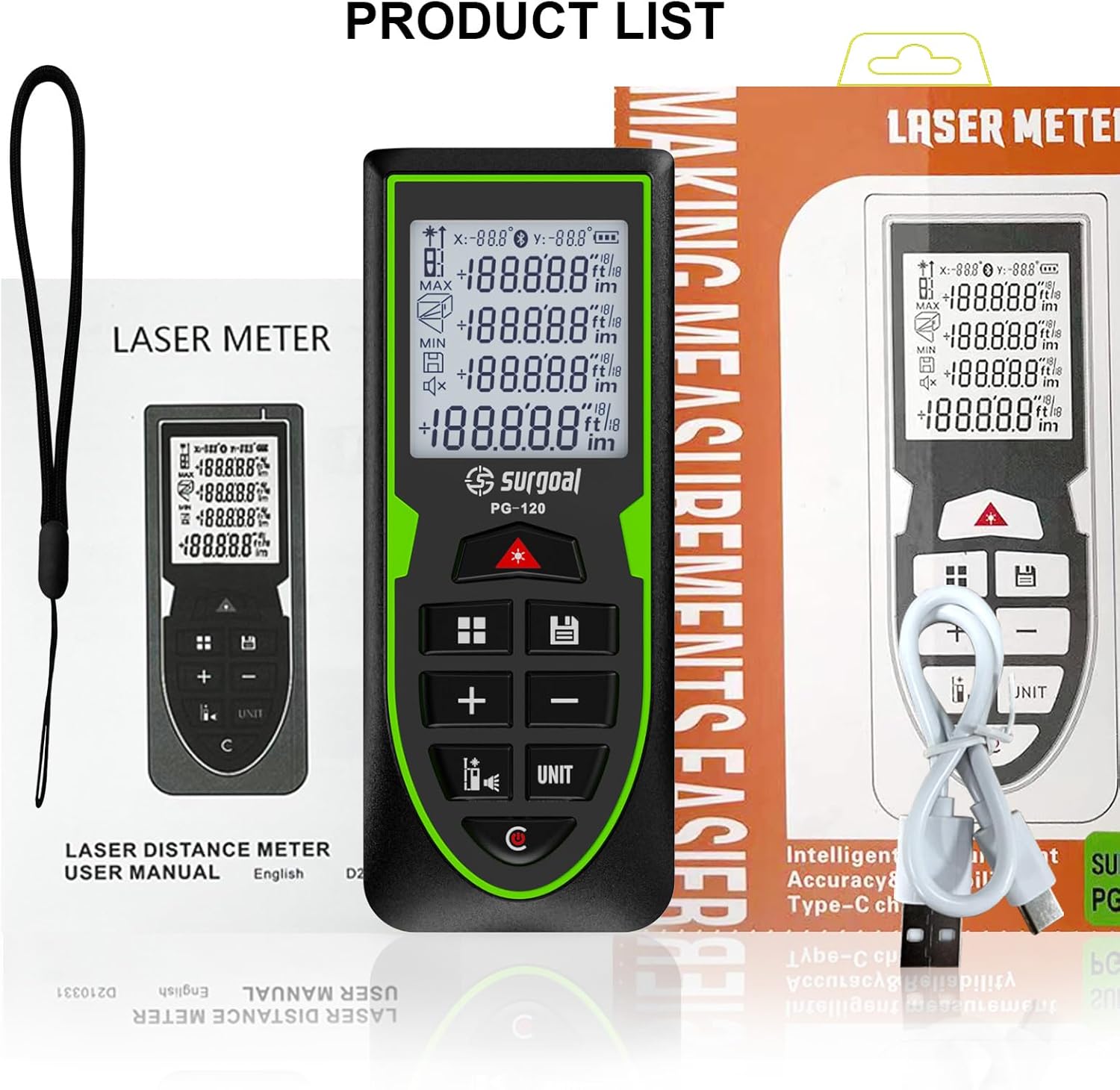
Image: Package contents of the SG SURGOAL Laser Measure LS.
4. Product Overview and Controls
Familiarize yourself with the device's display and button functions.

Image: Front view of the laser measure with key functions and display elements labeled.
- Power On / Measurement Key: Activates the device and initiates measurements.
- Function Key: Cycles through measurement modes (e.g., distance, area, volume, Pythagoras).
- Addition Key (+): Adds measurements.
- Reference Key / Sound Key: Changes the measurement reference point (front/back) and toggles sound.
- Save Key: Stores current measurement data.
- Subtraction Key (-): Subtracts measurements.
- Unit Key: Changes measurement units (m/in/ft).
- Clear Key / Off Key (C): Clears the current measurement or turns off the device.
- USB Type-C Port: For charging the device.
5. Setup
5.1 Charging the Device
The SG SURGOAL Laser Measure LS is equipped with a built-in Li-ion rechargeable battery. Use the provided Type-C data line to charge the device. Connect the Type-C cable to the device's charging port and the other end to a 5V power supply (e.g., a USB wall adapter or computer USB port). A full charge allows for over 20,000 measurements.
5.2 Powering On/Off
Press the Power On / Measurement Key to turn on the device. To turn off, press and hold the Clear Key / Off Key (C), or the device will automatically shut down after 120 seconds of inactivity.
6. Operating Modes
The device offers multiple measurement modes to suit various applications. Press the Function Key to cycle through the available modes.
6.1 Reference Point Selection
The measurement reference point can be set to either the front or the back of the device. Press the Reference Key to toggle between these options. The selected reference point will be indicated on the display.

Image: Illustration of front and back reference points and unit conversion.
6.2 Basic Measurement Modes
- Single Distance Measurement: Press the Power On / Measurement Key once to activate the laser, then press it again to take a single measurement.
- Continuous Measurement (Tracking): Hold the Power On / Measurement Key to enter continuous measurement mode. The display will update in real-time as the device is moved. This mode also shows maximum and minimum distances.
- Area Measurement: Select the area mode using the Function Key. Take two consecutive distance measurements (length and width). The device will automatically calculate and display the area.
- Volume Measurement: Select the volume mode. Take three consecutive distance measurements (length, width, and height). The device will calculate and display the volume.
- Pythagorean Theorem Measurement: Select the Pythagorean mode. Follow the on-screen prompts to take the required measurements (e.g., two sides of a right triangle) to calculate an unknown side.
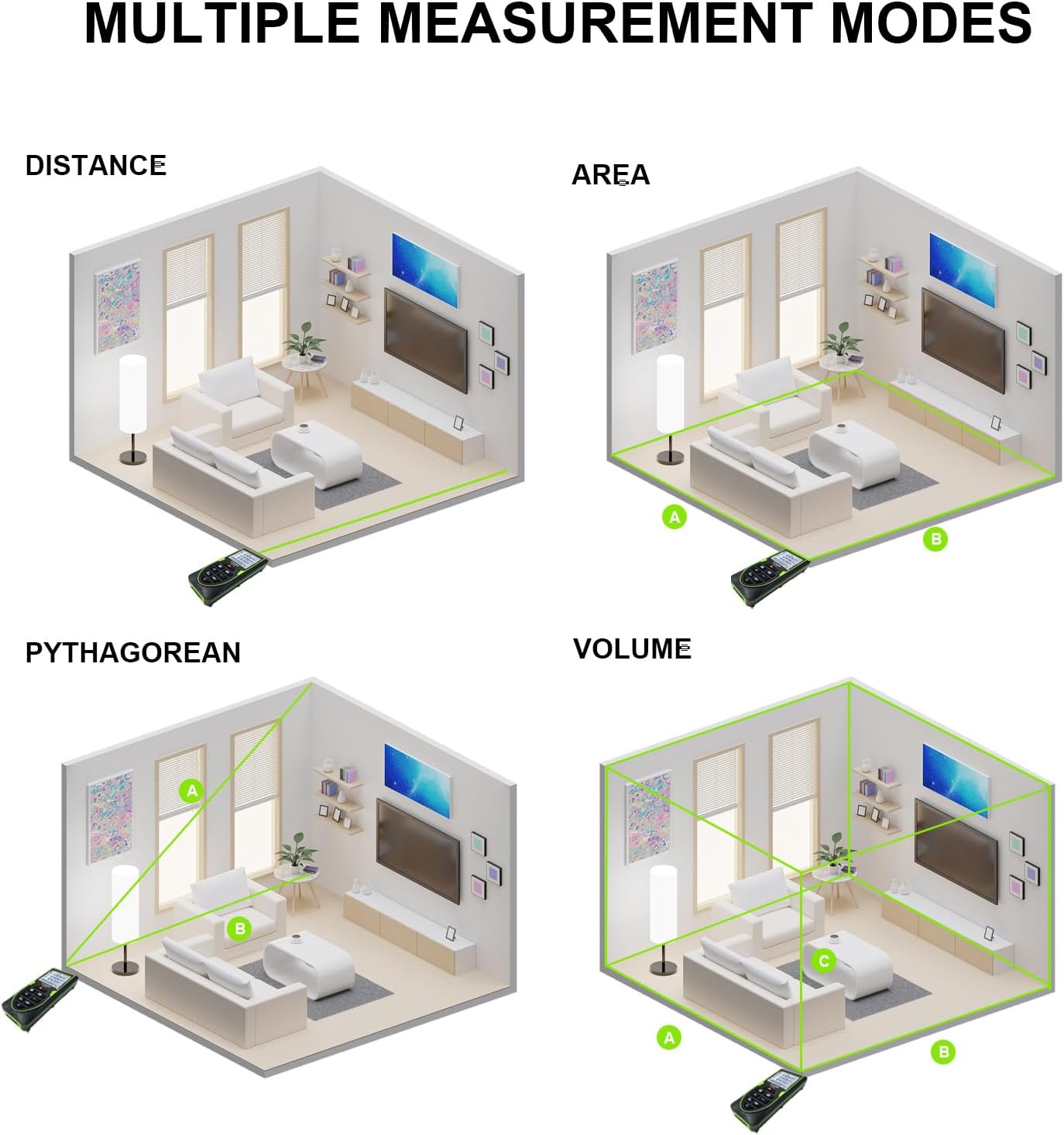
Image: Visual representation of multiple measurement modes.
6.3 Angle Sensor
The integrated electronic angle sensor allows for accurate angle measurements, useful for various applications such as determining slopes or leveling. The angle will be displayed on the screen.

Image: Laser measure displaying an angle using its electronic angle sensor.
6.4 Addition and Subtraction
After taking a measurement, you can use the Addition Key (+) or Subtraction Key (-) to add or subtract subsequent measurements from the current total.
7. Unit Conversion
The device supports multiple measurement units. Press the Unit Key to cycle through available units: meters (m), inches (in), and feet (ft). Area and volume units (m², in², ft², m³, in³, ft³) will automatically adjust based on the selected linear unit.
8. Data Storage
The SG SURGOAL Laser Measure LS can store up to 30 groups of historical measurement data. Use the Save Key to store a measurement. You can review stored data by navigating through the memory function.
9. Maintenance
- Keep the device clean and dry. Wipe the lens and housing with a soft, damp cloth. Do not use abrasive cleaners or solvents.
- Store the device in a cool, dry place when not in use.
- Avoid exposing the device to extreme temperatures or direct sunlight for prolonged periods.
- Ensure the Type-C charging port is free from dust and debris.
10. Troubleshooting
If you encounter issues with your laser measure, consider the following:
- Device not powering on: Ensure the battery is sufficiently charged. Connect the device to a 5V power source using the Type-C cable.
- Inaccurate measurements: Check that the reference point is correctly set (front or back). Ensure the laser beam is not obstructed and the target surface is suitable for reflection. Clean the laser lens if necessary.
- Display issues: Recharge the battery. If the problem persists, contact customer support.
11. Specifications

Image: Key specifications and dimensions of the laser measure.
| Feature | Specification |
|---|---|
| Measuring Range | 120m / 393.7ft |
| Measuring Accuracy | ± 2.0mm (± 0.07in) |
| Single Measurement Time | 0.5s |
| Laser Type | 500~690nm, Class II, <1MW (Green Laser) |
| Working Temperature | -10°C to +40°C |
| Auto Laser Off | 30 seconds of no operation |
| Auto Shutdown | 120 seconds of no operation |
| Battery Type | Rechargeable Lithium-Ion |
| Charging Port | Type-C (5V) |
| Measurements per Charge | >20000 times |
| Material | Plastic |
| International Protection Rating | IP68 |
| Item Weight | 12 Ounces (approx. 340g) |
| Dimensions (approx.) | 11.9cm x 4.8cm x 2.5cm (4.7in x 1.9in x 1in) |
12. Warranty and Support
The SG SURGOAL Laser Measure LS comes with a 1-year warranty. For any questions, technical support, or warranty claims, please contact our customer service team via email. We are committed to providing professional assistance to ensure your satisfaction.