
1. Product Overview
This manual provides detailed instructions for the assembly, operation, and maintenance of your YATINEY Narrow Console Table with Outlets, Model CT07UBG. This versatile table is designed to fit behind sofas or in narrow hallways, offering convenient surface space and integrated charging capabilities.
Key Features:
- Versatile L-shaped or straight configurations to suit various spaces.
- Integrated power strip with 2 AC outlets and 2 USB ports for device charging.
- Slim design (5.9" width) for optimized space utilization.
- Constructed from premium particleboard and metal frame for durability.
- Includes anti-tip kit and adjustable feet for enhanced stability.
Package Contents:
Please verify that all components are present before beginning assembly. Refer to the included parts list diagram for identification.
- Tabletop panels
- Metal frame components
- Power strip with cable
- Anti-tip kit
- Adjustable feet
- Assembly hardware (screws, bolts, etc.)
- Instruction manual
2. Safety Information
To ensure safe use of your console table, please adhere to the following guidelines:
- Always assemble and secure the table according to the provided instructions.
- Ensure the anti-tip kit is properly installed and anchored to a wall to prevent tipping, especially if children or pets are present.
- Adjust the feet at the base to ensure the table is level and stable on uneven surfaces.
- Do not place heavy objects on the table that exceed its weight capacity, as this could compromise stability.
- Use the integrated power strip only for devices within its specified voltage and current limits (120V/12A for AC outlets, 5V/2A for USB ports).
- Avoid exposing the power strip to moisture or liquids.
- Keep all electrical cords organized and away from high-traffic areas to prevent tripping hazards.
- Do not modify the product or use it for purposes other than its intended use as a console or sofa table.
3. Setup and Assembly
Assembly of the YATINEY console table is designed to be straightforward. All necessary tools and an illustrated manual are included. Please follow the steps below and refer to the diagrams for visual guidance.
Assembly Options:
The table offers three primary installation configurations:
- Plan A (L-Shape): Two L-shaped sections forming a corner.
- Plan B (L-Shape): Two L-shaped sections forming a corner, mirrored from Plan A.
- Plan C (Straight): A long, straight configuration suitable for hallways or behind a straight sofa.
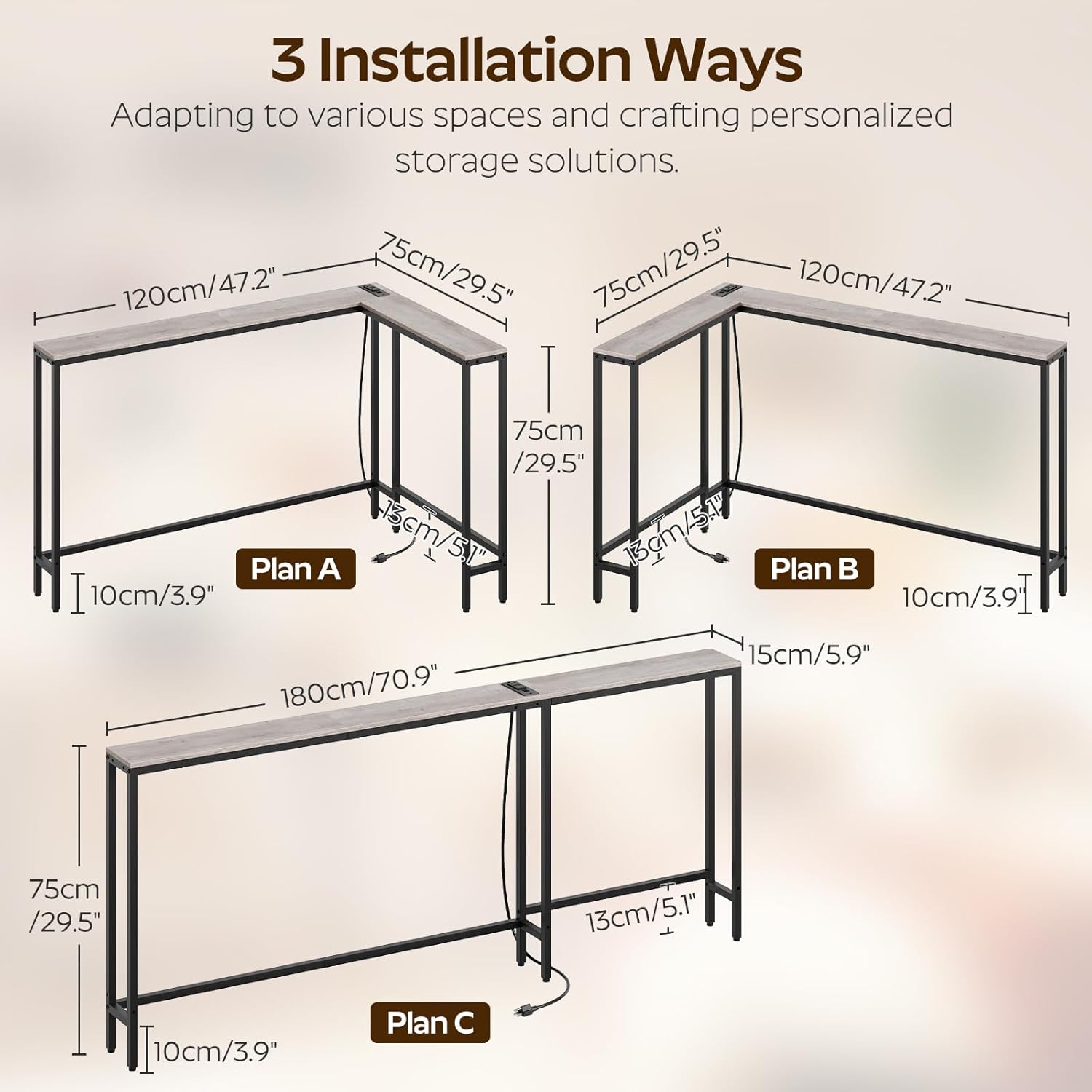
Figure 3.1: Three Installation Ways (Plans A, B, C)
General Assembly Steps:
- Unpack and Identify Parts: Carefully remove all components from the packaging. Lay them out and compare them against the parts list in the included manual to ensure everything is present and undamaged.
- Assemble Frame Sections: Attach the metal frame components together using the provided screws and an Allen wrench (if applicable). Ensure all connections are secure but do not overtighten initially.
- Attach Tabletop Panels: Secure the tabletop panels to the assembled frame sections. Pay attention to the orientation for your chosen configuration (L-shape or straight).
- Install Adjustable Feet: Screw the adjustable feet into the bottom of the table legs. These can be rotated later to level the table.
- Install Power Strip: Position the power strip in one of the designated cutouts on the tabletop. The table offers six installation options for personalized positioning. Secure it with the provided fasteners.
- Final Tightening: Once all parts are assembled and aligned, fully tighten all screws and bolts.
- Attach Anti-Tip Kit: Secure the anti-tip strap to the back of the table and then to a wall stud using the provided hardware. This step is crucial for safety.

Figure 3.2: L-Shaped Sofa Table Configuration
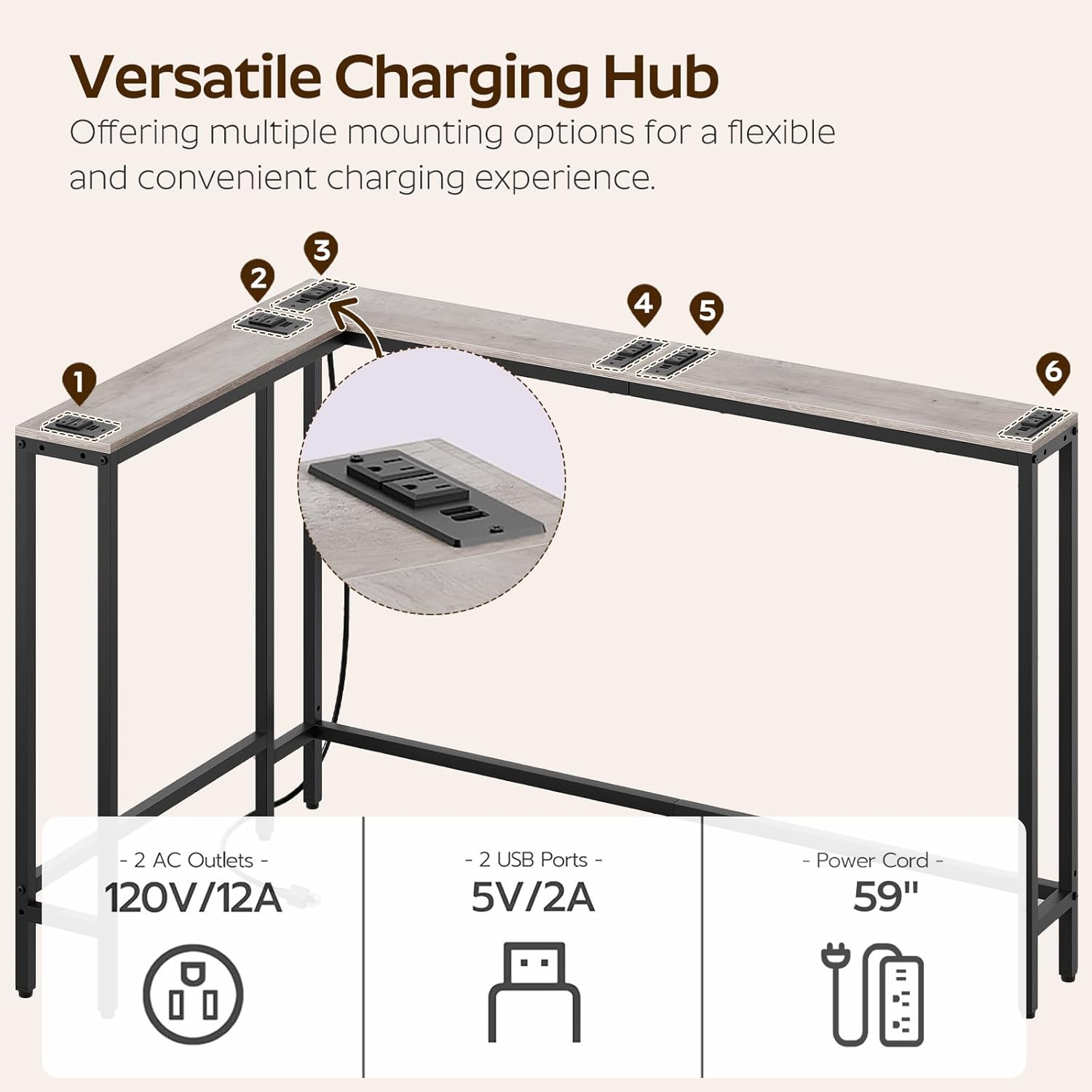
Figure 3.3: Slim 5.9" Design for Optimal Space
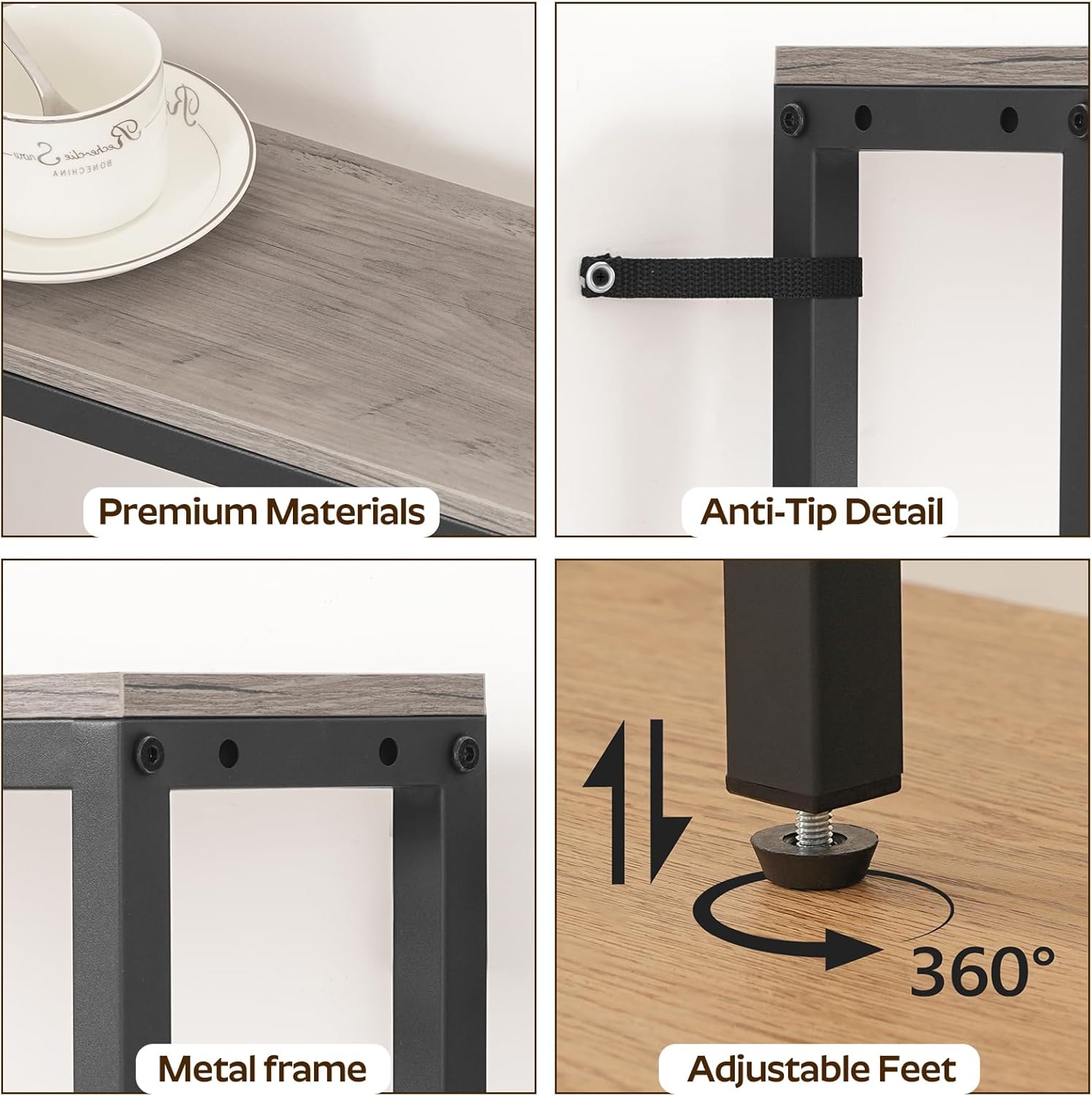
Figure 3.4: Premium Materials and Stability Features
4. Operating the Charging Station
Your YATINEY console table includes an integrated power strip for convenient charging of electronic devices.
Features:
- 2 Standard AC Outlets (120V/12A)
- 2 USB Ports (5V/2A)
- 59-inch Power Cord

Figure 4.1: Versatile Charging Hub
Usage:
- Plug the table's power cord into a standard wall outlet.
- Connect your electronic devices (e.g., phones, tablets, lamps) to the available AC outlets or USB ports.
- Ensure devices are compatible with the power strip's specifications to prevent damage.
5. Maintenance
Proper care will extend the life and appearance of your console table.
- Cleaning: Wipe surfaces with a soft, damp cloth. Avoid harsh chemicals or abrasive cleaners, which can damage the finish.
- Spills: Immediately wipe up any spills to prevent staining or water damage to the tabletop.
- Heat and Moisture: Avoid placing hot items directly on the surface. Use coasters or protective pads. Keep the table away from excessive moisture or direct sunlight to prevent warping or fading.
- Hardware: Periodically check all screws and bolts to ensure they remain tight. Retighten as necessary.
6. Troubleshooting
If you encounter issues with your console table, refer to the following common problems and solutions:
| Problem | Possible Cause | Solution |
|---|---|---|
| Table is wobbly or unstable. | Uneven floor; loose hardware; anti-tip kit not installed. | Adjust the leveling feet at the bottom of the legs. Ensure all assembly hardware is tightened. Install the anti-tip kit securely to a wall. |
| Charging station not working. | Power cord not plugged in; wall outlet not active; faulty device. | Ensure the table's power cord is fully plugged into a live wall outlet. Test the wall outlet with another device. Try a different device with the charging station. |
| Parts missing or damaged during assembly. | Shipping damage; packaging error. | Contact YATINEY customer support with your purchase details and a description of the issue for assistance. |
7. Product Specifications
| Brand | YATINEY |
| Model Number | CT07UBG |
| Product Dimensions (L x W x H) | 70.9" x 5.9" x 29.5" (180cm x 15cm x 75cm) |
| Color | Greige + Black |
| Material Type | Engineered Wood, Metal |
| Item Weight | 7.12 Kilograms |
| AC Outlets | 2 (120V/12A) |
| USB Ports | 2 (5V/2A) |
| Power Cord Length | 59 inches |
| Recommended Assembly People | 1 |
| Includes All Assembly Tools | Yes |
8. Warranty and Customer Support
YATINEY stands behind the quality of its products. For specific warranty information, please refer to the documentation included with your purchase or visit the official YATINEY website.
If you have any questions, require assistance with assembly, or need to report missing/damaged parts, please contact YATINEY customer support. Have your model number (CT07UBG) and purchase details ready for faster service.
Contact Information: (Please refer to your purchase documentation or the YATINEY official website for the most current contact details.)