
DEKOPRO DKPSRTA03VDC1-K1-OLPK-EU
DEKO 3.6V Cordless Rotary Tool Kit User Manual
Model: DKPSRTA03VDC1-K1-OLPK-EU
1. Introduction
Thank you for choosing the DEKO 3.6V Cordless Rotary Tool Kit. This versatile tool is designed for various DIY projects and light-duty tasks, including carving, cutting, sanding, grinding, polishing, and engraving. Please read this manual thoroughly before operating the tool to ensure safe and efficient use. Keep this manual for future reference.

Image 1.1: The DEKO 3.6V Cordless Rotary Tool Kit and its included accessories.
2. Safety Information
Always follow basic safety precautions to reduce the risk of fire, electric shock, and personal injury.
- Wear Eye Protection: Always wear safety goggles or safety glasses with side shields when operating the tool.
- Secure Workpiece: Always clamp or otherwise secure the workpiece to a stable surface.
- Avoid Accidental Starting: Ensure the switch is in the OFF position before connecting to a power source or picking up the tool.
- Maintain Good Grip: The tool features an ergonomic pen-style design. Maintain a firm and comfortable grip during operation.
- Keep Work Area Clean: Cluttered areas invite accidents.
- Do Not Overreach: Keep proper footing and balance at all times.
- Use Correct Tool: Do not force small tools or attachments to do the work of a heavy-duty tool.
- Disconnect Tool: Disconnect the tool from the power source before making any adjustments, changing accessories, or storing it.
- Store Idle Tools: When not in use, tools should be stored in a dry, high, or locked-up place, out of reach of children.
3. Package Contents
The DEKO 3.6V Cordless Rotary Tool Kit includes the following items:
- 1 x DEKO 3.6V Cordless Rotary Tool
- 1 x USB-C Charging Cable
- 1 x Wrench
- 5 x Aluminum Oxide Grinding Stones
- 6 x Diamond Wheel Tips
- 12 x Sanding Bands
- 30 x Sanding Discs
- 2 x Polishing Wheel Tips
- 1 x Bristle Brush
- 2 x Engraving Bits
- 1 x Drill Bit
- 1 x Drum Mandrel
- 1 x Mandrel for Disc
- 1 x Mandrel for Felt Wheel
- 3 x Felt Wheels (various sizes)
- 2 x Rubber Wheel Points

Image 3.1: A comprehensive display of the 70 accessories provided with the rotary tool kit, categorized by function.
4. Product Overview
Familiarize yourself with the components of your DEKO rotary tool:
- USB-C Charging Port: For recharging the internal battery.
- Speed Indicator: LED lights display the current speed setting.
- Speed & ON/OFF Switch: Controls power and adjusts rotational speed.
- Heat Dissipation Vents: Ensures proper cooling during operation.
- LED Light: Illuminates the work area for improved visibility.
- Chuck: Holds the various accessories securely.
- Spindle Lock Button: Used to lock the spindle for easy accessory changes.
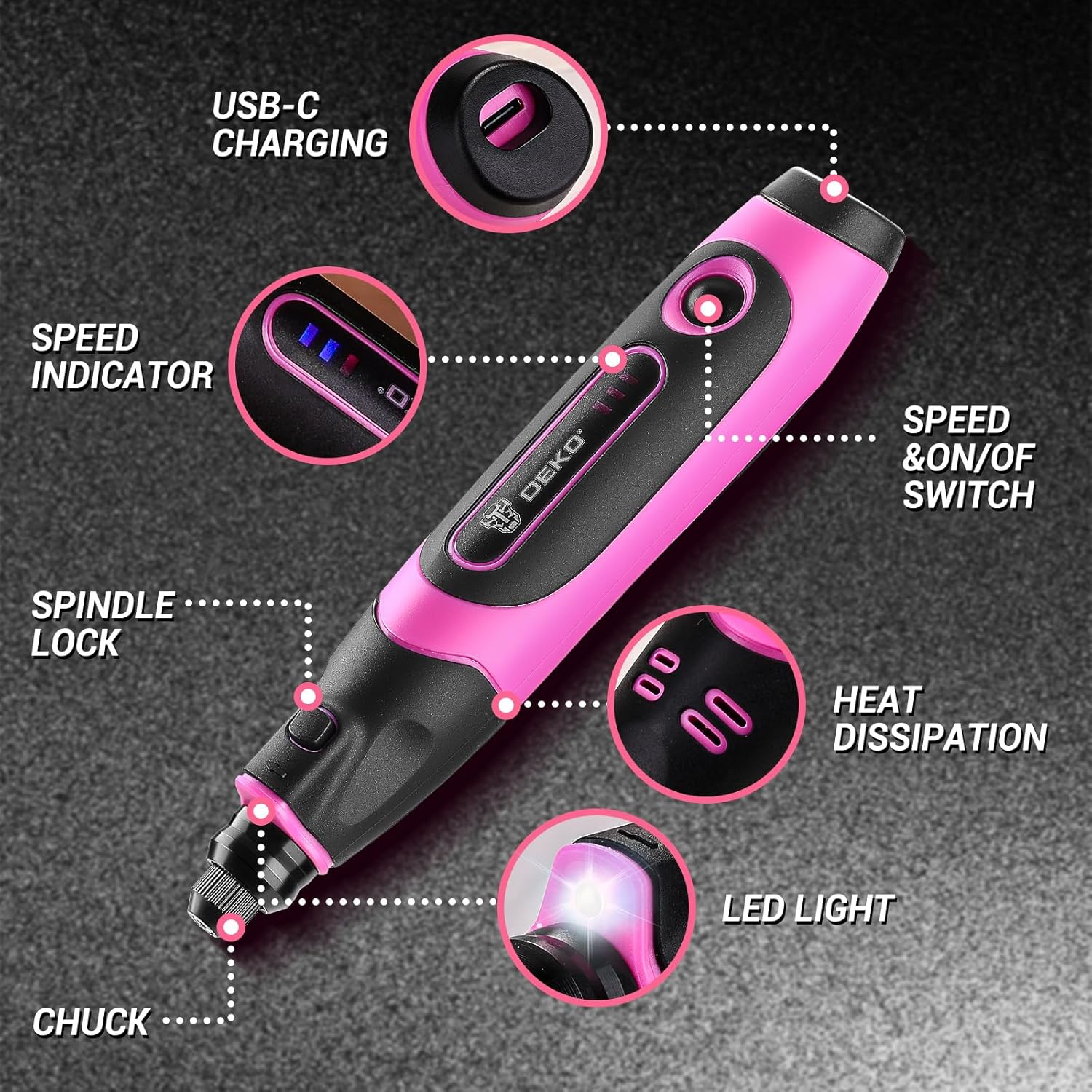
Image 4.1: Labeled diagram of the DEKO rotary tool's key features.
5. Setup
5.1 Charging the Tool
The tool is powered by an internal rechargeable battery. Before first use, fully charge the tool.
- Connect the provided USB-C charging cable to the tool's USB-C charging port.
- Plug the other end of the USB-C cable into a compatible USB power source (e.g., computer, charging head, car charger, power bank).
- The speed indicator LEDs will show charging status. Once fully charged, all LEDs will be lit or indicate full charge.

Image 5.1: The rotary tool being charged via a USB-C connection, highlighting its compatibility with various USB power sources.
5.2 Attaching Accessories
To change or attach an accessory:
- Press and hold the spindle lock button.
- Unscrew the collet nut at the chuck counter-clockwise.
- Insert the desired accessory into the collet. Ensure the accessory shank is fully seated.
- While still holding the spindle lock button, tighten the collet nut clockwise using the provided wrench until the accessory is secure. Do not overtighten.
- Release the spindle lock button.

Image 5.2: Step-by-step guide for securely installing accessories into the rotary tool's chuck.
6. Operating Instructions
6.1 Powering On and Adjusting Speed
The tool features 3 speed levels: 5000 RPM, 12000 RPM, and 18000 RPM.
- To turn on the tool, press the Speed & ON/OFF switch. The tool will start at the lowest speed setting (5000 RPM), indicated by one LED.
- To increase the speed, press the Speed & ON/OFF switch again. Each press will cycle through the speed settings (5000 RPM > 12000 RPM > 18000 RPM).
- To turn off the tool, press the Speed & ON/OFF switch after the highest speed setting, or hold it down for a few seconds.
6.2 Using the LED Light
The integrated LED light automatically illuminates when the tool is powered on, providing enhanced visibility for detailed work.
Image 6.1: The LED light feature in action, providing illumination for precision tasks.
6.3 Applications
Select the appropriate accessory and speed for your task:
- Sanding: Use sanding bands or discs at medium to high speeds for smoothing surfaces.
- Grinding: Aluminum oxide grinding stones are suitable for shaping and deburring at medium to high speeds.
- Polishing: Felt wheels and polishing tips, often with polishing compound, are used at low to medium speeds for achieving a smooth, shiny finish.
- Carving/Engraving: Diamond wheel tips and engraving bits are ideal for detailed work on various materials at medium speeds.
- Cutting: Use appropriate cutting discs at high speeds for precise cuts.
- Drilling: The drill bit can be used for small pilot holes at medium to high speeds.

Image 6.2: Examples of the rotary tool performing sanding, grinding, carving, drilling, and polishing tasks.
7. Maintenance
7.1 Cleaning
Regular cleaning ensures optimal performance and extends the tool's lifespan.
- Always disconnect the tool from the charger before cleaning.
- Use a soft, damp cloth to wipe down the tool's exterior. Do not use harsh chemicals or abrasive cleaners.
- Use a small brush or compressed air to clear dust and debris from the heat dissipation vents and chuck area.
- Clean accessories after each use to maintain their effectiveness.
7.2 Storage
Store the tool and its accessories in a dry, clean place, away from direct sunlight and extreme temperatures. Keep out of reach of children.
8. Troubleshooting
| Problem | Possible Cause | Solution |
|---|---|---|
| Tool does not turn on. | Battery is depleted. | Charge the tool using the USB-C cable. |
| Accessory wobbles or falls out. | Collet nut is not tightened sufficiently or accessory is not properly seated. | Ensure accessory is fully inserted and collet nut is securely tightened with the wrench. |
| Tool loses power quickly. | Battery capacity reduced due to age or improper charging. | Ensure full charge cycles. If problem persists, battery may need replacement (contact support). |
| Excessive vibration or noise. | Damaged or improperly installed accessory. | Inspect accessory for damage. Reinstall accessory correctly. Replace if damaged. |
9. Specifications
| Feature | Detail |
|---|---|
| Model Number | DKPSRTA03VDC1-K1-OLPK-EU |
| Power Source | Battery Powered (3.6V) |
| Speed Settings | 3 levels: 5000 RPM, 12000 RPM, 18000 RPM |
| Special Features | Cordless, Variable Speed, Multifunction, USB-C Charging, Integrated LED Light |
| Included Components | 70 accessories (grinding stones, diamond tips, sanding bands/discs, polishing tips, brush, engraving bits, drill bit, mandrels, felt wheels, rubber points, wrench) |
| Dimensions (Package) | 19.7 x 14.3 x 4.4 cm |
| Weight (Tool) | Approximately 340 grams |
10. Warranty and Support
DEKOPRO products are manufactured to high-quality standards. For warranty information, technical support, or replacement parts, please refer to the warranty card included with your purchase or visit the official DEKOPRO website. Please have your model number (DKPSRTA03VDC1-K1-OLPK-EU) ready when contacting support.
Related Documents - DKPSRTA03VDC1-K1-OLPK-EU
 |
SHENHAOXU PSD-045 Rotary Tool User Manual and Safety Guide Comprehensive user manual and safety instructions for the SHENHAOXU PSD-045 Cordless Electric Grinder Rotary Tool, featuring 5-speed control and USB charging. Learn about assembly, operation, maintenance, and safety precautions. |
 |
TILSWALL W402 Cordless Rotary Tool User Manual User manual for the TILSWALL W402 Cordless Rotary Tool, detailing safety instructions, product description, technical specifications, usage, charging, maintenance, and troubleshooting. |
 |
Aideepen 135W Mini Electric Grinder - Versatile Rotary Tool for Crafting and Polishing Explore the Aideepen 135W mini electric grinder, a powerful and versatile rotary tool designed for DIY enthusiasts and crafters. This guide details its 5-speed control, compact design, various applications including carving, cutting, drilling, and polishing, along with its comprehensive accessory kit and installation instructions. |
 |
PARKSIDE Cordless Rotary Tool 12V PFBS 12 C7 User Manual Comprehensive user manual for the PARKSIDE Cordless Rotary Tool 12V (Model PFBS 12 C7). Provides detailed information on safety, intended use, features, technical specifications, operation, maintenance, and warranty. Includes multilingual support. |
 |
DEKO 3-in-1 Palm Sander Instruction Manual (Model DKPAISX030C1) Official instruction manual for the DEKO 3-in-1 Palm Sander, model DKPAISX030C1. Learn about safe operation, maintenance, parts, specifications, and intended use for sanding various materials. |
 |
Bosch Power Tool Spare Parts and Illustrations: GBH 180-LI, GSR 18V-50, GWS 180-LI Comprehensive spare parts lists and technical illustrations for Bosch Cordless Rotary Hammer (GBH 180-LI), Cordless Drill Driver (GSR 18V-50), and Cordless Angle Grinder (GWS 180-LI). Includes part numbers, descriptions, and diagrams. |
Ask a question about this manual
Ask about setup, troubleshooting, compatibility, parts, safety, or missing instructions. Manuals+ will review the question and use this page’s manual context to help answer it.