
W&P PD301W
W&P Portable Charger Power Bank PD301W User Manual
Model: PD301W | Brand: W&P
1. Introduction
Thank you for choosing the W&P Portable Charger Power Bank PD301W. This device is designed to provide convenient and fast charging for your electronic devices on the go. Featuring a 20000mAh capacity, built-in USB-C and Lightning cables, and an integrated AC wall plug, it offers versatile charging and recharging options. Please read this manual thoroughly to ensure proper use and to maximize the lifespan of your power bank.
2. Package Contents
Verify that all items are present in your package:
- 1 x W&P 35W 20,000mAh Compact Power Bank (Gray White)
- 1 x User Manual
3. Product Overview
The W&P Portable Charger Power Bank PD301W combines multiple charging functionalities into a single compact unit.
3.1 Key Features
- 20000mAh High Capacity: Provides multiple charges for smartphones, tablets, and other devices.
- Built-in Cables: Includes integrated USB-C and Lightning cables for direct device charging without extra accessories.
- Integrated AC Wall Plug: Allows direct recharging of the power bank from any standard wall outlet.
- 35W Fast Charging: Supports rapid charging for compatible devices via the USB-C port and built-in cables.
- Digital Display: Shows remaining battery percentage and charging status.
- Built-in Phone Stand: Retractable kickstand for hands-free viewing while charging.
- Multi-Device Charging: Capable of charging up to three devices simultaneously.
- Safety Protections: Incorporates 10-level safety protection and GLP3.0 Cold Zone Chip for real-time temperature monitoring.
- Flight Approved: Complies with FAA regulations for air travel.
3.2 Component Identification


- Built-in USB-C Cable: For charging USB-C compatible devices.
- Built-in Lightning Cable: For charging Lightning compatible devices.
- USB-C Port (Input/Output): For charging USB-C devices or recharging the power bank.
- Foldable AC Wall Plug: For direct wall charging of the power bank.
- Digital LED Display: Indicates battery level and charging status.
- Power Button/Touch Sensor: Activates the display and initiates charging.
- Retractable Phone Stand: Located on the side for device support.
4. Setup
Before first use, it is recommended to fully charge your W&P Portable Charger Power Bank.
4.1 Initial Charging of the Power Bank
There are three methods to recharge the power bank:
- Using the Built-in AC Wall Plug:

Figure 3: The foldable AC wall plug, designed for direct wall charging of the power bank. - Fold out the integrated AC wall plug.
- Plug the power bank directly into a standard wall outlet (AC input 110-220V).
- The digital display will show the charging progress. A full charge via AC plug takes approximately 8 hours.
- Using the Built-in USB-C Cable:

Figure 4: Recharging the power bank using its built-in USB-C cable connected to an external power source. - Connect the built-in USB-C cable to a USB-C wall adapter (not included) or a computer's USB-C port.
- The digital display will indicate charging. A full charge via USB-C cable takes approximately 3.5 hours (30W Max).
- Using the USB-C Port:
- Connect a USB-C to USB-C cable (not included) from a power source to the power bank's USB-C port.
- The digital display will indicate charging. A full charge via USB-C port takes approximately 3.5 hours (30W Max).
The digital display will show "100%" when fully charged.
5. Operating Instructions
5.1 Charging Your Devices
The power bank can charge up to three devices simultaneously using its built-in cables and USB-C port.
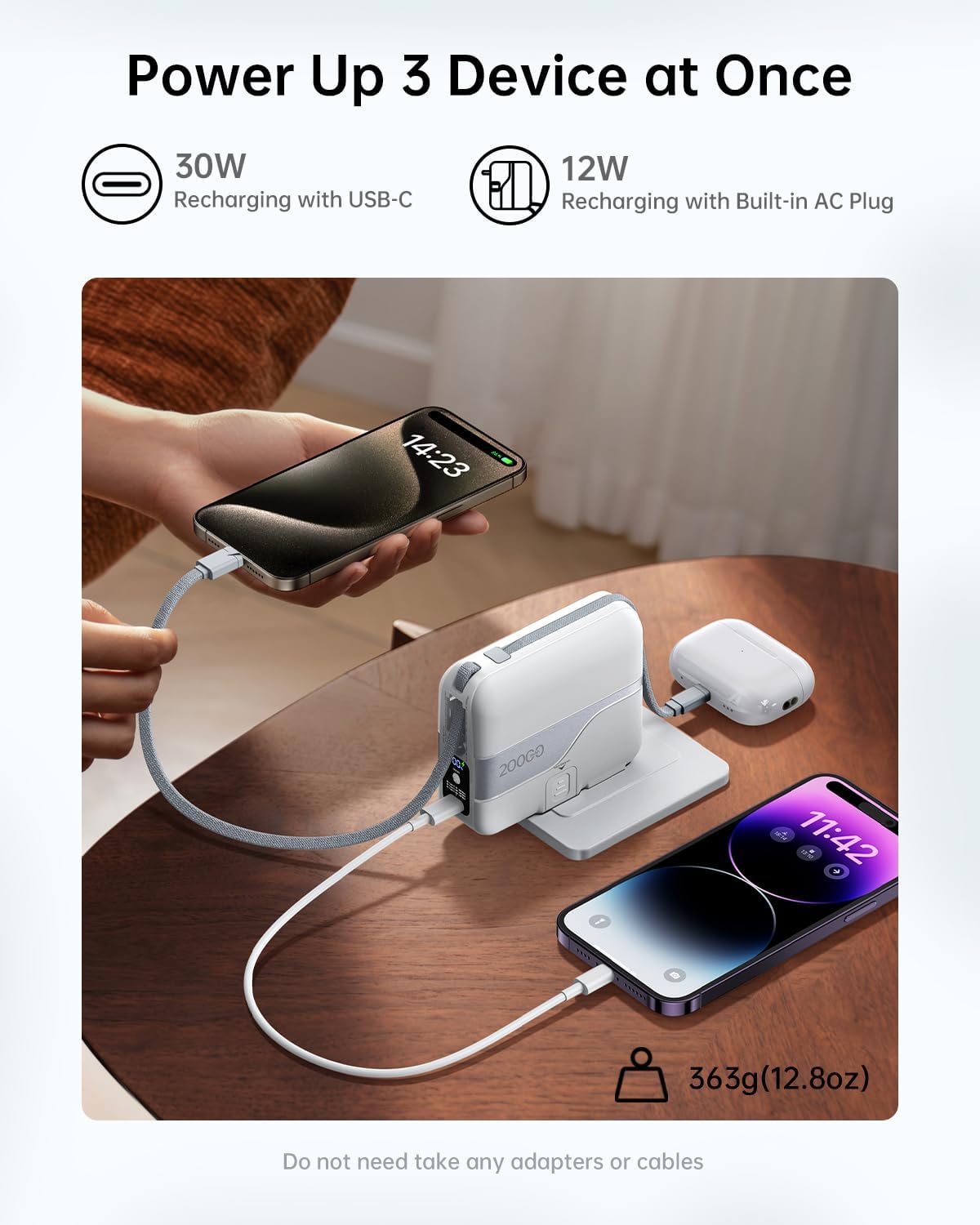
- Using Built-in USB-C Cable:
- Pull out the built-in USB-C cable.
- Connect it to your USB-C compatible device (e.g., iPhone 15/16 series, iPad Air/Pro, MacBook Air, Samsung Galaxy S24 Ultra, AirPods 4/Pro2 Series).
- Charging will begin automatically. The digital display will show the power bank's remaining charge.
- Using Built-in Lightning Cable:
- Pull out the built-in Lightning cable.
- Connect it to your Lightning compatible device (e.g., iPhone 11-14 series, AirPods Pro/3/2/1 Series).
- Charging will begin automatically.
- Using the USB-C Port:
- Connect your device's USB-C charging cable (not included) to the power bank's USB-C port.
- Connect the other end to your USB-C compatible device.
- Charging will begin automatically.
The power bank features 35W max output via the Type-C cable/port and 27W max output via the Lightning cable for fast charging.

5.2 Pass-through Charging
The power bank supports pass-through charging, allowing you to charge your devices while the power bank itself is being recharged from a wall outlet.

5.3 Using the Built-in Phone Stand
To use the phone stand:
- Locate the retractable kickstand on the side of the power bank.
- Pull out the kickstand in two steps until it is fully extended.
- Place your smartphone or small tablet on the stand for hands-free viewing while charging.

6. Safety Information
To ensure safe operation and prolong the life of your power bank, please observe the following safety guidelines:
- Do not expose the power bank to extreme temperatures (above 60°C/140°F or below 0°C/32°F), direct sunlight, or fire.
- Avoid dropping, impacting, or disassembling the device.
- Keep away from water, moisture, and corrosive materials.
- Do not use if the power bank is damaged, swollen, or leaking.
- Keep out of reach of children.
- Dispose of the power bank responsibly according to local regulations.
- The power bank features W&P 10-Level Safety Protection including overdischarge, cell overcurrent, short-circuit, cell overvoltage, overcharge, overcurrent, reset, overvoltage, overpower, and overtemperature protection.
- Equipped with a GLP3.0 Cold Zone Chip for real-time temperature monitoring (500 times per second) to prevent overheating.


7. Specifications
| Problem | Possible Cause | Solution |
|---|---|---|
| Power bank not charging devices. |
|
|
| Power bank not recharging. |
|
|
| Slow charging speed. |
|
|
| Digital display not working. |
|
|

8. Troubleshooting
| Problem | Possible Cause | Solution |
|---|---|---|
| Power bank not charging devices. |
|
|
| Power bank not recharging. |
|
|
| Slow charging speed. |
|
|
| Digital display not working. |
|
|
9. Maintenance
- Cleaning: Use a soft, dry cloth to clean the power bank. Do not use liquid cleaners or aerosols.
- Storage: Store the power bank in a cool, dry place away from direct sunlight and extreme temperatures. For long-term storage, charge the power bank to approximately 50-75% every 3-6 months to maintain battery health.
- Cable Care: Avoid sharp bends or excessive pulling on the built-in cables to prevent damage. The military-grade nylon cables are designed for durability (10,000+ bends).

10. Warranty and Support
W&P products come with a standard manufacturer's warranty. For specific warranty details, technical support, or customer service inquiries, please refer to the contact information provided on the product packaging or visit the official W&P website.
Please retain your proof of purchase for warranty claims.
Ask a question about this manual
Ask about setup, troubleshooting, compatibility, parts, safety, or missing instructions. Manuals+ will review the question and use this page’s manual context to help answer it.