
Introduction
This manual provides detailed instructions for the safe and efficient operation, installation, and maintenance of your Himarine Jebao DCS-5000 Submersible Water Pump. Please read this manual thoroughly before use and retain it for future reference.
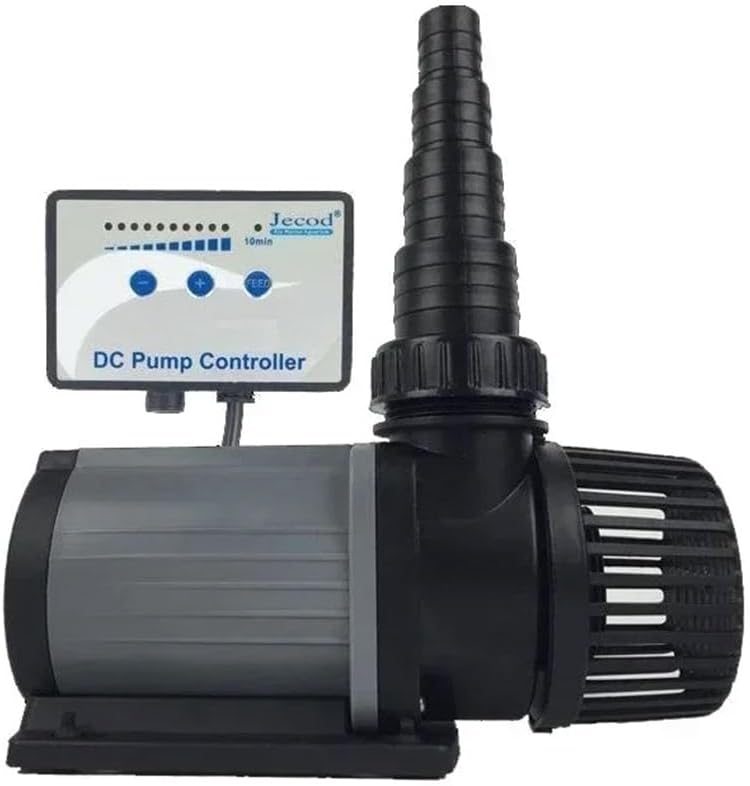
Image: Himarine Jebao DCS-5000 Submersible Water Pump with its DC controller. The pump features a black and gray housing with a protective intake screen, and the controller has buttons for flow adjustment and feed mode.
Safety Instructions
- Always disconnect power before performing any maintenance or installation.
- Ensure the pump is fully submerged when operating in submersible mode to prevent overheating.
- Do not operate the pump dry.
- Check the power cord for damage before each use. Do not use if damaged.
- This pump is designed for fresh and saltwater aquariums and water features. Do not use with flammable or corrosive liquids.
- Keep the controller dry and away from water splashes.
- Ensure all connections are secure to prevent leaks.
Package Contents
Verify that all items are present in the package:
- DCS-5000 Submersible Water Pump
- DC Pump Controller
- Hose Adapters (20mm, 25mm, 32mm, 38mm) - two of each size
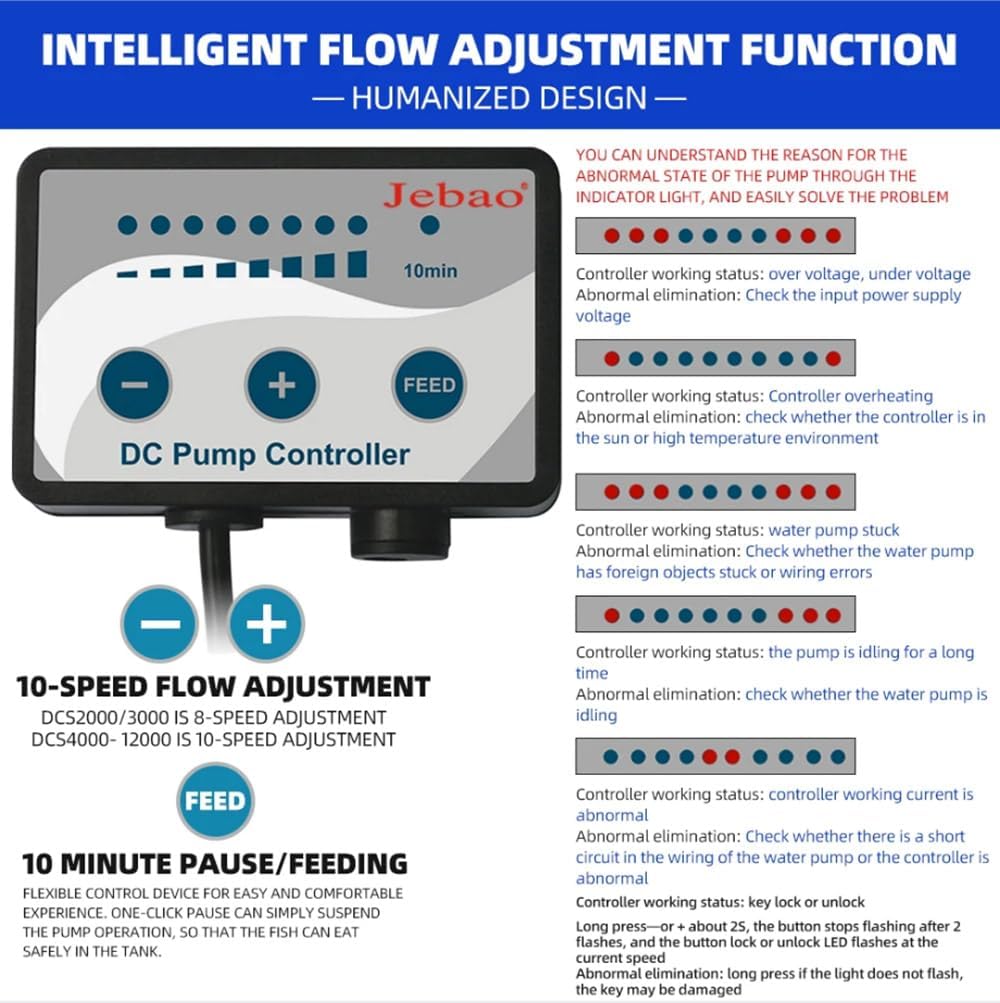
Image: Diagram showing the dimensions of the DCS-5000 pump (160mm length, 90mm width, 120mm height) and the included hose adapters (20mm, 25mm, 32mm, 38mm) with two of each size, along with two 48mm caps.
Product Features
- Powerful Performance: 40-watt DC submersible pump with a maximum flow rate of 5000 L/H (1320 GPH) and a maximum head of 3.5 meters.
- Adjustable Flow Rate: Included DC pump controller allows for 10-speed flow adjustment.
- Feed Mode: One-click pause function for 10 minutes to facilitate feeding or maintenance.
- Versatile Installation: Suitable for both submersible and external applications.
- Multiple Adapters: Comes with various hose adapters (20mm, 25mm, 32mm, 38mm) for broad compatibility.
Specifications
| Specification | Value |
|---|---|
| Model | DCS-5000 |
| Voltage | DC 24V |
| Power | 40 Watts |
| Max Flow Rate (Q max.) | 5000 L/H (1320 GPH) |
| Max Head (H max.) | 3.5 meters |
| Inlet/Outlet Diameter | Ø20, 25, 32, 38 mm |
| Product Dimensions (L x W x H) | 160mm x 90mm x 120mm (6.3"L x 3.5"W x 4.7"H) |
| Material | Plastic |
| Color | Black/Gray |
Setup Instructions
- Unpack Components: Carefully remove all items from the packaging and verify against the "Package Contents" section.
- Attach Hose Adapter: Select the appropriate hose adapter (20mm, 25mm, 32mm, or 38mm) for your tubing. Screw the adapter onto the pump's outlet. Ensure a tight seal to prevent leaks.

Image: Side view of the DCS-5000 pump, highlighting the threaded outlet where hose adapters are attached.
- Placement:
- Submersible Use: Place the pump entirely underwater in your aquarium or water feature. Ensure it is stable and not obstructed.
- External Use: Position the pump on a stable, level surface outside the water. Ensure the inlet is connected to the water source and the outlet to the return line. The pump must be primed before starting in external applications.
- Connect Controller: Plug the pump's power cable into the DC Pump Controller.
- Connect Power: Plug the DC Pump Controller's power adapter into a suitable electrical outlet.
- Initial Check: Once connected, the pump should start operating. Check for any leaks or unusual noises.
Operating Instructions

Image: The DC Pump Controller interface, showing the 10-speed flow adjustment buttons ('-' and '+') and the 'FEED' button for a 10-minute pause. Indicator lights display the current flow setting and potential error states.
- Power On/Off: The pump will start automatically when connected to power. To turn off, disconnect from the power outlet.
- Adjusting Flow Rate:
- Use the '+' button to increase the flow rate.
- Use the '-' button to decrease the flow rate.
- The controller features 10-speed adjustments. The indicator lights on the controller will show the current speed setting.
- Feed Mode (10-Minute Pause):
- Press the 'FEED' button to activate a 10-minute pause. This is useful for feeding fish or performing minor maintenance without fully shutting down the pump.
- After 10 minutes, the pump will automatically resume its previous operating speed.
- To exit feed mode manually before 10 minutes, press the 'FEED' button again.
Maintenance
Regular maintenance ensures optimal performance and extends the lifespan of your pump.
- Disconnect Power: Always unplug the pump from the power source before any maintenance.
- Clean Intake Screen: Periodically remove any debris, algae, or foreign matter from the pump's intake screen. This prevents blockages and maintains flow.
- Clean Impeller:
- Carefully remove the front cover of the pump to access the impeller chamber.
- Remove the impeller and clean it thoroughly with a soft brush under running water. Remove any accumulated debris or mineral deposits.
- Clean the impeller chamber and shaft.
- Reassemble the impeller and front cover, ensuring all parts are securely in place.
- Check Connections: Regularly inspect all hose connections and power cables for wear, damage, or leaks.
Troubleshooting
Refer to the following table for common issues and their solutions. The controller's indicator lights can also provide diagnostic information.
| Problem | Possible Cause | Solution |
|---|---|---|
| Pump not running / No flow | No power; Blocked impeller; Airlock (external use); Damaged pump/controller. | Check power connection; Clean impeller; Prime pump (external); Contact support if damaged. |
| Reduced flow rate | Clogged intake screen; Partially blocked impeller; Incorrect flow setting. | Clean intake screen; Clean impeller; Adjust flow rate using controller. |
| Unusual noise/vibration | Debris in impeller; Impeller worn or damaged; Pump not stable. | Clean impeller; Inspect impeller for damage (replace if necessary); Secure pump placement. |
| Controller indicator lights flashing (e.g., all lights, specific patterns) | Over voltage/Under voltage: Input power supply voltage issue. Overheating: Controller in sun/high temperature. Water pump stuck: Foreign objects or wiring errors. Pump idling: Pump running without water for too long. Controller working current abnormal: Short circuit in wiring or controller. Key lock/unlock: Long press '+' or '-' for 2 seconds. | Check power supply; Relocate controller; Check pump for obstructions/wiring; Ensure pump is submerged; Check wiring/controller; Unlock controller. |
Warranty and Support
For warranty information or technical support, please refer to the product packaging or contact Himarine customer service directly. Keep your purchase receipt as proof of purchase.
For further assistance, please visit the Himarine Store on Amazon.