
quakadjs 5500-135M
Product Instruction Manual
For the quakadjs 5500-135M Compatible with Robertshaw Commercial Cooking 120V Infinite Switch Kit
Introduction
This manual provides detailed instructions for the installation, operation, maintenance, and troubleshooting of the quakadjs 5500-135M Compatible with Robertshaw Commercial Cooking 120V Infinite Switch Kit. Please read this manual thoroughly before installation and operation to ensure proper function and safety.
This infinite switch is designed for commercial cooking applications, providing variable heat control for heating elements.
Safety Information
WARNING: Disconnect power before servicing. Installation should be performed by a qualified technician in accordance with all local and national electrical codes.
Failure to follow these instructions could result in electrical shock, fire, or personal injury.
- Always wear appropriate personal protective equipment (PPE) during installation and maintenance.
- Ensure the power supply matches the voltage rating of the switch (120V AC).
- Do not operate the switch if it is damaged.
- Keep children and pets away from the appliance during installation and operation.
Kit Components
The quakadjs 5500-135M kit includes the following components:
- Infinite Switch Module (5500-135M)
- Control Dial
- Mounting Hardware (nut, bracket, screws)
- Wiring Harnesses (2)
- Shaft Adapter (yellow)
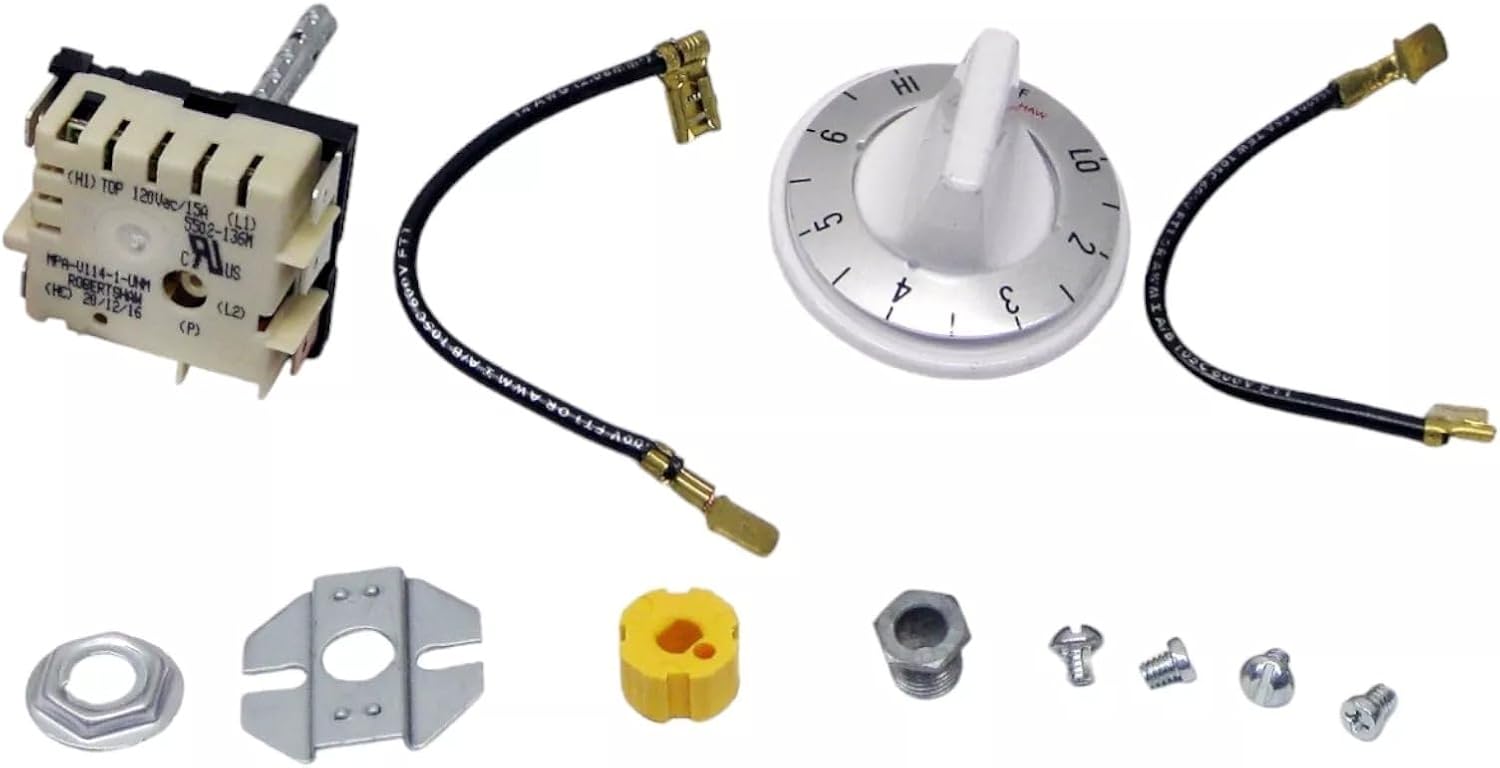
Figure 1: Overview of all components included in the 5500-135M Infinite Switch Kit.
Setup and Installation
This section outlines the steps for installing the infinite switch. Ensure all safety precautions are followed.
- Power Disconnection: Before beginning any work, ensure the power supply to the appliance is completely disconnected at the circuit breaker or fuse box. Verify with a voltage tester.
- Access the Existing Switch: Locate and access the existing infinite switch within the commercial cooking appliance. This may involve removing control panels or access covers.
- Document Wiring: Carefully note or photograph the wiring connections to the old switch. Pay attention to terminal markings (e.g., L1, L2, H1, H2, P).
- Remove Old Switch: Disconnect all wires from the old switch and remove any mounting hardware securing it.
- Install New Switch Module:
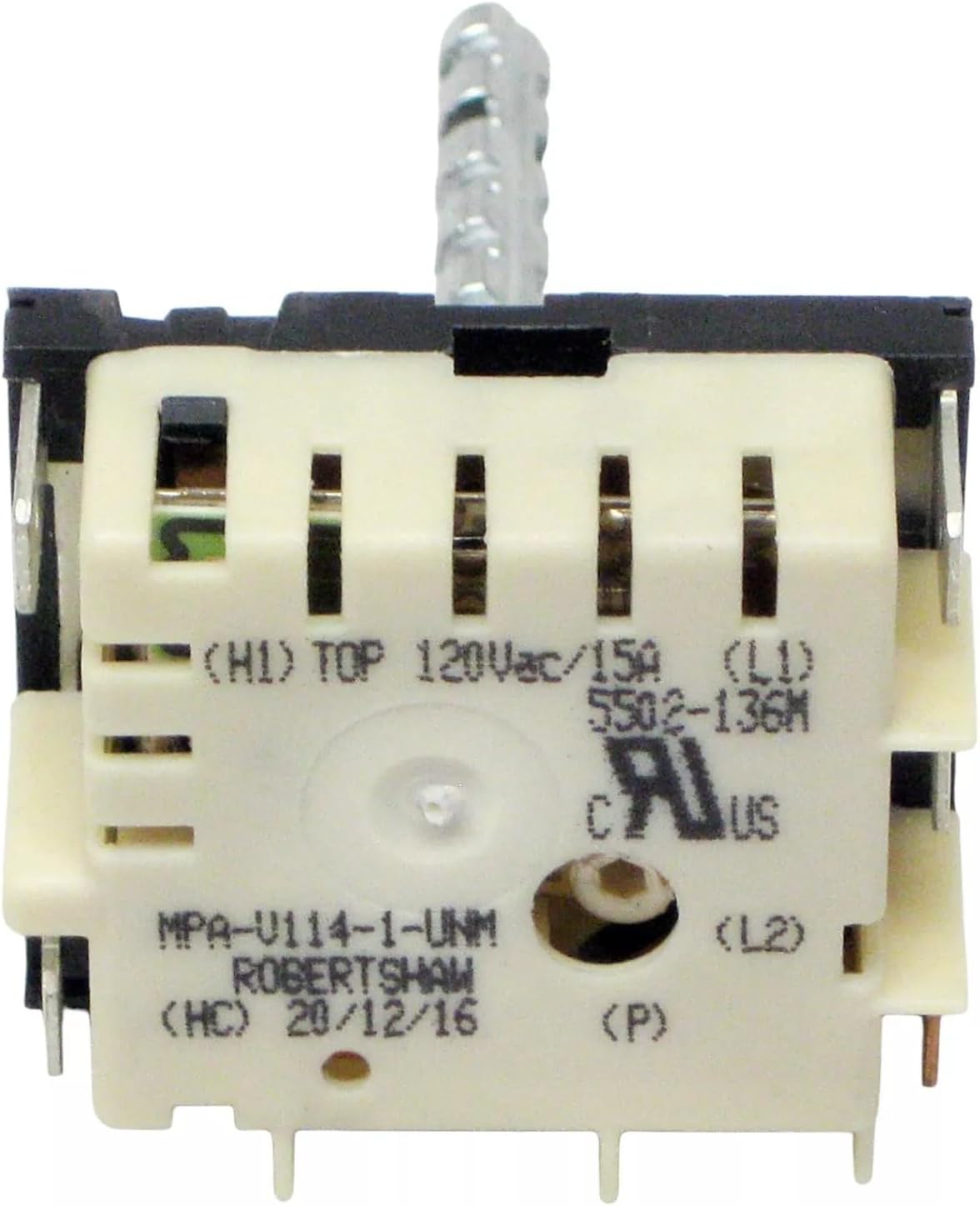
Figure 2: Front view of the Infinite Switch Module.
Position the new 5500-135M infinite switch module in the appliance's control panel opening. Secure it using the provided mounting nut and bracket. Ensure the shaft is properly aligned.

Figure 3: Top view of the Infinite Switch Module with stem.

Figure 4: Mounting hardware components.
- Wire Connections: Connect the wires to the new switch according to the documentation from step 3. Use the provided wiring harnesses if necessary. Ensure all connections are secure and properly insulated.

Figure 5: Control dial and wiring harnesses.
- Install Control Dial: If applicable, attach the yellow shaft adapter to the switch stem, then push the control dial onto the stem until it is firmly seated and aligned with the control panel markings.
- Reassemble Appliance: Replace any removed control panels or access covers.
- Restore Power: Carefully restore power to the appliance at the circuit breaker or fuse box.
Operating Instructions
The 5500-135M infinite switch provides variable heat control for commercial cooking elements. Operation is straightforward:
- Power On: Ensure the appliance is connected to a 120V AC power source and the main power is on.
- Adjust Heat: Rotate the control dial to the desired heat setting. The dial typically ranges from 'LO' (low heat) to 'HI' (high heat), with intermediate numerical settings (e.g., 1-6).
- Monitor Heating: Observe the heating element to ensure it is functioning as expected. The infinite switch continuously cycles power to the element to maintain the selected heat level.
- Power Off: To turn off the heating element, rotate the control dial to the 'OFF' position.
Note: The specific temperature range controlled by the dial is dependent on the appliance's design and the heating element it controls. This switch has a maximum control temperature of 250 degrees Fahrenheit.
Maintenance
The 5500-135M infinite switch is designed for durability and requires minimal maintenance. However, periodic checks can help ensure its longevity and proper function.
- Power Disconnection: Always disconnect power to the appliance before performing any maintenance.
- Visual Inspection: Periodically inspect the switch and its wiring for any signs of wear, damage, or loose connections. Look for discoloration, frayed wires, or corrosion.
- Cleaning: If the switch or surrounding area becomes dirty, gently wipe it with a dry, clean cloth. Do not use liquid cleaners directly on the switch.
- Connection Check: Ensure all electrical connections remain tight and secure.
- Replacement: If the switch shows signs of damage or malfunction, it should be replaced by a qualified technician.
Troubleshooting
This section provides solutions to common issues you might encounter with the infinite switch.
| Problem | Possible Cause | Solution |
|---|---|---|
| Heating element does not turn on. |
|
|
| Heating element stays on or does not turn off. |
|
|
| Inconsistent heat control. |
|
|
If troubleshooting steps do not resolve the issue, contact a qualified appliance technician for assistance.
Specifications
Key technical specifications for the quakadjs 5500-135M Infinite Switch Kit:
| Feature | Detail |
|---|---|
| Product Type | Infinite Switch |
| Model Number | 5500-135M |
| Input Voltage | 120V AC |
| Compatible Brands | Robertshaw, Consolidated Communications, Uni-Line |
| OEM Replacement Part Numbers | 23715, 5500-135, IK-104, INF-120-1152, INF-120-799, MPA-V114-1-UNM |
| Stem Length | 2 inches |
| Dial Range | 2 to 6 (typically LO to HI) |
| Maximum Control Temperature | 250 Degrees F |
| Manufacturer | quakadjs |
| Item Weight | 1 pound |
| Origin | Made in Mexico |
Warranty Information
This product is sold as a replacement part. Specific warranty terms are typically provided by the seller or the original equipment manufacturer (OEM) of the appliance it is installed in. Please refer to your purchase documentation or contact the seller for details regarding any applicable warranty.
Protection plans may be available for purchase separately. For details on protection plans, please refer to the product listing where this item was acquired.
Customer Support
For technical assistance, questions regarding installation, or troubleshooting beyond the scope of this manual, please contact the seller or a qualified appliance repair professional.
When contacting support, please have the following information ready:
- Product Model Number: 5500-135M
- Date of Purchase
- Description of the issue