
Introduction
This manual provides detailed instructions for the installation and operation of your RONGJI Car Stereo system, designed specifically for Buick Encore and Opel Mokka models from 2012 to 2016. This unit features a 9-inch IPS touch screen, Android OS, and includes functionalities such as Car-Play, Android Auto, GPS navigation, Bluetooth, FM radio, and steering wheel control. Please read this manual thoroughly before installation and use to ensure proper function and safety.
Vehicle Compatibility
This car stereo is compatible with Buick Encore and Opel Mokka vehicles manufactured between 2012 and 2016. Before installation, it is crucial to compare your vehicle's dashboard with the product images provided to ensure proper fitment. If you are uncertain about compatibility, please contact customer support with clear photos of your vehicle's dashboard and the back of your original OEM radio for verification.
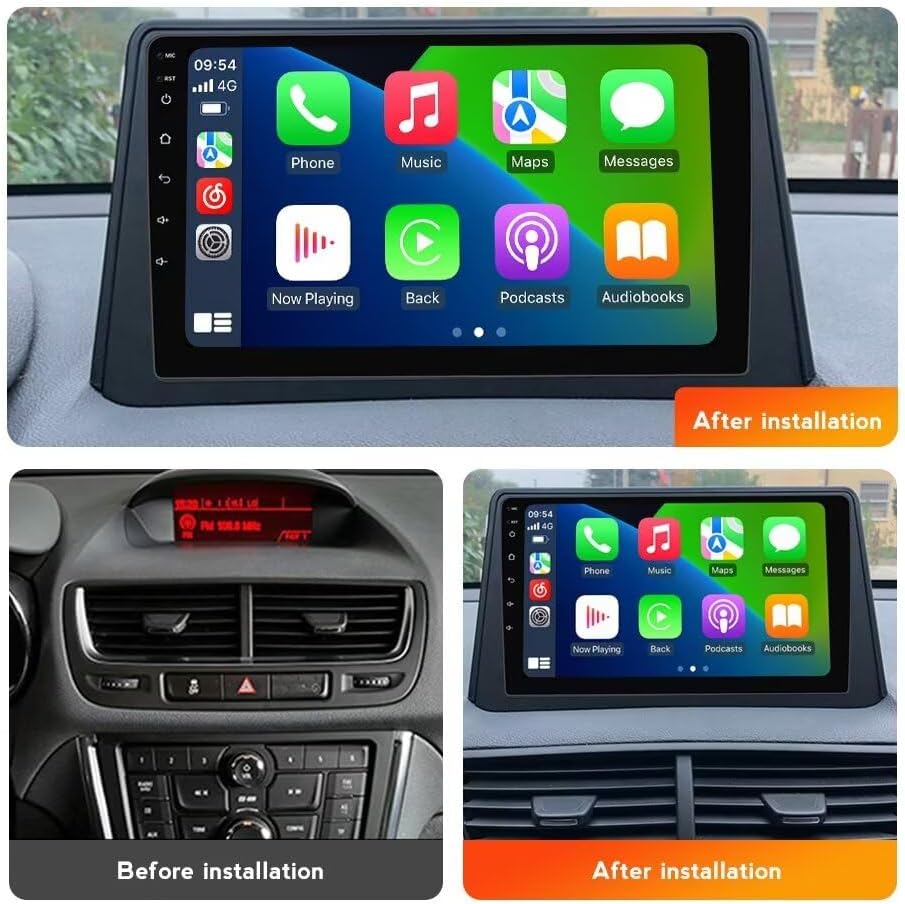
Figure 1: Comparison of dashboard before and after RONGJI car stereo installation.
Package Contents
Verify that all components listed below are included in your package:
- Main Head Unit (Machine)
- Power Cable + Canbus Box
- RCA Cable
- Reversing Camera
- USB Cable
- Microphone (MIC)
- GPS Antenna

Figure 2: All components included in the RONGJI car stereo package.
Setup and Installation
The RONGJI Car Stereo is designed for a plug-and-play installation process. While the kit includes everything necessary for installation, professional installation is recommended if you are unfamiliar with car electronics or wiring.
- Preparation: Disconnect the vehicle's battery before beginning any electrical work.
- Remove OEM Radio: Carefully remove your vehicle's existing radio and dashboard trim.
- Connect Wiring: Connect the provided power cable and Canbus box to the vehicle's harness. Ensure all connections are secure.
- Connect Peripherals: Attach the GPS antenna, USB cable, microphone, RCA cables, and reversing camera (if applicable) to their respective ports on the new head unit.
- Test Functionality: Before fully reassembling the dashboard, temporarily connect the battery and test the stereo's basic functions (power, audio, touch screen).
- Secure Installation: Mount the new head unit into the dashboard opening and reassemble all trim pieces.
- Final Check: Reconnect the battery and perform a comprehensive test of all features, including Car-Play, Android Auto, GPS, Bluetooth, and FM radio.
Figure 3: RONGJI car stereo after successful installation.
Operating Instructions
General Operation
The unit features a 9-inch IPS capacitive touch screen with a resolution of 1280x720 pixels, offering a clear and responsive visual experience. The Android OS provides an intuitive interface for navigating applications and settings.
Car-Play & Android Auto
The car stereo includes built-in Car-Play and Android Auto functionality, supporting both wireless and wired connections. This allows seamless integration with your smartphone, providing access to calls, music, navigation, and other compatible applications directly on the stereo display. This feature enhances driving safety and convenience by minimizing phone distractions.

Figure 4: Car-Play and Android Auto interfaces.
GPS Navigation
The unit has a built-in GPS module and includes an external GPS antenna for accurate positioning. It supports online and offline map navigation, ensuring reliable guidance even in areas without mobile signal. The system supports GPS, GLONASS, and BDS for global positioning, providing comprehensive coverage.

Figure 5: GPS navigation and accurate positioning.
Bluetooth Functionality
The built-in Bluetooth supports hands-free calling, phonebook synchronization, and audio streaming. An integrated microphone ensures clear call quality during conversations. You can easily manage calls, access your contacts, and play music from your connected mobile device.

Figure 6: Bluetooth call and music functions.
FM Radio
The FM radio features high-quality stereo reception and RDS (Radio Data System). It supports both automatic and manual station searching, allowing you to easily find and save your preferred radio channels. Enjoy clear audio quality for news, music, and talk shows.
Figure 7: FM RDS Radio interface.
Steering Wheel Control (SWC)
The unit supports steering wheel control (SWC) functions, allowing you to manage music playback (e.g., changing tracks, adjusting volume) and answer calls directly from your steering wheel buttons. This feature requires a digital SWC connection and helps maintain focus on the road, enhancing safety.

Figure 8: Steering Wheel Control functionality.
Wi-Fi and Split Screen Function
A built-in 5G Wi-Fi receiver allows connection to Wi-Fi networks and mobile hotspots. This enables downloading applications, online navigation, and streaming content. The split-screen function allows two applications to be displayed simultaneously on the 9-inch screen, such as navigation and music playback, for enhanced multitasking.
Figure 9: Split-screen functionality with map and music.
Troubleshooting
If you encounter issues with your RONGJI Car Stereo, please refer to the following common troubleshooting steps:
- No Power: Check all power connections and fuses. Ensure the vehicle's ignition is on.
- No Sound: Verify speaker connections. Check volume settings and ensure mute is not active.
- GPS Signal Loss: Ensure the external GPS antenna is properly installed and has a clear view of the sky.
- Bluetooth Pairing Issues: Ensure Bluetooth is enabled on both the stereo and your mobile device. Delete previous pairings and try again.
- Touch Screen Unresponsive: Try restarting the unit by pressing and holding the power button. If the issue persists, contact customer support.
For further assistance, please contact RONGJI customer support.
Specifications
| Feature | Specification |
|---|---|
| Brand | RONGJI |
| Model Name | Car Stereo for Buick Encore Opel Mokka 2012-2016 |
| Display Size | 9 Inches |
| Screen Resolution | 1280x720 IPS |
| Operating System | Android OS |
| CPU | 4 Core |
| RAM | 2GB |
| ROM | 32GB |
| Connectivity Technology | Bluetooth, Wi-Fi |
| Special Features | Touchscreen, Car-Play, Android Auto, GPS Navigation, Steering Wheel Control, Split Screen |
| Map Type | Worldwide |
| Audio Output Mode | Stereo |
| Mounting Type | Dashboard Mount |
| Included Components | External GPS Antenna, Car Dash Cam (Note: Dash Cam may be an optional accessory or included in specific packages) |
Warranty and Support
For product support, technical assistance, or warranty inquiries, please visit the official RONGJI store on Amazon or contact their customer service directly. Information regarding product warranties and available protection plans can typically be found on the product's purchase page or by contacting the seller.