
1. Introduction
This manual provides detailed instructions for the proper use and maintenance of your NEEWER 16 Pro Max Cage. Designed for the iPhone 16 Pro Max, this video rig enhances mobile photography and filmmaking capabilities by providing secure mounting points for various accessories and lens adapters.

Image 1.1: NEEWER 16 Pro Max Cage components.
2. Key Features
- iPhone 16 Pro Max Compatibility: Specifically designed for the iPhone 16 Pro Max, ensuring full access to camera, charging port, and function buttons.
- Quick Release Installation: Features a side button for quick and secure phone installation and removal.
- 67mm Filter Adapter: Integrated snap-on adapter for attaching 67mm threaded filters (sold separately).
- 17mm Threaded Lens Backplate: Allows mounting of 17mm threaded phone attachment lenses (sold separately) to the main and telephoto cameras.
- T Mount Lens Backplate Adapter: Compatible with Moment T Series mobile lenses (sold separately).
- Multiple Accessory Mounting Points: Equipped with 1/4" threads and cold shoes for attaching handles, lights, microphones, and tripods.
- MagSafe Compatibility: Hollow back design supports MagSafe wireless charging and accessories.
- Durable Construction: Solid aluminum alloy frame with shock-absorbing rubber cushions for reliable phone protection.
3. Setup
3.1 Installing Your iPhone 16 Pro Max
- Locate the quick-release side button on the cage.
- Press the button to open the cage. The top section will pivot open.
- Carefully insert your iPhone 16 Pro Max into the cage, ensuring it seats properly within the rubber cushions.
- Close the cage until it locks securely with an audible click. Verify that the phone is firmly held and all ports/buttons are accessible.

Image 3.1: Quick and easy phone installation.
3.2 Attaching Lens Backplates and Filter Adapter
The cage comes with three interchangeable backplates: a 67mm filter adapter, a 17mm threaded lens backplate, and a T mount lens backplate. These snap onto the camera module area of the cage.
- Select the desired backplate (67mm filter, 17mm lens, or T mount lens).
- Align the chosen backplate with the camera module opening on the cage.
- Gently press the backplate until it snaps securely into place. Ensure it is flush and stable.
- To remove, gently pry the backplate off from one side.

Image 3.2: Multifunctional backplates for various lenses and filters.
4. Operating Instructions
4.1 Using the 67mm Filter Adapter
Once the 67mm filter adapter is attached to the cage, you can screw in any standard 67mm threaded filter (e.g., UV, CPL, ND, black diffusion, graduated color, star, blue streak filters) for creative effects.

Image 4.1: Attaching a 67mm filter to the adapter.
4.2 Using 17mm and T Mount Lens Backplates
After attaching the appropriate lens backplate (17mm or T mount), you can mount compatible external lenses. For 17mm backplates, attach NEEWER phone attachment lenses such as macro, fisheye, telephoto, or wide-angle lenses. For the T mount backplate, attach Moment T Series lenses.

Image 4.2: Mounting external lenses using the backplates.
4.3 Utilizing Accessory Mounting Points
The cage features multiple 1/4" threaded holes and cold shoe mounts on its sides and top. These allow for the attachment of various filmmaking accessories:
- 1/4" Threads: Use these to attach mini tripods, handles (e.g., PA026 Dual Side Handles, PS005E Side Handle), SSD holders (e.g., UA035 SSD Holder), or other gear with 1/4" screws.
- Cold Shoes: Mount LED video lights (e.g., PL81 RGB61 RGB62 Mini LED Video Light) or wireless lavalier microphone systems (e.g., CM22 CM28 Wireless Lavalier Microphone System).
- Quick Release Clamp Slots: Dedicated slots for quick release clamp-on side handles (e.g., PA045).
- Lanyard Eyelet: Attach a wrist strap or lanyard for added security.

Image 4.3: Overview of versatile mounting points.
4.4 Accessing Camera Controls
The cage includes a detachable rubber plug that covers the camera control area. Remove this plug to fully access and operate your iPhone's camera controls.

Image 4.4: Detachable rubber for camera control access.
5. Maintenance
- Cleaning: Use a soft, dry cloth to wipe the cage. For stubborn dirt, a slightly damp cloth can be used, followed by immediate drying. Avoid harsh chemicals or abrasive materials.
- Storage: Store the cage in a dry, dust-free environment when not in use. Keep it away from extreme temperatures and direct sunlight.
- Inspection: Periodically check all screws and connections to ensure they are secure.
6. Troubleshooting
- Phone not fitting correctly: Ensure your phone is an iPhone 16 Pro Max. Remove any existing phone cases before attempting to install the phone into the cage.
- Backplate not snapping into place: Verify correct alignment with the camera module. Apply gentle, even pressure. Ensure no debris is obstructing the connection points.
- Accessories not attaching securely: Confirm that accessories use standard 1/4" threads or fit cold shoe mounts. Tighten all screws firmly but do not overtighten.
7. Specifications
| Feature | Detail |
|---|---|
| Model Number | PA074 |
| Compatible Device | iPhone 16 Pro Max |
| Material | Aluminum Alloy, Rubber |
| Item Weight | 5 ounces (141.75 grams) |
| Package Dimensions | 7.28 x 4.06 x 0.79 inches |
| Filter Compatibility | 67mm threaded filters |
| Lens Compatibility | 17mm threaded lenses, Moment T Series lenses |
| Mounting Points | 1/4" threads, Cold Shoe mounts, Quick Release Clamp Slots |
| UPC | 191073092174 |
8. Package Contents
- 1 x NEEWER 16 Pro Max Cage
- 1 x 67mm Filter Backplate
- 1 x 17mm Threaded Lens Backplate
- 1 x T Mount Lens Backplate
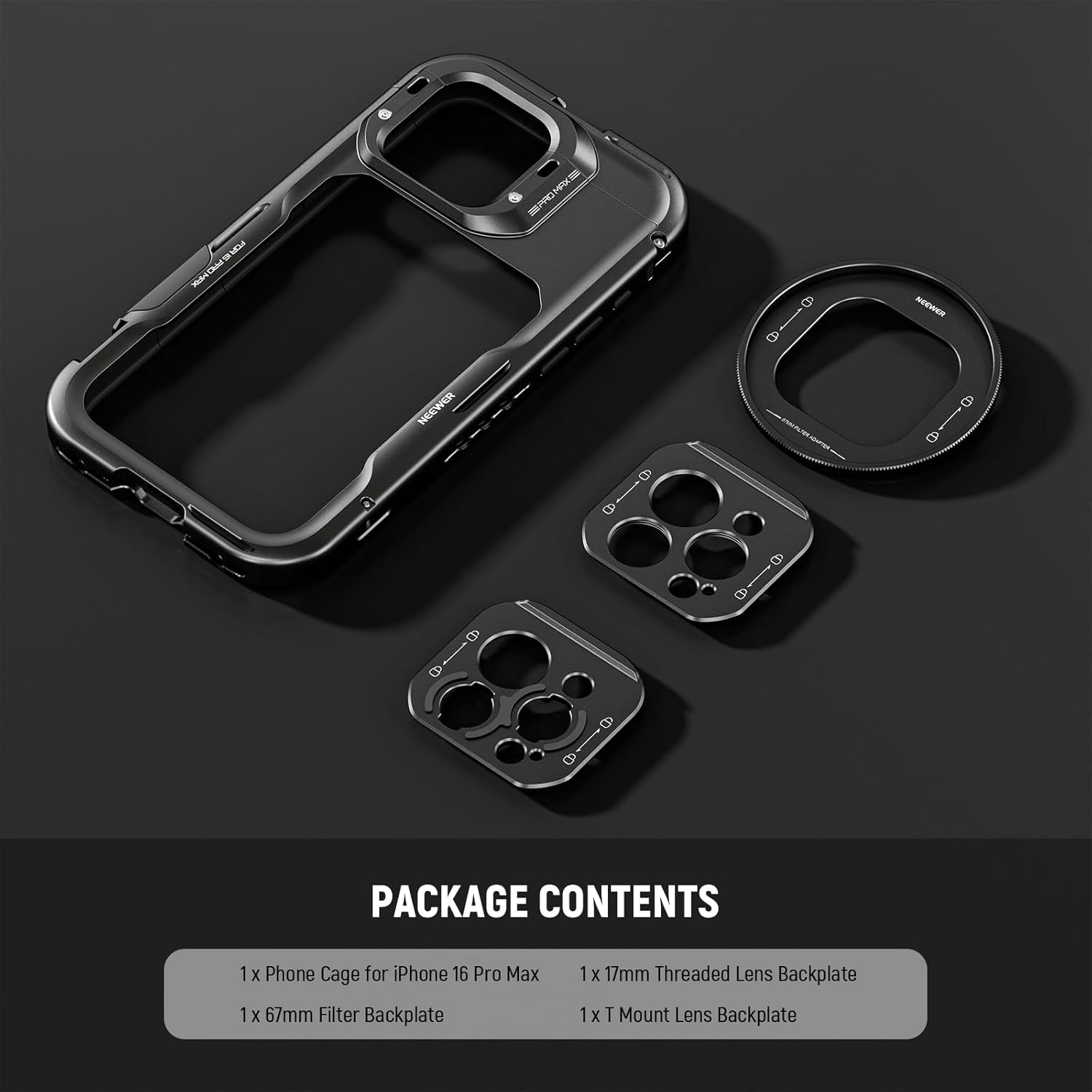
Image 8.1: Contents included in the package.
9. Warranty and Support
NEEWER products are covered by a limited warranty. For detailed warranty information, product support, or technical assistance, please visit the official NEEWER website or contact customer service through your retailer.
Official NEEWER Website: www.neewer.com