
1. Introduction
This manual provides detailed instructions for the installation, setup, operation, and maintenance of your MANSNIX Motorized Blackout Roller Shades. These shades offer 100% light blocking, remote control functionality, and can be powered by an included solar panel for energy efficiency. They are also compatible with smart home systems like Alexa and Google Home via an optional HUB.
2. Package Contents
Please verify that all components are present in your package:
- 1 x Motorized Roller Blind
- 1 x Solar Panel
- 1 x Single-Channel Remote Control
- 1 x Installation Kit (mounting hardware)
- 1 x Instruction Manual
3. Safety Information
For safe operation and to prevent injury, please observe the following:
- Ensure the installation is secure to prevent the blind from falling.
- Keep the remote control out of reach of children to prevent unintended operation.
- The cordless design of these blinds enhances safety for children and pets by eliminating hazardous cords.
- Do not attempt to manually force the blind up or down when the motor is engaged.
4. Installation
The motorized blinds can be installed using either an inside mount or an outside mount method. Refer to the measuring guide below to determine the appropriate mounting type and size for your window.
4.1 Measuring Guide

This guide provides clear diagrams and instructions for measuring your window for both inside mount and outside mount installations, ensuring a proper fit for your motorized blinds.
4.2 Mounting the Brackets
Use the provided installation kit to securely mount the brackets to your window frame or wall. For inside mounts, ensure the window depth is at least 2 or 4 inches. For outside mounts, position the brackets to allow for sufficient overlap around the window opening.
4.3 Attaching the Blind
Once the brackets are installed, carefully attach the motorized roller blind to the brackets. Ensure it clicks securely into place. The front panel of the blind helps to keep light out and provides a finished look.
Video: This video provides a visual guide on how to install the MANSNIX motorized blinds and demonstrates their operation using the remote control. It highlights the ease of installation and the smooth, quiet movement of the blinds.
5. Setup and Pairing
5.1 Remote Control Pairing
The single-channel remote control allows for easy operation of your blinds. To pair the remote with your blind, follow the instructions provided in the remote control's specific manual. An optional 15-channel remote is available for controlling multiple blinds simultaneously.

This image illustrates the single-channel remote control and the optional 15-channel remote, which can manage up to 15 blinds from a single device.
5.2 Smart Home Integration (Optional)
For enhanced convenience, these motorized blinds are compatible with mobile apps and smart assistant devices such as Alexa and Google Home. This functionality requires an optional HUB accessory.
- App Control: Set the blinds to rise or fall at fixed times via the Tuya app or other mobile phone settings.
- Voice Control: Use voice commands with Alexa or Google Home for hands-free operation.

This image illustrates the smart control capabilities, showing how blinds can be operated via a mobile app or voice commands through smart assistants like Alexa, with an optional HUB.
6. Operation
Operate your motorized blinds using the remote control or through smart home integration.
6.1 Remote Control Functions
- Up Button: Raises the blind.
- Down Button: Lowers the blind.
- Pause Button: Stops the blind at its current position.
You can pause the blind at any desired height to control light and privacy.
6.2 Setting Preferred Positions
The blinds can be programmed to stop at specific upper and lower limits, as well as a favorite intermediate position. Refer to the remote control manual for detailed instructions on setting these limits.
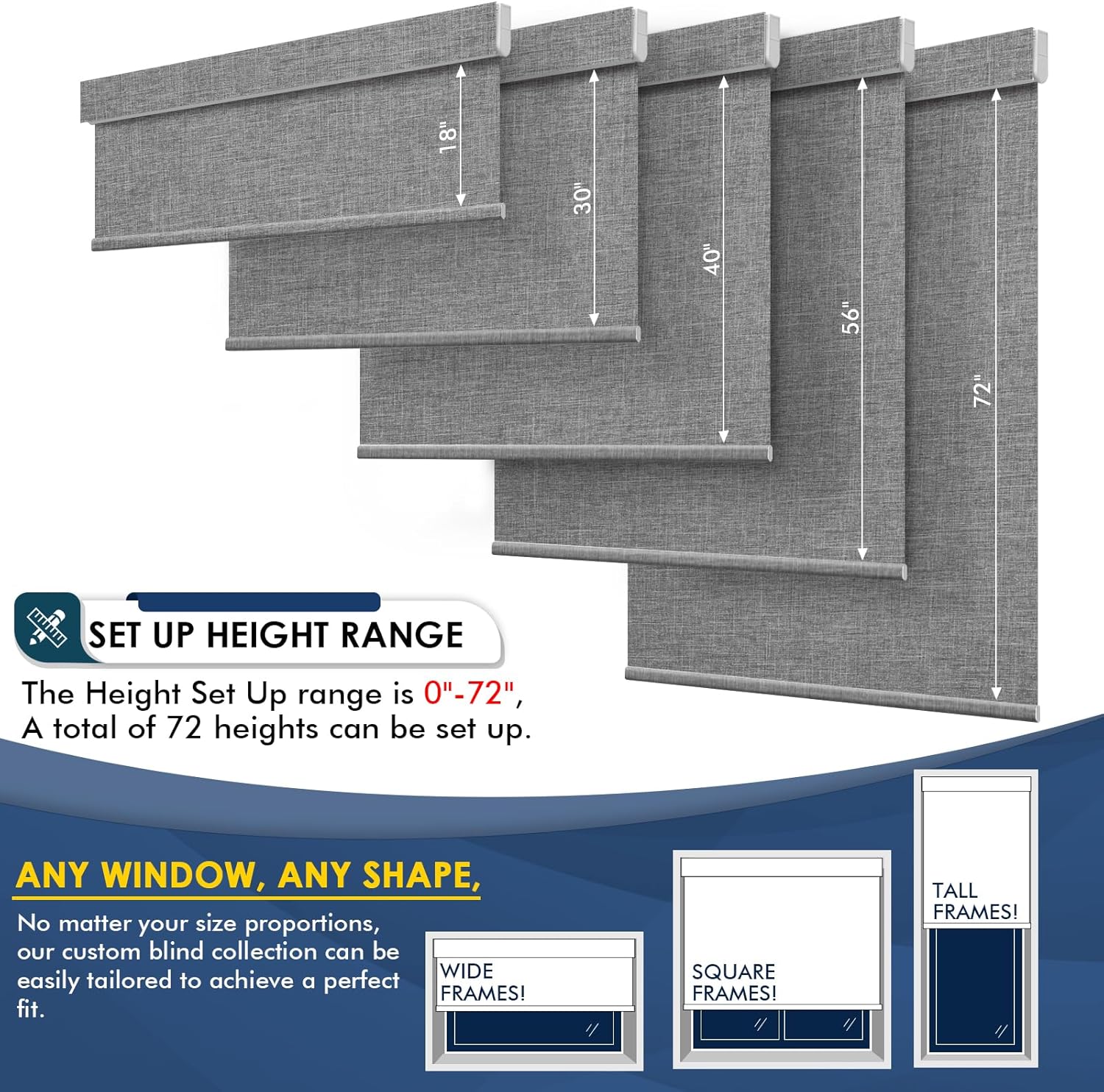
This image displays various blinds set at different heights, indicating that the height can be adjusted from 0 to 72 inches, offering 72 possible height settings for versatile window coverage.
7. Charging
The motorized blinds are powered by a rechargeable motor. Multiple charging options are available:
7.1 Solar Panel Charging
The included solar panel provides an eco-friendly and convenient way to charge your blinds. Attach the solar panel to the inside of your window where it receives direct sunlight. This reduces the need for frequent manual charging.

This image illustrates the solar panel connected to the motorized blind, demonstrating how it recharges the internal motor using sunlight. The solar panel is designed to be placed on the window for optimal charging.
7.2 Alternative Charging Methods
If solar charging is insufficient or unavailable, you can charge the motor using a USB plug or a power bank. A full charge typically takes 4-6 hours.
- Charge by USB Plug: Connect a USB cable (not included) to the motor and a standard USB power adapter (not included).
- Charge by Power Bank: Connect a USB cable (not included) to the motor and a power bank (not included).

This diagram illustrates the three available charging methods: via the solar panel (included), a USB plug (not included), or a power bank (not included).
8. Maintenance
To ensure the longevity and optimal performance of your MANSNIX Motorized Blackout Roller Shades, follow these simple maintenance guidelines:
- Cleaning: The fabric should be spot cleaned only. Use a soft, damp cloth with mild soap for any stains. Do not immerse the blind in water or use harsh chemicals.
- Motor Care: The motor is designed for durability. Avoid exposing it to excessive moisture or extreme temperatures.
- Solar Panel: Keep the solar panel clean and free of dust or obstructions to ensure efficient charging.

This image provides a close-up view of the blackout fabric, emphasizing its 100% blackout capability, UV protection, privacy features, and thermal insulation benefits.
9. Troubleshooting
If you encounter issues with your motorized blinds, refer to the following common solutions:
- Blind Not Moving: Check if the motor is charged. Ensure the remote control batteries are functional and that the remote is properly paired with the blind.
- Inconsistent Movement: The upper and lower limits may need to be reset. Refer to the remote control manual for instructions on recalibrating the blind's travel limits.
- Solar Panel Not Charging: Ensure the solar panel is clean and positioned to receive adequate sunlight. Verify the connection cable is securely attached to the motor.
- Smart Control Issues: Confirm that the optional HUB is properly connected and configured. Check your mobile app or smart assistant device settings for connectivity.
10. Specifications
| Brand | MANSNIX |
| Model Number | be69893a-27b6-4ec7-94b6-73db018cdcaf |
| Material | Polyester |
| Product Dimensions | 72"L x 46"W |
| Color | B-grey |
| Operation Mode | Automatic |
| Closure Type | Motorized |
| Mounting Type | Outside Mount (Inside Mount also possible) |
| Control Type | Motorized (Remote, App, Voice via optional HUB) |
| Motor Noise Level | Less than 35dB |
| Charging Time | 6-12 hours for 1500 operations (approx.) |
| Recommended Uses | Indoor (Bathroom, Bedroom, Home Office, Kids Room, Living Room) |
| Included Components | Mounting Hardware, Remote Control, Solar Panel |
| Product Care | Spot Clean Only |
11. Warranty and Support
MANSNIX provides a 2-year post-sales service for all electric blinds. If you encounter any issues or require assistance, please do not hesitate to contact MANSNIX customer support. Refer to your purchase documentation for specific contact details.


