
Introduction
This manual provides detailed instructions for the installation, operation, maintenance, and troubleshooting of your ducrew 52-inch Flush Mount Ceiling Fan with Lights and Remote/APP Control, Model 1271BK-52XL. Please read all instructions carefully before installation and use to ensure safe and efficient operation.

Image: The ducrew 52-inch flush mount ceiling fan installed in a modern bedroom, showcasing its sleek design, remote control, and smartphone app interface.
Setup and Installation
The ducrew 52-inch flush mount ceiling fan is designed for straightforward installation. For a visual guide, please refer to the official installation video provided below. Always ensure power is disconnected at the circuit breaker before beginning any electrical work.
Video: Official ducrew Ceiling Fan Installation Guide. This video demonstrates the step-by-step assembly and wiring process for the ceiling fan.
Assembly Steps:
- Unpack Components: Carefully remove all parts from the packaging. Verify all components are present against the packing list. (Refer to video 0:00-0:05)
- Attach Fan Blades: Secure each of the three fan blades to the motor housing using the provided screws. Ensure they are firmly attached. (Refer to video 0:06-0:58)
- Install LED Light Kit: Connect the LED light module to the fan's wiring and secure it to the central housing. (Refer to video 0:59-1:26)
- Mount to Ceiling: Attach the fan's mounting bracket to a secure ceiling junction box. Connect the fan's electrical wires to the household wiring (live, neutral, ground) and the receiver unit. (Refer to video 1:27-2:08)
- Final Securement: Ensure all connections are secure and the fan is properly mounted before restoring power.
For detailed wiring diagrams and specific screw types, consult the included printed instruction manual.
Operating Instructions
Your ducrew ceiling fan can be operated using the included remote control or a dedicated smartphone application.
Remote Control Functions:
- Power On/Off: Activates or deactivates the fan and light.
- Fan Speed: Select from 6 adjustable fan speeds.
- Light Control: Turn the LED light on/off, adjust brightness (25-100%), and change color temperature (Warm White 3000K, Natural Light 4500K, Cool White 6000K).
- Direction Control: Switch between forward (summer mode) and reverse (winter mode) rotation.
- Timer: Set the fan to turn off automatically after 1, 4, or 8 hours.

Image: Illustration of the fan's dual-direction functionality, showing upward airflow for Winter Mode to enhance circulation and downward airflow for Summer Mode to provide a cooling effect.
Smartphone APP Control:
The fan supports control via a mobile application. Scan the QR code provided in the product images or refer to the manual for download instructions. The app offers comprehensive control over fan speeds, light settings, and scheduling features.

Image: A smartphone displaying the fan control app interface next to a QR code for downloading the application. The app allows for remote control of fan settings.
Download the app from: https://www.jasonghost.com/fanlamppro/
Maintenance
Regular maintenance ensures the longevity and optimal performance of your ceiling fan.
- Cleaning: Dust the fan blades and motor housing periodically with a soft, damp cloth. Avoid using abrasive cleaners or solvents.
- Tighten Fasteners: Check all screws and fasteners annually to ensure they are secure. Loose connections can cause noise or wobble.
- Blade Balance: If the fan wobbles, check that the blades are clean and free of debris. Ensure all blades are securely attached.
- LED Light: The integrated LED light module is designed for long-term use and typically does not require replacement.
Warning: Always turn off the power at the circuit breaker before cleaning or performing any maintenance on your fan.
Troubleshooting
If you encounter issues with your ducrew ceiling fan, refer to the following common problems and solutions:
| Problem | Possible Cause | Solution |
|---|---|---|
| Fan does not operate | No power supply; loose wiring; remote control battery low. | Check circuit breaker; ensure all wires are securely connected; replace remote control battery. |
| Fan wobbles | Loose blade screws; unbalanced blades; improper mounting. | Tighten all blade screws; ensure blades are clean and free of debris; verify secure ceiling mounting. |
| Light does not work | Loose wiring; LED module issue. | Check light kit wiring connections; contact customer service if LED module is faulty. |
| Remote control not responding | Low battery; interference; remote not paired. | Replace remote battery; ensure no obstructions; re-pair remote if necessary (refer to manual for pairing instructions). |
| APP connection issues | Incorrect network settings; app not updated. | Ensure phone is connected to a stable Wi-Fi network; update the app to the latest version; restart the fan and app. |
If the problem persists after attempting these solutions, please contact ducrew customer service for further assistance.
Specifications
| Feature | Detail |
|---|---|
| Brand | ducrew |
| Model Name | 1271BK-52XL |
| Size | 52 inch |
| Color | Black |
| Product Dimensions | 52"D x 52"W x 10"H |
| Item Weight | 12.92 pounds |
| Number of Blades | 3 |
| Motor Type | DC Inverter Motor |
| Number of Power Levels | 6 Fan Speeds |
| Light Type | Integrated 15W Dimmable LED (1500 Lumens) |
| Light Color Temperature | 3CCT (3000K, 4500K, 6000K) |
| Light Brightness Adjustment | 25-100% |
| Control Method | Remote, App |
| Indoor/Outdoor Usage | Indoor, Outdoor (Moisture-proof) |
| Mounting Type | Ceiling Mount (Flush Mount) |
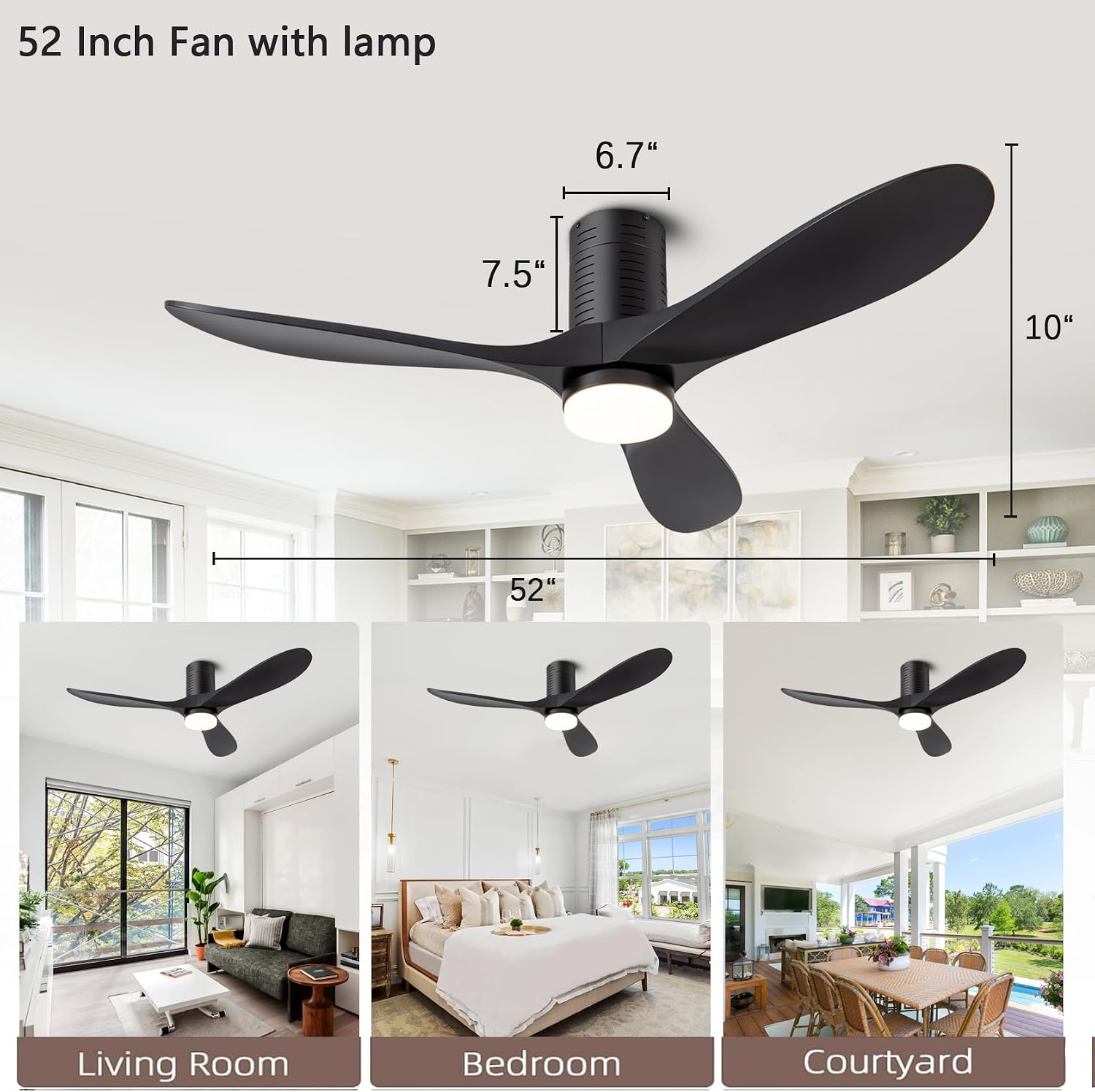
Image: Diagram showing the 52-inch fan dimensions (10" height, 6.7" canopy height, 7.5" motor height) and examples of suitable room types including Living Room, Bedroom, and Courtyard.
Warranty and Support
For any questions or concerns regarding your ducrew ceiling fan, please contact our customer service. Our team is available to provide assistance and will respond within 24 hours. To facilitate support, please locate your order and use the customer support button.
This product is designed for DIY installation. Detailed instructions and an installation video are provided to assist with the setup process.