Introduction
This manual provides comprehensive instructions for the safe and effective operation, maintenance, and troubleshooting of your Ironsten 120V 200W Portable Pulse Laser Cleaning Machine. This advanced system is designed for precise and non-damaging removal of rust, paint, and oxidation from various materials including wood, metal, and aluminum. Please read this manual thoroughly before operating the machine to ensure optimal performance and safety.
Safety Information
Operating a laser cleaning machine involves inherent risks. Adherence to all safety guidelines is paramount to prevent injury and damage to the equipment. Always prioritize safety.
- Eye Protection: Always wear certified laser safety goggles appropriate for the laser's wavelength and power. Never look directly into the laser beam or its reflection.
- Skin Protection: Avoid direct exposure of skin to the laser beam. Wear appropriate protective clothing if necessary.
- Ventilation: Ensure adequate ventilation in the work area to dissipate fumes and particles generated during cleaning. Some materials may produce hazardous byproducts when laser-cleaned.
- Flammable Materials: Keep flammable materials away from the laser cleaning area. The laser can generate heat and ignite combustible substances.
- Electrical Safety: Ensure the machine is properly grounded. Do not operate with wet hands or in damp environments. Disconnect power before performing any maintenance or inspection.
- Authorized Personnel: Only trained and authorized personnel should operate this equipment.
- Emergency Stop: Familiarize yourself with the location and operation of the emergency stop button.
What's in the Box
Upon unpacking, verify that all components are present and undamaged:
- 1 x Portable Pulse Laser Cleaning Machine Unit
- 1 x Scanning Head (Laser Gun)
- 1 x Chiller (Integrated or External, depending on model variant)
- 1 x Power Cable
- 1 x User Manual (This Document)
- Laser Safety Goggles (Recommended, may be sold separately)
Setup
Follow these steps for initial setup of your laser cleaning machine:
- Unpacking: Carefully remove the machine and all accessories from the packaging. Retain packaging for future transport or storage.
- Placement: Place the machine on a stable, level surface in a well-ventilated area. Ensure there is sufficient space around the unit for air circulation, especially near cooling vents.
- Connect Scanning Head: Connect the scanning head (laser gun) cable securely to the designated port on the main unit. Ensure the connection is firm to prevent signal loss or damage.
- Power Connection: Connect the power cable to the machine's power input and then to a grounded 110V AC power outlet. Ensure the power source meets the machine's requirements.
- Initial Inspection: Before powering on, visually inspect all cables and connections for any signs of damage or loose fittings.
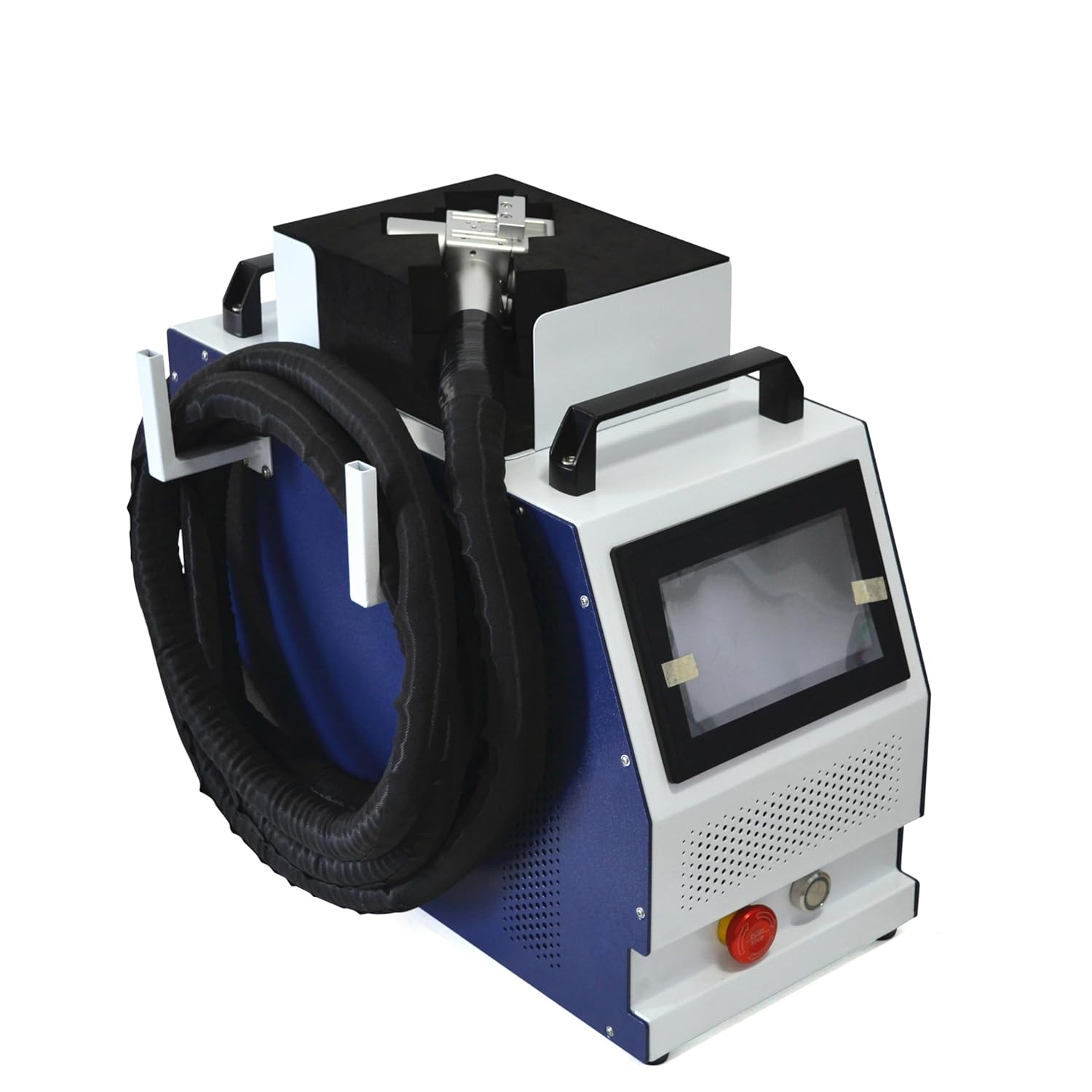
Figure 1: Front-side view of the Ironsten Portable Pulse Laser Cleaning Machine. Shows the main unit with the scanning head hose connected and wrapped around the side.

Figure 2: Side view of the laser cleaning machine, highlighting the cooling vents essential for proper operation.
Operating Instructions
This section details the general operation and specific applications of the laser cleaning machine.
General Operation
- Power On: Press the main power button. The display screen will illuminate.
- Parameter Settings: Use the control panel to adjust laser parameters such as power, frequency, and scanning speed. Refer to the display interface for navigation.
- Target Preparation: Ensure the surface to be cleaned is stable and free from loose debris. Secure small objects if necessary.
- Start Cleaning: Point the scanning head at the target surface. Press the trigger on the scanning head to activate the laser. Move the scanning head steadily across the surface. The dual vibrating lens enables multiple motion trajectories for efficient cleaning.
- Monitor Progress: Observe the cleaning process. Adjust parameters as needed for optimal results without damaging the base material. Pulsed laser cleaning minimizes damage and high temperatures.
- Power Off: When finished, release the trigger, then power off the machine using the main power button.

Figure 3: Front view of the machine, showing the control panel and emergency stop button.
Specific Applications
- Rust Removal (Metal): For light to moderate rust, start with lower power settings and gradually increase if needed. Maintain a consistent distance from the surface.
- Paint Cleaning (Wood/Metal): Adjust power and speed based on paint thickness and substrate material. Test on an inconspicuous area first.
- Aluminum Oxidation Removal: Use appropriate settings to gently remove oxidation without affecting the underlying aluminum. This machine is widely used for this purpose.
- Precision Mould Cleaning: The precise nature of pulsed laser cleaning makes it ideal for delicate mould cleaning without abrasion.
Maintenance
Regular maintenance ensures the longevity and optimal performance of your laser cleaning machine.
- Cleaning: Keep the exterior of the machine clean and free of dust. Use a soft, dry cloth. Do not use abrasive cleaners or solvents.
- Ventilation Grilles: Periodically check and clean the cooling vents and grilles to ensure unobstructed airflow. Blocked vents can lead to overheating.
- Scanning Head Lens: Handle the scanning head with care. If necessary, clean the protective lens according to manufacturer guidelines using specialized lens cleaning materials. Avoid touching the lens directly.
- Cable Inspection: Regularly inspect all cables for fraying, cuts, or damage. Replace damaged cables immediately.
- Storage: When not in use, store the machine in a clean, dry environment, away from extreme temperatures and direct sunlight.

Figure 4: Rear view of the machine, showing the power input and other connection ports.
Troubleshooting
This section addresses common issues you might encounter and their potential solutions.
| Problem | Possible Cause | Solution |
|---|---|---|
| Machine does not power on. | No power supply; Loose power cable; Blown fuse. | Check power outlet; Ensure power cable is securely connected; Check and replace fuse if necessary. |
| Laser not emitting. | Emergency stop engaged; Scanning head not connected; Incorrect settings; Overheat protection. | Disengage emergency stop; Reconnect scanning head; Verify laser parameters; Allow machine to cool down. |
| Poor cleaning results. | Incorrect laser parameters; Too fast scanning speed; Incorrect focal distance. | Adjust power, frequency, and speed; Slow down scanning; Ensure proper working distance. |
| Machine overheating. | Blocked ventilation; Prolonged continuous operation; High ambient temperature. | Clean vents; Allow machine to rest; Operate in a cooler environment. |
Specifications
| Feature | Detail |
|---|---|
| Model | B0DGLXY4T1 |
| Power Input | 120V AC |
| Laser Power | 200W Pulse Laser |
| Cleaning Method | Pulsed Laser Cleaning |
| Applications | Wood, Metal, Paint, Rust Removal, Aluminum Oxidation |
| Cooling System | Miniaturized Air-cooled |
| Manufacturer | XING Laser |
| First Available Date | September 10, 2024 |
Warranty and Support
This Ironsten Portable Pulse Laser Cleaning Machine is backed by a 2-year Limited Warranty offered by XING Laser, the manufacturer. This warranty covers defects in materials and workmanship under normal use.
For technical support, warranty claims, or service inquiries, please contact XING Laser directly. Refer to the product packaging or manufacturer's website for the most current contact information.
Note: Unauthorized modifications or repairs will void the warranty.