
Tristar CM-2301
Tristar 3-in-1 Multi-Capsule Coffee Machine
Model: CM-2301 | Brand: Tristar
1. Introduction
Thank you for choosing the Tristar CM-2301 Multi-Capsule Coffee Machine. This versatile appliance is designed to provide a premium coffee experience, offering compatibility with Nespresso® capsules, Dolce Gusto® capsules, E.S.E. pods, and ground coffee. With its 19-bar high-pressure pump and adjustable brewing options, you can enjoy barista-quality coffee in the comfort of your home.
Key features include:
- Versatile compatibility for Nespresso®, Dolce Gusto®, E.S.E. pods, and ground coffee.
- Powerful 19-bar high-pressure pump for rich aroma and crema.
- Adjustable brewing temperatures and pre-infusion function.
- User-friendly control panel with indicator lights.
- Automatic shut-off and dry-boil protection for safety.
- Removable 0.6L transparent water tank.
- Adjustable drip tray for various cup sizes.
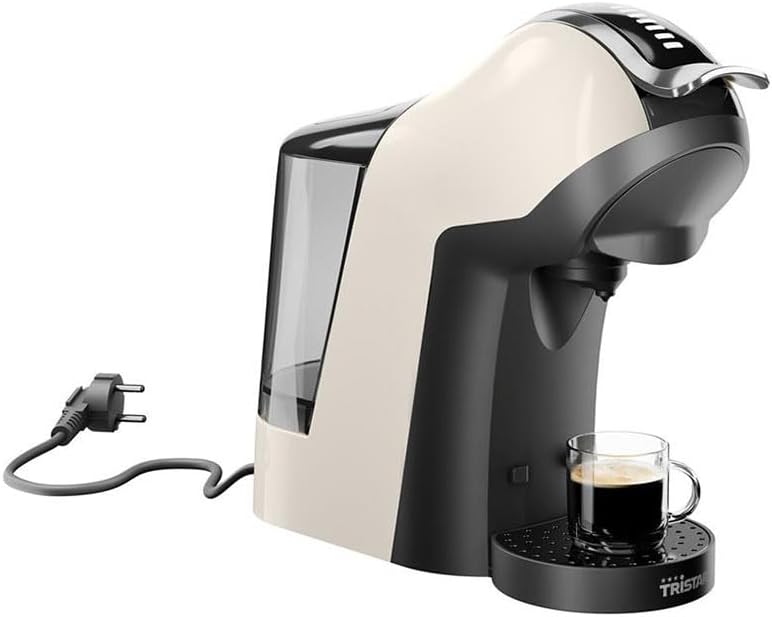
Image 1.1: Tristar CM-2301 Multi-Capsule Coffee Machine, showcasing its sleek design and compact footprint.
2. Important Safety Instructions
Please read all safety instructions carefully before using the appliance. Failure to follow these instructions may result in electric shock, fire, or serious injury.
- Always connect the appliance to a grounded power outlet.
- Do not immerse the appliance, power cord, or plug in water or other liquids.
- Keep the appliance out of reach of children.
- Do not operate the appliance if the power cord or plug is damaged.
- Avoid contact with hot surfaces. Use handles or knobs.
- Ensure the water tank is filled with water before operating to prevent dry-boil.
- Unplug the appliance from the outlet when not in use and before cleaning.
- Use only cold, fresh water in the water tank.
- Do not open the brewing chamber during operation.
3. Parts Overview
Familiarize yourself with the components of your Tristar CM-2301 coffee machine:
- Water Tank: Removable, transparent tank for water.
- Control Panel: Buttons for power, brewing, and temperature selection.
- Brewing Lever: Used to open and close the brewing chamber.
- Capsule Adapters: Interchangeable adapters for Nespresso®, Dolce Gusto®, E.S.E. pods, and ground coffee.
- Drip Tray: Removable tray to collect excess liquid, adjustable for different cup heights.
- Coffee Outlet: Where the brewed coffee dispenses.

Image 3.1: The Tristar CM-2301 coffee machine shown with its interchangeable capsule adapters for different coffee types.
4. Initial Setup
Before first use, follow these steps to prepare your coffee machine:
- Unpack: Remove all packaging materials and stickers from the appliance.
- Clean: Wash the water tank, drip tray, and capsule adapters with warm soapy water. Rinse thoroughly and dry.
- Fill Water Tank: Fill the removable water tank with fresh, cold water up to the MAX level. Ensure it is securely placed back on the machine.
- First Rinse Cycle: Place an empty cup on the drip tray. Do not insert any capsule or ground coffee. Press the power button to turn on the machine. Once the indicator light stops blinking and remains solid, press the brew button to run a cycle of hot water through the system. Repeat this 2-3 times to clean the internal components.
- Power On: Plug the machine into a suitable power outlet. The power indicator light will illuminate.

Image 4.1: Rear view of the Tristar CM-2301, highlighting the removable water tank for easy filling and cleaning.
5. Operating Instructions
This section details how to brew coffee using different methods.
General Brewing Steps:
- Ensure the water tank is filled with fresh water.
- Place a cup on the drip tray. Adjust the drip tray height if necessary.
- Press the power button to turn on the machine. Wait for the indicator light to become solid, indicating the machine is preheated.
Brewing with Nespresso® or Dolce Gusto® Capsules:
- Select the appropriate capsule adapter (Nespresso® or Dolce Gusto®).
- Open the brewing lever and insert the chosen capsule into the adapter.
- Place the adapter with the capsule into the brewing chamber and close the lever firmly.
- Press the brew button. The machine will start brewing.
- Once brewing is complete, the machine will stop automatically. Open the lever to eject the used capsule into the internal waste bin.
Brewing with E.S.E. Pods or Ground Coffee:
- Select the E.S.E. pod adapter or the ground coffee adapter.
- For E.S.E. pods, place one pod into the adapter. For ground coffee, fill the adapter with your desired amount of finely ground coffee (do not overfill or tamp too hard).
- Insert the adapter into the brewing chamber and close the lever firmly.
- Press the brew button.
- After brewing, open the lever and carefully remove the adapter to discard the used pod or coffee grounds.
Adjusting Temperature and Pre-infusion:
Refer to your machine's specific button combinations for temperature selection (low, medium, high) and activating the pre-infusion function. Typically, these are controlled by pressing and holding the brew button or a dedicated temperature button for a few seconds until the indicator light changes.
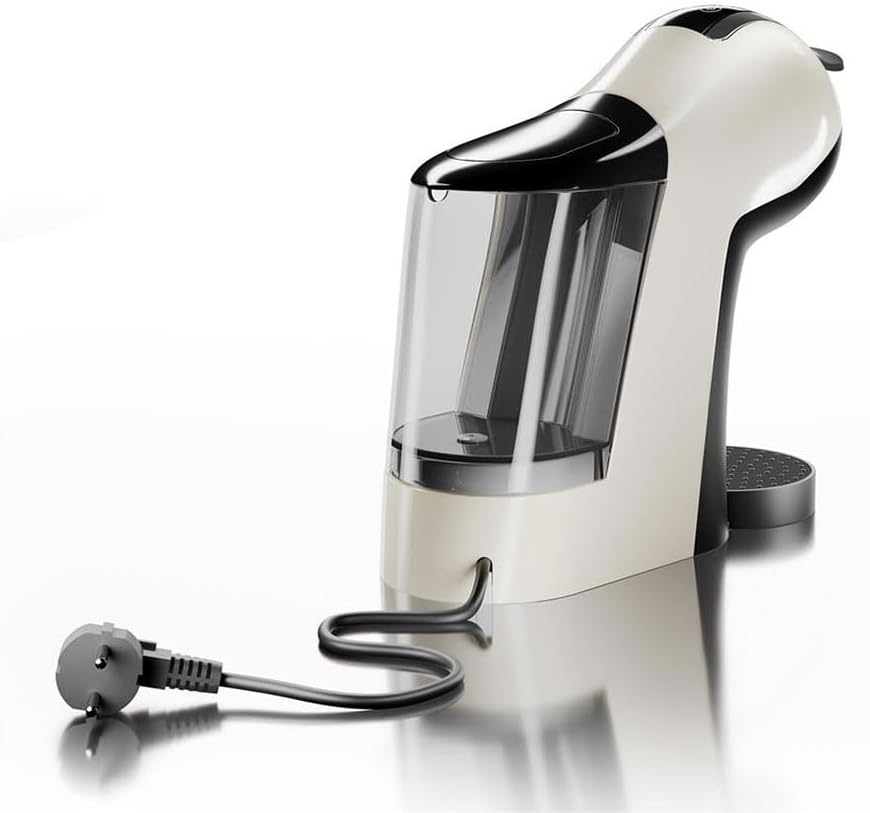
Image 5.1: The Tristar CM-2301 coffee machine in operation, dispensing a fresh cup of coffee.
6. Maintenance and Cleaning
Regular cleaning and maintenance ensure optimal performance and longevity of your coffee machine.
Daily Cleaning:
- Drip Tray: Empty and rinse the drip tray and grid after each use or when the indicator is visible.
- Water Tank: Empty any remaining water from the tank and rinse it daily. Refill with fresh water before next use.
- Capsule Adapters: Rinse the used capsule adapter under running water after each use.
- Exterior: Wipe the exterior of the machine with a soft, damp cloth. Do not use abrasive cleaners.
Descaling:
Descaling is crucial to remove mineral deposits and maintain brewing quality. The frequency depends on water hardness and usage, but generally every 2-3 months.
- Prepare Solution: Mix a descaling solution (e.g., citric acid or commercial descaler) with water according to the descaler's instructions. Pour into the water tank.
- Run Cycles: Place a large container under the coffee outlet. Run several brewing cycles without any capsule/coffee until the water tank is empty.
- Rinse: Rinse the water tank thoroughly and fill it with fresh, clean water. Run 2-3 full cycles of clean water through the machine to rinse out any descaling residue.
7. Troubleshooting
If you encounter issues with your coffee machine, refer to the following common problems and solutions:
| Problem | Possible Cause | Solution |
|---|---|---|
| Machine does not turn on. | No power supply. | Check if the power cord is securely plugged into the outlet and the machine. |
| No coffee dispenses. | Water tank empty; Clogged needle/outlet; Machine not preheated. | Fill water tank; Clean the coffee outlet and needle; Wait for preheating indicator. |
| Coffee is too weak or watery. | Insufficient coffee/wrong grind (for ground coffee); Descaling needed. | Use more coffee or finer grind; Perform descaling. |
| Water leaks from machine. | Water tank not properly seated; Drip tray full. | Ensure water tank is correctly positioned; Empty and clean drip tray. |
| Loud noise during brewing. | Air in the system; Descaling needed. | Run a few water-only cycles to prime the pump; Perform descaling. |
8. Technical Specifications
- Model Number: CM-2301
- Brand: Tristar
- Power: 1400 Watts
- Voltage: 230 Volts
- Pressure: 19 Bar
- Water Tank Capacity: 0.6 Liters
- Dimensions (L x W x H): 36.5 x 16.2 x 33.5 cm
- Weight: 2.8 Kilograms
- Material: Plastic
- Special Features: Timer, Jug (referring to adjustable cup size), Automatic Shut-off, Dry-boil Protection
9. Warranty and Support
Your Tristar CM-2301 coffee machine comes with a standard manufacturer's warranty. Please refer to the warranty card included in your product packaging for specific terms and conditions, including the warranty period and coverage details.
For technical support, spare parts, or warranty claims, please contact Tristar customer service through their official website or the contact information provided in your product documentation. Always have your model number (CM-2301) and proof of purchase ready when contacting support.
Ask a question about this manual
Ask about setup, troubleshooting, compatibility, parts, safety, or missing instructions. Manuals+ will review the question and use this page’s manual context to help answer it.