
1. Introduction
This manual provides comprehensive instructions for the setup, operation, maintenance, and troubleshooting of your Herloreen VT30 3-in-1 Visual Timer Task Timer. Please read this manual carefully before using the device to ensure proper function and longevity.

Image 1.1: Herloreen VT30 3-in-1 Visual Timer Task Timer. This image displays the complete device, including the visual timer dial, digital clock, and the task list area with slide buttons.
2. Product Overview
The Herloreen VT30 is a versatile time management tool designed to assist individuals in organizing tasks and managing time effectively. It integrates three primary functions:
- Visual Timer: A clear circular display that visually represents the passage of time.
- Digital Clock: Displays current time and date.
- Chore Chart/Task Planner: A customizable board for daily activities and to-do lists.
2.1. Components
Familiarize yourself with the main components of your Herloreen VT30:
- Visual Timer Dial: Located on the left side, used for setting countdowns.
- LCD Clock Display: Shows current time, date, and battery status.
- Task Planning Area: Right side, features slots for task cards and corresponding slide buttons.
- Control Buttons: Located below the LCD display for settings and mode selection.
- Kickstand: On the back for upright positioning.
- USB-C Charging Port: For power input.
- Sound/Volume Controls: On the back panel.
- Task Card Slot: On the back for storing additional task cards.

Image 2.1: Close-up view of the visual timer dial, showing the red disk indicating remaining time.

Image 2.2: Detailed view of the LCD clock display and the control buttons located beneath it.
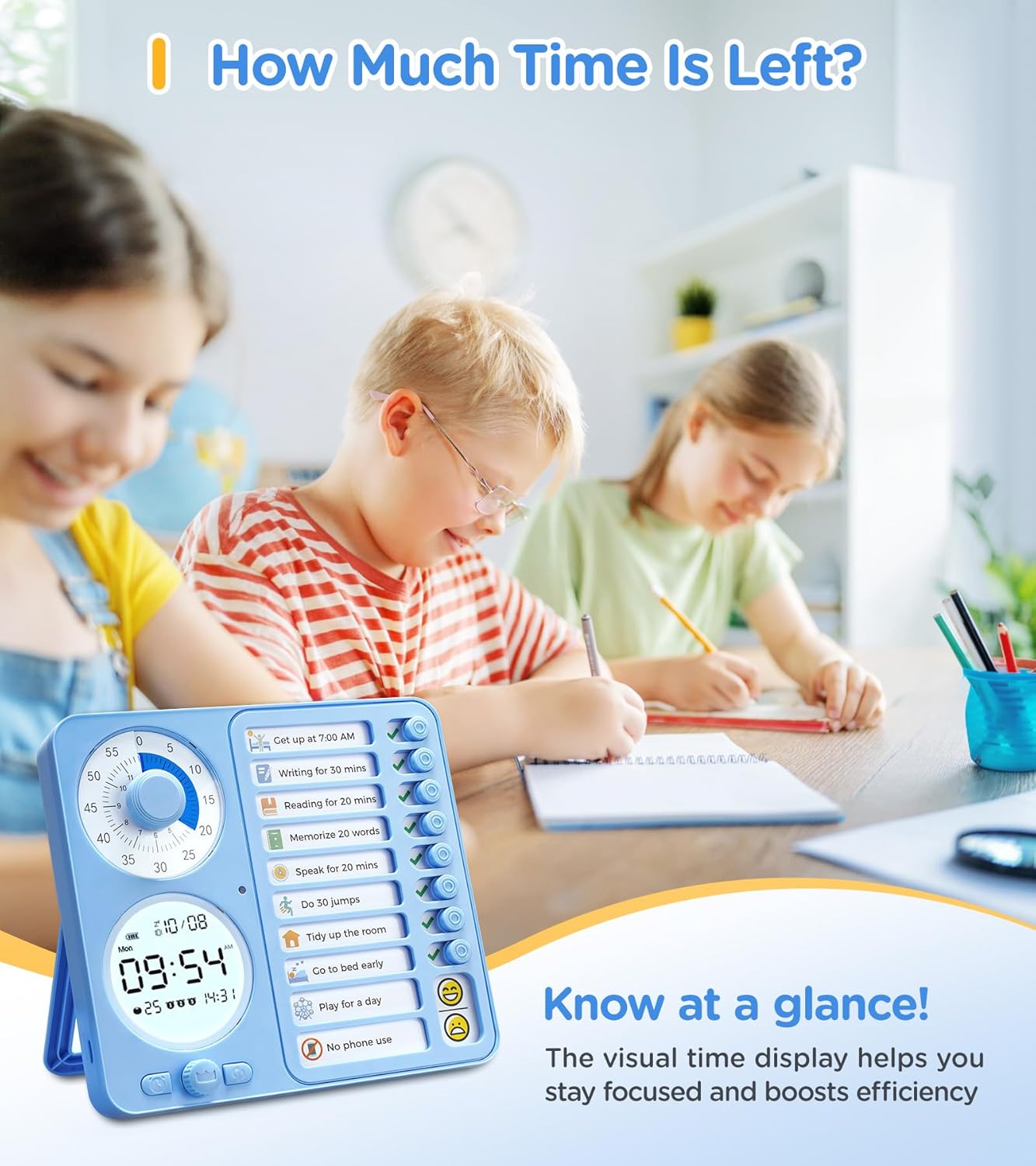
Image 2.3: Close-up of the task planning area, showing a task card inserted and the corresponding slide buttons.
3. Setup
3.1. Initial Charging
Before first use, fully charge the device. Connect the provided USB-C cable to the charging port on the side of the timer and plug the other end into a compatible USB power adapter (not included).
- A charging indicator will typically appear on the LCD screen.
- A full charge provides approximately 1 year of battery life.

Image 3.1: The Herloreen VT30 connected via its USB-C charging port, highlighting the charging feature and the back card slot for task cards.
3.2. Setting Time and Date
Refer to the specific instructions provided with your device for setting the current time and date using the control buttons below the LCD display. This typically involves pressing a 'Set' button and using arrow buttons to adjust values.
3.3. Inserting Task Cards
The device comes with pre-printed and blank task cards. Slide a desired task card into the slot on the right side of the device. Ensure it is securely seated.
- Use the provided dry-erase markers on the reusable task cards.
- Store extra task cards in the back card slot.
4. Operating Instructions
4.1. Using the Visual Timer
The visual timer helps in understanding time duration through a colored disk that recedes as time passes.
- Set Time: Rotate the central dial of the visual timer clockwise to set the desired countdown duration (up to 60 minutes). The red disk will expand to indicate the set time.
- Start: The timer begins counting down immediately after setting.
- Completion: When the red disk disappears, the set time has elapsed. An alarm will sound, vibrate, or remain silent based on your selected mode.

Image 4.1: Children using the Herloreen VT30 visual timer to manage their study time, demonstrating how the visual display helps track remaining time.
4.2. Utilizing the Task Planner/Chore Chart
The task planner allows for visual tracking of up to 8 tasks.
- Assign Tasks: Write tasks on the task card or use pre-printed ones.
- Track Progress: For each task, slide the corresponding button to the right to mark it as complete.
- Reset: Slide the buttons back to the left to reset the chart for a new day or set of tasks.
4.3. Digital Clock Functions
The LCD display shows the current time and date. It also features:
- Alarms: Set multiple alarms for reminders. Consult the device's specific button functions for alarm setting.
- Pomodoro Timer: A built-in function for focused work intervals (e.g., 25 minutes work, 5 minutes break). Activate this mode via the control buttons.
5. Modes and Settings
The Herloreen VT30 offers various modes to suit different environments and preferences:
- Silent Mode: The timer completes without any audible alarm, ideal for quiet environments like libraries or classrooms.
- Vibration Mode: The device vibrates upon timer completion, providing a discreet alert.
- Ringing Mode: An audible alarm sounds when the timer finishes. The volume can be adjusted using the controls on the back panel.
To switch between modes, locate the sound/vibration switch on the back of the device. Adjust the volume dial as needed for ringing mode.
6. Maintenance
- Cleaning: Wipe the device with a soft, dry cloth. For the reusable task cards, use a damp cloth or a small amount of alcohol spray to clean off dry-erase marker residue. Do not use abrasive cleaners.
- Storage: Store the device in a cool, dry place away from direct sunlight and extreme temperatures.
- Battery Care: Recharge the device when the battery indicator is low. Avoid fully depleting the battery frequently to prolong its lifespan.
7. Troubleshooting
| Problem | Possible Cause | Solution |
|---|---|---|
| Device does not turn on. | Low or depleted battery. | Connect to a USB-C charger and allow it to charge for at least 30 minutes before attempting to turn on. |
| Visual timer disk does not move. | Timer not set correctly or mechanism issue. | Ensure the dial is rotated fully to set a time. If the issue persists, contact customer support. |
| Alarm does not sound/vibrate. | Incorrect mode selected or volume too low. | Check the mode switch on the back (Silent, Vibration, Ringing). If in Ringing mode, ensure volume is adjusted appropriately. |
| LCD display is blank or flickering. | Low battery or internal fault. | Charge the device. If the problem continues, perform a soft reset (if applicable, refer to specific device instructions) or contact support. |
8. Specifications
| Brand | Herloreen |
| Model Number | VT30 |
| Color | Blue |
| Material | Plastic |
| Product Dimensions | 2"D x 7"W x 7"H |
| Item Weight | 1.32 pounds (0.6 Kilograms) |
| Number of Settings | 5 (referring to modes/functions) |
| Battery | 1 12V battery (included) |
| Charging | USB-C |
9. Warranty and Support
For warranty information, product support, or to inquire about replacement parts, please contact Herloreen customer service. Refer to the product packaging or the official Herloreen website for the most current contact details.
Manufacturer: Herloreen