Introduction
This manual provides comprehensive instructions for the setup, operation, and maintenance of your FKZ GMK26 Mechanical Numpad. The GMK26 is a versatile 26-key numeric keypad featuring triple-mode connectivity (wired USB-C, 2.4GHz wireless, Bluetooth 5.0), hot-swappable switches, RGB backlighting, and VIA/QMK programmability. It is designed for enhanced productivity and customization across various operating systems including Windows, macOS, iOS, and Android.
Package Contents
Verify that all items are present in your product packaging:
- FKZ GMK26 Mechanical Numpad
- USB Cable (Type-C)
- Keycap Puller
Product Overview
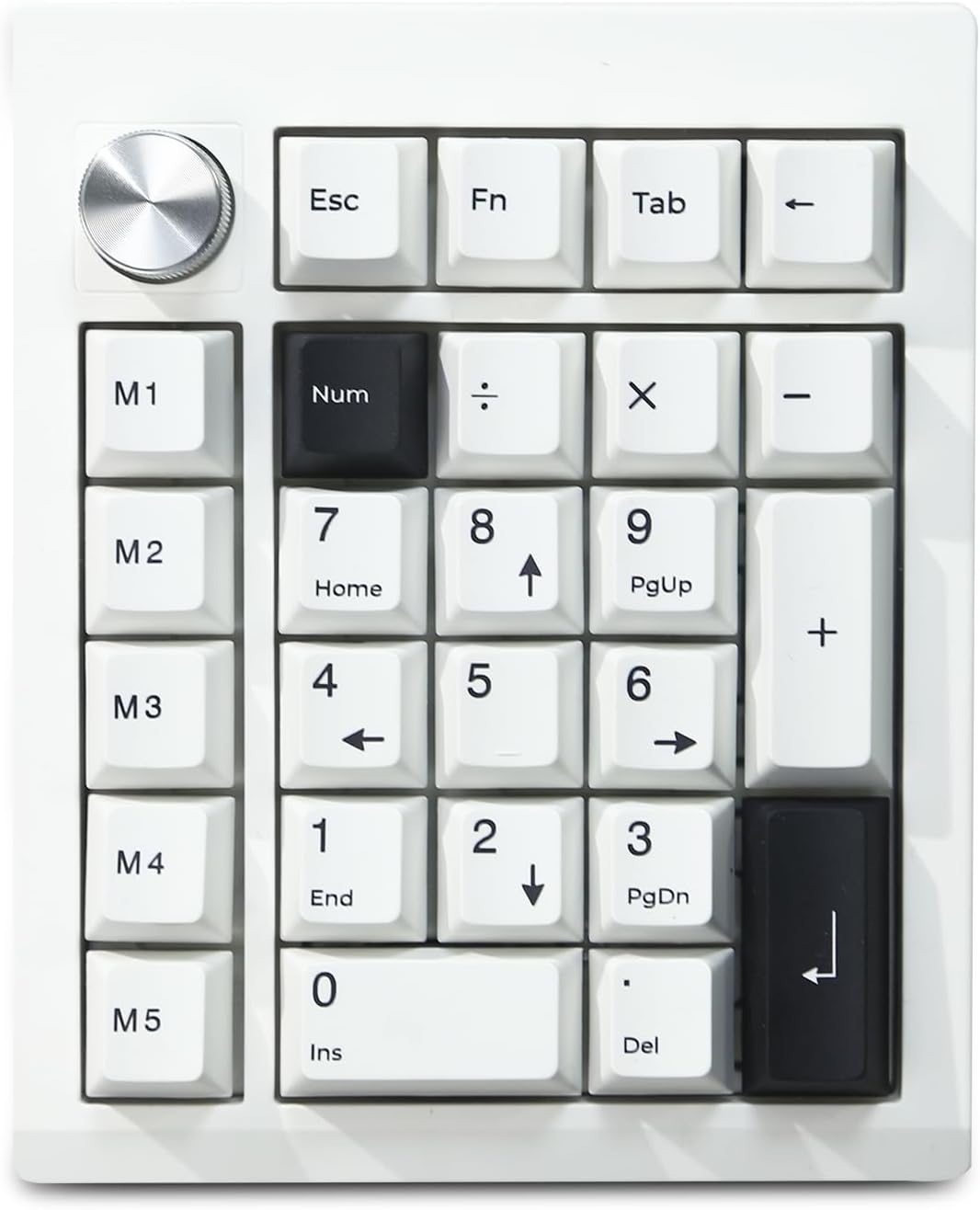
Top-down view of the FKZ GMK26 Mechanical Numpad, showcasing its 26-key layout and rotary knob.

An infographic detailing key features: 2000mAh battery, tri-mode connectivity, hot-swappable switches, RGB backlight, 26 keys + 1 knob, gasket structure, south-facing LEDs, and VIA/QMK programmability.

Exploded view illustrating the internal gasket-mounted structure, including Poron cotton and IXPE switch pads for improved typing feel and sound.

Close-up of the multi-function rotary knob, used for volume control and DFU mode access.

Rear view showing the USB-C port and the switch for 2.4G wireless, USB wired, and Bluetooth modes.

Diagram illustrating the physical dimensions of the GMK26 Numpad.
Specifications
| Feature | Detail |
|---|---|
| Model | GMK26 |
| Connectivity | 2.4G Wireless, Bluetooth 5.0, USB-C Wired |
| Keys | 26 Keys, NKRO (N-Key Rollover) |
| Switches | Hot-swappable (3-pin and 5-pin mechanical switches supported), Linear switches included |
| Keycaps | Dye-sublimated PBT, Ergonomical Cherry Profile |
| Backlighting | RGB, South-facing LEDs |
| Battery | 2000mAh Lithium Ion (included) |
| Programmability | VIA/QMK compatible (customize key functions, macros, lighting) |
| Dimensions (L x W x H) | 5.5 x 4.6 x 1.1 inches (14cm x 11.8cm x 3cm) |
| Weight | 14.4 ounces |
| Compatible OS | Windows, macOS, iOS, Android |
Setup
Charging the Numpad
Before initial use, it is recommended to fully charge the numpad. Connect the provided USB-C cable to the numpad's USB-C port and the other end to a powered USB port on your computer or a USB wall adapter. The 2000mAh battery ensures extended usage.
Connectivity Modes
The GMK26 Numpad supports three connection modes: Wired, 2.4GHz Wireless, and Bluetooth 5.0. Use the switch located on the rear of the numpad to select your desired mode.
- Wired Mode (USB-C):
Set the switch to "USB". Connect the numpad to your device using the USB-C cable. The numpad will be recognized automatically.
- 2.4GHz Wireless Mode:
Set the switch to "2.4G". Insert the 2.4GHz USB receiver (not explicitly listed in package contents, but standard for 2.4G wireless devices) into an available USB port on your computer. The numpad should connect automatically. If not, ensure the numpad is in pairing mode (refer to specific pairing instructions if provided by manufacturer, otherwise assume automatic connection).
- Bluetooth 5.0 Mode:
Set the switch to "BT". The numpad can store up to three Bluetooth devices. To pair with a new device:
- Press FN + 1, FN + 2, or FN + 3 to select a Bluetooth channel.
- Activate Bluetooth on your host device (computer, smartphone, tablet).
- Search for "GMK26" or a similar device name in your device's Bluetooth settings and select it to pair.
To switch between paired Bluetooth devices, press FN + 1/2/3 corresponding to the desired channel.
Operating Instructions
Key Functions
The GMK26 Numpad features 26 keys, including standard numeric keys, arithmetic operators, and additional function keys for enhanced utility:
- Standard Numeric Keys: 0-9, Num Lock, Del, Ins, Home, End, PgUp, PgDn.
- Arithmetic Operators: /, *, -, +.
- Special Keys: ESC, FN, Tab, Backspace.
- Macro Keys: M1-M5. These keys are programmable for custom functions or macros.
All 26 keys support N-Key Rollover (NKRO), ensuring all key presses are registered accurately, even when multiple keys are pressed simultaneously.
Rotary Knob Functionality
The rotary knob provides convenient multimedia control:
- Rotate: Adjusts system volume (clockwise to increase, counter-clockwise to decrease).
- Press: Mutes/unmutes audio.
- Long Press (Wired Mode Only): Enters Device Firmware Upgrade (DFU) mode for firmware updates.
RGB Backlighting Control
The numpad features customizable RGB backlighting with south-facing LEDs:
- FN + ENTER: Cycles through various backlighting modes and effects.
- FN + BACKSPACE: Toggles the backlighting on or off.
VIA/QMK Programmability
The GMK26 Numpad is compatible with VIA/QMK software, allowing for extensive customization:
- Key Remapping: Change the function of any key to suit your workflow.
- Macro Creation: Record and assign complex sequences of key presses to the M1-M5 keys or other programmable keys.
- Lighting Customization: Adjust RGB lighting effects, colors, and brightness.
To use VIA, download the compatible software from the official VIA website or the manufacturer's support page. Ensure your numpad is connected in wired mode for initial VIA setup and firmware flashing if required.
Maintenance
- Cleaning: Use a soft, dry cloth to wipe the surface of the numpad. For deeper cleaning, remove keycaps using the provided keycap puller and use compressed air to clear debris from between switches. Avoid using harsh chemicals or abrasive materials.
- Keycap and Switch Replacement: The numpad features hot-swappable switches. Use the keycap puller to remove keycaps and a switch puller (not included, but standard for mechanical keyboards) to remove switches. Ensure replacement switches are compatible (3-pin or 5-pin).
- Storage: When not in use for extended periods, store the numpad in a cool, dry place away from direct sunlight and extreme temperatures.
Troubleshooting
| Problem | Solution |
|---|---|
| Numpad not responding in wireless mode. |
|
| Keys are not registering or double-typing. |
|
| RGB backlighting is not working or stuck. |
|
| VIA software not detecting the numpad. |
|
Warranty and Support
FKZ products are designed for reliability and performance. For warranty information, please refer to the documentation included with your purchase or visit the official FKZ website. If you encounter any issues not covered in this manual or require further assistance, please contact FKZ customer support through their official channels.
For the latest drivers, firmware, and support resources, please visit the FKZ official website.

