1. Introduction
This manual provides detailed instructions for the installation, operation, and maintenance of your RONGJI 8Core 2+32GB Android Car Radio. This unit is specifically designed for Opel Astra H models manufactured between 2004 and 2014. It features a 9-inch IPS touch screen, Android 13 operating system, built-in Car-Play and Android Auto, GPS navigation, Bluetooth, FM/AM radio, Steering Wheel Control (SWC) support, and a DSP sound processor. Please read this manual thoroughly before installation and use to ensure proper functionality and safety.

Figure 1.1: Front view of the RONGJI Android Car Radio displaying the CarPlay interface with various application icons.
2. Package Contents
Verify that all items listed below are included in your package. If any items are missing or damaged, please contact customer support.
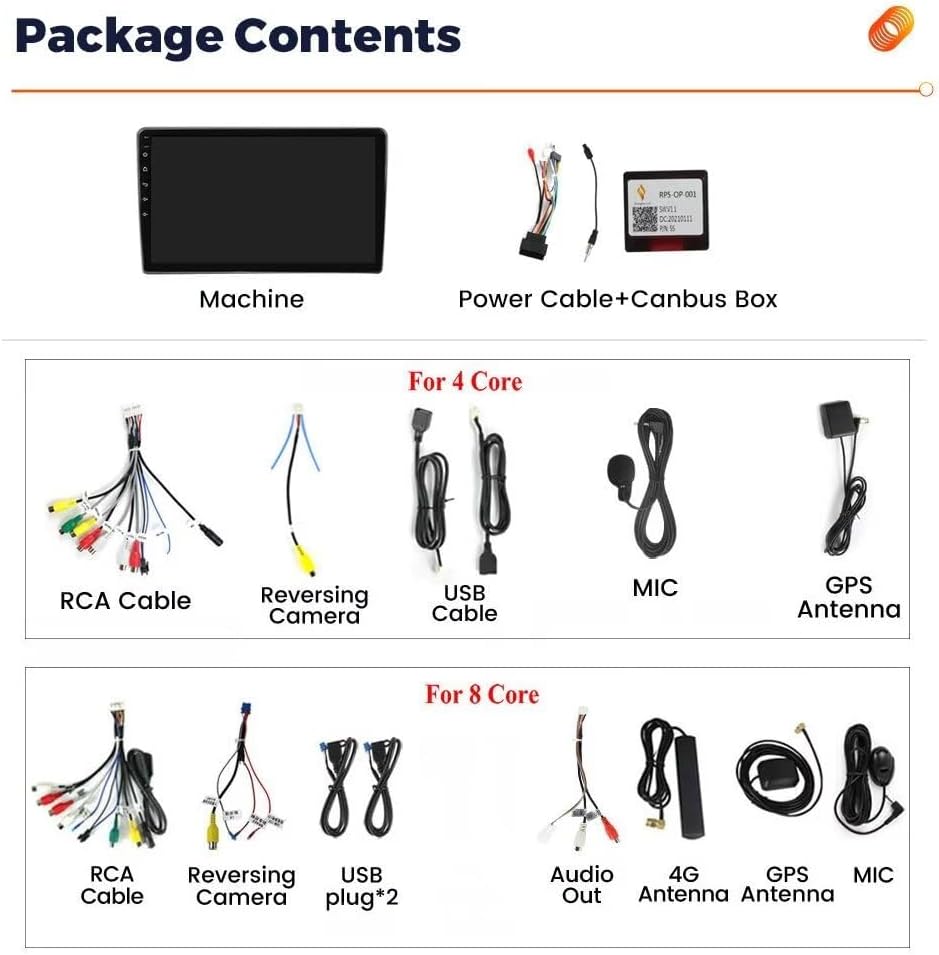
Figure 2.1: Overview of the RONGJI Android Car Radio package contents.
- Main Head Unit (Machine)
- Power Cable + Canbus Box
- RCA Cable Set
- Reversing Camera Input Cable
- USB Cable(s) (Quantity may vary based on core version)
- External Microphone
- GPS Antenna
- 4G Antenna (for 8Core versions)
- Audio Out Cable (for 8Core versions)
3. Setup and Installation
Professional installation is recommended. Ensure the vehicle's battery is disconnected before beginning installation. This unit is designed for Opel Astra H models (2004-2014). If your vehicle has an OEM backup camera or amplifier, additional adapters or wiring modifications may be required. Consult a professional installer if unsure.
3.1 Pre-Installation Check
- Confirm vehicle compatibility (Opel Astra H 2004-2014).
- Verify all package contents are present and undamaged.
- Ensure you have the necessary tools for dashboard removal and wiring.
3.2 Installation Steps (General Guide)
- Carefully remove the original car radio and dashboard trim.
- Connect the main power harness from the new unit to the vehicle's wiring harness. Ensure the Canbus box is correctly integrated if provided.
- Connect the GPS antenna and position it in a location with a clear view of the sky (e.g., on the dashboard).
- Connect the external microphone and route its cable to a suitable position for clear voice pickup.
- Connect any additional cables such as RCA cables for external amplifiers, USB cables, or the reversing camera input.
- Mount the new Android car radio securely into the dashboard opening.
- Reconnect the vehicle's battery and test all functions before fully reassembling the dashboard.
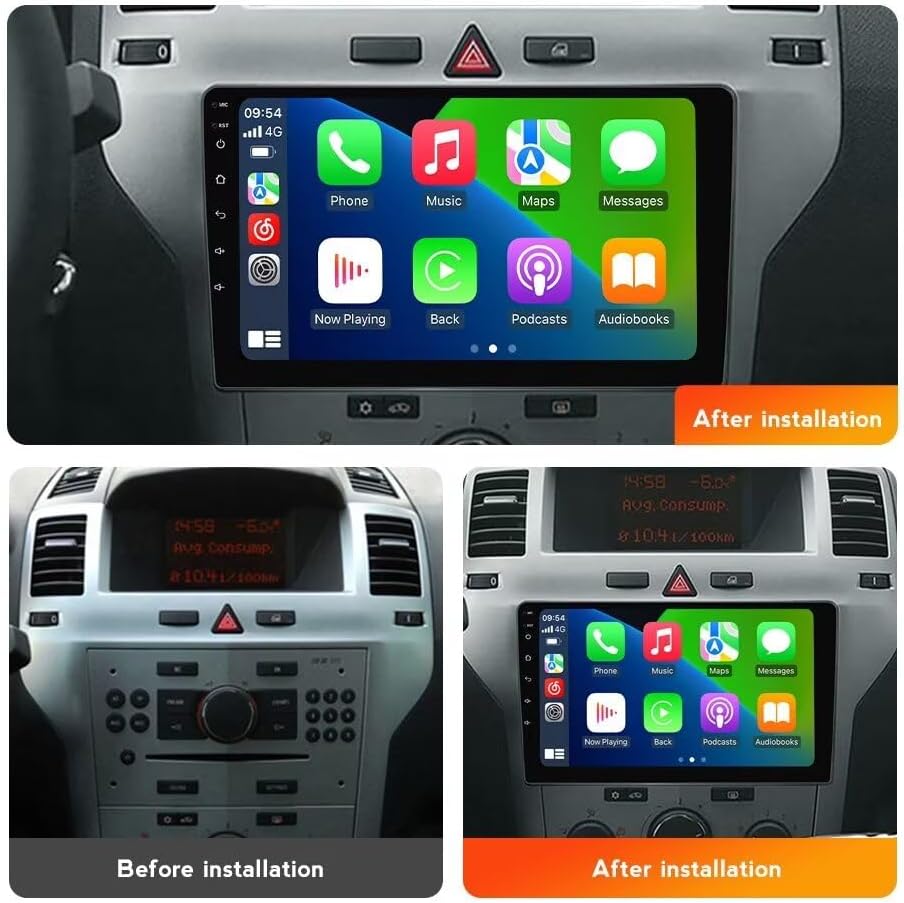
Figure 3.1: Visual comparison of the Opel Astra H dashboard before and after the RONGJI Android Car Radio installation.
4. Operating Instructions
This section details the primary functions and features of your Android Car Radio.
4.1 CarPlay and Android Auto
The unit supports both wired and wireless CarPlay and Android Auto. This allows seamless integration of your smartphone for navigation, music, calls, and messages.
- Wireless Connection: Enable Bluetooth and Wi-Fi on your smartphone. Follow the on-screen prompts on the car radio to pair your device.
- Wired Connection: Connect your smartphone to the unit's USB port using a certified USB cable.

Figure 4.1: CarPlay and Android Auto connectivity options.
4.2 GPS Navigation
The unit features a built-in GPS module and supports various navigation applications. You can use online maps with an internet connection or download offline maps for navigation without mobile data.
- Online Navigation: Connect to Wi-Fi or a mobile hotspot and use pre-installed or downloaded navigation apps.
- Offline Navigation: Download map data for your region within the navigation application settings.

Figure 4.2: GPS accurate positioning and WiFi support features.
4.3 WiFi Connectivity
Connect the car radio to a Wi-Fi network or your phone's hotspot to access online features, download applications, stream media, and browse the internet.
- Go to Settings > Network & Internet > Wi-Fi.
- Select your desired network and enter the password if required.
4.4 Bluetooth Functions
The built-in Bluetooth module enables hands-free calling and audio streaming.
- Pairing: Enable Bluetooth on your phone and the car radio. Search for available devices on your phone and select the car radio's name. Confirm the pairing code.
- Hands-Free Calling: Once paired, you can make and receive calls directly from the car radio interface. The external microphone ensures clear communication.
- Bluetooth Music: Stream audio from your phone to the car radio speakers.
4.5 FM/AM Radio with RDS
Access local radio stations with the integrated FM/AM tuner. RDS (Radio Data System) provides additional information like station name and program type where available.
- Automatic Search: Use the auto-scan function to find and save available stations.
- Manual Tuning: Manually adjust the frequency to find specific stations.
- Preset Stations: Save your favorite stations for quick access.

Figure 4.3: FM/AM RDS Radio and DSP Processor interfaces.
4.6 Steering Wheel Control (SWC)
The unit supports your vehicle's original steering wheel controls, allowing you to manage audio playback, volume, and calls without taking your hands off the wheel. This enhances driving safety.
- Configuration may be required in the unit's settings menu to map the steering wheel buttons correctly.

Figure 4.4: HD Capacitive Split Touch Screen and Steering Wheel Control features.
4.7 DSP Processor (Digital Sound Processor)
The integrated DSP allows for advanced audio customization. Adjust equalizer settings, balance, fader, and other sound parameters to optimize your listening experience.
- Access the DSP settings through the audio or sound menu on the unit.
- Experiment with different equalizer presets or create custom profiles.
4.8 Split Screen Function
The split-screen feature allows you to run two applications simultaneously on the 9-inch display. For example, you can have navigation on one side and a music player on the other.
- To activate, open an application, then long-press the recent apps button or drag another app from the recent apps list to the side of the screen.
5. Maintenance
Proper maintenance ensures the longevity and optimal performance of your car radio.
- Screen Cleaning: Use a soft, lint-free cloth specifically designed for electronic screens. Dampen the cloth slightly with water or a screen cleaner if necessary. Avoid harsh chemicals or abrasive materials.
- Software Updates: Periodically check for software updates through the unit's settings menu or the manufacturer's website to ensure you have the latest features and bug fixes.
- General Care: Avoid exposing the unit to extreme temperatures, direct sunlight for prolonged periods, or excessive moisture.
- Ventilation: Ensure the unit's ventilation openings are not blocked to prevent overheating.
6. Troubleshooting
This section addresses common issues you might encounter. If the problem persists, contact customer support.
| Problem | Possible Cause | Solution |
|---|---|---|
| Unit does not power on. | Loose power connection, blown fuse, vehicle battery issue. | Check power cables and connections. Inspect vehicle fuses. Ensure vehicle battery is charged. |
| No sound from speakers. | Volume too low, mute activated, incorrect wiring, amplifier issue. | Increase volume. Check if mute is active. Verify speaker wiring. If using an external amplifier, check its power and connections. |
| GPS signal is weak or inaccurate. | GPS antenna improperly placed, obstruction, outdated map data. | Ensure GPS antenna has a clear view of the sky. Update map data if necessary. |
| Bluetooth connection issues. | Device not paired, Bluetooth off, interference. | Ensure Bluetooth is enabled on both devices. Re-pair the device. Move closer to the unit. |
| Touch screen unresponsive. | Temporary software glitch, screen protector interference. | Restart the unit. Remove any thick screen protectors. If issue persists, contact support. |
7. Specifications
Key technical specifications of the RONGJI 8Core 2+32GB Android Car Radio.
- Model: 8Core 2+32GB
- Operating System: Android 13.0
- CPU: Octa Core
- RAM: 2GB
- ROM (Internal Storage): 32GB
- Display Size: 9 Inches
- Screen Resolution: 1280*720
- Touch Screen Type: Capacitive
- Connectivity: Bluetooth, Wi-Fi
- Special Features: Built-in Car-Play, Android Auto (Wireless/Wired), GPS Navigation, Steering Wheel Control (SWC), DSP (Digital Sound Processor), FM/AM Radio with RDS, Split Screen Function, Rear View Camera Support (camera not included).
- Vehicle Service Type: Car (Opel Astra H 2004-2014)
- Manufacturer: Shenzhen Rongji Electronics Co., Ltd
8. Warranty and Support
For warranty information, please refer to the documentation provided at the time of purchase or contact your retailer. For technical support or assistance with installation and troubleshooting, please contact the seller directly. The seller for this product is "Navifly car radio".
Optional protection plans may be available for extended coverage. Please check with your retailer for details on available plans.