
1. Introduction
The Symass TENS Unit Muscle Stimulator Model SM9592 is a dual-channel electronic pulse massager designed for temporary relief of sore muscles and muscle relaxation. It combines Transcutaneous Electrical Nerve Stimulation (TENS) and Electrical Muscle Stimulation (EMS) technologies to address various body areas including the back, abs, shoulders, knees, arms, legs, and feet.
2. Important Safety Information
Please read all instructions and warnings carefully before using this device. Failure to do so may result in injury or device malfunction.
Contraindications: Do Not Use If:
- You are pregnant.
- You have heart disease or a pacemaker.
- You have deep-vein thrombosis.
- You are a hypertensive patient.
- You have metal or plastic implants.
- You have open wounds, broken skin, or skin allergies in the application area.
Consult your physician before use if you have any pre-existing medical conditions or concerns.

Figure 2.1: Important safety warnings and contraindications for using the Symass TENS Unit.
3. Package Contents
Verify that all items are present in your package:
- 1 x Symass TENS Unit Device (Model SM9592)
- 10 x Reusable Electrode Pads (2 small, 6 medium, 2 large)
- 2 x Dual Plug Snap Cables
- 1 x ABS Pads Holder
- 1 x USB Type-C Charging Cable
- 1 x Dust-Proof Drawstring Storage Bag
- 1 x Professional User Manual (this document)

Figure 3.1: Contents included in the Symass TENS Unit package.
4. Device Overview
The Symass TENS Unit features a large LCD screen with backlit icons for easy operation. It is a compact and portable device with intuitive controls.
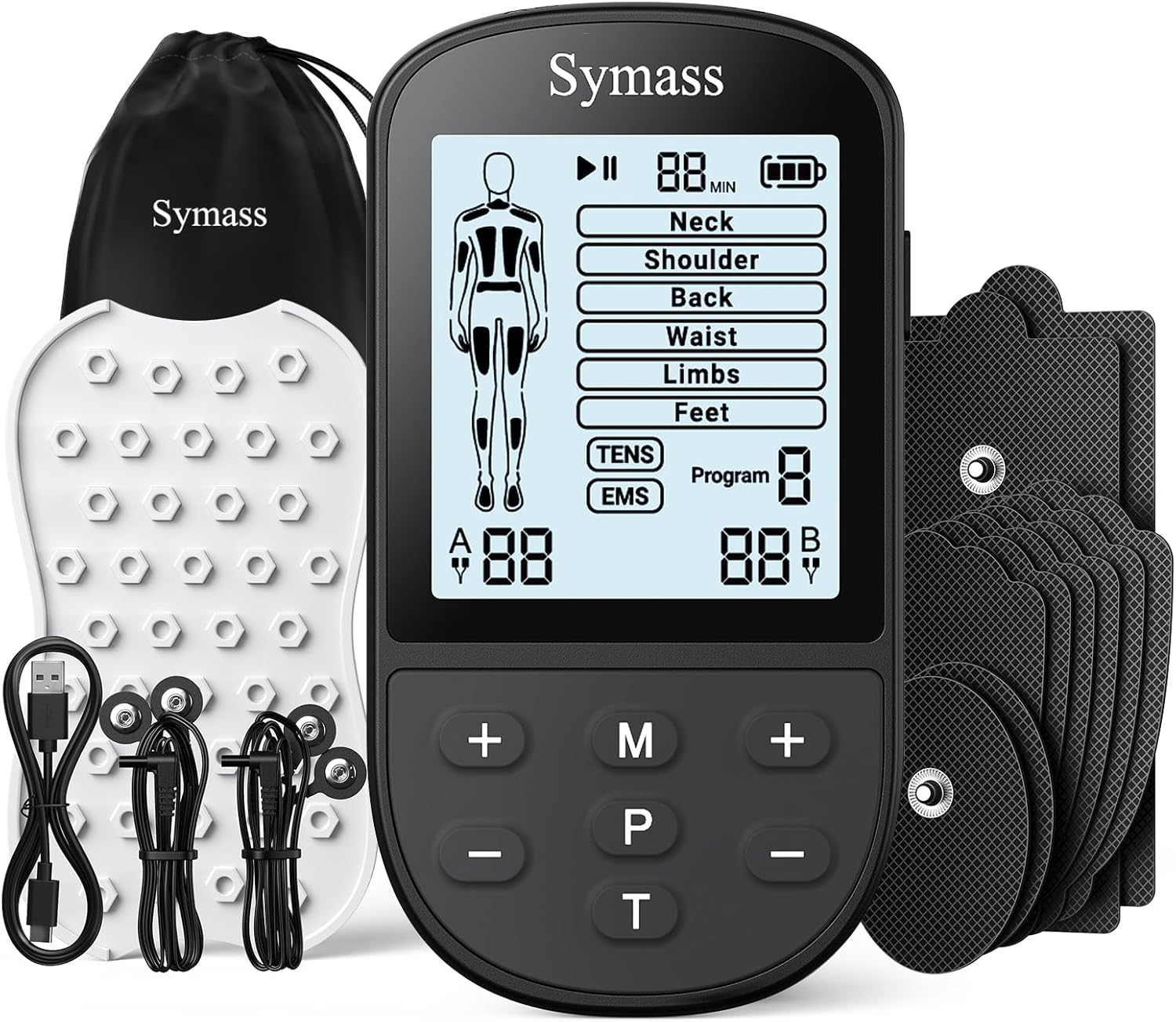
Figure 4.1: The Symass TENS Unit Muscle Stimulator and its accessories.
Controls and Display:
- LCD Screen: Displays mode, intensity, time, battery level, and body map.
- Power Button: Turns the device on/off.
- '+' / '-': Adjusts intensity levels for Channel A and Channel B.
- 'M' (Mode) Button: Selects the desired treatment mode (e.g., Neck, Shoulder, Back).
- 'P' (Program) Button: Selects the specific program within a mode (TENS or EMS).
- 'T' (Time) Button: Adjusts the treatment duration.
5. Setup and Operation
Follow these steps to set up and operate your Symass TENS Unit:

Figure 5.1: Visual guide for using the Symass TENS Unit.
- Charge the Device: Connect the USB Type-C cable to the device and a power source (wall charger, power bank, or laptop USB port). The 180mAh rechargeable battery fully charges in approximately 2 hours and provides up to 30 hours of continuous use.
- Connect Electrode Cables: Plug the dual-plug snap cables into the output ports (Channel A and Channel B) on the top of the device.
- Attach Electrode Pads: Snap one pair of electrode pads onto each lead wire. Ensure a secure connection.
- Prepare Skin: Ensure the desired application area on your skin is clean and dry.
- Place Electrode Pads: Apply the electrode pads firmly to the skin in the area you wish to treat. You can use up to 4 pads simultaneously for multi-area relaxation.
- Turn On: Press and hold the Power button for 2 seconds to turn on the device.
- Select Mode: Press the 'M' button to choose a mode based on the body area (Neck, Shoulder, Back, Waist, Limbs, Feet).
- Select Program: Press the 'P' button to select the desired program. Programs 1-2 are TENS (Pain Relief), and Programs 3-4 are EMS (Muscle Conditioning). The device offers 24 pre-programmed modes.
- Adjust Intensity: Use the '+' and '-' buttons to adjust the intensity level for Channel A and Channel B independently. There are 20 intensity levels. Start with a low intensity and gradually increase until you feel a comfortable, yet effective, sensation.
- Set Time: Press the 'T' button to change the working time. The timer can be customized from 10 to 60 minutes.
- Turn Off: After your session, press and hold the Power button for 2 seconds to turn off the device.
6. Maintenance
Cleaning Electrode Pads:
The reusable electrode pads feature upgraded adhesive for extended lifespan. To maintain their stickiness and hygiene:
- After each use, gently wipe the adhesive side of the pads with a damp cloth or a small amount of mild soap and water.
- Allow the pads to air dry completely before reattaching them to the pads holder or plastic film.
- Avoid using harsh chemicals or abrasive cleaners, as these can damage the adhesive.
Device Storage:
- Store the device and pads in the provided dust-proof drawstring storage bag when not in use.
- Keep the device in a cool, dry place away from direct sunlight and extreme temperatures.
- Ensure the device is turned off before storing.

Figure 6.1: Symass TENS Unit reusable electrode pads.
7. Troubleshooting
If you encounter any issues with your Symass TENS Unit, refer to the following common problems and solutions:
| Problem | Possible Cause | Solution |
|---|---|---|
| Device does not turn on. | Low battery; device not properly charged. | Charge the device fully using the provided USB Type-C cable. Ensure the power button is pressed and held for 2 seconds. |
| No sensation or weak sensation. | Pads not making good contact; intensity too low; cables not connected properly. | Ensure pads are firmly applied to clean, dry skin. Increase intensity gradually. Check that cables are securely plugged into the device and pads. |
| Electrode pads are not sticking. | Pads are dirty or worn out; skin is oily or hairy. | Clean pads as per maintenance instructions. Ensure skin is clean and dry. Replace pads if they are old or no longer adhesive. |
| Display is dim or flickering. | Low battery. | Recharge the device. |
If the problem persists after trying these solutions, please contact customer support.
8. Specifications
| Feature | Specification |
|---|---|
| Model Number | SM9592 |
| Product Dimensions | 2.5 x 4.5 x 0.4 inches |
| Item Weight | 10.23 ounces |
| Battery Type | 1 Lithium Polymer battery (included) |
| Battery Capacity | 180mAh |
| Charging Port | USB Type-C |
| Modes | 24 Pre-programmed Modes |
| Intensity Levels | 20 Levels |
| Channels | Dual Independent Channels (A/B) |
| Timer | Adjustable (10-60 minutes) |
9. Warranty and Support
Warranty Information:
Symass products are manufactured to high-quality standards. For specific warranty details, please refer to the warranty card included with your product or visit the official Symass website. Keep your purchase receipt as proof of purchase for warranty claims.
Customer Support:
If you have any questions, concerns, or require assistance with your Symass TENS Unit, please contact Symass customer service. Contact information can typically be found on the product packaging or the official Symass website.