
Introduction
This manual provides detailed instructions for the operation and maintenance of the Generic TMR-R-V4.0 Ibutton and 125KHZ EM/ID RFID Reader Writer. This device is designed for reading and writing Ibutton and 125KHZ EM/ID numbers, supporting various chip types for duplication and programming tasks.
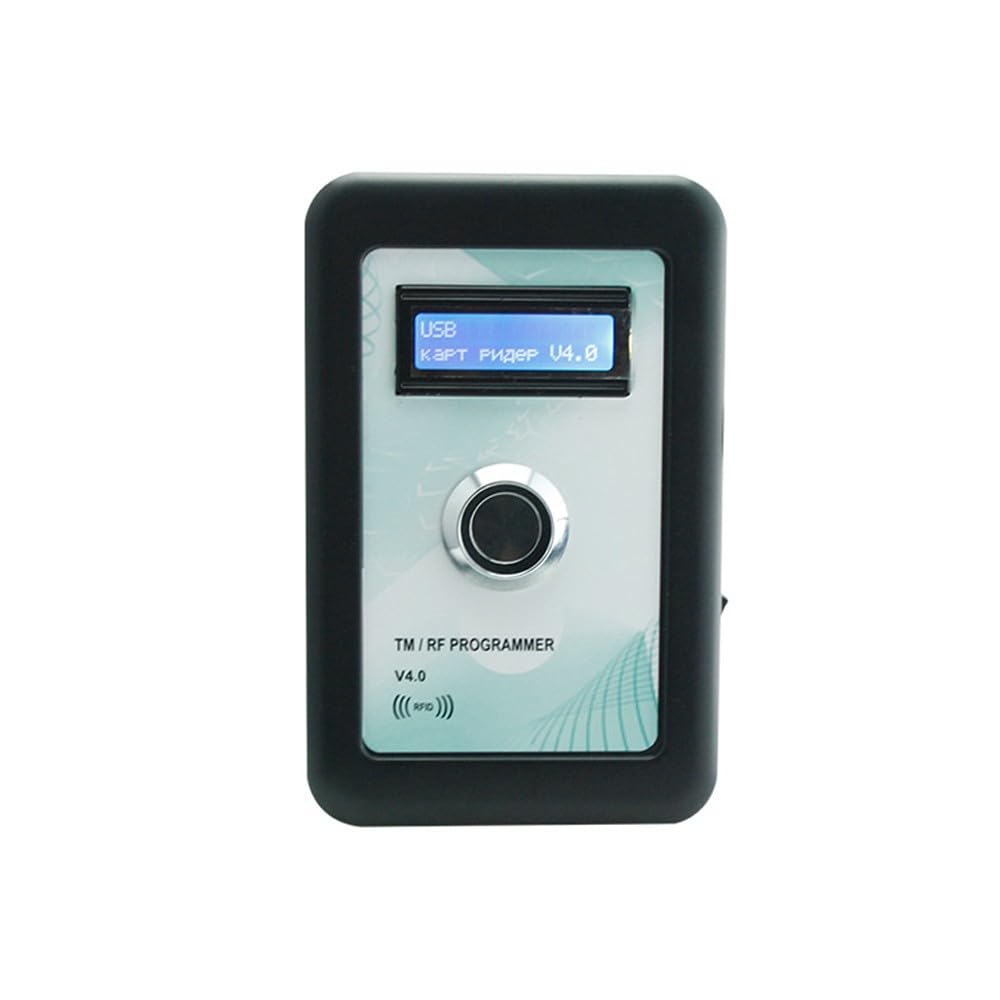
Image: Front view of the TMR-R-V4.0 device, showing the LCD display and central button.
Product Features
- Reads and writes Ibutton (DS1990/TM1990) and 125KHZ EM/ID (EM4100/TK4100) numbers.
- Supports writing to T5577/5200/5201/MINI57 for EM/ID cards and RW1990 for Ibutton.
- Integrated LCD display (36mm x 1.0mm) with English/Russian language options.
- Dual power options: USB connection to PC or 3 x AAA batteries.
- Compact and durable plastic/ABS casing with chromium-plated metal parts.
- Working temperature range: -10 °C to 70 °C.
Package Contents
- 1x TMR-R-V4.0 Card Reader/Writer Unit
- Note: USB cable and AAA batteries may be sold separately.
Safety Information
- Do not expose the device to extreme temperatures outside the specified working range (-10 °C to 70 °C).
- While the device is waterproof, avoid prolonged exposure to harsh environmental conditions or submersion in water.
- Use only specified power sources (USB or 3 x AAA batteries).
- Do not attempt to disassemble or modify the device, as this will void the warranty and may cause damage.
- Keep out of reach of children.
Setup
Powering the Device
- Using USB Power: Connect the device to a computer or a USB power adapter using a compatible USB cable. The device will power on automatically.
- Using AAA Batteries: Open the battery compartment on the back of the device and insert 3 x AAA batteries, ensuring correct polarity. Use the power switch on the side of the device to turn it on or off.

Image: Side view of the TMR-R-V4.0 device, highlighting the power switch and USB port for connection.
Initial Display
Upon powering on, the LCD display will show "USB" (if connected via USB) and "Карт Ридер V4.0" or "Card Reader V4.0", indicating the device is ready for operation. You can switch between English and Russian languages via the device's menu options (refer to Operating Instructions).
Operating Instructions
Reading an Ibutton or RFID Card
- Ensure the device is powered on.
- For Ibutton (e.g., DS1990/TM1990): Gently press the Ibutton against the central metal button on the device. The LCD will display the Ibutton's ID number.
- For 125KHZ EM/ID Card (e.g., EM4100/TK4100): Place the RFID card or tag flat against the front surface of the device, near the "RFID" indicator. The LCD will display the EM/ID number.
- The displayed ID number can then be used for writing to a compatible blank card/Ibutton.

Image: Two TMR-R-V4.0 devices, illustrating the front panel where cards are read and the central button for Ibuttons.
Writing to a Blank Ibutton or RFID Card
Before writing, you must first read the source ID number as described above.
- After successfully reading a source ID, place a compatible blank writable Ibutton (RW1990) or 125KHZ EM/ID card (T5577/5200/5201/MINI57) onto the device.
- The device typically has a dedicated "Write" button or a menu option to initiate the writing process. Consult the on-screen prompts on the LCD.
- Confirm the writing operation. The LCD will indicate success or failure.
- Note: Ensure the blank card/Ibutton is compatible with the type you are trying to copy.
Maintenance
- Cleaning: Use a soft, dry cloth to clean the device's exterior. Avoid abrasive cleaners or solvents.
- Battery Replacement: If using AAA batteries, replace all three batteries simultaneously when the display indicates low power or the device fails to power on. Ensure correct polarity.
- Storage: Store the device in a cool, dry place away from direct sunlight and extreme temperatures when not in use.
- Environmental Conditions: The device is designed for a working temperature of -10 °C to 70 °C. While waterproof, it is not intended for use in harsh or corrosive environments.
Troubleshooting
| Problem | Possible Cause | Solution |
|---|---|---|
| Device does not power on. | No power from USB or dead/incorrectly inserted batteries. | Check USB connection. Replace AAA batteries, ensuring correct polarity. |
| Cannot read Ibutton/RFID card. | Incorrect placement, incompatible card type, or damaged card. | Ensure Ibutton is pressed firmly on the button, or RFID card is flat on the front. Verify card type is 125KHZ EM/ID or supported Ibutton. Try another card. |
| Cannot write to blank card/Ibutton. | Blank card/Ibutton is not writable, incompatible type, or writing procedure not followed correctly. | Ensure you are using a writable T5577/5200/5201/MINI57 card for EM/ID or RW1990 for Ibutton. Follow the writing steps precisely. |
| LCD display is blank or unreadable. | Low battery, power issue, or display damage. | Check power source. If batteries, replace them. If problem persists, contact support. |
Specifications
- Product Model: TMR-R-V4.0
- Material: Plastic/ABS
- Display: LCD Screen, 36mm x 1.0mm (English/Russian optional)
- Power: USB to PC or 3 x AAA batteries
- Supported Read Types: Ibutton (DS1990/TM1990), 125KHZ EM/ID (EM4100/TK4100)
- Supported Write Types: T5577/5200/5201/MINI57 (for EM/ID), RW1990 (for Ibutton)
- Color: Black
- Dimensions: 120mm x 80mm x 25mm
- Weight: 185g
- Working Temperature: -10 °C to 70 °C
- Waterproof: Yes, but not for hard environmental conditions.
- Manufacturer: RHOMBUS
- Country of Origin: China
Warranty and Support
For warranty information or technical support, please refer to the documentation provided with your purchase or contact the manufacturer, RHOMBUS, directly. Keep your purchase receipt as proof of purchase.