
Product Overview
This manual provides instructions for the installation and maintenance of the Generic Thermostat Backplate, model AKIT-CONV-ST. This wall plate is designed to provide a clean and finished look for thermostat installations, specifically compatible with the ATST-CWE-BL-A thermostat.
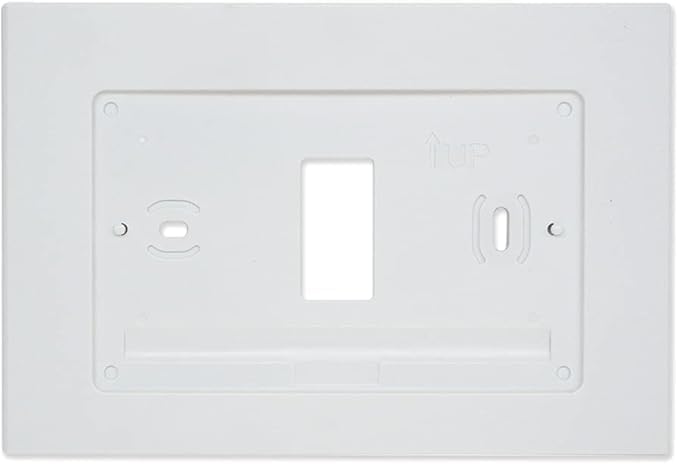
Figure 1: Generic Thermostat Backplate (Model AKIT-CONV-ST). This image shows the front of the white plastic backplate, highlighting the central rectangular cutout for a thermostat, and additional cutouts for a toggle switch, rocker switch, and a standard electrical outlet, along with screw mounting points.
The backplate is crafted from durable plastic, ensuring long-lasting performance and resistance to wear. Its clean, white finish offers a modern and minimalistic aesthetic, complementing various interior decor styles.
Safety Information
- Always disconnect power at the circuit breaker before beginning any electrical installation.
- If you are unsure about any part of the installation process, consult a qualified electrician.
- Do not use this product for purposes other than its intended use.
- Keep out of reach of children.
Setup and Installation
This section outlines the steps for installing the thermostat backplate. Ensure you have the necessary tools before starting.
Tools Required:
- Screwdriver (Phillips or Flathead, depending on screw type)
- Wire strippers (if connecting new wiring)
- Voltage tester (recommended for safety)
Installation Steps:
- Prepare the Area: Turn off power to the circuit at the main breaker. Verify power is off using a voltage tester.
- Remove Old Plate (if applicable): Carefully remove any existing wall plate or thermostat from the wall. Disconnect any wiring if necessary, noting their connections.
- Position the Backplate: Align the Generic Thermostat Backplate (Model AKIT-CONV-ST) over the electrical box or mounting area. Ensure the "UP" arrow (if present on the back of the plate) is pointing upwards. The pre-cut openings should align with the thermostat mounting holes and any existing electrical components (toggle switch, rocker switch, outlet).
- Secure the Backplate: Use appropriate screws (not included, typically provided with the thermostat or electrical components) to secure the backplate to the wall or electrical box. Do not overtighten.
- Install Components: Install your thermostat (e.g., ATST-CWE-BL-A), toggle switch, rocker switch, and/or outlet into their respective openings on the backplate. Follow the installation instructions provided with those specific components.
- Restore Power: Once all components are securely installed and wiring is properly connected, restore power at the circuit breaker.
- Test Functionality: Test the thermostat and any installed switches/outlets to ensure they are functioning correctly.
Operating Instructions
This backplate is a passive component designed to provide a mounting surface and aesthetic finish for your thermostat and other electrical devices. Its operation is entirely dependent on the devices mounted within it.
Refer to the user manuals of your specific thermostat (e.g., ATST-CWE-BL-A), toggle switch, rocker switch, and electrical outlet for their respective operating instructions.
Maintenance
The Generic Thermostat Backplate requires minimal maintenance.
- Cleaning: To clean the surface, gently wipe with a soft, damp cloth. Avoid using abrasive cleaners, solvents, or harsh chemicals, as these may damage the finish.
- Inspection: Periodically inspect the backplate for any signs of damage, cracks, or discoloration. If damage is observed, consider replacing the backplate to maintain safety and aesthetics.
- Tightness: Ensure that the screws securing the backplate and any mounted devices remain tight. Loose connections can lead to instability.
Troubleshooting
As a non-electrical component, the backplate itself does not typically experience "malfunctions." Most issues will relate to installation or the devices mounted within it.
| Issue | Possible Cause | Solution |
|---|---|---|
| Backplate is loose on the wall. | Mounting screws are not tight enough. | Gently tighten the mounting screws. Do not overtighten. |
| Thermostat/switch/outlet does not fit properly. | Incorrect backplate model or component. | Verify that the backplate (Model AKIT-CONV-ST) is compatible with your specific thermostat (ATST-CWE-BL-A) and other components. |
| Electrical device (thermostat, switch, outlet) is not working. | Power issue, wiring error, or device malfunction. | Check circuit breaker. Refer to the specific device's manual for troubleshooting. Consult a qualified electrician if needed. |
If you encounter issues not listed here, or if the problem persists, please contact customer support or a qualified professional.
Specifications
| Feature | Detail |
|---|---|
| Model Number | AKIT-CONV-ST |
| Brand | Generic |
| Material | Plastic |
| Color | White |
| Finish Type | Unfinished |
| Configuration | Wall Plate with cutouts for toggle switch, rocker switch, and outlet |
| Compatibility | Designed for ATST-CWE-BL-A thermostat and standard electrical components |
| Item Weight | 3 pounds |
| Date First Available | September 10, 2024 |
Warranty and Support
This product is a passive component. For specific warranty information regarding the thermostat or other electrical devices installed with this backplate, please refer to the documentation provided by the respective manufacturers of those devices.
For support related to the Generic Thermostat Backplate (Model AKIT-CONV-ST), please contact the retailer or manufacturer where the product was purchased. Keep your proof of purchase for any inquiries.
Note: As a "Generic" brand, specific warranty details may vary.