
1. Important Safety Instructions
Read and understand all safety precautions and operating instructions before using this welding machine. Failure to follow these instructions can result in serious injury or death.
- Electric Shock: Welding current can cause fatal electric shock. Ensure proper grounding. Do not touch live electrical parts. Wear dry, insulated gloves and protective clothing.
- Fumes and Gases: Welding produces fumes and gases hazardous to health. Work in a well-ventilated area. Use an exhaust fan or fume extractor.
- Arc Rays: Arc rays can burn eyes and skin. Wear a welding helmet with a proper shade filter. Use protective clothing to cover exposed skin.
- Fire and Explosion: Welding can cause fire or explosion. Keep flammable materials away from the welding area. Have a fire extinguisher readily available.
- Hot Parts: Welded parts and equipment can be hot. Allow them to cool before handling. Use insulated gloves.
- Magnetic Fields: Welding current creates electromagnetic fields. Consult your doctor if you have a pacemaker or other medical implant.
2. Product Overview
The SamFansar MIG-270 is a versatile 3-in-1 inverter welding machine designed for MIG (Gasless), TIG (Lift TIG), and ARC (MMA) welding processes. It features an LED digital display for precise control and adjustable power settings to suit various applications. Its compact and portable design makes it suitable for both daily and professional use.

Figure 2.1: The SamFansar MIG-270 3-in-1 Welding Machine, highlighting its multi-process capabilities: ARC, Lift TIG, and Gasless MIG.
Key Features:
- 3-in-1 Functionality: Supports MIG (Gasless), Lift TIG, and ARC (MMA) welding.
- LED Digital Display: Provides clear and precise current readings.
- Adjustable Current: Allows fine-tuning of welding parameters for optimal results.
- 60% Duty Cycle: Ensures prolonged operation and machine longevity.
- Overload Safety Protection: Automatically shuts off to prevent damage from overheating or excessive voltage/current.
- Portable Design: Lightweight (4KG) with a sturdy handle for easy transport.
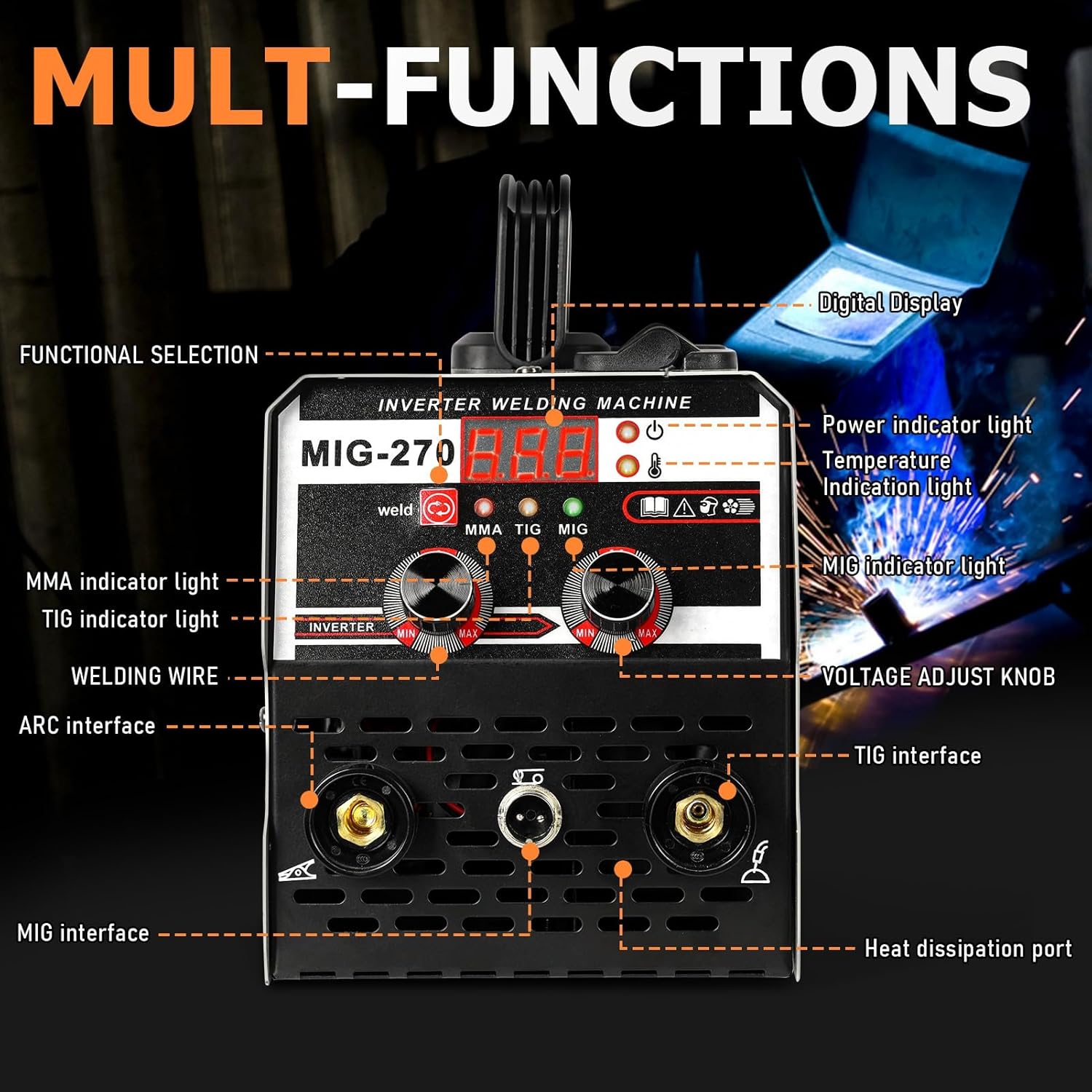
Figure 2.2: Detailed view of the MIG-270 front panel, showing the digital display, functional selection buttons, indicator lights (MMA, TIG, MIG, Power, Temperature), and voltage adjust knob.
3. Setup Instructions
3.1 Unpacking and Inspection
Carefully remove the welding machine and all accessories from the packaging. Inspect for any shipping damage. If any damage is found, contact your supplier immediately.
3.2 Package Contents
The package should include:
- 1 x MIG Welding Machine (MIG-270)
- 1 x Welding Torch
- 1 x Welding Torch Cable
- 1 x Ground Clip
- 1 x Welding Wire
- 1 x Face Guard
- 1 x Brush
- 1 x User Manual
3.3 Power Connection
Connect the welding machine to a 110V power supply. Ensure the power outlet is properly grounded and can handle the machine's current requirements.
3.4 Wire Installation (MIG Mode)
For MIG welding, install the welding wire spool into the machine's wire feed compartment.
- Open the wire feed compartment cover.
- Place the wire spool onto the spindle, ensuring it rotates freely.
- Thread the welding wire through the wire pressing wheel and wire feeding wheel.
- Adjust the pressure regulation knob to ensure proper wire tension.
- Close the compartment cover.

Figure 3.1: The automatic wire feed system, showing the welding wires, pressure regulation, wire pressing wheel, and wire feeding wheel. Inset images show the spindle, spool, spool spacer, and spool lock.
3.5 Connecting Welding Accessories
Connect the welding torch and ground clamp according to the desired welding mode.
- MIG (Gasless): Connect the MIG torch to the MIG interface and the ground clamp to the negative (-) terminal.
- Lift TIG: Connect the TIG torch to the TIG interface and the ground clamp to the negative (-) terminal.
- ARC (MMA): Connect the electrode holder to the positive (+) terminal and the ground clamp to the negative (-) terminal.

Figure 3.2: Visual guide for connecting welding accessories for ARC, MIG Gasless, and Lift TIG operations.
Video 3.1: This video demonstrates the process of installing the welding wire spool and connecting the welding torch and ground clamp to the SamFansar MIG-270 machine for operation.
4. Operating Instructions
4.1 Powering On
After connecting all necessary cables and accessories, turn on the power switch located on the rear panel of the machine. The LED digital display will illuminate.
4.2 Selecting Welding Mode
Use the functional selection button on the front panel to choose between MMA (ARC), TIG, or MIG welding modes. The corresponding indicator light will illuminate.
4.3 Adjusting Current/Voltage
Rotate the adjustment knobs to set the desired welding current (amperage) or voltage. The LED digital display will show the selected value. Refer to welding charts for appropriate settings based on material thickness and type.
4.4 Welding Process
Once settings are configured and safety gear is worn:
- Position the ground clamp securely to the workpiece.
- Bring the welding torch/electrode close to the workpiece.
- Initiate the arc according to the chosen welding process (e.g., trigger for MIG, scratch start for Lift TIG/ARC).
- Maintain a steady hand and consistent travel speed for a smooth weld bead.
- After welding, allow the workpiece to cool before handling.
The machine's 60% duty cycle ensures it can operate for extended periods without overheating. If the machine becomes too hot or experiences an overload, the safety protection system will activate, temporarily shutting down operation to prevent damage. Allow the machine to cool down before resuming work.
5. Maintenance
Regular maintenance ensures the longevity and optimal performance of your welding machine.
- Cleaning: Periodically clean the machine's exterior with a dry cloth. Use compressed air to clear dust from ventilation openings. Ensure the machine is unplugged before cleaning.
- Cable Inspection: Regularly inspect all welding cables, torch, and ground clamp for damage, fraying, or loose connections. Replace damaged components immediately.
- Wire Feed Mechanism: Keep the wire feed mechanism clean and free of debris. Check the wire feed rollers for wear and replace if necessary.
- Storage: Store the welding machine in a dry, clean environment away from direct sunlight and excessive moisture.
6. Troubleshooting
If you encounter issues with your welding machine, refer to the following common troubleshooting steps:
| Problem | Possible Cause | Solution |
|---|---|---|
| Machine does not power on | No power supply; Power switch off; Faulty power cable | Check power connection; Turn on power switch; Inspect/replace power cable. |
| No arc | Loose connections; Incorrect mode selection; Ground clamp not properly attached; Incorrect current settings | Check all cable connections; Verify welding mode; Ensure good ground contact; Adjust current settings. |
| Wire feed issues (MIG) | Wire tangled; Incorrect wire tension; Clogged liner; Worn feed roller | Untangle wire; Adjust tension; Clean/replace liner; Replace feed roller. |
| Overheat indicator on | Exceeded duty cycle; Poor ventilation | Allow machine to cool down; Ensure adequate airflow around the machine. |
If the problem persists after attempting these solutions, contact qualified service personnel.
7. Specifications
The following table outlines the technical specifications for the SamFansar MIG-270 welding machine:
| Feature | Specification |
|---|---|
| Model | MIG-270 |
| Input Voltage | 110V |
| Current Adjustment Range | 20-250A |
| Load Sustaining Rate (Duty Cycle) | 60% |
| No-Load Voltage | 62V |
| Applicable Welding Rod | 1.6-3.2mm |
| Insulation Grade | F |
| Machine Weight | 4KG (Approx. 8.8 lbs) |
| Dimensions (L x W x H) | 28.5cm x 15cm x 17cm (Approx. 11.22" x 5.91" x 6.69") |
| Manufacturer | SamFansar |

Figure 7.1: Approximate dimensions of the MIG-270 welding machine.

Figure 7.2: The portable design of the welding machine, highlighting its weight (9.9 lbs), amperage range (20-120A), power supply (110V + 10%), and frequency (50/60 Hz).
8. Warranty and Support
For information regarding the product warranty, please refer to the warranty card included with your purchase or contact SamFansar customer support directly. Keep your purchase receipt as proof of purchase for warranty claims.
For technical support, troubleshooting assistance beyond this manual, or spare parts, please contact the manufacturer or your authorized dealer.