
Introduction
This manual provides essential information for the safe and effective use of your THSTPA 7-Color LED Facial and Neck Light Therapy Mask. This device is designed for at-home skin care, utilizing advanced LED light technology to address various skin concerns. Crafted from flexible, high-quality silicone, it offers a comfortable and portable solution for your daily beauty regimen.

Image: The THSTPA 7-Color LED Facial and Neck Light Therapy Mask, showcasing its design and the included neck piece.
Package Contents
Please ensure all items are present in your package:
- Silicone LED Face Mask
- Silicone LED Neck Mask
- Remote Controller
- USB Charging Cable
- Blackout Eye Mask (Eye Pads)
- Adjustable Straps
- User Manual

Image: All components included in the THSTPA LED Facial and Neck Light Therapy Mask package.
Safety Information
- Do not use the device while it is charging.
- Consult a healthcare professional before use if you have any pre-existing skin conditions, medical concerns, or are pregnant.
- Avoid direct eye exposure to the LED lights. Always use the provided eye protection during treatment.
- Keep the device out of reach of children.
- Store the device in a cool, dry place away from direct sunlight and moisture.
- Do not attempt to disassemble or modify the device.
- Discontinue use immediately if you experience any discomfort or adverse reactions.
Setup
- Charge the Remote Controller: Connect the USB charging cable to the remote controller and a suitable power source. Ensure the remote is fully charged before first use (approximately 4-5 hours). The indicator light will stop flashing when charging is complete.
- Attach Eye Protection: Insert the provided blackout eye pads into the designated areas on the face mask.
- Attach Straps: Secure the adjustable straps to the face and neck masks for a comfortable and snug fit.
- Connect Controller: Plug the face and neck masks into the remote controller.
Video: Quick installation and use of the 7-color beauty mask, demonstrating how to assemble and wear the device.
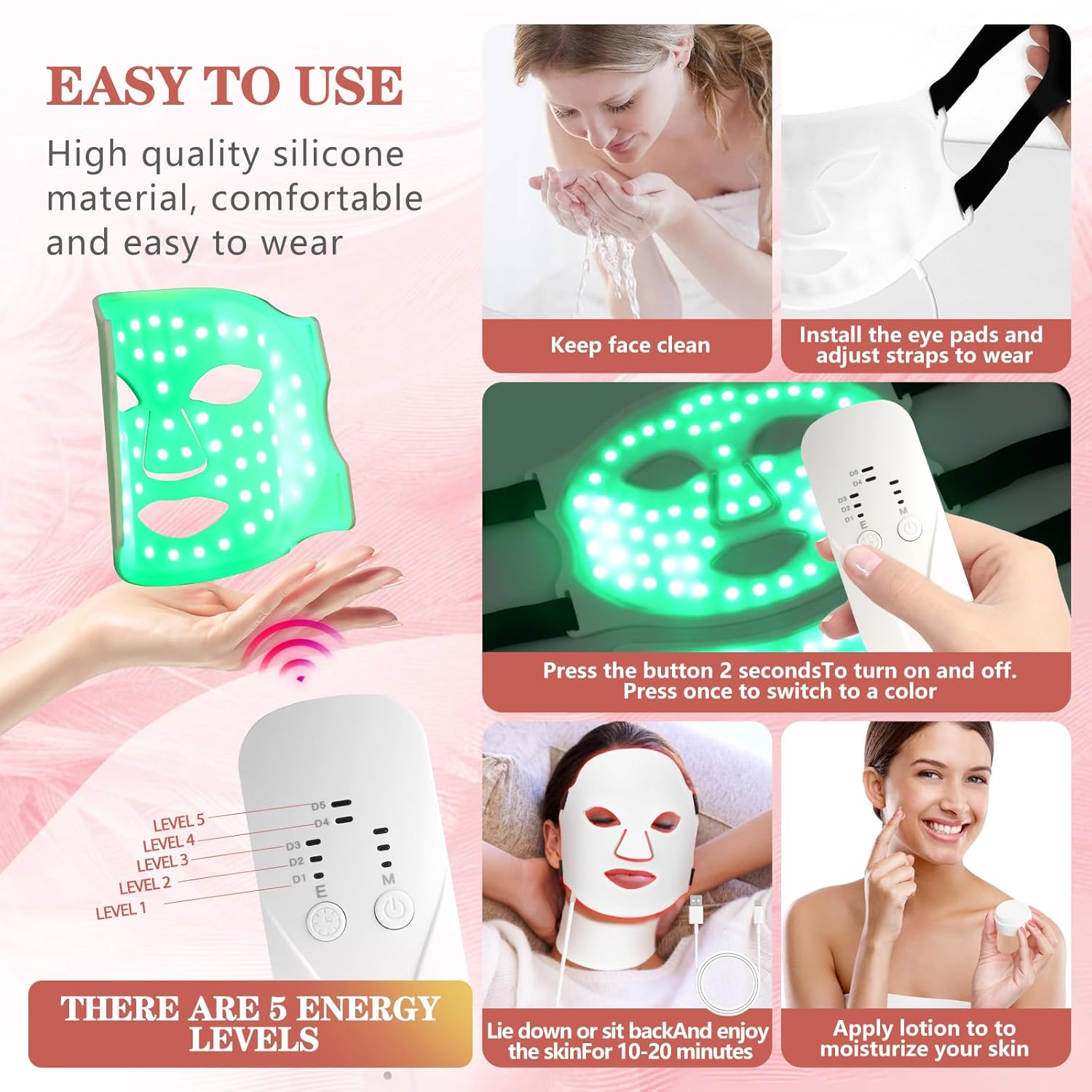
Image: Visual guide for preparing the mask, including cleaning the face, installing eye pads, and adjusting straps.
Operating Instructions
- Cleanse Skin: Ensure your face and neck are clean and dry, free of makeup or other products, before using the mask.
- Wear the Mask: Place the face mask over your face and the neck mask around your neck, adjusting the straps for comfort.
- Power On: Press and hold the power button on the remote controller for 2 seconds to turn on the device.
- Select Light Color: Press the 'M' button to cycle through the 7 available LED light colors. Each color targets specific skin concerns:
- Red Light (620-630nm): Anti-aging mode, promotes collagen production, reduces wrinkles.
- Green Light (520-525nm): Skin balance mode, improves skin tone and brightness.
- Blue Light (440-465nm): Purifying mode, targets blemishes.
- Cyan Light (525+460nm): Relaxing mode, enhances cellular energy.
- Purple Light (630+460nm): Dual-frequency mode, improves cellular oxygen exchange.
- Yellow Light (630+520nm): Calming mode, eliminates acne scars.
- White Light (460+520+630nm): Boost mode, breaks down pigmentation, improves fine lines and sagging.
- Adjust Brightness: Use the 'E+' and 'E-' buttons to adjust the light intensity (5 levels available).
- Set Treatment Time: Use the 'T+' and 'T-' buttons to set the desired treatment duration (recommended 20 minutes per session).
- Begin Treatment: Relax and allow the mask to work. The device will automatically turn off after the set time.
- Post-Treatment: Apply your preferred lotion or moisturizer to hydrate your skin.
Video: Demonstration of the use of the 7-color beauty masks, showing how to operate the device.
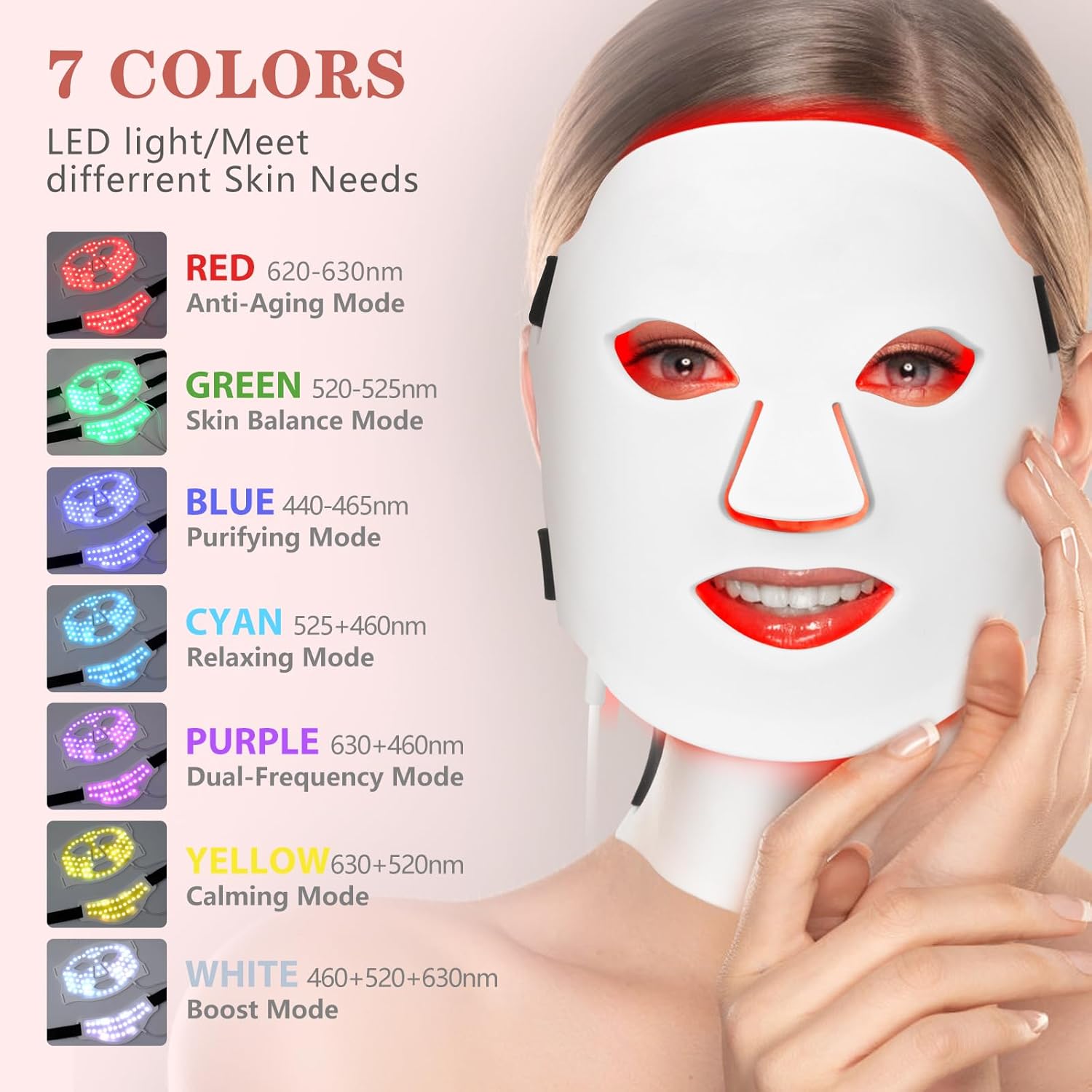
Image: Detailed breakdown of the 7 LED light colors and their corresponding benefits for various skin needs.

Image: Close-up of the remote control, highlighting the buttons for power, color selection, intensity, and time adjustment.
Recommended Usage
For optimal results, it is recommended to use the THSTPA LED Facial and Neck Light Therapy Mask 3-5 times per week. Each session should last 20 minutes. Once visible results are achieved, you may reduce usage to 2-3 times per week.

Image: Visual representation of skin improvement before and after using the mask, along with recommended usage frequency.
Maintenance
- Clean the mask regularly with a soft, damp cloth. Do not use harsh chemicals or abrasive cleaners.
- Ensure the mask is completely dry before storing.
- Store the mask in its original packaging or a clean, dry place to protect it from dust and damage.
- Do not fold the mask excessively or apply heavy objects to it to avoid damaging the internal wiring and LED beads.
Troubleshooting
If the device does not power on or function correctly, please check the following:
- Ensure the remote controller is fully charged.
- Verify that the masks are securely plugged into the remote controller.
- If the issue persists, refer to the warranty and support section for assistance.
Specifications
| Package Dimensions | 11.14 x 8.43 x 1.81 inches; 1.3 Pounds |
| Batteries | 1 Lithium Ion battery required (included) |
| Manufacturer | THSTPA |
| Item Form | Flexible, high-quality silicone |
| Product Benefits | Skin care, anti-aging |
| Scent | No odor at all |
| Skin Type | All |
| LED Beads | 309 LED chips (103 new type 3-in-1 light beads) |
| Optical Power | Max 46MW/CM2 |
| Brightness Adjustment | 5 levels |

Image: Details on the mask's soft silicone material, lightweight design, and wireless functionality.
Warranty and Support
We offer 24-hour after-sales support to handle any issues properly. For further assistance, refer to the contact information provided in your product packaging or visit the official THSTPA website. We are committed to providing our customers with the best shopping experience.