
1. Introduction
The GEEKOM Air12 Lite Mini PC is a compact and powerful desktop computer designed for various applications, from home office tasks to business and educational environments. Featuring the Intel 12th Gen Alder Lake-N100 processor, 8GB DDR4 RAM, and a 256GB PCIe M.2 SSD, it offers efficient performance in a small form factor. This manual provides essential information for setting up, operating, maintaining, and troubleshooting your Mini PC.

Figure 1.1: GEEKOM Air12 Lite Mini PC, showcasing its compact design and sleek black finish.
2. What's in the Box
Upon opening your GEEKOM Air12 Lite Mini PC package, please ensure all the following items are present:
- 1x Air12 Lite Mini PC
- 1x HDMI Cable
- 1x VESA Mount
- 1x Power Adapter
- 1x User Guide (this manual)

Figure 2.1: All components included in the GEEKOM Air12 Lite Mini PC retail package.
3. Product Features
3.1 Metal Design & Compact Size
The GEEKOM Air12 Lite features a sleek and minimalist design with dimensions of only 135.5 x 115.5 x 34.5mm. Its compact size and modern aesthetics allow it to seamlessly blend into any environment, making it an ideal choice for offices, schools, and homes alike. The interior adopts a sturdy zinc plate frame that can withstand daily wear and tear, ensuring long-lasting durability.

Figure 3.1.1: The compact dimensions of the GEEKOM Air12 Lite, highlighting its portability.
3.2 Efficient Performance
Equipped with the Intel 12th Gen Alder Lake-N100 processor (4C/4T, 6M Cache, up to 3.4GHz), the Air12 Lite delivers over 25% higher performance than previous generations like N5105/N5095. It is perfect for web browsing, spreadsheet editing, and light gaming. It comes pre-installed with Windows 11 and supports Windows 10, Ubuntu Linux, and FydeOS. The integrated Intel UHD Graphics supports 4K 60Hz output for smooth multimedia experiences.

Figure 3.2.1: Internal components of the GEEKOM Air12 Lite, highlighting the DDR4 RAM and M.2 SSD.
3.3 Iceblast Improved Cooling System
The Mini PC features GEEKOM's self-developed Iceblast cooling system, which includes additional heat conductions, improved heat-conducting materials, and cooling fans. This system effectively manages case temperatures and reduces noise levels by 40% compared to similar products, ensuring a quiet working environment.
Video 3.3.1: An animation demonstrating the GEEKOM Iceblast Improved Cooling System, showing airflow and heat dissipation within the mini PC.
3.4 Energy-Efficient and Eco-Friendly
The Air12 Lite integrates advanced manufacturing processes and power management technologies to control thermal losses, with a power consumption of only 45 watts. It saves unnecessary energy consumption during idle periods, balancing performance and energy efficiency. This contributes to lower energy costs and a positive environmental impact.
Video 3.4.1: A comparison video illustrating the energy consumption differences between GEEKOM Mini PCs and traditional desktop computers, highlighting the energy savings.
3.5 Dependable Quality
GEEKOM products undergo rigorous testing, including temperature, humidity, noise, drop resistance, and continuous operation tests. This commitment to quality ensures an average lifespan twice that of similar products in the industry.
Video 3.5.1: A video explaining why GEEKOM products outperform competitors, focusing on superior materials and higher manufacturing standards.
4. Setup Guide
Follow these steps to set up your GEEKOM Air12 Lite Mini PC:
- Connect Display: Connect your monitor(s) to the Mini PC using the HDMI 2.0 port or the Mini DisplayPort (DP 1.4). The Air12 Lite supports dual 4K displays.
- Connect Peripherals: Plug in your keyboard, mouse, and other USB devices into the available USB 3.2 Gen 1 (front), USB 3.2 Gen 2 (rear), or USB 2.0 (rear) ports.
- Connect to Network: For a wired connection, plug an Ethernet cable into the RJ45 port. For wireless, the Mini PC supports WiFi 5 and Bluetooth 5.1.
- Connect Power: Connect the power adapter to the DC in port on the Mini PC, then plug the power adapter into a wall outlet.
- Power On: Press the power button located on the front of the Mini PC. The power LED will illuminate.
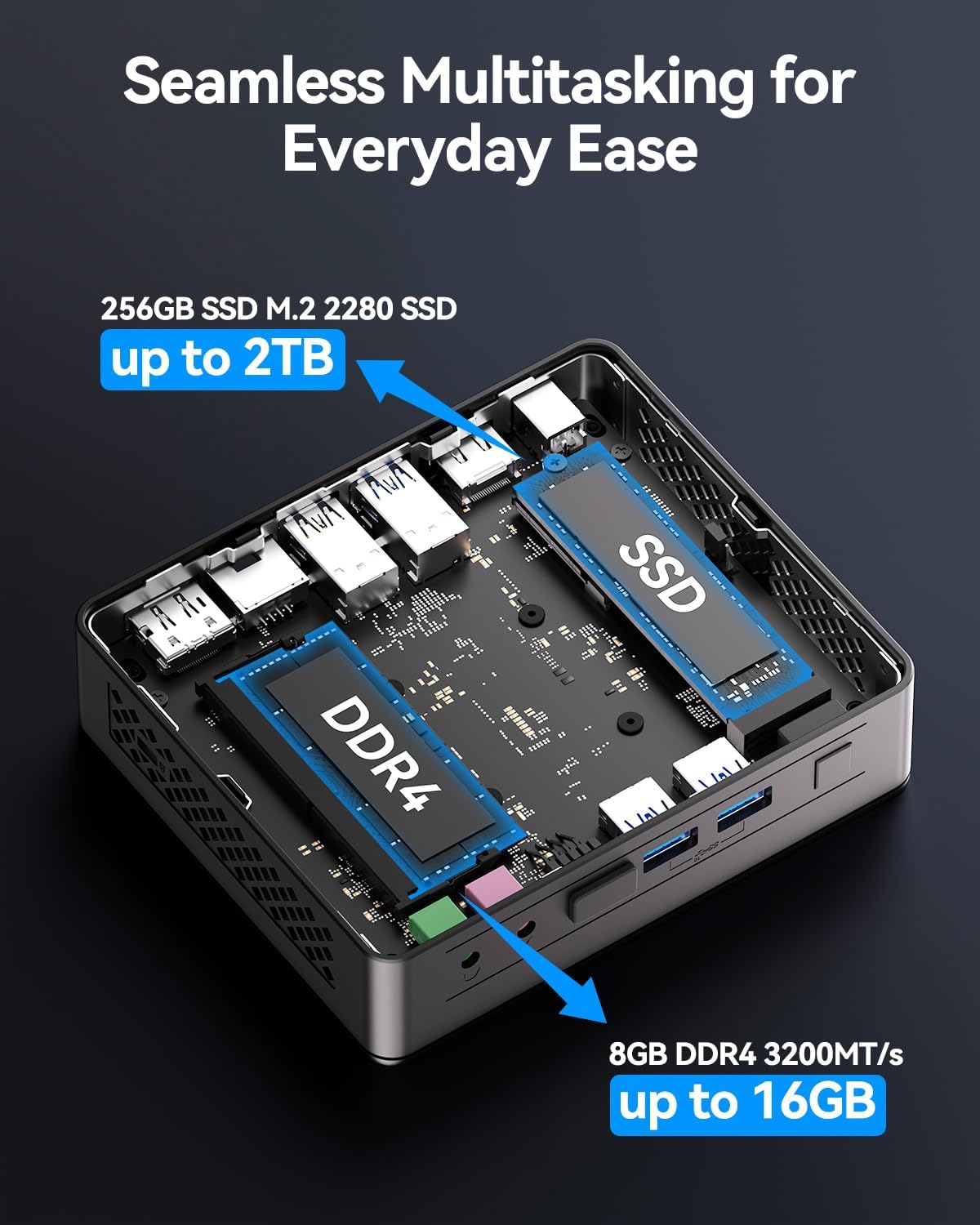
Figure 4.1: Detailed view of the GEEKOM Air12 Lite's various input/output ports for connectivity.
Video 4.2: An introductory video to the GEEKOM Air12 Lite Mini PC, demonstrating its features and initial setup.
5. Operating Instructions
Your GEEKOM Air12 Lite Mini PC comes pre-installed with Windows 11, providing a familiar and user-friendly operating environment. After initial setup, the system will guide you through the Windows 11 configuration process.
- First Boot: The first time you power on the Mini PC, it will go through a setup wizard for Windows 11. Follow the on-screen prompts to configure your region, language, network, and user account.
- Dual Display Setup: To utilize the dual 4K display capability, connect two monitors to the available HDMI and Mini DisplayPort outputs. Windows 11 will automatically detect the displays, and you can configure their arrangement and resolution in the Display Settings.
- Software Installation: Install your preferred applications and software. The Mini PC is suitable for a wide range of productivity, entertainment, and light gaming applications.
- Connectivity: Utilize the integrated WiFi 5 for wireless internet access or connect Bluetooth 5.1 devices such as headphones, keyboards, or mice.

Figure 5.1: The GEEKOM Air12 Lite supports dual 4K displays for enhanced productivity and multimedia.
6. Maintenance
Proper maintenance ensures the longevity and optimal performance of your GEEKOM Air12 Lite Mini PC:
- Keep Clean: Regularly clean the exterior of the Mini PC with a soft, dry cloth. Avoid using liquid cleaners directly on the device.
- Ensure Ventilation: Do not block the ventilation holes on the sides and back of the Mini PC. Ensure it is placed in a well-ventilated area to allow the Iceblast cooling system to function effectively.
- Software Updates: Keep your operating system (Windows 11) and drivers updated to ensure system stability and security.
- Safe Shutdown: Always shut down the Mini PC properly through the operating system to prevent data corruption.
7. Troubleshooting
If you encounter issues with your GEEKOM Air12 Lite Mini PC, refer to the following common troubleshooting steps:
| Problem | Possible Cause | Solution |
|---|---|---|
| No Power | Power adapter not connected; Power outlet issue | Ensure power adapter is securely connected to both the Mini PC and a working power outlet. Try a different outlet. |
| No Display | Display cable loose; Incorrect input source on monitor | Check HDMI/DP cable connections. Ensure monitor is set to the correct input source. |
| Slow Performance | Too many applications running; Overheating | Close unnecessary applications. Ensure proper ventilation and clean dust from vents. Check for background processes. |
| No Internet (Wi-Fi) | Wi-Fi disabled; Router issue; Driver issue | Check Wi-Fi settings in Windows. Restart your router. Update Wi-Fi drivers. |
8. Specifications
Detailed technical specifications for the GEEKOM Air12 Lite Mini PC:
| Feature | Specification |
|---|---|
| Processor | Intel 12th Gen Alder Lake-N100 (up to 3.4GHz) |
| Graphics | Intel UHD Graphics 630 (4K 60Hz support) |
| RAM | 8 GB DDR4 (expandable up to 16GB) |
| Storage | 256 GB PCIe M.2 SSD (expandable up to 2TB) |
| Operating System | Windows 11 (compatible with Windows 10, Ubuntu Linux, FydeOS) |
| Wireless Connectivity | WiFi 5, Bluetooth 5.1 |
| Ports (Front) | 2x USB 3.2 Gen 1, 1x 9-pin expansion jack, 3.5mm Microphone jack, 3.5mm Headphone jack |
| Ports (Rear) | 2x USB 3.2 Gen 2, 2x USB 2.0, 1x RJ45, 1x DP1.4, 1x HDMI 2.0, Power in |
| Dimensions | 135.5 x 115.5 x 34.5mm (4.6 x 4.4 x 1.3 inches) |
| Weight | 2.83 pounds |
9. Warranty and Support
GEEKOM stands by the quality of its products. Your Air12 Lite Mini PC comes with a comprehensive warranty and dedicated customer support.
- 3-Year Warranty: From the date of purchase, GEEKOM provides a 3-year warranty for each Mini PC. This warranty covers any failures caused by design or craftsmanship.
- Dedicated Customer Service: Our dedicated customer service team is committed to meeting your needs and ensuring you enjoy using your Mini PC to the fullest.

Figure 9.1: GEEKOM's commitment to quality and customer support, including a 3-year warranty.
For any questions or support, please refer to the contact information provided on your warranty card or visit the official GEEKOM website.