
1. Introduction
Thank you for choosing the Scttomon HT-6080 Professional Barber Combo. This comprehensive grooming kit includes a T-blade hair trimmer and a foil shaver, designed for precise hair trimming and a smooth, close shave. This manual provides essential information for safe operation, maintenance, and optimal performance of your device. Please read it thoroughly before first use and retain it for future reference.
2. Safety Information
To ensure safe operation and prevent injury or damage, please adhere to the following safety guidelines:
- Avoid use while charging: Do not operate the device when it is connected to a power source for charging.
- Water exposure: Keep the device away from water sources, except when cleaning the washable components as instructed.
- Pre-use inspection: Always ensure the device is properly charged and inspect it for any damage or defects before each use.
- Skin caution: Use with caution on dry skin. When using with shaving gel or foam, ensure proper application to minimize potential skin irritation, nicks, or cuts.
- Children: Keep out of reach of children. This device is not a toy.
- Disassembly: Do not attempt to disassemble or repair the device yourself. Contact customer support for assistance.
3. Package Contents
The Scttomon HT-6080 Professional Barber Combo typically includes the following items:
- 1 x T-blade Hair Trimmer
- 1 x Foil Shaver
- Multiple Guide Combs for Trimmer (various lengths)
- 1 x USB Charging Cable
- 1 x Cleaning Brush
- 1 x Blade Oil
- 1 x Travel Pouch
- User Manual

Image 3.1: Contents of the Scttomon HT-6080 Professional Barber Combo package, including the T-blade trimmer, foil shaver, various guide combs, cleaning brush, and charging cable.
4. Product Overview
The Scttomon HT-6080 is designed for versatile grooming, featuring two primary devices:
4.1 T-blade Hair Trimmer
- Precision Blade: Equipped with a sharp, stainless steel T-blade for precise hair trimming and detailing.
- Adjustable Speed: Features three speed modes (6000 RPM, 6500 RPM, 7000 RPM) for different hair types and trimming needs.
- LED Display: Shows battery percentage, charging status, oil reminder, and current speed mode.

Image 4.1: Close-up of the T-blade hair trimmer, highlighting its sharp blade, three-speed adjustment, and LED display.
4.2 Foil Shaver
- Double-layer Blades: Utilizes a unique double-layer floating mesh design with independent dual cutting blades for a close and comfortable shave.
- Titanium Foil Head: Designed for ultra-close shaving, minimizing skin irritation.
- Pop-up Trimmer: Integrated pop-up trimmer for precise detailing of sideburns and mustaches.
- Adjustable Speed: Offers two speed settings (7000 RPM, 8000 RPM) for varying shaving preferences.
- LED Display: Displays battery percentage, charging status, and current speed mode.

Image 4.2: Close-up of the foil shaver, showing its double-layered blades, titanium foil head, and pop-up trimmer.
4.3 Common Features
- Cordless Operation: Both devices are cordless for maximum flexibility and ease of use.
- IPX6 Waterproof: Fully washable design allows for easy cleaning under running water.
- Long-lasting Battery: Built-in rechargeable Lithium-Ion batteries provide extended runtime.
- Travel Lock: Ensures safe transport and prevents accidental activation.

Image 4.3: Overview of key features including precision blades, lithium battery, metal body, USB charging, powerful motor, and low noise operation.
5. Setup
5.1 Initial Charging
Before first use, fully charge both the T-blade trimmer and the foil shaver. Connect the USB charging cable to the device and a suitable USB power adapter (not included). The LED display will indicate charging progress. A full charge takes approximately 1.5 hours.
5.2 Attaching Guide Combs (Trimmer)
To attach a guide comb to the T-blade trimmer, align the comb with the blade and push it firmly until it clicks into place. To remove, gently pull the comb away from the blade.
6. Operating Instructions
6.1 Using the T-blade Hair Trimmer
- Ensure the trimmer is charged.
- Attach the desired guide comb for your preferred hair length, or use without a comb for precise outlining.
- Press the power button to turn on the trimmer.
- Adjust the speed using the speed adjustment button (6000/6500/7000 RPM) as needed.
- Hold the trimmer against the skin and move it slowly against the direction of hair growth for effective trimming.
- For best results when using the foil shaver, first trim longer stubble with the T-blade trimmer.
6.2 Using the Foil Shaver
- Ensure the shaver is charged.
- Press the power button to turn on the shaver.
- Adjust the speed using the speed adjustment button (7000/8000 RPM) as needed.
- Hold the shaver gently against your skin, moving it in small circular motions or straight lines against the direction of hair growth.
- For sideburns, mustaches, or stray hairs, activate the pop-up trimmer by sliding the switch on the side of the shaver.
6.3 Wet and Dry Shaving
Both devices are IPX6 waterproof, allowing for both dry and wet shaving. For a more comfortable shave and to reduce skin irritation, you may use the foil shaver with shaving gel or foam.

Image 6.1: Demonstrations of the grooming kit in use for various applications, including facial shaving, trimming, and body hair removal.
7. Maintenance and Cleaning
Regular cleaning and maintenance will prolong the life and performance of your grooming kit.
- After Each Use: Turn off the device. For the foil shaver, press the button to remove the blade cover. Rinse the blades and foil head under running water. For the T-blade trimmer, use the cleaning brush to remove loose hairs.
- Deep Cleaning: Periodically, you may detach the blade heads for a more thorough cleaning. Refer to the specific instructions for each device.
- Oiling Blades: After cleaning and drying, apply a small drop of the provided blade oil to the trimmer blades and foil shaver cutting elements. Run the device for a few seconds to distribute the oil. The LED display may show an oil add reminder when necessary.
- Drying: Allow all parts to air dry completely before reassembling or storing.

Image 7.1: Demonstration of cleaning the waterproof Scttomon HT-6080 devices under running water, showing how to remove the blade cover for thorough cleaning.
8. Charging and Battery Life
The Scttomon HT-6080 devices are equipped with powerful Lithium-Ion batteries.
- Charging Time: Approximately 1.5 hours for a full charge for both devices.
- Runtime: The T-blade trimmer provides up to 150 minutes of runtime on a full charge. The foil shaver provides up to 75 minutes of runtime.
- LED Indicator: The high-definition LED screen clearly displays the remaining battery percentage, allowing you to monitor charge levels. It also provides a charging reminder when the battery is low.
- Charging Compatibility: The USB charging cable can be connected to various USB power sources, including computers, mobile power banks, and USB wall adapters.
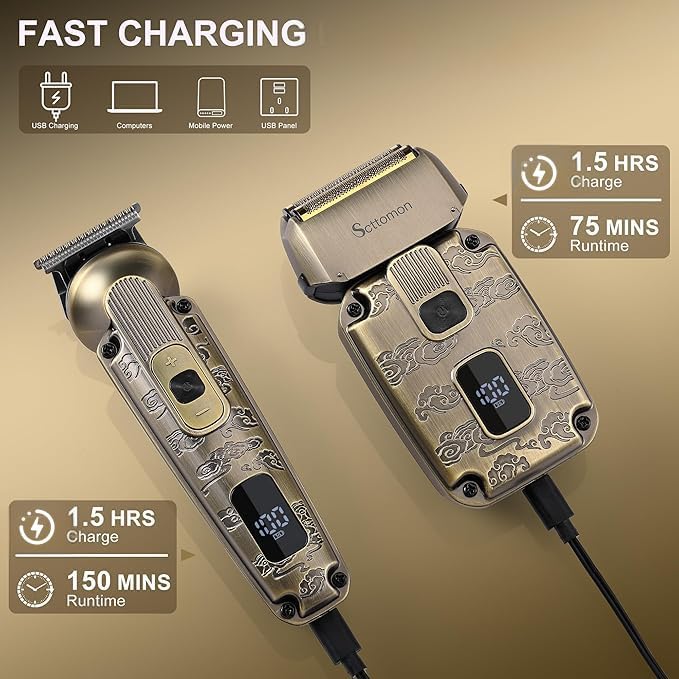
Image 8.1: Illustration of the fast charging capability, showing 1.5 hours charge time for both devices and their respective runtimes.
9. Troubleshooting
If you encounter issues with your Scttomon HT-6080, refer to the following common solutions:
| Problem | Possible Cause | Solution |
|---|---|---|
| Device does not turn on | Low battery; Travel lock engaged | Charge the device fully; Press and hold the power button for 3 seconds to disengage travel lock. |
| Reduced cutting/shaving performance | Blades are dull or clogged with hair; Insufficient lubrication | Clean blades thoroughly; Apply blade oil as instructed. |
| Skin irritation after shaving | Incorrect technique; Dry shaving sensitive skin; Blades need cleaning/oiling | Ensure proper shaving technique; Try wet shaving with gel/foam; Clean and oil blades. |
| LED display not working | Device is off; Battery completely drained | Turn on the device; Connect to charger and allow some time for the display to activate. |
If the problem persists after attempting these solutions, please contact Scttomon customer support for further assistance.
10. Specifications
Key technical specifications for the Scttomon HT-6080 Professional Barber Combo:
| Feature | Detail |
|---|---|
| Model | HT-6080 |
| Power Source | Rechargeable Lithium-Ion Battery |
| Charging Time | 1.5 Hours |
| Trimmer Runtime | Up to 150 Minutes |
| Shaver Runtime | Up to 75 Minutes |
| Waterproof Rating | IPX6 (Fully Washable) |
| Trimmer Speed Modes | 6000 RPM, 6500 RPM, 7000 RPM |
| Shaver Speed Modes | 7000 RPM, 8000 RPM |
| Included Components | Foil Shaver, T-blade Trimmer, Guide Combs, USB Cable, Cleaning Brush, Oil |
| Package Dimensions | 8.43 x 8.11 x 2.8 inches |
| Weight | 2.23 Pounds |
11. Warranty and Support
For information regarding warranty coverage, product support, or replacement parts, please refer to the warranty card included in your product packaging or contact Scttomon customer service directly. Contact details can typically be found on the manufacturer's official website or on the product packaging.
12. Official Product Videos
No official product videos from the seller were found that meet the specified embedding criteria (m3u8 format with 'Seller' creator type).