
ECO-WORTHY 60A MPPT Solar Charge Controller
ECO-WORTHY 60A MPPT Solar Charge Controller Instruction Manual
Model: 60A MPPT Solar Charge Controller
Brand: ECO-WORTHY
1. Product Overview
The ECO-WORTHY 60A MPPT Solar Charge Controller is an advanced device designed to optimize power harvesting from solar panels and efficiently charge various battery types in solar systems, RVs, and off-grid applications. It features Maximum Power Point Tracking (MPPT) technology for high efficiency, Bluetooth connectivity for remote monitoring and control, and multiple load control modes.

Figure 1: ECO-WORTHY 60A MPPT Solar Charge Controller with Bluetooth module and app interface.
2. Key Features
- Innovative MPPT Charge Controller: Maximum power point tracking technology, tracking efficiency up to 99.5%, peak conversion efficiency up to 98%, ensuring maximum possible power output even on cloudy days; Automatic detection of 12V/24V/36V/48V system voltage, rated charging current 60A.
- Bluetooth Monitoring & Customization: Equipped with a Bluetooth module, this controller allows you to connect via an app for real-time monitoring up to 33 feet away; Customize parameters and track 30 days of performance history right from your smartphone.
- 4 Load Control Modes: Connect DC load and safely supply power to equipment directly through solar charge controller; Supports 4 load control modes: Normal on/off, Optical control, Dual-period timing control, and Fixed time light control, to meet different usage scenarios and needs.
- Compatible with All Types of Batteries: Suitable for lead-acid and LiFePO4 batteries; Lead acid battery 4-stage charging and LiFePO4 battery 2-stage charging, as well as LiFePO4 battery activation function, multi-level intelligent charging to protect battery health.
- Full System Protection: The backlit LCD screen and indicator lights can quickly check the system's working data and status; It has multiple protection functions, including anti-reverse connection, short circuit, high temperature, load overcurrent, etc., to protect the safety of the entire system.
3. Product Components and Specifications
3.1 Components Overview
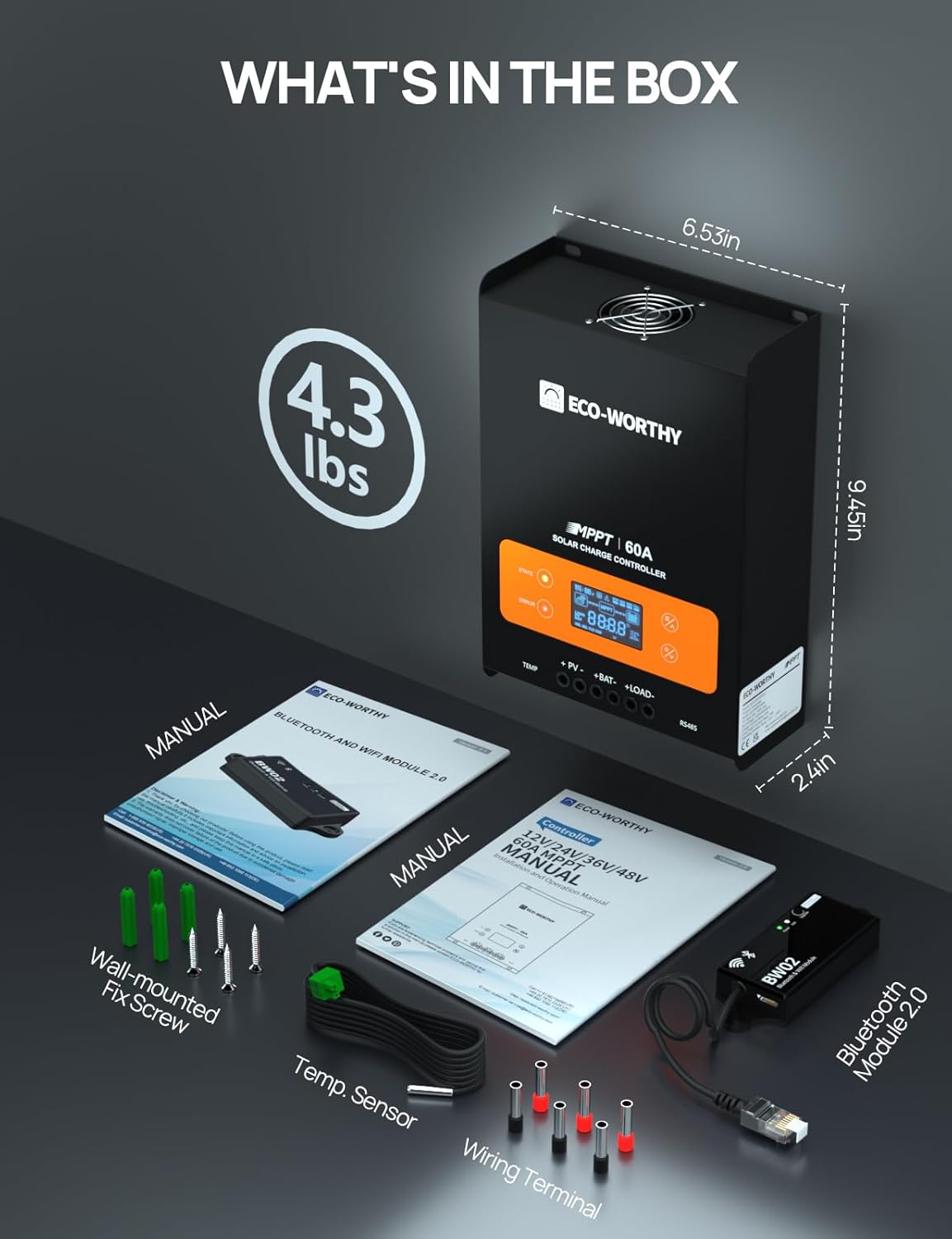
Figure 2: Detailed view of the ECO-WORTHY 60A MPPT Solar Charge Controller components.
- 1. Charge status and fault indicators
- 2. LCD display
- 3. Operation buttons
- 4. Holes for wiring screws
- 5. Input and output power cable connectors
- 6. RJ45 serial communication interface
- 7. Temperature sensing wire connector
- 8. Mounting hole for grounding
- 9. Cooling fan
3.2 What's in the Box
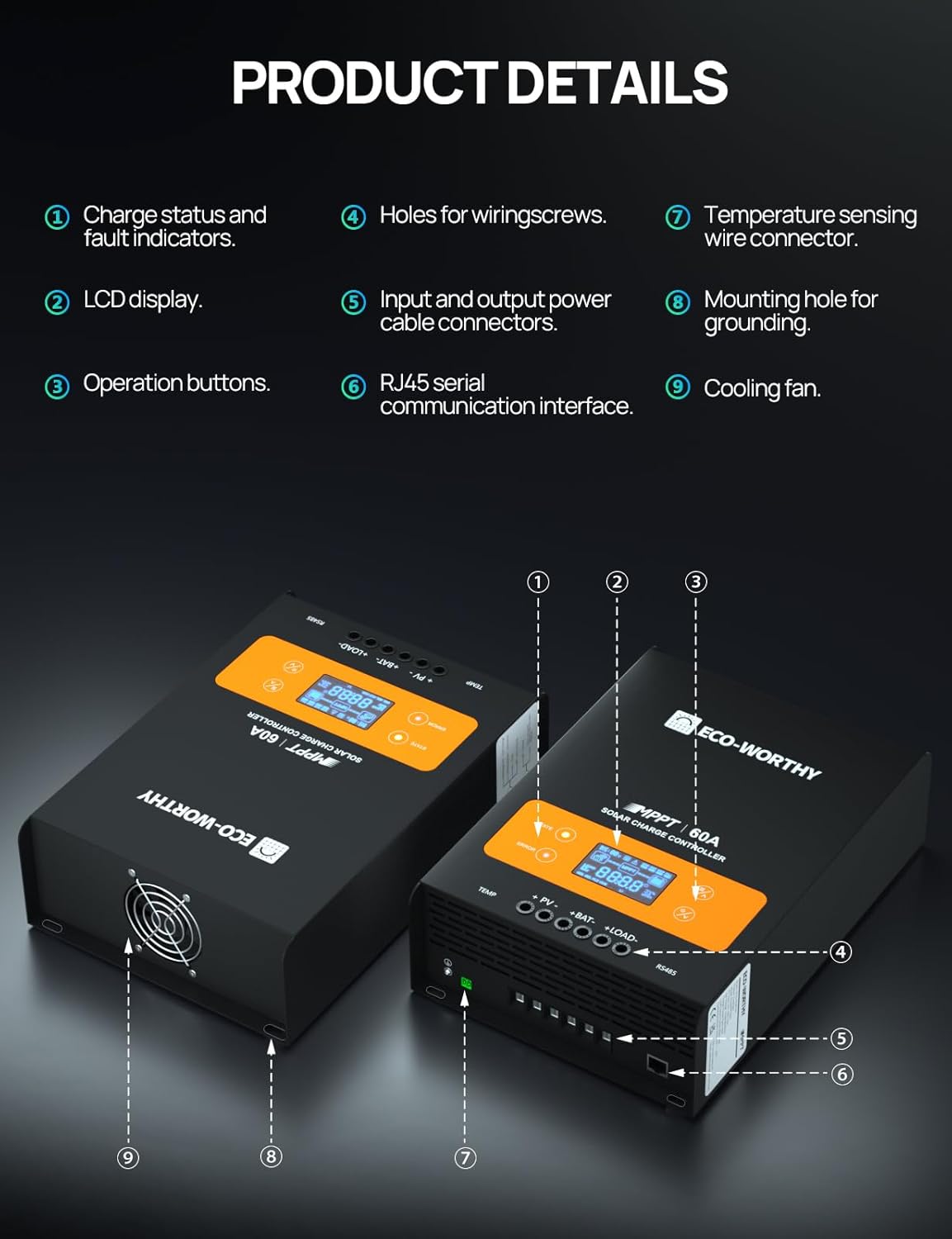
Figure 3: Package contents of the ECO-WORTHY 60A MPPT Solar Charge Controller.
- ECO-WORTHY 60A MPPT Solar Charge Controller
- Bluetooth and WiFi Module (BW02)
- Temperature Sensor
- Wiring Terminals
- Wall-mounted Fix Screws
- User Manuals
3.3 Technical Specifications
| Specification | Value |
|---|---|
| Display Type | LCD |
| Manufacturer | ECO-WORTHY |
| Charging Port Type | MC4 |
| Product Dimensions | 6.53 x 9.45 x 2.4 inches |
| Item Weight | 4.3 pounds |
| Color | Black |
| Voltage | 48 Volts (DC) |
| Supported System Voltage | 12V/24V/36V/48V (Auto-detection) |
| Rated Charging Current | 60A |
| Max Input Voltage | 150Vdc |
| Peak Conversion Efficiency | Up to 98% |
| Tracking Efficiency | Up to 99.5% |
4. Setup and Installation
Proper installation is crucial for the safe and efficient operation of your solar charge controller. Please follow these steps carefully.
4.1 Connection Steps
- Step 1: Connect to the Battery First. Ensure the battery is connected to the controller before connecting solar panels or loads. This allows the controller to detect the system voltage.
- Step 2: Connect the DC Load (if required). If a DC output is required to control a load, connect it to the designated load terminals on the controller.
- Step 3: Connect the Solar Panel. Finally, connect your solar panels to the PV input terminals of the controller.
4.2 Disconnection Steps
To safely disconnect the system, follow these steps in reverse order:
- Step 1: Disconnect the Solar Panel First.
- Step 2: Disconnect the Load.
- Step 3: Disconnect the Battery.

Figure 4: Connection and disconnection sequence for the solar charge controller.
4.3 Cable Specification Table (12V System Example)
Refer to the table below for recommended wire sizes based on current and distance for a 12V system. For other system voltages, please consult customer service or a qualified electrician.

Figure 5: Cable specification table for a 12V system.
5. Operating Instructions
5.1 LCD Display and Indicators
The controller features a backlit LCD screen and indicator lights to provide real-time system data and status.

Figure 6: Clear backlit LCD display showing system parameters.

Figure 7: LED indicator meanings for charge status and fault.
- Charge Status Indicator:
- LED flashes fast: Fast charging state (Bulk Charge)
- LED flashes slowly: Constant voltage charging state (Absorption)
- LED always on: Floating charging state or standby mode (Float)
- LED off: Not charging
- Fault Indicator:
- LED steady on: Fault occurred, please refer to the user manual for details.
- LED off: Running normally.
5.2 Bluetooth Monitoring and Control
The included BW02 Bluetooth & WiFi Module allows for convenient remote monitoring and parameter customization via a smartphone application.

Figure 8: Bluetooth module connection and app monitoring.
Video 1: Official product video demonstrating the ECO-WORTHY 60A MPPT Solar Charge Controller, highlighting its features and Bluetooth connectivity for remote monitoring and control via a smartphone app. This video is provided by the seller, ECO-WORTHY US.
Download the official ECO-WORTHY app from your smartphone's app store. Once installed, connect to the BW02 module via Bluetooth to access real-time data, adjust charging parameters, and view historical performance data for up to 30 days.
5.3 Load Control Modes
The controller offers four distinct load control modes to manage connected DC loads:

Figure 9: Overview of the four load control modes.
- Normal On/Off: The load is manually turned on or off.
- Optical Control: The load is controlled based on ambient light levels (e.g., turns on at dusk, off at dawn).
- Dual-Period Timing Control: Allows setting two distinct time periods for the load to be active.
- Fixed Time Light Control: The load operates for a fixed duration after activation (e.g., turns on at dusk for a set number of hours).
5.4 Battery Compatibility and Charging
The controller is compatible with both lead-acid and LiFePO4 batteries, offering optimized charging algorithms for each type.

Figure 10: Battery compatibility and charging features.
- Lead-Acid Battery Charging: Utilizes a 4-stage charging process (Bulk, Absorption, Float, Equalization) to ensure optimal battery health and longevity.
- LiFePO4 Battery Charging: Features a 2-stage fast charging mode for efficient and safe charging, along with a 0V activation function to revive deeply discharged LiFePO4 batteries.
6. Maintenance
To ensure the long-term performance and reliability of your ECO-WORTHY MPPT Solar Charge Controller, regular maintenance is recommended.
- Regular Inspection: Periodically check all wiring connections for tightness and corrosion. Ensure no cables are frayed or damaged.
- Cleanliness: Keep the controller clean and free from dust and debris. Ensure the cooling fan (if applicable) and ventilation openings are not obstructed to prevent overheating.
- Environmental Conditions: Ensure the controller is installed in a well-ventilated area, away from direct sunlight, moisture, and extreme temperatures, as specified in the product's technical specifications.
- Firmware Updates: Check the ECO-WORTHY website or app for any available firmware updates to ensure optimal performance and access to new features.
7. Troubleshooting
The ECO-WORTHY 60A MPPT Solar Charge Controller is designed with multiple protection functions. If an error occurs, the fault indicator LED will illuminate. Refer to the table below for common issues and their potential solutions.

Figure 11: Built-in safety protections.
| Problem/Fault Indicator | Possible Cause | Solution |
|---|---|---|
| Fault LED is ON | General error, refer to LCD for specific code. Could be reverse connection, short circuit, over-temperature, overcurrent, overvoltage, undervoltage, or battery drop. | Check the LCD display for a specific error code. Verify all connections (PV, Battery, Load) are correct and secure. Ensure the system voltage matches the controller's auto-detected voltage. Check for any short circuits in the wiring. Allow the unit to cool down if an over-temperature warning is present. Reduce load if overcurrent is detected. |
| No Charging (State LED OFF) | No solar input, PV voltage too low, or battery not connected/faulty. | Ensure solar panels are receiving adequate sunlight. Check PV input voltage on the LCD. Verify battery connection and battery health. |
| Bluetooth Connection Issues | Module not powered, out of range, or app issue. | Ensure the BW02 module is properly connected and powered (green LED on). Move closer to the controller (within 33 feet). Restart the app and/or your phone's Bluetooth. |
For persistent issues or error codes not listed, please contact ECO-WORTHY customer support.
8. Warranty and Support
For detailed warranty information and customer support, please refer to the official ECO-WORTHY website or the warranty card included with your product. You can also contact their customer service team directly for assistance with product inquiries, technical support, or warranty claims.
ECO-WORTHY US is the seller of this product.