
1. Introduction
This manual provides essential information for the installation, operation, and maintenance of your EFCUIWC 3D Face Recognition WiFi Camera Smart Lock. Please read this manual thoroughly before installation and use to ensure proper function and safety. Keep this manual for future reference.

Figure 1.1: EFCUIWC 3D Face Recognition WiFi Camera Smart Lock, showing the sleek design of the exterior and interior units, along with the mortise.
2. Product Features
The EFCUIWC Smart Lock is equipped with advanced features designed to enhance your home security and convenience:
- Multiple Unlocking Methods: Supports 3D facial recognition, remote unlocking via APP, fingerprint, password, swipe card, and mechanical key.
- 3D Face Recognition: Automatically senses, recognizes faces, and unlocks the door as you approach, providing hands-free access.
- Visible Doorbell & Cat's Eye: When the doorbell is pressed, the camera captures a photo and displays it on the lock screen and your mobile phone, allowing real-time viewing of the outdoor situation. The indoor display also functions as a cat's eye, enhancing security by preventing outside viewing.
- Automatic Alarm: Activates an alarm sound and sends notifications to your mobile phone if someone loiters or attempts to tamper with the lock. Outdoor alarm video can be saved to a TF 128G memory card (optional) for review.
- Durable Construction: Carved alloy material ensures sturdiness and long-lasting security.
- Automatic Locking/Unlocking: Utilizes the latest automatic technology for convenient, hands-free operation.
- Indoor Double Locking Knob: Provides an additional layer of security from inside.
- Emergency Power Supply: Features an emergency power supply option in case of battery depletion.
- Rechargeable Lithium Battery: Built-in rechargeable battery offers approximately 3 months of operation on a single charge. Low power insulation ensures efficient energy use.
- Voice and Menu Prompts: English voice and menu guidance for ease of use.
- Unlock Record Query: Ability to query unlock records directly from the lock.
- Infrared Sensor Camera: Ensures effective operation in dark environments.
- Wide Door Compatibility: Suitable for various door types including wooden, stainless steel, copper, double doors, and old-style security doors.
- Universal Handing: Fully compatible with both left-open and right-open doors.

Figure 2.1: Visual representation of the 9 advanced functions, including Digital Door Viewer, Photo Capture, Face Recognition, Fingerprint Unlock, Password Unlock, Card Unlock, Key Unlock, USB Port, and integration with the USmart Go app.
3. Package Contents
Please verify that all components are present and in good condition before proceeding with installation. The standard configuration includes:
- Smart Lock Front Panel (with camera and keypad)
- Smart Lock Rear Panel (with battery compartment and indoor knob)
- Mortise Lock Body (24x280(6068)R)
- 2 x RFID Cards
- Accessories (screws, connecting cables, etc.)
- 1 x USB Charging Cable
- Lock Cylinder
- 2 x Mechanical Keys
- Rechargeable Lithium Battery
- Optional: Backup Battery (if purchased separately)
- Optional: TF 128GB Memory Card (if purchased separately)

Figure 3.1: Overview of the standard package contents, including the smart lock units, mortise, RFID cards, accessories, USB cable, lock cylinder, keys, and battery. Also shown are the dimensions for choosing the appropriate mortise.
4. Installation Guide
Proper installation is crucial for the optimal performance and security of your smart lock. It is recommended to have the lock installed by a qualified professional if you are unsure about any steps.
4.1. Pre-Installation Checks
- Door Compatibility: Ensure your door type (wooden, stainless steel, copper, double doors, security doors) and thickness are compatible with the lock.
- Door Handing: The lock is compatible with both left-open and right-open doors. Adjust the mortise and handle direction as needed during installation.
- Mortise Selection: Verify that the mortise included (24x280(6068)R) matches your door's requirements. Refer to the dimensions provided.

Figure 4.1: Detailed dimensions for 24x240(6068) and 30x240(6068) mortises, crucial for selecting the correct fit for your door.
4.2. General Installation Steps (Summary)
- Prepare the Door: If replacing an existing lock, remove it. Ensure the door frame and boreholes are clean and correctly sized according to the provided template (not included in this manual, refer to product packaging).
- Install the Mortise: Insert the mortise lock body into the door edge. Secure it with screws. Ensure the deadbolt and latch operate smoothly.
- Install the Lock Cylinder: Insert the lock cylinder into the mortise and secure it.
- Install the Front Panel: Route the connecting cables through the door. Position the front panel and secure it.
- Install the Rear Panel: Connect the cables from the front panel to the rear panel. Position the rear panel and secure it to the front panel using the provided screws.
- Install Batteries: Insert the rechargeable lithium battery into the battery compartment.
- Test Operation: Test all unlocking methods (mechanical key, fingerprint, password, card, face recognition) to ensure proper function.
5. Operating Instructions
Your EFCUIWC Smart Lock offers multiple convenient ways to access your property.
5.1. Unlocking Methods
- 3D Face Recognition: Approach the lock. The integrated camera will automatically scan and recognize your registered face, unlocking the door.
- Fingerprint Unlocking: Place your registered finger on the fingerprint sensor. The lock will verify your fingerprint and unlock.
- Password Unlocking: Enter your registered password on the keypad, followed by the '#' key.
- RFID Card Unlocking: Present your registered RFID card to the card reader area on the lock.
- Mobile APP Unlocking: Use the dedicated mobile application (e.g., USmart Go) on your smartphone to remotely unlock the door. Ensure the lock is connected to your WiFi network.
- Mechanical Key Unlocking: In case of emergency or battery depletion, insert the mechanical key into the hidden keyhole and turn to unlock.

Figure 5.1: Illustration of the six primary unlocking methods: Face Recognition, Mobile APP, Fingerprint, RFID Card, Password, and Mechanical Key.
5.2. Visible Doorbell and Cat's Eye Function
When a visitor presses the doorbell button on the outdoor unit:
- The doorbell will ring.
- The camera will capture a photo or video feed.
- The situation outside the door will be displayed on the indoor screen of the smart lock.
- Your mobile phone will receive a notification and a request to open the door, allowing you to view and unlock remotely.
The indoor screen also functions as a digital cat's eye, allowing you to view outside without being seen from the exterior, enhancing privacy and security.
5.3. Automatic Alarm System
The smart lock is designed to provide proactive security:
- If suspicious activity (e.g., loitering, tampering attempts) is detected, the lock will automatically emit an alarm sound.
- You will receive an alert on your mobile phone, allowing you to view the situation remotely.
- Outdoor alarm video can be recorded and saved to an optional TF 128G memory card for later playback and evidence.
6. Power Management
The EFCUIWC Smart Lock is powered by a built-in rechargeable lithium battery, designed for long-lasting performance.
- A single full charge can provide approximately 3 months of operation.
- The lock features low power insulation to optimize battery life.
- When the battery level is low, the lock will provide alerts. If using an optional backup battery, one battery can be used normally while the other is removed for charging.
6.1. Emergency Power Supply
In the event of complete battery depletion, the lock can be temporarily powered via an emergency USB power supply interface.
- Locate the hidden keyhole and the USB power supply interface on the bottom edge of the outdoor unit.
- Connect a standard USB power bank or charger to the USB interface to provide temporary power for unlocking.
- Once unlocked, replace or recharge the main battery.
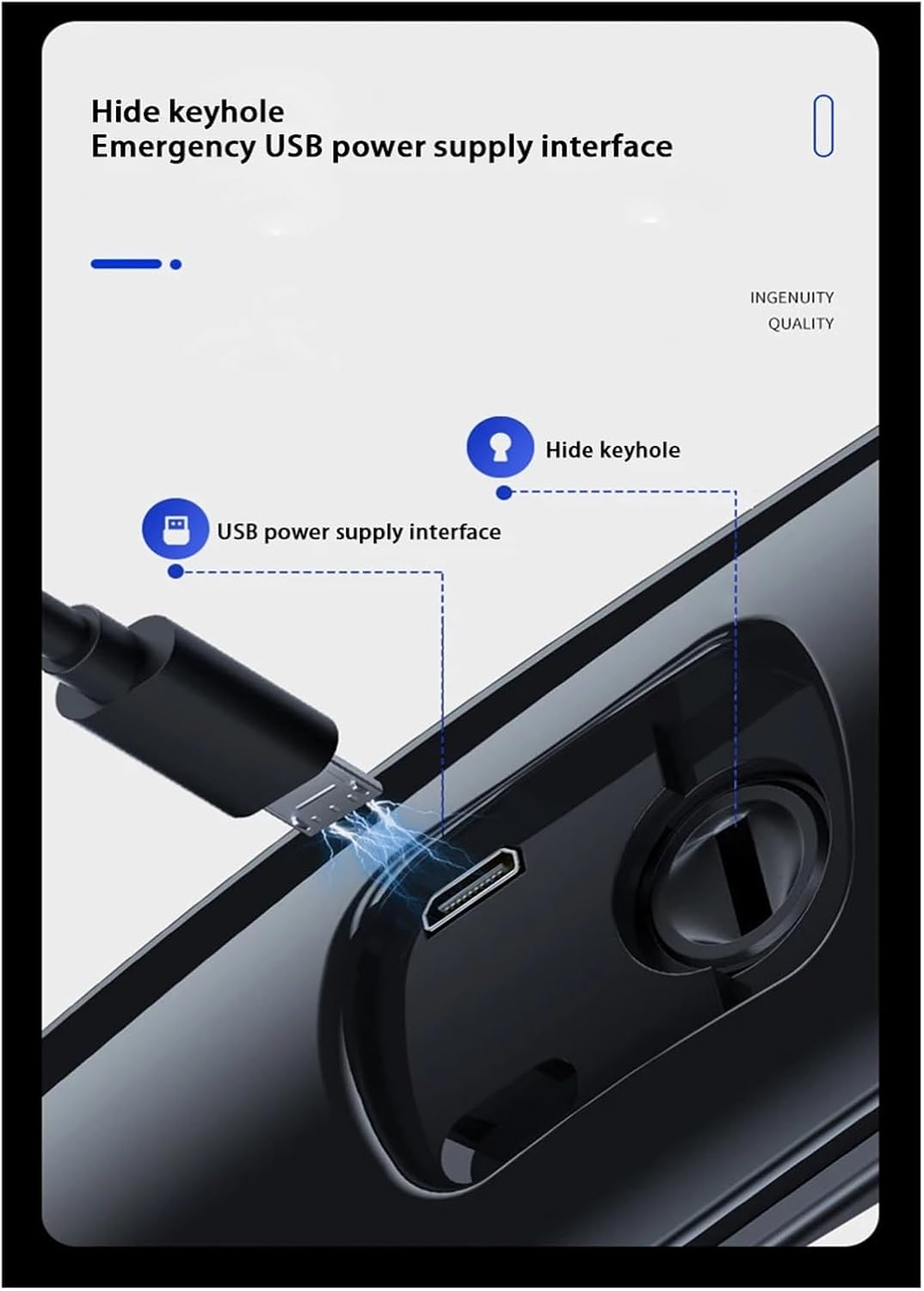
Figure 6.1: Location of the hidden keyhole for mechanical key access and the emergency USB power supply interface on the bottom of the smart lock's exterior unit.
7. Maintenance
Regular maintenance ensures the longevity and optimal performance of your smart lock.
- Cleaning: Wipe the lock's surface with a soft, dry cloth. Avoid using abrasive cleaners, solvents, or harsh chemicals, as they can damage the finish and electronic components.
- Battery Care: Recharge the battery promptly when low battery alerts are issued. Avoid completely draining the battery frequently.
- Sensor Maintenance: Keep the fingerprint sensor, camera lens, and keypad clean and free of dust or debris to ensure accurate recognition.
- Software Updates: Check the mobile application periodically for any available firmware updates for your lock. Keeping the software updated can improve performance and security.
- Mechanical Check: Periodically check that the mechanical components (handle, deadbolt, latch) operate smoothly. Do not lubricate with oil; consult a professional if mechanical issues arise.
8. Troubleshooting
If you encounter issues with your EFCUIWC Smart Lock, refer to the following common problems and solutions:
| Problem | Possible Cause | Solution |
|---|---|---|
| Lock does not respond. | Battery depleted. | Connect an emergency USB power supply or replace/recharge the battery. |
| Fingerprint/Face recognition fails. | Sensor/camera dirty; unregistered data; improper placement. | Clean the sensor/camera. Ensure your fingerprint/face is properly registered. Try repositioning your finger/face. |
| Password/Card unlocking fails. | Incorrect password; unregistered card; card damaged. | Verify the password. Ensure the card is registered and undamaged. Try another registered card. |
| Mobile APP cannot connect to the lock. | WiFi signal weak; lock not paired; app issues. | Ensure strong WiFi signal. Re-pair the lock with the app. Restart the app or your phone. |
| Alarm sounds frequently without cause. | Sensitivity settings too high; environmental factors. | Adjust alarm sensitivity settings in the app. Ensure no objects are obstructing the sensor. |
If the problem persists after attempting these solutions, please contact customer support.
9. Specifications
Detailed technical specifications for the EFCUIWC 3D Face Recognition WiFi Camera Smart Lock:
| Attribute | Value |
|---|---|
| Brand | EFCUIWC |
| Model Name | EFCUIWC |
| Item Model Number | EFCUIWC |
| ASIN | B0DGG6J4FD |
| Color | 24x280(6068)R BAT |
| Dimensions (L x W x H) | 3 x 2 x 2 inches |
| Item Weight | 1.76 ounces (50 Grams) |
| Number of Pieces | 1 (for the lock unit) |
| Power Source | Built-in Rechargeable Lithium Battery |
| Unlocking Methods | 3D Face Recognition, APP, Fingerprint, Password, RFID Card, Mechanical Key |
| Memory Card Support | TF 128G (optional) |
| Door Compatibility | Wooden doors, stainless steel doors, copper doors, double doors, old-style security doors |
| Handing | Left open, Right open (full compatibility) |
10. Warranty and Support
For warranty information, please refer to the documentation provided with your purchase or contact the retailer where you purchased the EFCUIWC Smart Lock. Typically, electronic products come with a limited manufacturer's warranty covering defects in materials and workmanship.
If you require technical assistance, have questions about installation, or need to report a defect, please contact EFCUIWC customer support through their official website or the contact information provided in your product packaging. When contacting support, please have your product model number (24x280(6068)R BAT) and ASIN (B0DGG6J4FD) ready.