
1. Introduction
This manual provides essential instructions for the safe and effective use of your XZMO RC-N3 Remote Controller. Please read this manual thoroughly before operating the device to ensure proper functionality and to prevent damage. Keep this manual for future reference.

Image 1.1: The XZMO RC-N3 Remote Controller, designed for seamless control of compatible DJI drones.
2. Safety Information
Always observe the following safety precautions to ensure safe operation:
- Do not expose the controller to water or moisture.
- Avoid dropping the controller or subjecting it to strong impacts.
- Keep the controller away from extreme temperatures.
- Use only approved charging cables and adapters.
- Ensure the mobile device is securely mounted before flight.
3. Package Contents
Verify that all items are present in your package:
- Remote Controller x 1
- RC Cable (USB-C Connector) x 1
- RC Cable (Standard Connector) x 1 (Note: This may refer to a Lightning connector based on product details, but is generically listed as 'Connector' in the provided data.)
4. Product Overview
The XZMO RC-N3 Remote Controller features an ergonomic design for comfortable handling and precise control. It includes a built-in mobile device holder for real-time viewing of drone footage.
4.1. Front View

Image 4.1: Front view of the RC-N3 Remote Controller, highlighting the control sticks, power button, and battery indicator LEDs.
4.2. Rear View
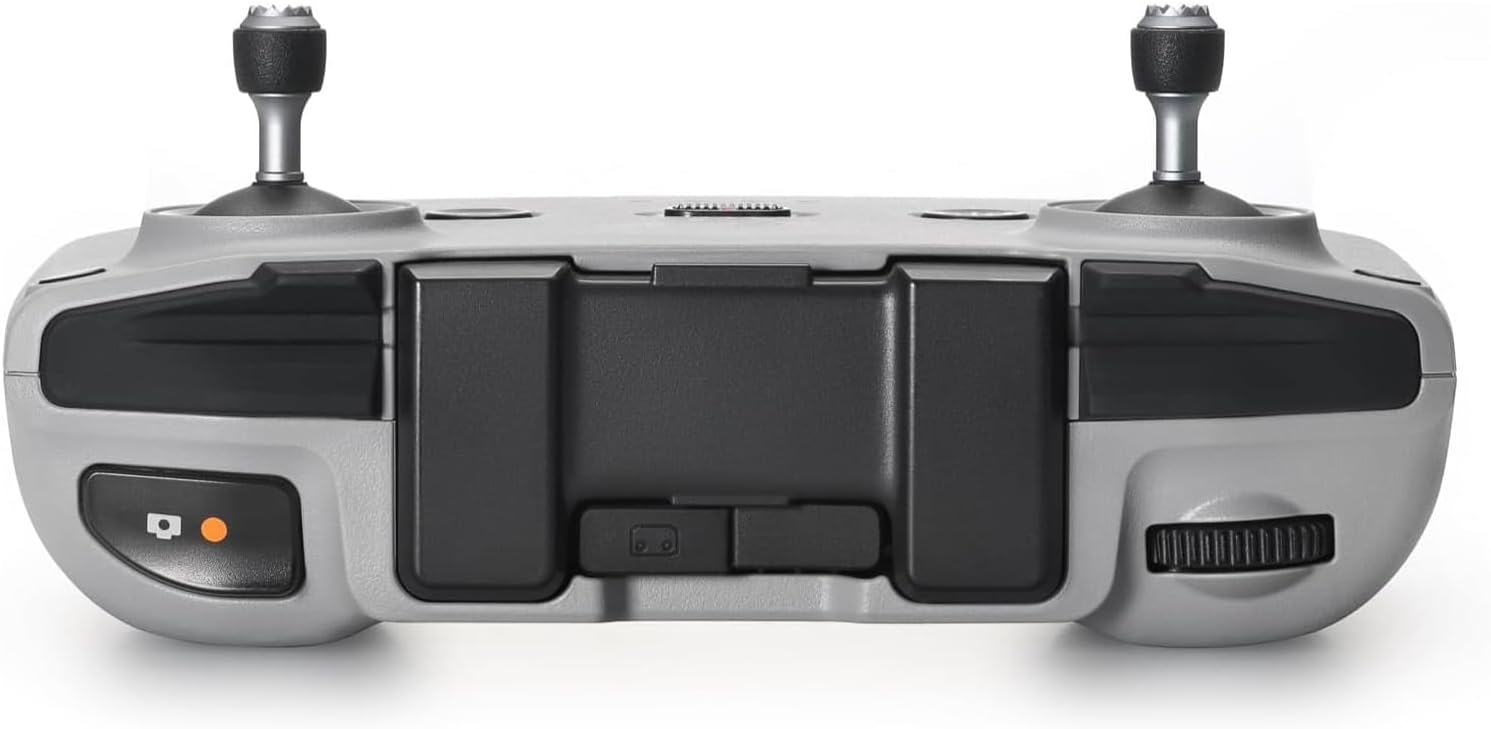
Image 4.2: Rear view of the RC-N3 Remote Controller, illustrating the trigger buttons and the integrated mobile device holder.
5. Setup
5.1. Charging the Controller
Before first use, fully charge the remote controller. Connect the provided USB-C cable to the charging port on the controller and to a USB power adapter (not included). The charging time is approximately 2 hours. A full charge provides up to 3.5 hours of operation without charging a connected mobile device.
5.2. Attaching a Mobile Device
The remote controller features a sturdy stand designed to securely hold your mobile device. This allows for real-time viewing of high-definition images from your drone.
- Extend the mobile device holder from the top of the controller.
- Carefully place your mobile device into the holder. Ensure it is securely seated. The holder accommodates devices with a maximum size of 180 mm in length, 86 mm in width, and 10 mm in height.
- Connect your mobile device to the controller using the appropriate RC cable (USB-C or standard connector).

Image 5.1: The RC-N3 Remote Controller with a mobile device mounted, showing the live drone feed.
5.3. Connecting to a Drone
Power on the remote controller and your compatible DJI drone. Follow the drone's specific pairing instructions to establish a connection. The RC-N3 controller is compatible with DJI Mini 5 Pro, Neo, Mini 4 Pro, Air 3, and Air 3S models.
6. Operating the Controller
Once connected to your drone, use the control sticks and buttons to operate the aircraft. Refer to your drone's specific user manual for detailed flight controls and functions. The mobile device screen will display the drone's camera view and flight telemetry.

Image 6.1: Operating the RC-N3 Remote Controller to control a drone.
7. Compatibility
The XZMO RC-N3 Remote Controller is designed for use with the following DJI drone models:
- DJI Mini 5 Pro
- DJI Mini 4 Pro
- DJI Air 3
- DJI Air 3S
- DJI Neo

Image 7.1: Visual representation of the RC-N3 Remote Controller's compatibility with various DJI drone models.
8. Maintenance
To ensure the longevity and optimal performance of your RC-N3 Remote Controller, follow these maintenance guidelines:
- Clean the controller regularly with a soft, dry cloth.
- Avoid using harsh chemicals or abrasive materials.
- Store the controller in a cool, dry place when not in use.
- Protect the control sticks from damage during storage or transport.
9. Troubleshooting
If you encounter issues with your RC-N3 Remote Controller, consider the following:
- Controller not powering on: Ensure the battery is charged. Connect to a power source and try again.
- Unable to connect to drone: Verify that both the controller and drone are powered on and within range. Re-attempt the pairing process as per your drone's manual.
- Mobile device not displaying feed: Check the cable connection between the mobile device and the controller. Ensure the correct drone application is running on your mobile device.
- Short battery life: Ensure the controller is fully charged before use. Battery performance can vary based on usage and environmental conditions.
For persistent issues, contact customer support.
10. Specifications
Detailed technical specifications for the XZMO RC-N3 Remote Controller:
| Feature | Specification |
|---|---|
| Max Operating Time | Approx. 3.5 hours (without charging any mobile device) |
| Charging Time | Approx. 2 hours |
| Weight | Approx. 13.4 ounces (320 g) |
| Dimensions (L×W×H) | 104.2 x 150 x 45.2 mm (4.1 x 5.9 x 1.8 inches) |
| Max Supported Mobile Device Size | 180 mm (L) x 86 mm (W) x 10 mm (H) |
| Connectivity Technology | Bluetooth |
| Max Number of Supported Devices | 1 |
| Model Number | RC-N3 |

Image 10.1: Visual representation of the RC-N3 Remote Controller's dimensions and key parameters.
11. Warranty and Support
For warranty information and customer support, please refer to the documentation provided with your purchase or visit the official XZMO website. Keep your proof of purchase for warranty claims.